Back

Sunlight Eye Portrait: One Strip of Sun Across Your Eyes

Add one selfie. MakeViral turns it into a dark, cinematic studio close-up with a single horizontal beam of golden sunlight across your eyes. Your face and your own eye color stay.

The original Sunlight Eye Portrait reel by @Taaruk_Original reel
  • 1 photo you add
  • 2K photo you can turn into a video
  • 9:16 for TikTok, Reels, Shorts
  • No watermark

No prompt to write: Add your photo and tap once

Create your own

Ready in a few minutes · Photo · From 3 credits

The sunlight eye portrait, also called the horizontal sunlight eye portrait, is an AI photo trend: one selfie becomes a moody studio close-up with a single strip of warm sunlight across the eyes and the rest of the face in deep shadow. Add one photo and get it in one tap, with your own face and eye color.

Also called Sunlight eyes trend · Cinematic eye light portrait · Dramatic sunlight eye portrait · Eye light portrait

Example

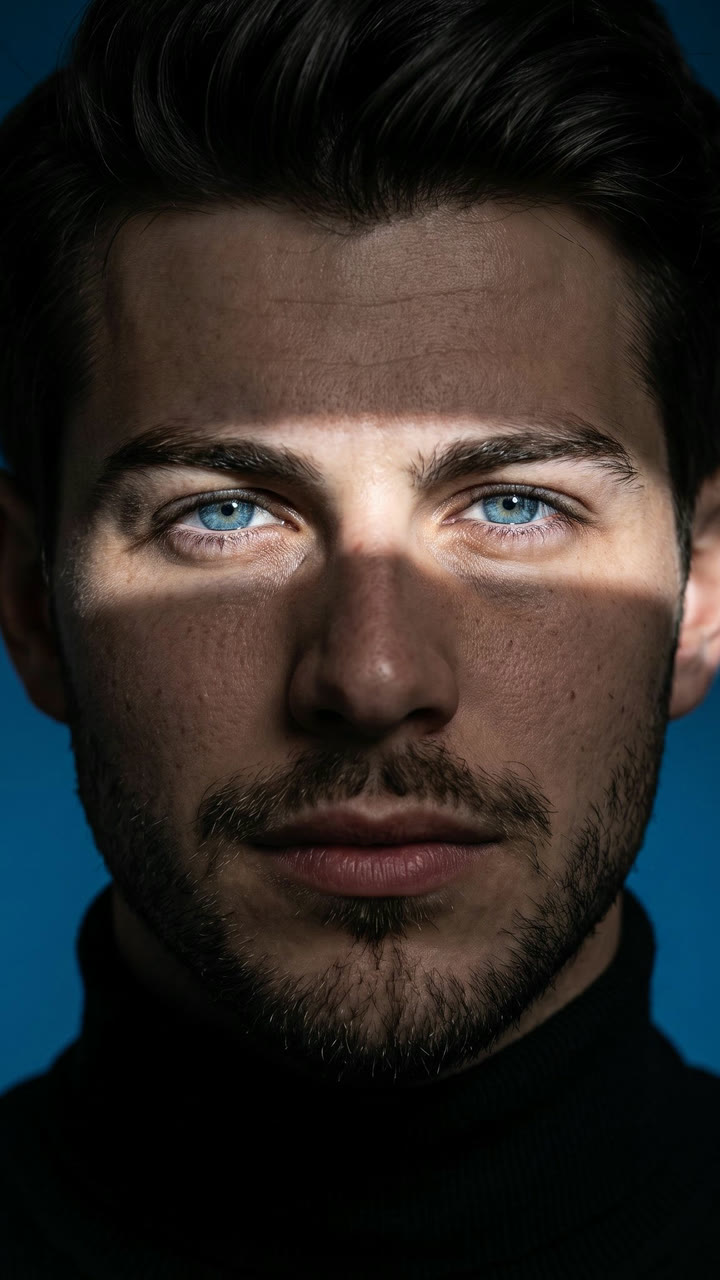
What the Sunlight Eye Portrait photo looks like

These are the trend's first two pictures, posted on X with the prompt. The people in them are AI-made, not real. Your result is one new still photo of your own face in the same light; the Photo + video version adds a 5-second clip with a slow blink and the trend's sound.

Original reel by @Taaruk_, 6 s

The two portraits that started the trend, by @Taaruk_ on X (28 June 2026): AI-made faces from the original prompt, with one beam of sunlight across only the eyes.

Step by step

How to make the Sunlight Eye Portrait photo on MakeViral

Everything runs in the browser. No editing app, no prompt to write, no watermark.

  1. Add your photo

    Press "Create your own" and add you, face clear, chest up. Take it with the camera or pick it from your library.

  2. Press Generate

    The button shows the price. Nano Banana 2.1 puts your photo into the Sunlight Eye Portrait scene and makes one 2K photo. You write no prompt.

  3. Download or share

    The photo is ready in a few minutes as a 9:16 2K image. Download it, share it from your phone, turn it into a video, or find it later in My videos.

Which photo works best?

Use one clear photo of you from the chest up, looking straight into the camera. The whole portrait is about your eyes, so the eyes in your photo matter most.

  • Eyes open and sharp. Face a window in daylight, so your exact eye color shows.
  • Look straight at the lens, with your head level. The beam runs straight across the face, so a tilted head gives a slanted strip.
  • No sunglasses and no hair over your eyes. Normal glasses are fine and stay on.
  • A calm, neutral face works best: the trend look is a steady stare.
  • One person per photo, no beauty filter.
  • Pet version: one photo of your pet's head and chest, with both eyes open and in view.
  • Use your own photo, or one of an adult who said yes. Never a stranger's photo.

Where did the Sunlight Eye Portrait trend start?

The look comes from one prompt. On 28 June 2026 the X user @Taaruk_ posted two AI portraits made with ChatGPT's image model, a man with blue eyes and a red-haired woman with green eyes, under the words "dramatic horizontal beam of sunlight cutting across only the eyes, leaving the forehead and lower face in deep shadow". The full prompt was in the post (5,779 views and 62 likes by 17 November 2026).

It landed on a feed that already loved eyes in the sun. Real eye close-ups were a big TikTok wave in 2026: "Brown eyes are literally golden in the sun" by @liam.nelson297 (6 July 2026) had 314,600 views, and @velvaega's slideshow of brown eyes in sunlight (6 November 2026) had 147,500 views and 21,200 likes. In mid-November people started to run the prompt on their own selfies and post the results with the prompt as the caption. On 15 November tutorial accounts began posting "horizontal sunlight eye portrait" how-tos, almost all with the sound "DID YOU MISS ME" by H.E.R., and by 17 November at least eight accounts had posted them.

  1. A Brazilian creator, @mahhvision, posts a Gemini prompt for a close-up lit by a single warm, diagonal beam of sunlight; the post reaches 35,800 views. TikTok

  2. @Taaruk_ posts the horizontal sunlight prompt on X with two AI portraits made with ChatGPT's image model: a single beam of sunlight across only the eyes. X

  3. "Brown eyes are literally golden in the sun": a real eye close-up by @liam.nelson297 reaches 314,600 views and 34,700 likes. TikTok

  4. @velvaega posts a slideshow of brown eyes in sunlight that reaches 147,500 views and 21,200 likes by 17 November. TikTok

  5. Tutorial accounts start posting "horizontal sunlight eye portrait" how-tos with the sound "DID YOU MISS ME"; the most viewed has 4,492 views on 17 November. TikTok

Copy and paste

The Sunlight Eye Portrait prompts

You do not need this: the one-tap flow runs it for you. The photo prompt puts your photo into the scene. Want to change it? Copy it and edit it in AI Photo.

Photo

1 photo: you, face clear, chest upNano Banana 2.1Photo · 2K · 9:163 credits
Photo prompt

Using the uploaded reference photo, create an ultra-realistic cinematic studio portrait of the same person, close-up headshot, subject centered, direct eye contact with the camera, neutral confident expression, wearing a black turtleneck sweater, dark navy seamless background, dramatic horizontal beam of sunlight cutting across only the eyes, leaving the forehead and lower face in deep shadow, bright catchlights in the person's own eyes, highly detailed skin texture, natural pores, facial hair only as in the photo, soft realistic makeup (for female), moody low-key lighting, high contrast, minimal composition, editorial fashion photography, luxury magazine cover aesthetic, 85mm lens, f/1.8, shallow depth of field, razor-sharp focus on the eyes, cinematic color grading, ultra photorealistic, HDR, 8K, masterpiece, volumetric light, soft shadows, premium portrait photography. THE EYES: the beam is one straight, warm golden band of sunlight from one side of the face to the other, at the height of the eyes, so both eyes are fully lit, open and sharp. The irises keep the exact color and darkness of the uploaded photo: the sunlight shows their texture and a warm glow, but never a new, lighter or brighter eye color, and never blue or green unless the photo shows it. Glasses stay on when the photo shows them, and the beam lights the eyes through the lenses. Vertical 9:16 close-up portrait, the head and the top of the shoulders in the frame. Exactly one person. No text, no letters, no logo, no watermark.

1518 characters

Photo + video

1 photo: you, face clear, chest upKling 3.05 s · 1080p · 9:1629 credits
Step 1 · Photo prompt

Using the uploaded reference photo, create an ultra-realistic cinematic studio portrait of the same person, close-up headshot, subject centered, direct eye contact with the camera, neutral confident expression, wearing a black turtleneck sweater, dark navy seamless background, dramatic horizontal beam of sunlight cutting across only the eyes, leaving the forehead and lower face in deep shadow, bright catchlights in the person's own eyes, highly detailed skin texture, natural pores, facial hair only as in the photo, soft realistic makeup (for female), moody low-key lighting, high contrast, minimal composition, editorial fashion photography, luxury magazine cover aesthetic, 85mm lens, f/1.8, shallow depth of field, razor-sharp focus on the eyes, cinematic color grading, ultra photorealistic, HDR, 8K, masterpiece, volumetric light, soft shadows, premium portrait photography. THE EYES: the beam is one straight, warm golden band of sunlight from one side of the face to the other, at the height of the eyes, so both eyes are fully lit, open and sharp. The irises keep the exact color and darkness of the uploaded photo: the sunlight shows their texture and a warm glow, but never a new, lighter or brighter eye color, and never blue or green unless the photo shows it. Glasses stay on when the photo shows them, and the beam lights the eyes through the lenses. Vertical 9:16 close-up portrait, the head and the top of the shoulders in the frame. Exactly one person. No text, no letters, no logo, no watermark.

1518 characters
Step 2 · Video prompt

A cinematic close-up portrait that slowly comes to life, one continuous shot with no cuts. Keep the person's face, eyes, eye color, hair, the black turtleneck, the dark navy background and the light exactly as in the image. The dramatic horizontal beam of warm golden sunlight stays across only the eyes the whole time; the forehead and the lower face stay in deep shadow. The person holds a calm, confident gaze straight into the lens. At about 2 seconds they slowly blink once, the eyelashes catching the light, then open the eyes again and keep looking into the camera, with the faintest hint of a smile at the end. Tiny specks of dust float slowly through the beam, and the light flickers very softly, as if leaves move in front of the sun. The camera pushes in very slowly. The irises keep their exact color from the image. One head only, no morphing, no change to the face. No dialogue. No text, no logos, no watermark.

925 characters

Pet

1 photo: your pet, head and chest, eyes openNano Banana 2.1Photo · 2K · 9:163 credits
Photo prompt

Using the uploaded reference photo, create an ultra-realistic cinematic studio portrait of the same pet, close-up of the head, subject centered, direct eye contact with the camera, calm confident expression, wearing a small black knit turtleneck sweater sized for the animal, dark navy seamless background, dramatic horizontal beam of sunlight cutting across only the eyes, leaving the top of the head and the muzzle in deep shadow, bright catchlights in its own eyes, highly detailed fur texture and whiskers, moody low-key lighting, high contrast, minimal composition, editorial fashion photography, luxury magazine cover aesthetic, 85mm lens, f/1.8, shallow depth of field, razor-sharp focus on the eyes, cinematic color grading, ultra photorealistic, HDR, 8K, masterpiece, volumetric light, soft shadows, premium portrait photography. THE EYES: the beam is one straight, warm golden band of sunlight across the face at the height of the eyes, so both eyes are fully lit, open and sharp. The irises keep the exact color of the uploaded photo, never a new eye color. Keep the exact same animal: the same species, breed look, head shape, ears, muzzle, fur colors, fur length and markings, with the natural proportions of that animal. Real paws, no human hands and no human body. Vertical 9:16 close-up portrait, the head and the top of the chest in the frame. Exactly one animal. No text, no letters, no logo, no watermark.

1424 characters

How many credits does it cost?

You pay per photo in credits, and the create page shows the exact price on the Generate button before you spend anything. The one-tap price covers one 2K photo, charged once. One photo is 3 credits, so the smallest one-time pack that covers it is $9.99 for 100 credits, with no subscription. A smaller 1K photo costs less if you run the prompt by hand in AI Photo.

ModelSettingsCredits
Photo: Nano Banana 2.1 (this template)2K photo, 9:16, one tap3
Photo + video: Kling 3.0 (this template)5 s, 1080p + 1 scene photo, one tap29
Pet: Nano Banana 2.1 (this template)2K photo, 9:16, one tap3
Nano Banana 2.1 (by hand in AI Photo)1K photo, 9:16, same prompt2

One-time packs and plans are on the pricing page. A failed photo gives its credits back.

Which version should you pick?

VersionWhat you getLength
Photo (default)One tall 9:16 picture at 2K: your face in a black turtleneck against a dark navy studio backdrop, a single horizontal beam of golden sunlight across your eyes, the forehead and lower face in deep shadow.A still photo
Photo + videoFirst the same portrait as a still, then a 5-second clip: you hold the stare, blink once slowly while the light catches your lashes, and dust floats in the beam as the camera pushes in. The trend's sound, "DID YOU MISS ME" by H.E.R., is on the video, and you can turn it off on the result screen.5 s, with sound
PetYour dog or cat in a small black knit turtleneck, the same strip of sunlight across its eyes.A still photo

The Photo is the fastest and costs the fewest credits. The video uses the best AI video models available; under "Best" you can pick a stronger one that keeps the eyes and the light steadier through the blink, at a higher price. The create page shows the exact price before you press Generate.
The sunlight eye portrait prompt

The trend runs on one copy-and-paste prompt. The original by @Taaruk_ asks for an "ultra-realistic cinematic studio portrait, close-up headshot, subject centered, direct eye contact with the camera, neutral confident expression", a black turtleneck, a dark navy seamless background and a "dramatic horizontal beam of sunlight cutting across only the eyes", with an 85mm lens at f/1.8, low-key light and high contrast. The tutorial videos pass the same idea around as a ChatGPT sunlight prompt, a sunlight eyes prompt, the cinematic eye light portrait prompt, the horizontal light on eyes prompt or an ultra realistic eye shadow portrait prompt.

Our version keeps those words and their order, with three changes:

  • It starts from your photo. The original is a text prompt with no face in it; ours makes the portrait of the person in your selfie.
  • Your own eyes, not blue or green. The original asks for "vivid blue/green eyes". Ours keeps the exact color of your irises, because a new eye color makes it look like someone else. Brown eyes still glow warm and golden in the beam, the way they do in real sunlight.
  • No added beard. The original adds subtle facial hair to men; ours keeps facial hair only as in your photo.

You can also copy the prompt from the create page into AI Photo and change it yourself, for example a black background in place of navy, like many of the November posts.

What goes wrong, and how to fix it

  • The strip of light misses the eyes. It sits on the brows or the cheeks. Run it again with a photo where you look straight into the lens with your head level.
  • Your eyes come out a different color. Use a sharper photo in daylight, with your eyes open wide; a dark or blurry selfie gives the model too little to go on.
  • It does not look like you. A side view, a low angle or a heavy filter is the usual reason. Take a new photo from the front at eye level and turn off beauty mode.
  • The light looks white and cold. The beam should be warm and golden. Run it again: each run is a little different.
  • Two strips of light, or light on the whole face. It happens now and then. Run it again; the prompt asks for one beam across only the eyes.

Is it the same as the eyes in the sun trend?

No, but it is close family. The eyes in the sun trend is real: people film or photograph their own eyes in direct sunlight, often brown eyes in the sun that suddenly look golden or amber, and post them as a slideshow. The sunlight eye portrait is an AI picture of your whole face, made in a studio look, where the light falls only across the eyes.

You can do the real one with a phone and a sunny window, but do not look into the sun itself. With the AI one you never need direct sun: the light is made for you.

FAQ

Sunlight Eye Portrait trend questions

What is the sunlight eye portrait trend?
It is an AI photo trend in which a selfie becomes a dark, cinematic close-up with one horizontal strip of golden sunlight across the eyes and the rest of the face in shadow. It started with a prompt posted on X on 28 June 2026, and on TikTok it took off as the horizontal sunlight eye portrait trend in mid-November 2026.
How do I make a sunlight eye portrait with AI?
Press "Create your own", add one clear selfie from the chest up, pick Photo, Photo + video or Pet, and press Generate. MakeViral puts the strip of sunlight across your eyes and keeps your face and your own eye color. The result lands in My videos.
What is the horizontal sunlight eye portrait prompt?
The original sunlight eye portrait prompt asks for an ultra-realistic cinematic studio portrait, a close-up headshot with direct eye contact, a black turtleneck, a dark navy background and a dramatic horizontal beam of sunlight across only the eyes, with the forehead and lower face in deep shadow. Our version keeps those words and adds your photo and your own eye color.
Is there a ChatGPT sunlight prompt I can copy?
Yes. The ChatGPT sunlight effect started as a copy paste ChatGPT eye light prompt on X, and it is on our create page to copy too. In a chat app you paste the ChatGPT sunlight effect prompt and add a selfie; the catch is that chat apps often change the face or turn brown eyes blue or green. Our one-tap version is written to keep both.
Does it work as a cinematic portrait prompt for Gemini?
The prompt is plain English, so it works as a cinematic portrait prompt for ChatGPT or for Gemini, and as a cinematic portrait prompt for men or for girls. The results differ by app. On MakeViral you do not need either app: one photo is enough.
Will my eyes change color?
They should not. The prompt tells the model to keep the exact color and darkness of your irises, and the run reads your eye color from the photo and names it in the prompt. In the beam, brown eyes look warmer and lighter, the way they do in real sunlight, but they stay brown.
Can I make the sunlight eyes portrait as a video?
Yes. Pick Photo + video: you get the still and a 5-second clip in which you blink once slowly, dust drifts through the light and the camera pushes in. The video has the trend's sound on it, and you can turn it off on the result screen.
Can I make it with my dog or cat?
Yes. Pick the Pet version and add one photo of your pet's head and chest with both eyes in view. Your pet gets the same dark studio look, a small black turtleneck and the strip of sunlight across its eyes.
Can I get a black background instead of navy?
The original sunlight portrait prompt uses a dark navy background, and that is what the one-tap version makes. Many November posts used a black one. Copy the prompt into AI Photo, change "dark navy" to "black" and run it yourself.
Do I need direct sunlight to take the photo?
No. Any clear, sharp selfie in daylight works: the AI makes the beam of sunlight. Never look straight into the sun for a photo. For the real eye trend pictures with sun, let the light fall on your eyes from the side and keep the sun itself out of your view.
Is this the sunlight eyes trend with brown eyes in the sun?
It is related but different. In the real trend people show their own brown eyes in the sun turning golden or amber. The sunlight eye photo here is an AI portrait of your whole face with the light across your eyes. Both show how sunlight on eyes brings out their color.
Is this the dramatic horizontal sunlight photo trend from the tutorials?
Yes. The tutorials call it the dramatic horizontal sunlight photo trend, the dramatic sunlight eye AI portrait or a sunlight across face photo effect, and some sell it as a glowing eyes portrait photo effect. It is all the same look: one AI sunlight effect across the eyes of a selfie, the rest of the face in shadow.
Can I use the sunlight eye photo as a profile picture?
Yes. The Photo is a tall 9:16 picture at 2K, so you can crop it to a square for a profile picture or post it whole to a story. It is your own picture to use.
Does the sunlight eye portrait cost credits?
Yes. The create page shows the exact price on the Generate button before you spend anything. The Photo costs far fewer credits than Photo + video, and if a run fails, the credits come back.
More trends

Other AI video templates

Make your own Sunlight Eye Portrait photo

Add one photo and tap once. No prompt to write. 3 credits.

No watermark. A failed video gives its credits back. Secure checkout by Stripe.