Ryuk AI: Put the Grinning Death God in Your Photo

Add one photo of yourself, and a tall death god with spiky black hair, black feathers and a wide grin shows up beside you, lit like your photo. Keep the photo, or make a 5 second clip where he bites an apple.

The original Ryuk AI reel by @jted1tOriginal reel
  • 1 photo you add
  • 2K photo you can turn into a video
  • 9:16 for TikTok, Reels, Shorts
  • No watermark

No prompt to write: Add your photo and tap once

Create your own

Ready in a few minutes · Photo · From 3 credits

The Ryuk AI trend puts Ryuk, the grinning shinigami from Death Note, into your own photo, next to you or just behind your shoulder like a close friend. It started as a CapCut AI photo edit called "Ryuk spotted" in October 2026. You need one clear photo of yourself with a little room beside you.

Also called Ryuk spotted trend · Ryuk companion AI trend · Ryuk Spotter Portrait · Ryuk behind you trend · Shinigami photo · Ryuk selfie

Example

What the Ryuk AI photo looks like

This is the original reel that started the trend. Your video is a new clip made from your photo in the same style, not a copy of these shots. No two runs come out the same.

Original reel by @jted1t, 5 s

The AI result in the "Ryuk Companion AI Trend" tutorial by @jted1t (18 October 2026), made from one photo with the creators' prompt: the grinning death god leans in next to a young man on a sunny campus walk. Cropped to the picture.

Step by step

How to make the Ryuk AI photo on MakeViral

Everything runs in the browser. No editing app, no prompt to write, no watermark.

  1. Add your photo

    Press "Create your own" and add your photo, room beside you. Take it with the camera or pick it from your library.

  2. Press Generate

    The button shows the price. Nano Banana 2 puts your photo into the Ryuk AI scene and makes one 2K photo. You write no prompt.

  3. Download or share

    The photo is ready in a few minutes as a 9:16 2K image. Download it, share it from your phone, turn it into a video, or find it later in your Library.

Which photo works best?

Use one clear photo of yourself where your face is easy to see, from the knees up or full body, with a little empty space on one side: that is where the death god stands.

  • A street, an alley, a shop front, a campus walk or a dark room at night all work. The prompt keeps your photo's own place and light.
  • Face the camera or turn three-quarters to it. No sunglasses, no hat over your eyes.
  • A tall photo works best. A square or wide photo gets its background extended.
  • Use your own photo, or the photo of an adult who agreed.

Where did the Ryuk AI trend start?

Ryuk is the shinigami, a god of death, in Death Note, the manga by Tsugumi Ohba and Takeshi Obata that began in 2003 and became an anime in 2006. He drops his notebook into the human world because he is bored, follows its new owner everywhere and loves apples. That is the joke of every Ryuk photo: a tall, grinning death god who stands right behind someone and never leaves.

Fans have put him behind themselves for years. A cosplay clip from April 2023, "Ryuk only wants your apples", has 6.6 million TikTok views, and a CapCut tutorial from November 2025 for the "Ryuk behind you" shadow edit has 4.2 million. From late 2025, people made the photos with AI image tools instead.

The current wave started on 8 October 2026, when @capcut.ed1t5 posted a tutorial "to turn a simple photo into a Ryuk Spotter Portrait" with the prompt on screen. AI template sites added a "Ryuk spotted" template from 13 October, and on 18 October @jted1t posted the same prompt as the "Ryuk Companion AI Trend". With Halloween on 31 October 2026, it is a fast costume-free Halloween post.

  1. Death Note, the manga by Tsugumi Ohba and Takeshi Obata, starts; the shinigami Ryuk, who loves apples, is one of its main characters. Wikipedia

  2. @nycx.zz posts the cosplay clip "Ryuk only wants your apples", which has 6.6 million views by October 2026. TikTok

  3. A CapCut tutorial for the "Ryuk behind you" shadow edit by @pgummp0102857 goes up; it has 4.2 million views by October 2026. TikTok

  4. @sinkto5 posts a tutorial for AI shinigami photos with Ryuk next to you; it has 1.8 million views by October 2026. TikTok

  5. @capcut.ed1t5 posts the "Ryuk Spotter Portrait" tutorial with the prompt on screen: 131.2K views by 18 October 2026. TikTok

  6. @jted1t posts the same prompt as the "Ryuk Companion AI Trend", made with Nano Banana 2. TikTok

Copy and paste

The Ryuk AI prompts

You do not need this: the one-tap flow runs it for you. The photo prompt puts your photo into the scene. Want to change it? Copy it and edit it in AI Photo.

Photo

1 photo: your photo, room beside youNano Banana 2Photo · 2K · 9:163 credits
Photo prompt

Add a tall, gaunt shinigami-like death god with black feathered wings, spiky black hair, a wide grin and yellow eyes into the uploaded photo, placing him next to or slightly behind the person like a close friend. Keep the original image completely unchanged: do not alter lighting, contrast, colors, camera angle, background, or the person's appearance in any way. The death god should appear as a highly realistic, ultra-detailed semi-realistic anime-human hybrid, naturally integrated into the real environment while staying instantly recognizable as the death god described here. Preserve his iconic features: tall and lean body proportions, spiky black hair, sharp glowing eyes, pale gray-blue skin texture, eerie grin with detailed teeth, dark feather-like clothing with layered textures, metallic accessories, and subtle supernatural details. Make the death god look more lifelike with realistic skin texture, natural shadows, detailed fabric materials, depth, subtle imperfections, and cinematic realism, while maintaining his mysterious death god identity. Match the photo's exact lighting direction, reflections, shadow softness, perspective, and scale perfectly. Pose the death god with a cool, confident, relaxed swagger as if casually hanging out with the person: playful smirk, slightly leaning in, teasing expression, natural hand gestures (peace sign, laughing pose, or playful interaction). Keep him friendly and charismatic rather than scary. Style: photorealistic anime blend, seamless real-world integration, as if an anime character truly exists and was captured naturally in a real camera photo. Final image should look like an authentic photo with anime friends casually standing with the person. Vertical 9:16: if the photo has another shape, extend the background naturally, with the death god's head and shoulders fully in the frame. Exactly the people from the photo plus this one death god: nobody else added. No notebook, no book, no weapon, no blood. No text, no captions, no logos, no watermark.

2025 characters
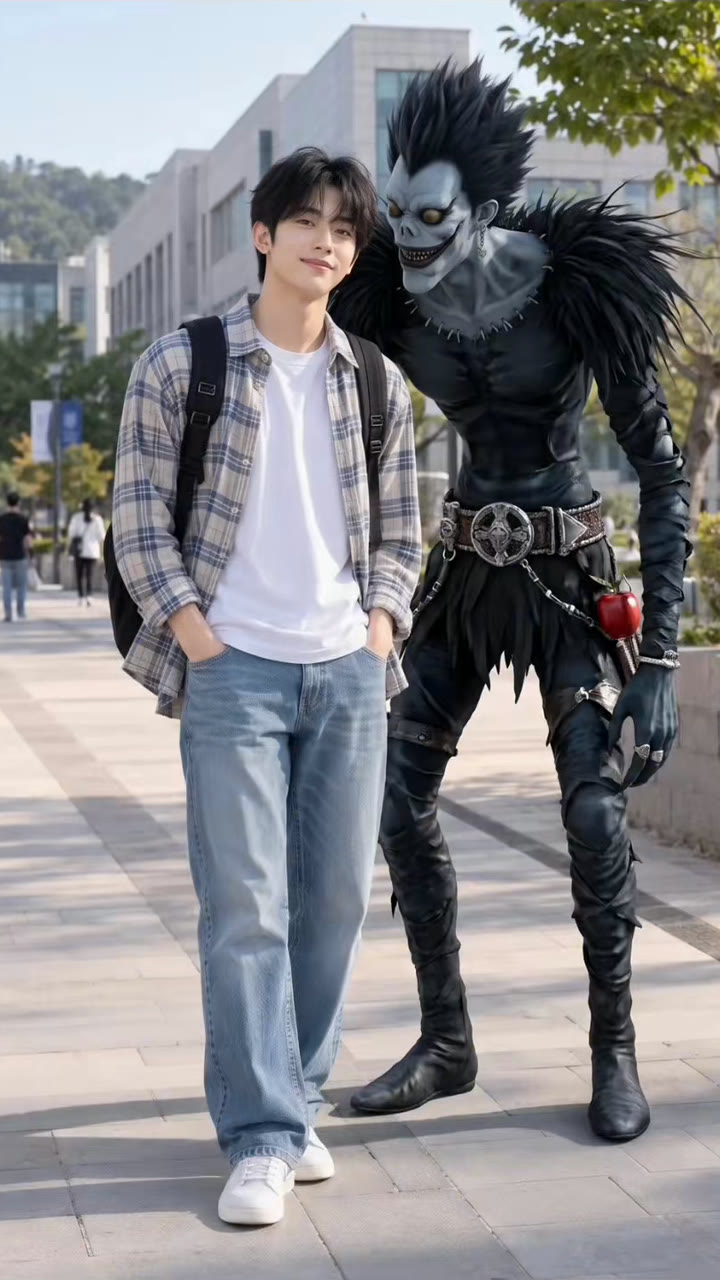
Photo + clip

1 photo: your photo, room beside youKling 3.05 s · 1080p · 9:1629 credits
Step 1 · Photo prompt

Add a tall, gaunt shinigami-like death god with black feathered wings, spiky black hair, a wide grin and yellow eyes into the uploaded photo, placing him next to or slightly behind the person like a close friend. Keep the original image completely unchanged: do not alter lighting, contrast, colors, camera angle, background, or the person's appearance in any way. The death god should appear as a highly realistic, ultra-detailed semi-realistic anime-human hybrid, naturally integrated into the real environment while staying instantly recognizable as the death god described here. Preserve his iconic features: tall and lean body proportions, spiky black hair, sharp glowing eyes, pale gray-blue skin texture, eerie grin with detailed teeth, dark feather-like clothing with layered textures, metallic accessories, and subtle supernatural details. Make the death god look more lifelike with realistic skin texture, natural shadows, detailed fabric materials, depth, subtle imperfections, and cinematic realism, while maintaining his mysterious death god identity. Match the photo's exact lighting direction, reflections, shadow softness, perspective, and scale perfectly. Pose the death god with a cool, confident, relaxed swagger as if casually hanging out with the person: playful smirk, slightly leaning in, teasing expression, natural hand gestures (peace sign, laughing pose, or playful interaction). Keep him friendly and charismatic rather than scary. Style: photorealistic anime blend, seamless real-world integration, as if an anime character truly exists and was captured naturally in a real camera photo. Final image should look like an authentic photo with anime friends casually standing with the person. Vertical 9:16: if the photo has another shape, extend the background naturally, with the death god's head and shoulders fully in the frame. Exactly the people from the photo plus this one death god: nobody else added. No notebook, no book, no weapon, no blood. No text, no captions, no logos, no watermark.

2025 characters
Step 2 · Video prompt

One continuous shot with no cuts, like a real phone video. Keep the person's face, hair, clothes and pose, the place and the light, and the tall death god's look (spiky black hair, pale gray-blue skin, wide toothy grin, glowing yellow eyes, dark feathered clothes, black feathered wings) exactly as in the image. 0-2 s: the person stays relaxed and smiles at the camera. The death god slowly leans in over the person's shoulder, his grin growing wider, his black feathers ruffling softly. 2-4 s: he lifts a shiny red apple to his mouth and takes a big, crunchy bite, chewing with a huge toothy grin, his eyes glinting. 4-5 s: he turns to the camera and flashes a playful peace sign next to the person's face, and the person laughs. The camera stays almost still, at the same height. Audio: the soft ambient sound of the place, a loud crunchy apple bite and a low, playful, spooky original tune. No spoken words, no lyrics. Exactly the people from the image and this one death god. The person's face never changes. No morphing, no extra limbs, five fingers on each hand. No notebook, no weapon, no blood. No text, no logos, no watermark.

1136 characters

How many credits does it cost?

You pay per photo in credits, and the create page shows the exact price on the Generate button before you spend anything. The one-tap price covers one 2K photo, charged once. One photo is 3 credits, so the smallest one-time pack that covers it is $9.99 for 100 credits, with no subscription. A smaller 1K photo costs less if you run the prompt by hand in AI Photo.

ModelSettingsCredits
Photo: Nano Banana 2 (this template)2K photo, 9:16, one tap3
Photo + clip: Kling 3.0 (this template)5 s, 1080p + 1 scene photo, one tap29
Nano Banana 2 (by hand in AI Photo)1K photo, 9:16, same prompt2

One-time packs and plans are on the pricing page. A failed photo gives its credits back.

What the Ryuk spotted photo looks like

The photo stays your photo. The place, the light, your face, your clothes and your pose stay as they were. Only one thing is new: a tall, lean death god stands right next to you or slightly behind you, as if a friend took the picture of you two.

PartWhat it looks like
The death godVery tall and thin, with spiky black hair, pale gray-blue skin, glowing yellow eyes and a wide grin full of teeth
His clothesDark, layered feathers, black feathered wings, a metal belt and chains
The poseLeaning in with a playful smirk, maybe a peace sign, friendly rather than scary
The lightMatched to your photo: the same light direction, shadows and grain, so it reads as one picture

That mix of a creepy look and a friendly pose is why people call it "Ryuk spotted" or the Ryuk companion photo. Pick Photo for the picture alone, or Photo + clip for a 5 second clip of the same picture: he leans in over your shoulder, takes a big crunchy bite of a red apple and flashes a peace sign.

The prompt behind the Ryuk AI trend

This trend has a shared prompt. On 8 October 2026, @capcut.ed1t5 showed it on screen in the first tutorial, and @aimaangn posted the same text in the comments the same day. It starts with "Add Ryuk from Death Note into this exact photo, placing him next to or slightly behind me like a close friend. Keep the original image completely unchanged", then lists his look, asks for a "photorealistic anime blend" and ends with "an authentic photo with anime friends casually standing with me".

Our Ryuk prompt keeps those words and their order, with three changes. It describes the death god instead of naming the character or the series, so it works the same in any image model. It adds a line for a tall 9:16 photo. And it bans what a model likes to add on its own: a notebook, letters, captions and logos. MakeViral then adds its face lock, so your face stays yours. The prompt is on this page to copy if you want to try it in another image tool, the same way people use a shinigami AI prompt or a Death Note AI prompt in Gemini or ChatGPT.

The result is Death Note AI art in the style of a real photo, not a drawing: a shinigami AI art piece made from your own picture. Every Ryuk AI art or Death Note AI generated photo on this page is made by AI, not taken with a camera.

Ryuk behind you, the Ryuk shadow trend and older versions

The Death Note Ryuk trend has come back on TikTok again and again. In April 2023 the big clips were cosplay and fan edits. In 2025, the Ryuk shadow trend and the "Ryuk behind you" edit put him behind people with CapCut templates and green-screen clips, and many tutorials show how to edit Ryuk behind you or behind me. Around December 2025 and January 2026, AI shinigami photo tutorials for Gemini and other tools took over, often set to the song "Work Hard, Play Hard".

The Ryuk AI trend of October 2026 is the AI version of the same joke, and it needs no costume, no green screen and no editing. That makes it an easy Ryuk Halloween post: one shinigami Ryuk photo, a caption like "he follows me everywhere" and an apple emoji.

FAQ

Ryuk AI trend questions

What is the Ryuk AI trend?
It is an AI photo trend from October 2026: you add one photo of yourself, and AI places Ryuk, the tall, grinning shinigami from Death Note, next to you or just behind you like a friend. People also call it the Ryuk spotted trend, the Ryuk companion AI trend, the Ryuk photo trend or a Death Note Ryuk AI photo.
How do I do the Ryuk spotted trend?
Press "Create your own" on this page, add one clear photo of yourself with a little room beside you, and press Generate. The photo lands in your Library. You do not need CapCut, a green screen or a prompt of your own.
What is the Ryuk AI prompt?
The prompt the creators shared starts with "Add Ryuk from Death Note into this exact photo, placing him next to or slightly behind me like a close friend" and keeps your photo unchanged. Our version keeps its words, describes the death god instead of naming him and bans notebooks, text and logos. You can copy it from this page.
Is there a Ryuk filter for Instagram or TikTok?
Not a live camera filter. This Ryuk filter is an AI edit of a photo you already have, so the death god matches your photo's light and looks far more real than a sticker. People also search for a Ryuk Instagram filter or a Death Note Ryuk filter; the photo you get here works on both apps, and on Ryuk TikTok posts.
Can I make a Ryuk AI video?
Yes. Pick "Photo + clip". MakeViral makes the photo first, then a 5 second vertical clip from it with Kling 3.0 Pro: he leans in over your shoulder, bites a red apple and flashes a peace sign. The clip has its own sound, a crunchy bite and a spooky little tune, with no words.
Is this a good Halloween post?
Yes. Halloween is on 31 October 2026, and the Ryuk AI trend gives you a spooky but friendly photo with no costume. Post it as a photo, or post the clip.
Is this the real Ryuk from Death Note?
No. The trend takes its look from Death Note, but our prompts describe a tall death god with spiky black hair, black feathers and a wide grin. They never name the character or the series, and the page uses no anime frames or manga panels. MakeViral is not connected to Death Note or its makers. Use the photos for fun posts, not to sell anything.
Does the Ryuk AI trend cost credits?
Yes. The photo costs a few credits, and the photo plus clip costs more, because the video model is the expensive part. The create page shows the exact price on the Generate button before you spend anything, and if a run fails, the credits come back.
Why does my Ryuk photo not look like me?
The model rebuilds your face from one photo, so a dark, blurry or side-on photo leaves it guessing. A sharp photo with your face to the camera in good light helps most. Every run is different, so a second run can come out closer.
Is my photo safe?
Your result goes to your Library, not to a public feed. MakeViral does not post it anywhere, and you can delete it from your Library at any time. Use your own photo, or the photo of an adult who agreed.
More trends

Other AI video templates

Template

Gemini Rain AI Effect: Put Yourself, or the Two of You, in Cinematic Rain

Heavy rain at night, wet hair, drops on your skin, blue light on your face. Add a selfie for the solo rain portrait, or two photos to run hand in hand through the rain and hold each other close.

Read more
Template

Cat in the Hat Trend: Make the AI Doorbell Cam Halloween Prank

A tall cat in a red and white striped top hat walks up your path on a grainy doorbell camera, waves and does a silly little dance. Or it stares up at your window, peeks out of your doorway, or stands right behind you in a selfie. It is all AI, made from one photo: a Halloween joke, not a sighting.

Read more
Template

Ghostface AI Trend: Put Yourself in the 90s Horror Phone Call

You lie on satin bedding with a chunky 90s phone at your ear, and a figure in a black hooded robe and a white ghost mask watches from the dark doorway. One selfie in, a grainy film photo out, or a short clip where you turn around.

Read more
Template

South Park Filter: You as a Paper Cut-Out Cartoon

Add a photo of you, your friends or your pet. AI redraws it as a flat paper cut-out cartoon with a big round head and oval eyes, standing in the snow of a small mountain town. Your hair, beard, glasses and outfit come along.

Read more
Template

AI Ghost Photoshoot: The Sheet Ghost Trend From One Photo

A white bedsheet, round black sunglasses and your own jeans and shoes below, on a path of orange leaves. Alone, with your best friend or with your dog. One photo in, a 2K ghost photo out.

Read more
Template

AI Halloween Costume Try-On: See Yourself in a Costume Before You Buy

Add one full-body photo, type or pick a costume, and see yourself in it at a Halloween party. Two photos make a matching couple costume, and a short costume transition video shows the change.

Read more

Make your own Ryuk AI photo

Add one photo and tap once. No prompt to write. 3 credits.

No watermark. A failed video gives its credits back. Secure checkout by Stripe.