Back

Flashlight Trend: Your Couple Photo on Pure Black With a Warm Rim Light

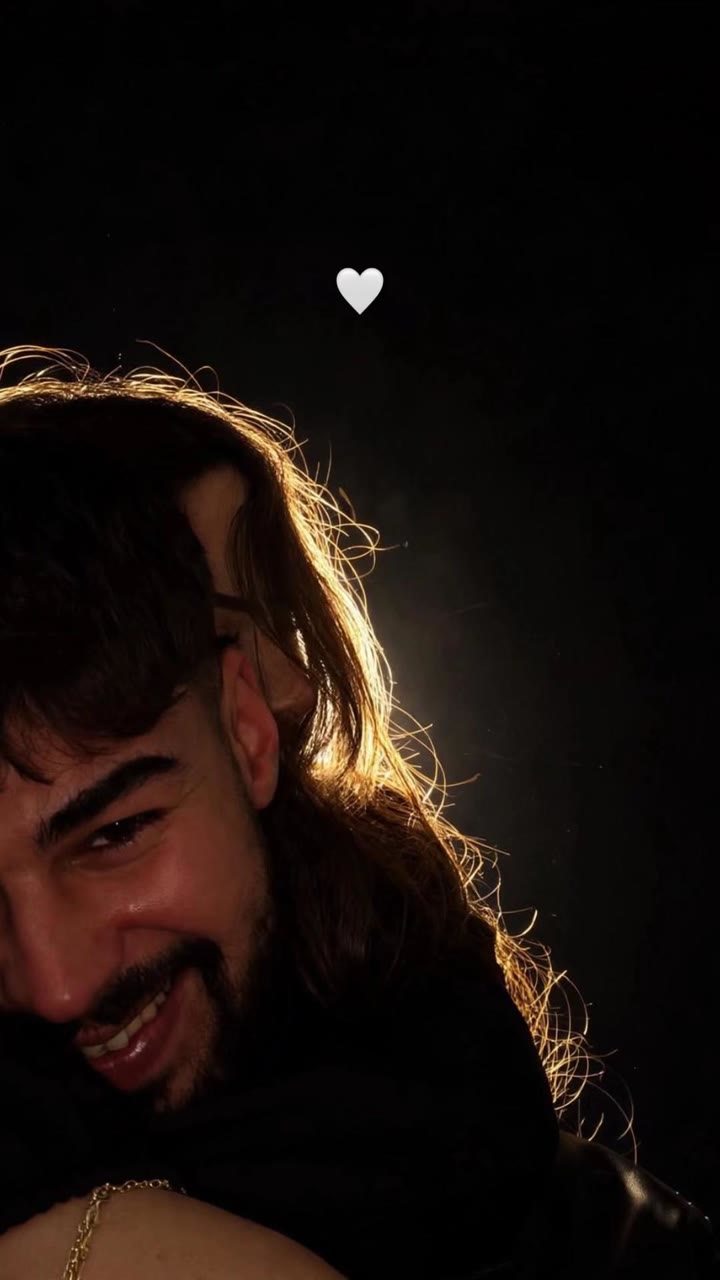
Upload a photo of you and one of your partner, or one photo of you two together. You get one vertical photo: the two of you close on a pure black background, a warm light behind you that outlines your hair, and a small white heart in the dark above.

The original Flashlight Couple reel by @harunn4790Original reel
  • 2 photos you add
  • 2K photo you can turn into a video
  • 9:16 for TikTok, Reels, Shorts
  • No watermark

No prompt to write: Add your photos and tap once

Create your own

Ready in a few minutes · Photo · 3 credits

The flashlight trend is a romantic AI couple photo: the two of you close together on a pure black background, lit only from behind, so a warm rim of light draws your hair and shoulders while your faces stay soft and a little dim. A small white heart floats in the dark above. You need one photo of each of you, or one couple photo.

Also called Flashlight trend · SONYAZ backlight couple photo · Couple rim light glow · Black background couple vibe filter · Siyah arka planlı çift silüeti · Çift ters ışık filtresi · Romantic silhouette glow

Example

What the Flashlight Couple photo looks like

These are two of the trend's original posts: real couples' photos in the flashlight look, shown the way TikTok plays them, with the post's own sound. Your result is one new still photo made from your own photos in the same look, not a copy of these. No two runs come out the same.

Original reel by @harunn4790, 19 s

The first post of the look to pass a million views, by @harunn4790 (3 November 2026, 1.1 million views): a warm rim light in her hair, his smile in soft light, a small white heart in the dark.

Original reel by @ezgisahil_01, 19 s

The most viewed post of the trend, by @ezgisahil_01 (9 November 2026, 1.2 million views): she rests on his back, both lit from behind on pure black, with the white heart above.

Step by step

How to make the Flashlight Couple photo on MakeViral

Everything runs in the browser. No editing app, no prompt to write, no watermark.

  1. Add the two photos

    Press "Create your own" and add you, face clear, chest up, then your partner, face clear, chest up. Add them in this order, because the order decides who is who in the scene. Take them with the camera or pick them from your library.

  2. Press Generate

    The button shows the price. Nano Banana 2.1 puts your photos into the Flashlight couple photo scene and makes one 2K photo. You write no prompt.

  3. Download or share

    The photo is ready in a few minutes as a 9:16 2K image. Download it, share it from your phone, turn it into a video, or find it later in My videos.

Which photo works best?

Pick the version, then the photos.

  • Couple: photo 1 is you, photo 2 is your partner. You end up on the left, your partner on the right, close together.
  • Couple photo: one photo of you two together. The pose and the framing of your photo stay; only the background and the light change. This is how the original template works.
  • You + pet: photo 1 is you, photo 2 is your cat or dog.
  • Use sharp photos with the face in full view, from the chest up or closer. Daylight or a bright room works best: the result dims the faces, so they need detail to start from.
  • Hair matters: the rim light draws it. Loose hair and curls look best.
  • No sunglasses, no heavy filter, no text or stickers on the photo.
  • Only adults who said yes, or your own pet.

Where did the Flashlight Couple trend start?

The look took off in Turkey in November 2026 as TikTok photo posts: one picture, no caption on the image, and the same sound, "orijinal ses" by the account SONYAZ, a romantic edit sound from October 2025. The first post with the look that we found among the sound's top posts went up on 3 November 2026 from @harunn4790 and passed 1.1 million views. More couples followed: @ezgisahil_01's photo of 9 November reached 1.2 million views and 212,300 likes, and @barisozis's of 11 November 791,000 views. By 12 November, 12 of the 20 November posts in the sound's top list showed the black background couple photo, with about 4.3 million views together. That is why tutorial makers call it the sonyaz trend.

On 11 November the tutorials arrived: Hypic template videos in Turkish called it siyah arka plan çift fotoğrafı and the flashlight trend, and pasted the template's prompt in the caption. A day later the same text came out in English, and CapCut tutorials named it the rim light couple photo and the backlit couple photo. Almost all of the posts come from Turkey; a few come from Turkish couples in Germany.

  1. The sound "orijinal ses" by SONYAZ starts with a romantic edit by @mert_edit00 (1.3 million views by 12 November 2026). It carries all kinds of couple edits for a year. TikTok

  2. @harunn4790 posts a couple photo on pure black with a warm rim light and a small white heart, on the SONYAZ sound. It reaches 1.1 million views and 151,700 likes. TikTok

  3. @ezgisahil_01's black background couple photo reaches 1.2 million views, 212,300 likes and 12,900 shares, the most viewed post of the look. TikTok

  4. Hypic tutorials in Turkish show the template and paste its prompt in the caption; the first one we found had 10,200 views a day later. TikTok

  5. 12 of the 20 November posts in the SONYAZ sound's top list show the look, with about 4.3 million views together. English and CapCut tutorials call it the flashlight trend, the rim light couple photo and the SONYAZ backlight couple photo.

Copy and paste

The Flashlight Couple prompts

You do not need this: the one-tap flow runs it for you. The photo prompt puts your photo into the scene. Want to change it? Copy it and edit it in AI Photo.

Couple

2 photos: you, face clear, chest up + your partner, face clear, chest upNano Banana 2.1Photo · 2K · 9:163 credits
Photo prompt

Use the two uploaded photos. The person in the first image is on the LEFT and the person in the second image is on the RIGHT: do not blend the two people. Show them as a romantic couple, close together: cheek to cheek, in a hug, or one resting the head on the other's shoulder, from the chest up, both faces turned toward the camera or three-quarters to it. Each keeps the face, hair, skin tone and clothes from their own photo. Black background: the whole background is pure, solid black, with no room, no wall, no furniture, no sky and no objects. Backlit subject contours (hair light / rim light), warm-toned backlight casts a bright warm glow on the edges, faces stay softly dim, but every face stays clear and recognizable, minimal vibe, strong light-and-shadow contrast. Light outlines the hair, translucent rim light, subject fades into darkness, high contrast, clean and minimalist, romantic mood. Place a simple filled small white heart emoji in the empty space above their heads. Photorealistic photo, vertical 9:16, like a real photo taken at night with one warm light behind them. No text, no letters, no logo, no watermark, no other emoji, no frame. Exactly two people in the frame.

1195 characters

Couple photo

1 photo: you two together, both faces clearNano Banana 2.1Photo · 2K · 9:163 credits
Photo prompt

Use the uploaded photo of two people. Keep the two people, their pose, their faces, their hair, their clothes and the framing exactly as in the photo: do not blend the two people. Only the background and the light change. Black background: the whole background is pure, solid black, with no room, no wall, no furniture, no sky and no objects. Backlit subject contours (hair light / rim light), warm-toned backlight casts a bright warm glow on the edges, faces stay softly dim, but every face stays clear and recognizable, minimal vibe, strong light-and-shadow contrast. Light outlines the hair, translucent rim light, subject fades into darkness, high contrast, clean and minimalist, romantic mood. Place a simple filled small white heart emoji in the empty space above their heads. Photorealistic photo, vertical 9:16, like a real photo taken at night with one warm light behind them. No text, no letters, no logo, no watermark, no other emoji, no frame. Exactly the people of the photo in the frame, no one added.

1015 characters

You + pet

2 photos: you, face clear, chest up + your pet, face and bodyNano Banana 2.1Photo · 2K · 9:163 credits
Photo prompt

Use the two uploaded photos. The person in the first image is on the LEFT and the pet in the second image is on the RIGHT. The person holds the pet close in a warm hug, cheek against its head, from the chest up, the person's face turned toward the camera or three-quarters to it. The pet is the same species and breed, with the same face, eyes, ears, muzzle, fur colors, fur length and markings as in the second image, with the natural body volume and proportions of that animal: never flattened, squashed, stretched or merged with the person. The person keeps the face, hair, skin tone and clothes from the first image. Black background: the whole background is pure, solid black, with no room, no wall, no furniture, no sky and no objects. Backlit subject contours (hair light / rim light), warm-toned backlight casts a bright warm glow on the edges, faces stay softly dim, but every face stays clear and recognizable, minimal vibe, strong light-and-shadow contrast. Light outlines the hair, translucent rim light, subject fades into darkness, high contrast, clean and minimalist, romantic mood. Place a simple filled small white heart emoji in the empty space above their heads. Photorealistic photo, vertical 9:16, like a real photo taken at night with one warm light behind them. No text, no letters, no logo, no watermark, no other emoji, no frame. Exactly one person and one pet in the frame.

1399 characters

How many credits does it cost?

You pay per photo in credits, and the create page shows the exact price on the Generate button before you spend anything. The one-tap price covers one 2K photo, charged once. One photo is 3 credits, so the smallest one-time pack that covers it is $9.99 for 100 credits, with no subscription. A smaller 1K photo costs less if you run the prompt by hand in AI Photo.

ModelSettingsCredits
Nano Banana 2.1 (this template)2K photo, 9:16, one tap3
Nano Banana 2.1 (by hand in AI Photo)1K photo, 9:16, same prompt2

One-time packs and plans are on the pricing page. A failed photo gives its credits back.

What does the flashlight trend photo look like?

One vertical photo, 9:16:

  • The background is pure black: no room, no wall, no sky.
  • The light comes from behind the two of you. It is warm and golden and draws a bright line around your hair, your shoulders and the edges of your faces.
  • Your faces stay soft and a little dim, as in the trend, but still clear enough to know who you are.
  • A small white heart floats in the empty dark above you. It is the trend's mark, so it stays in every version.

People call it the flashlight trend, a flash couple photo or a couple flash photo AI edit, but there is no flash from the front: the glow is a backlight, like a lamp behind you at night. That is why you also see it as the backlit couple photo, the rim light couple photo or the couple silhouette photo.

Which versions can you make?

VersionPhotosWhat you get
Couple (default)Photo 1 you, photo 2 your partnerThe two of you close together, cheek to cheek or in a hug, from the chest up
Couple photoOne photo of you two togetherYour own photo, same pose, now on black with the rim light and the heart
You + petPhoto 1 you, photo 2 your petYou hug your cat or dog, both lit from behind on black

Every version makes one still photo, about one minute per run. The trend has no video step: people post the photo itself. If you want it to move, the result screen can turn it into a short video.

How do you post it like the trend?

  1. Make the photo here and save it.
  2. Post it as a TikTok photo post, one slide, with nothing written on the picture. That is how the black background couple photo posts look.
  3. Add the trend's sound: "orijinal ses" by SONYAZ. Tap the sound under any post of the trend and press Use this sound. Your result is a still photo, so the sound is not on it: you add it in TikTok.
  4. Caption: keep it short. Most posts use only a white heart emoji and #sonyaz.

On Instagram, post it as a photo or a story with a soft love song.

What goes wrong, and how do you fix it?

ProblemFix
A face does not look like youUse a sharper, closer photo in daylight, face to the camera, without filters.
The faces are too darkThe trend keeps them dim on purpose. Run it again, or use a photo where your face is bright and clear.
The two faces blendUse the Couple version, with one person per photo.
Part of the old room shows behind youRun it again. A photo with a plain background helps.
No heart, or a different emojiRun it again: the heart is in the prompt, but image models sometimes skip small details.
The model refuses the photoSome photos get refused. The credits come back; try another photo.
FAQ

Flashlight Couple trend questions

What is the flashlight trend?
It is a romantic AI couple photo trend from Turkey, November 2026: a couple on a pure black background, lit from behind by a warm rim light, with a small white heart in the dark. People post it as a single TikTok photo with the sound "orijinal ses" by SONYAZ. The first big post we found, from 3 November 2026, passed 1.1 million views.
How do I make the flashlight trend photo with my own photos?
Press "Create your own", pick Couple, add a photo of you and one of your partner and press Generate. Or pick Couple photo and add one photo of you two together. You get one vertical photo in about a minute.
What is the flashlight trend prompt?
The Hypic template that the tutorials use comes with this text: backlit subject contours (hair light, rim light), a warm-toned backlight that casts a bright warm glow on the edges, faces that stay dim, strong light-and-shadow contrast, the subject fading into darkness, high contrast, clean and minimalist, a romantic mood, and a simple filled small white heart emoji in the empty space. MakeViral uses that same prompt with your photos, so you do not need to copy it into ChatGPT. This also answers the flashlight trend Instagram prompt and the ChatGPT couple photo prompt searches.
Siyah arka plan çift fotoğrafı nasıl yapılır?
"Create your own" düğmesine bas. Couple sürümünde kendi fotoğrafını ve sevgilinin fotoğrafını yükle, ya da Couple photo sürümünde ikinizin birlikte olduğu tek bir fotoğrafı yükle ve Generate'e bas. Yaklaşık bir dakikada siyah arka planlı, arkadan sıcak ışıklı ve küçük beyaz kalpli çift fotoğrafın hazır olur. Bu, TikTok'ta çift flaş trendi ve flaşlı çift fotoğrafı diye de geçen akım.
Why is it called the sonyaz trend?
Most posts of the look use the TikTok sound "orijinal ses" by the account SONYAZ, and many carry the #sonyaz hashtag. Tutorial makers took the name from there, for example "SONYAZ backlight couple photo".
Is it a real camera flash couple photo?
No. The name says flash, but the light in the trend comes from behind the couple, not from a camera flash in front. The AI image model relights your photo: it makes the background pure black and adds the warm backlight. The result looks like a backlit photo taken at night.
Is this the Hypic couple filter or a CapCut template?
No. The tutorials use a closed Hypic or CapCut template, and some call it the Hypic couple filter. MakeViral is a separate tool: you upload your own photos and get the photo directly, with no template link and no app to install.
Can I use one couple photo instead of two?
Yes, with the Couple photo version. Your pose and framing stay as in your photo; only the background turns black and the light comes from behind. Use a photo where both faces show clearly.
Can I do it with my cat or dog?
Yes, with the You + pet version: photo 1 is you, photo 2 is your pet. You hold your pet close, both lit from behind on pure black, with the white heart above.
Does the result have the trend's sound?
No. The result is a still photo, so it has no sound. Add "orijinal ses" by SONYAZ when you post it on TikTok, the way the trend's posts do. If you turn the photo into a video on the result screen, that video gets its own sound.
Is there a couple silhouette AI or a dark background couple photo version without the heart?
The heart is the trend's mark, so every version adds it. The rest is the couple silhouette AI look: a dark background couple photo with a warm rim light, like a black background couple photoshoot at night. If you do not want the heart, crop it out after you save the photo.
Does it cost credits?
Yes. Each photo costs credits, much less than a video, and the create page shows the exact price on the Generate button before you spend anything. If a photo fails, the credits come back.
More trends

Other AI video templates

Make your own Flashlight Couple photo

Add two photos and tap once. No prompt to write. 3 credits.

No watermark. A failed video gives its credits back. Secure checkout by Stripe.