Back

Photogenic Filter: Your Photo Shoot in Slow Motion and Freeze Frames

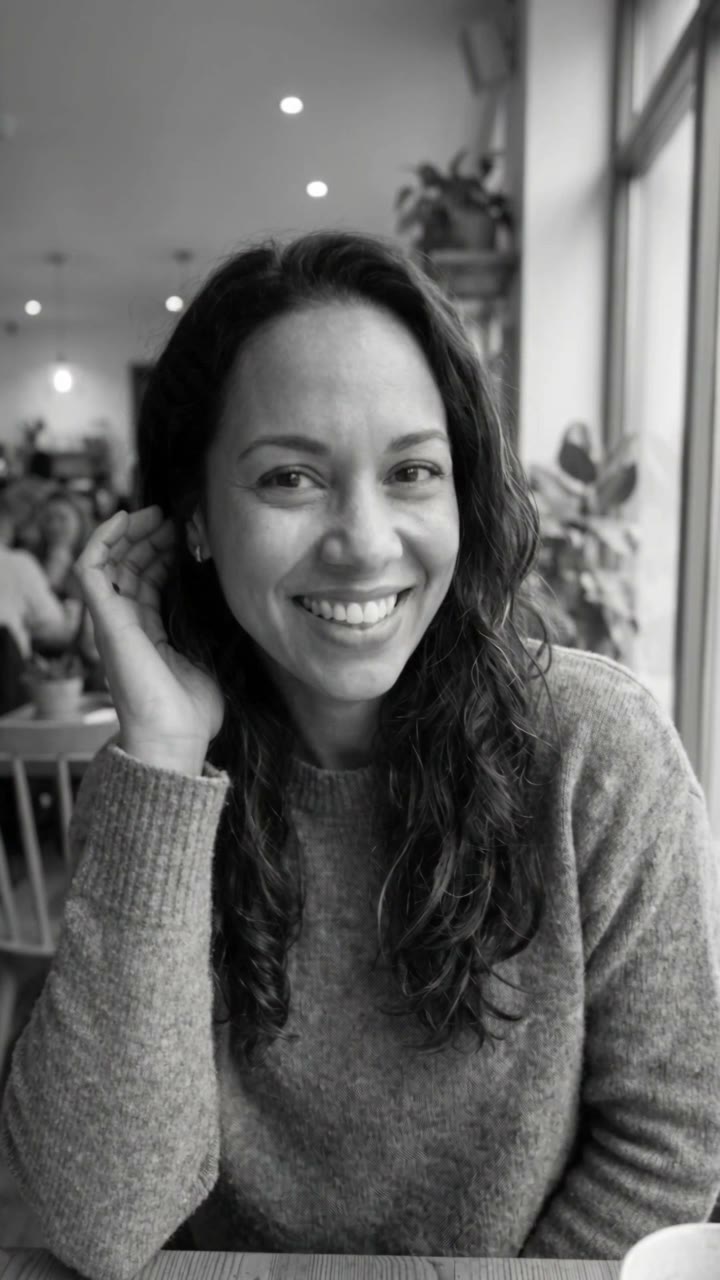
You pose in slow motion, the shutter clicks, and every pose freezes into a black and white still photo. Or a camera on a desk prints your photo. One photo in, a 10-second clip out.

Photogenic Filter example video, made with AI-made peopleAI-made
  • 1 photo you add
  • 10 s clip with sound
  • 9:16 for TikTok, Reels, Shorts
  • No watermark

No prompt to write: Add your photo and tap once

Create your own

Ready in a few minutes · From 56 credits

The photogenic filter is a TikTok edit that turns a short clip of you into a photo shoot: you pose in slow motion, a camera click and a flash freeze the moment, and the frame turns into a black and white still photo before the next pose. You need one clear photo of yourself or your pet.

Also called photogenic filter · Photogenic camera filter · black and white freeze pose filter

Example

What the Photogenic Filter video looks like

Made from the prompts on this page. The people and pets are AI-made, not real persons, and the sound is original. Your result will differ from run to run.

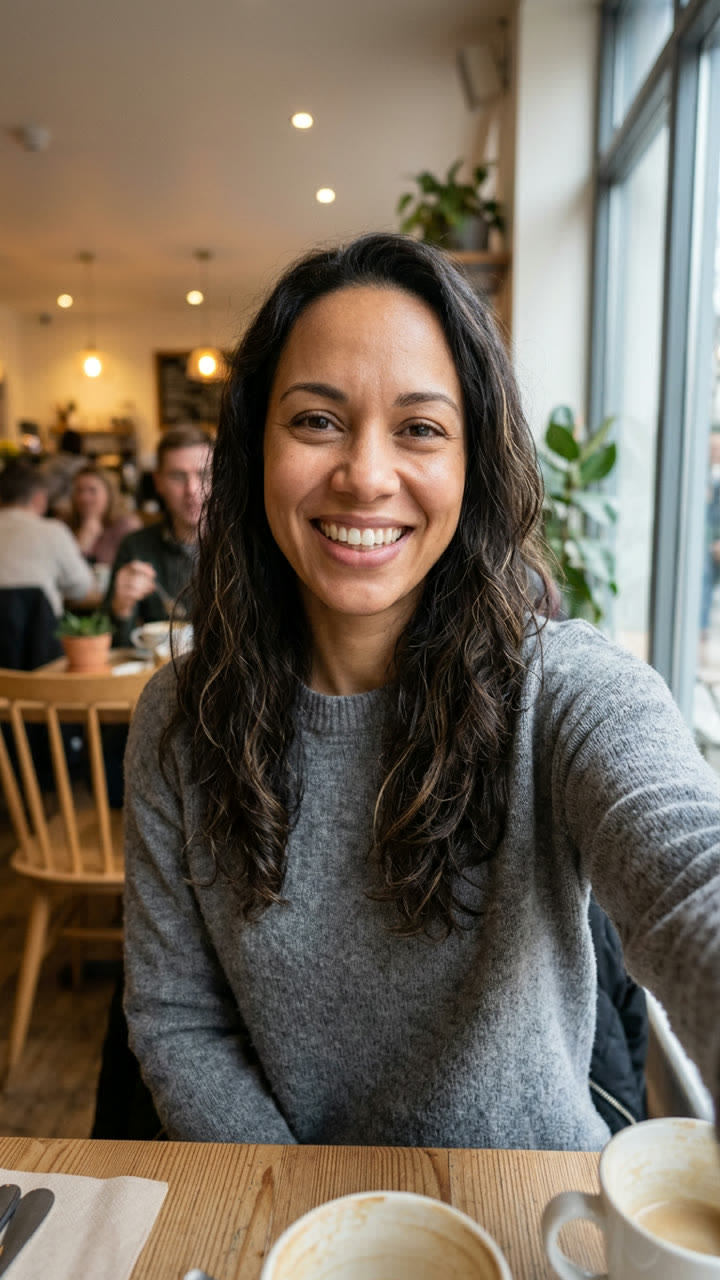
Input photo for Photogenic Filter example (AI-made person)
Input
Result, 10 s, with sound

Made with MakeViral from one photo of an AI-made woman (not a real person): she poses in slow motion and each pose freezes into a black and white still.

Step by step

How to make the Photogenic Filter video on MakeViral

Everything runs in the browser. No editing app, no prompt to write, no watermark.

  1. Add your photo

    Press "Create your own" and add you, face clear. Take it with the camera or pick it from your library.

  2. Press Generate

    The button shows the price. Seedance 2.5 films the Photogenic Filter scene straight from your photo, with no in-between picture, for 10 seconds with original sound. You write no prompt.

  3. Download or share

    The video is ready in a few minutes as a 9:16 MP4. Download it, share it from your phone, or find it later in My videos.

Which photo works best?

You need one sharp photo.

  • Photo shoot and Photo print: a photo of yourself from the chest up or the waist up, the face clear, looking at or near the camera, in good light. No sunglasses, no hand over the face. Your clothes and your hair come from the photo, so wear what you want to see.
  • Pet: one animal, the head and the chest in view, eyes open, in daylight.
  • The setting of your photo becomes the set of the Photo shoot version, so a tidy, bright background looks best. Photo print always uses its own desk and window.
  • Use your own photo, your own pet or a photo of an adult who agreed. Never a celebrity, a stranger or a child.

Where did the Photogenic Filter trend start?

The photogenic filter effect started as a one-tap template in a phone video editor. On 25 October 2025 @xsnowo006 posted a "Photogenic filter tutorial 2025": a woman smiles and poses in slow motion, and on each beat the shot freezes in black and white like a printed photo (269,000 views and 14,500 likes on 28 October 2026). More photogenic filter tutorial posts followed, such as @kayla_asd on 9 December 2025 (288,200 views).

In October 2026 the trend came back with a new look. On 5 October @uhz63eclm1 posted a template where a camera sits on a desk printer and the printer slowly prints the user's photo: 1.5 million views. French promoter accounts then posted the same "Photogenic Filter 2026: Slow Motion, Freeze Frame, Still Photo Effect" caption on dozens of edits, and @callie4457 reached 682,200 views and 164,500 likes on 22 October. On 28 October #photogenicfilter had 3,343 videos and 55.0 million views, and new photogenic effect TikTok posts still came in every day.

The original is a closed template with no prompt, so MakeViral wrote its own prompts for both looks.

  1. @xsnowo006 posts "Photogenic filter tutorial 2025": slow-motion poses that freeze into black and white stills (269,000 views by 28 October 2026). TikTok

  2. @kayla_asd posts "Photogenic filter effect tutorial 2025" with the same black and white freeze frames (288,200 views). TikTok

  3. A new "Photogenic Filter 2026" template, a camera on a desk printer that prints your photo, reaches 1.5 million views for @uhz63eclm1. TikTok

  4. The French account @junzcybs posts the printer version: 490,100 views by 28 October. TikTok

  5. @callie4457 posts a Photogenic Filter 2026 edit that reaches 682,200 views and 164,500 likes. TikTok

  6. #photogenicfilter has 3,343 videos and 55.0 million views on TikTok. TikTok

Copy and paste

The Photogenic Filter prompts

You do not need this: the one-tap flow runs it for you. [Image 1] is your photo: the video model takes it as a reference and films the scene straight from it, with no photo step first.

Photo shoot

1 photo: you, face clearSeedance 2.510 s · 720p · 9:16126 credits
Video prompt

A photogenic photo shoot clip, photorealistic, vertical 9:16, like a phone video with a slow-motion and freeze-frame edit: the person poses for the camera, and on every shutter click the moment freezes into a black-and-white still photo. The person is the one in [Image 1], in every frame: copy the exact face from [Image 1] (the face shape, eye color and eye shape, eyebrows, nose, mouth, skin tone, age, hair color, hair length and hairstyle, and any beard, moustache, glasses or freckles), so their friends recognize them at once. The face stays the same from the first frame to the last, also in the black-and-white stills. Never morph. They wear the clothes from [Image 1], with their own hair. If [Image 1] shows an animal, the subject is that animal, with its own face, fur and markings, posing in the same way. The place: the setting of [Image 1], or a bright room with soft window light if the photo has no clear setting. A medium close-up from the chest up, the camera at face height, the face large and sharp. 0-2 s: in slow motion, the person turns to the camera with a big, happy smile and touches their hair. 2-3 s: a shutter click and a quick white flash: the frame freezes and turns black and white, like a printed still photo, for about one second. 3-5 s: the color comes back, and in slow motion they tilt the head and laugh, one hand near the chin. 5-6 s: a click and a flash: freeze, black and white. 6-8 s: color again; in slow motion they look back over one shoulder with a soft, confident look. 8-9 s: a click and a flash: the last black-and-white freeze frame, held. 9-10 s: a fast, smooth zoom blur transition ends the clip. Audio: an upbeat, catchy beat with a shutter click and a soft flash sound on each freeze. No singing, no words. Exactly one person, no other people. Anatomy: two arms, two hands with five fingers each. No text, no subtitles, no logos, no watermark, no camera or phone in the frame, no app buttons.

1952 characters

Photo print

1 photo: you, face clearSeedance 2.510 s · 720p · 9:16126 credits
Video prompt

A clip of a photo printer, photorealistic, vertical 9:16, a fixed camera: a black camera rests on top of a black desktop printer, and the printer prints a photo of the person in [Image 1]. The set: a white desk on thin black legs; on it a large black digital camera with a big lens lies on top of a black desktop printer; beside it a small potted plant with pink flowers and a vase of thin branches with small yellow balls; behind, a bright window with a blue sky and white clouds. Soft daylight. The printer is in the middle of the frame, seen a little from the front and above, with a white paper tray at the bottom. The printed photo shows the person in [Image 1]: copy the exact face from [Image 1] (the face shape, eye color and eye shape, eyebrows, nose, mouth, skin tone, age, hair color, hair length and hairstyle, and any beard, moustache, glasses or freckles), their clothes and their pose, so their friends recognize them at once. The person in the print stays the same from the first frame to the last. Never morph. If [Image 1] shows an animal, the print shows that animal, with its own face, fur and markings. 0-2 s: the printer starts with a soft whirr and a blank white sheet slides into the tray. 2-6 s: a glossy photo print slowly feeds out of the printer from the top down: first the top of the head, then the face, then the shoulders, in full color and sharp. 6-8 s: the print tips forward and leans against the front of the printer; the whole photo is now in view: the person from [Image 1], large and clear. 8-10 s: the camera pushes in slowly on the print until the face fills most of the frame; a small shine moves across the glossy paper. Audio: the whirr and clicks of the printer, the soft slide of paper, then a light, happy beat. No singing, no words. Exactly one printed photo with one person in it. No people in the room, no hands. No text on the photo, no subtitles, no logos or brand names on the camera or the printer, no watermark.

1971 characters

Pet

1 photo: your petKling 3.010 s · 1080p · 9:1656 credits
Step 1 · Photo prompt

Use the uploaded image as the base. 9:16 vertical photo, a bright, cheerful pet photo shoot in soft window light. The pet from the uploaded image sits facing the camera, head up, looking straight into the lens with a happy, alert face, in a cozy, bright room. Medium close-up, the head and the chest large and sharp, with the natural body volume and proportions of that animal. Photorealistic. Exactly one animal. No text, no logos, no watermark.

446 characters
Step 2 · Video prompt

Keep the pet's face, eyes, ears, fur colors, markings and body exactly as in the image, with the natural body volume and proportions of that animal. A photogenic photo shoot with a slow-motion and freeze-frame edit. 0-2 s: in slow motion the pet tilts its head at the camera. 2-3 s: a shutter click and a quick white flash: the frame freezes and turns black and white like a printed still photo for one second. 3-5 s: the color comes back; in slow motion the pet perks up its ears and licks its nose. 5-6 s: click, flash, black-and-white freeze. 6-8 s: color again; the pet turns its head to one side and back to the lens. 8-9 s: click, flash, the last black-and-white freeze frame, held. 9-10 s: a fast zoom blur transition. Audio: an upbeat, catchy beat with a shutter click and a soft flash sound on each freeze. No words. Exactly one animal, no people, no extra legs, no morphing. No text, no logos, no watermark.

917 characters

How many credits does it cost?

You pay per video in credits, and the create page shows the exact price on the Generate button before you spend anything. The one-tap price covers the scene photo and the video, charged once. Each version has its own price: Photo shoot 126 credits, Photo print 126 credits, Pet 56 credits. The cheaper models are there if you run the prompts by hand in AI Video.

Video modelSettingsCredits
Photo shoot: Seedance 2.5 (this template)10 s, 720p, straight from your photos, one tap126
Photo print: Seedance 2.5 (this template)10 s, 720p, straight from your photos, one tap126
Pet: Kling 3.0 (this template)10 s, 1080p + 1 scene photo, one tap56

One-time packs and plans are on the pricing page. A failed video gives its credits back.

What does the photogenic filter do, second by second?

There are two looks of the photogenic TikTok trend, and MakeViral makes both from one photo.

TimePhoto shoot (and Pet)Photo print
0-2 sYou turn to the camera in slow motion with a big smileA black camera sits on a desk printer by a bright window; a blank sheet slides out
2-3 sClick and flash: the frame freezes in black and whiteYour photo starts to feed out of the printer, from the top of your head down
3-6 sColor comes back, you tilt your head and laugh; click, freezeThe print comes out in full color, sharp and glossy
6-9 sYou look over one shoulder; the last black and white freeze is heldThe print leans against the printer, your whole photo in view
9-10 sA fast zoom blur ends the clipThe camera pushes in on your face in the print

Why does it work? It makes anyone look photogenic: slow motion flatters a smile, and the freeze frames look like real photo shoot shots. The printer version is a small reveal, and people wait to see whose photo comes out.

Photo shoot, Photo print or Pet: which one?

Press "Create your own" and pick one. All three take one photo and make a vertical 9:16 clip of 10 seconds.

Photo shootPhoto printPet
What you getYou pose in slow motion; each pose freezes into a black and white stillA camera on a desk printer prints your photoYour dog or cat poses; each pose freezes in black and white
How it worksTop-quality AI video models, including Seedance 2.5, make the video straight from your photo, so your face stays close to itThe same, straight from your photoStandard: a still of your pet, then an AI video model plays it. Best: the stronger model
Frame720p720pStandard 1080p, Best 720p
SoundAn upbeat beat, a shutter click and a flash sound on each freezePrinter whirr, paper, a light beatThe same as Photo shoot

The exact price shows on the Generate button before you spend anything, and you write no prompt.

The sound: the trend has no one song: creators put many different sounds under it. Your clip comes with its own beat and shutter clicks, not a TikTok sound. Add the sound you like when you post.

What goes wrong, and how do you fix it?

ProblemFix
A freeze frame stays in color, or there are only two freezesEvery run is a new take. Run it again.
The face in the black and white stills looks less like youUse a sharp, well-lit photo where your face is big, then run it again.
The print shows a slightly different pose than your photoThe model redraws the print. A photo with a clear, simple pose comes out closest.
Text or a logo shows on the camera or the printThe prompt bans it. Run it again.
The video model refuses the photoSome photos get refused. The credits come back; try another photo.

Results differ from run to run, so a second try often fixes the small things.

How should you post it?

Post it as it is, or put a sound you like under it. Good captions: "Am I photogenic or not?", "The camera loves me", "POV: you finally got your photo shoot", or for the print, "Guess who came out of the printer".

Hashtags: #photogenicfilter (3,343 videos, 55.0 million views on 28 October 2026), #photogenictrend (1,462 videos, 10.8 million views) and #freezeframe. Keep the platform's AI label on: the clip is made by AI.

More photo looks: the AI ghost photoshoot, the 80s AI trend and the AI school photo.

FAQ

Photogenic Filter trend questions

What is the photogenic filter?
It is a TikTok edit that makes you look like you are at a photo shoot: you pose in slow motion, a camera click and a flash freeze each pose, and the frame turns into a black and white still photo. The 2026 version also has a camera on a printer that prints your photo. MakeViral makes both from one photo.
Is there a photogenic filter app?
On TikTok the photogenic filter app is a one-tap template inside a video editor, and it needs a video of you. MakeViral is a photogenic effect app that needs only one photo: pick a version, add the photo and press Generate. It works in the browser, so it is also a photogenic filter online.
Where can I find a photogenic filter tutorial?
Most photogenic filter tutorial posts on TikTok show how to open the template in a video editor. Here there is no editing: press "Create your own", pick Photo shoot, Photo print or Pet, add one photo and press Generate. The 10-second clip waits in My videos when it is ready.
Is this the photogenic filter effect from TikTok?
Yes, it is the same look: the slow motion, the freeze frames and the black and white still photo effect, and the printer that prints your photo. It is the photogenic filter TikTok creators post as a photogenic tiktok trend, made with photogenic AI from one photo instead of a video.
Is it the photogenic filter 2026 or the photogenic filter 2025?
Both. The photogenic filter 2025 posts were the black and white freeze frame look (Photo shoot). The photogenic filter 2026 posts added the printer that prints your photo (Photo print). This photogenic trend page has a version for each.
Can I use it for the photogenic filter on Instagram?
Yes. The result is a vertical MP4, so you can post your photogenic filter clip on Instagram Reels as well as on TikTok. The photogenic filter effect on TikTok and on Instagram is the same file.
Is this a photogenic AI photo generator?
It makes a video, not a photo. If you want to see how photogenic you are, it is a make me photogenic AI clip: your best poses as slow-motion shots and black and white stills. For a still photo, try the photo templates linked below. It is not the old photogenic challenge on TikTok; it is the new photogenic AI trend.
How do I make the freeze frame photo effect?
Pick Photo shoot and add one photo of yourself. The AI makes a slow-motion clip of you posing, with a camera click, a white flash and a black and white freeze frame photo effect on each pose.
What is the photo print filter?
It is the printer look of the trend: a camera sits on a desk printer and your photo slowly comes out of it. Pick Photo print and add one photo; the print shows your face, your clothes and your pose.
Can I make it with my pet?
Yes. Pick Pet and add one photo of your dog or cat. Your pet tilts its head, perks up its ears and looks at the camera in slow motion, and each pose freezes into a black and white still.
How long is the video, and does it have sound?
10 seconds, vertical 9:16, as an MP4. It has its own sound: an upbeat beat with a shutter click on each freeze, or the printer sounds and a light beat in Photo print. It is not a TikTok sound, so add the sound you want when you post.
Can I use a photo of someone else?
Use your own photo, your own pet or a photo of an adult who said yes. Never a celebrity, a stranger or a child. The clip is made by AI, so keep the AI label on when you post it.
Does the photogenic filter cost credits?
Yes. Each video costs credits, and the create page shows the exact price on the Generate button before you spend anything. If a video fails, the credits come back.
More trends

Other AI video templates

Template

Stones to Castle AI Trend: They Threw Stones, You Built a Castle

A crowd of angry women throws stones toward you across a green mountain valley. You stay calm, pick the stones up, and they rise into a huge Gothic castle while you smile down from its window. One photo, 15 seconds, with the reel's own song.

Read more
Template

Bby Wow Guy AI: Put Your Face in the Guy Dancing at a Quince Meme

Dance up to the camera at a quinceañera, bite the concha, chew with full cheeks while you stare into the lens, then dance away. Add one photo and become the bby wow guy, with the song.

Read more
Template

Hit the Road Dude: Be the Private Property Meme Driver

"State? This? It ain't. Hit the road, dude. This ain't no state property. This is private property." Add one photo, and you, your dog or your cat play the grumpy pickup driver from the viral clip, with the original audio.

Read more
Template

AI School Photo: Classic School Pictures From a Phone Photo

Take a photo of your child at home. MakeViral turns it into a classic picture day portrait: mottled blue backdrop, soft studio light, head and shoulders. The face stays exactly the same.

Read more
Template

AI Ghost Photoshoot: The Sheet Ghost Trend From One Photo

A white bedsheet, round black sunglasses and your own jeans and shoes below, on a path of orange leaves. Alone, with your best friend or with your dog. One photo in, a 2K ghost photo out.

Read more
Template

80s AI Trend: Your 1985 Photo and Home Video

One selfie becomes a faded 1985 snapshot with big hair and a date stamp. Stop there for the photo, or animate it into a 10-second camcorder home video with sound.

Read more

Make your own Photogenic Filter video

Add one photo and tap once. No prompt to write. 126 credits.

No watermark. A failed video gives its credits back. Secure checkout by Stripe.