Airplane Flying Over Head AI Trend: A Jet Right Above You

You sit on the guardrail of an airport viewing deck at golden dusk and wave up, and a big airliner glides so low over you that its belly, engines and wheels fill the sky. One photo of you or your pet in, an 8-second clip with jet sound out.

The original Plane Over Your Head reel by @hoaithuong034Original reel
  • 1 photo you add
  • 8 s clip with sound
  • 9:16 for TikTok, Reels, Shorts
  • No watermark

No prompt to write: Add your photo and tap once

Create your own

Ready in a few minutes · 46 credits

The airplane flying over head AI trend turns one photo into a short clip where a huge airliner glides so low over you that its belly, engines and wheels fill the sky, while you sit at an airport viewing deck at sunset and wave up at it. You need one clear photo of yourself or your pet.

Example

What the Plane Over Your Head video looks like

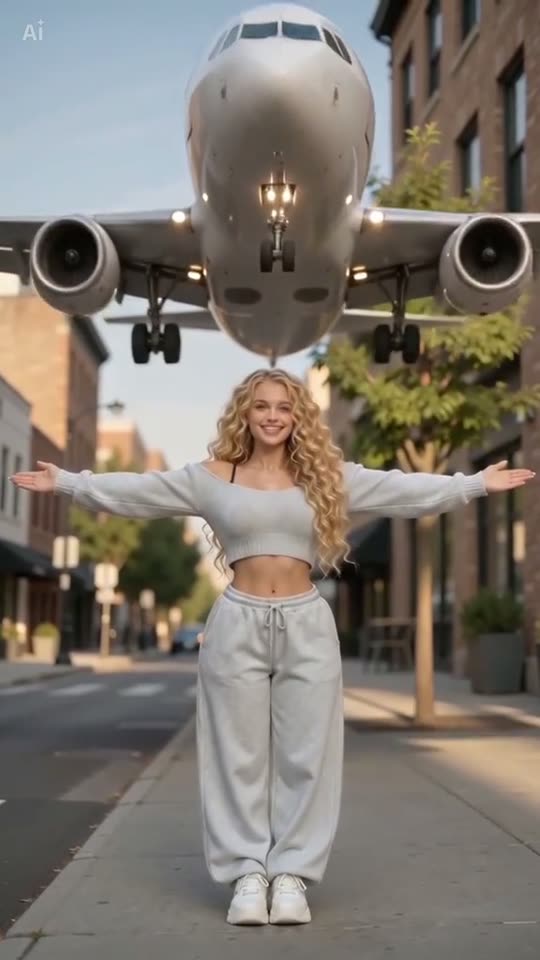
This is the original reel that started the trend. Your video is a new clip made from your photo in the same style, not a copy of these shots. No two runs come out the same.

Original reel by @hoaithuong034, 10 s

The original reel by @hoaithuong034, made with a CapCut AI template: an AI-made woman steps back on a city street, spreads her arms and a plain white airliner flies straight over her head. Posted on 28 September 2026 with its own AI sound.

Step by step

How to make the Plane Over Your Head video on MakeViral

Everything runs in the browser. No editing app, no prompt to write, no watermark.

  1. Add your photo

    Press "Create your own" and add your photo. Take it with the camera or pick it from your library.

  2. Press Generate

    The button shows the price. MakeViral builds the Plane over your head scene with your photos, then Kling 3.0 animates it for 8 seconds with original sound. You write no prompt.

  3. Download or share

    The video is ready in a few minutes as a 9:16 MP4. Download it, share it from your phone, or find it later in your Library.

Which photo works best?

You need one sharp photo: of yourself for Human, of your pet for Pet.

  • Human: waist up or full body, in good light, with your face clearly visible. The still turns you to the side and has you wave one hand up, so a photo where your face is not hidden by a hat, sunglasses or your hand works best.
  • Your clothes and hair stay as in your photo. Wear what you want to see in the clip.
  • Pet: the whole animal in view, ears to paws, in daylight. Your pet sits by the guardrail and looks up as the plane passes.
  • One person or one pet per photo.
  • Use your own photo, a photo of an adult who agreed, or your own pet. Never a celebrity or a stranger.

Where did the Plane Over Your Head trend start?

Clips of planes flying very low went viral on TikTok in late summer 2026. On 27 August a hairdresser posted "I still can't believe how low this plane was", a joke that ends with a paper plane advertising her salon; it reached 26.9 million views. On 10 September @livelyiqra, who posts aviation videos from London, filmed a selfie as a double-decker airliner passed low over her head. It got 4.9 million views and 529,000 likes, and its sound later played under many of the AI tutorials.

The AI version took off in late September as a one-photo CapCut AI template: you upload a picture and a jet flies right over your head. The first tutorials we found are from 25 September, in Vietnamese and English, then came a Filipino one with 838,300 views and a Burmese one with 796,800, whose screen showed the template at 301,900 uses. On 28 September ByteDance's Dreamina added a "Sunset-Aviation" skill with the same look: you on the guardrail of an airport viewing deck at dusk, waving at a low airliner. A second wave of Russian and Spanish tutorials passed 1.1 million and 947,800 views on 10 October.

  1. @livelyiqra posts a selfie in London as a double-decker airliner passes low over her head. It has 4.9 million views and 529,000 likes by 13 October. TikTok

  2. The first tutorials for the one-photo CapCut AI template appear in Vietnamese and English, calling it the "Airplane Flyover Effect". TikTok

  3. A Filipino tutorial for the template reaches 838,300 views and 25,300 likes, and a Burmese one 796,800 views. The Burmese tutorial shows the template at 301,900 uses. TikTok

  4. Dreamina adds the "Sunset-Aviation" skill: a person on the guardrail of an airport viewing platform, waving up at a low-flying airliner at dusk. The photo step of this template uses its description. Dreamina

  5. A Russian tutorial for the template reaches 1.1 million views and 19,100 likes, and a Spanish one 947,800 views. TikTok

  6. The sound of @livelyiqra's clip is in 2,100 TikTok videos, and #airplanetrend has 576 videos and 8.2 million views (all time). TikTok

Copy and paste

The Plane Over Your Head prompts

You do not need these: the one-tap flow runs them for you. A photo prompt puts your photo into the scene, then a video prompt animates it. Want to change them? Copy them and edit them in AI Photo and AI Video.

Human

1 photo: your photoKling 3.08 s · 1080p · 9:1646 credits
Step 1 · Photo prompt

Use the uploaded image as the base. Keep the person's face, facial features, skin tone, hair, age, body shape and clothes exactly the same as in the photo. 9:16 vertical travel portrait. Character from reference image sits on guardrail at airport viewing platform, smiling in profile and waving one hand up. Low wide-angle shot with a low-flying airliner overhead. Warm golden dusk rim light, strong perspective, 8K realistic photo with film texture. Exactly one person. The airliner is plain white with no airline name, no logo, no tail emblem, no lettering and no registration number. No other people, no text, no logos, no watermark.

636 characters
Step 2 · Video prompt

One continuous shot from a low wide angle, like a real phone video at an airport viewing platform at golden dusk. Keep the person's face, hair and clothes and the airliner exactly as in the image. The person sits on the guardrail, smiling in profile, with one hand waving up at the sky. The low-flying airliner glides straight over their head, so low that its huge belly, engines, wheels and landing lights fill the top of the frame, then it flies on and out of the top of the frame. The wind from the jet blows through their hair and clothes; they look up with a big, amazed smile and reach one hand up as if to touch it. The camera stays low and almost still, tilting up a little to follow the plane. Audio: a deep, rising jet engine roar that peaks as the plane passes overhead, rushing wind and the person's surprised laugh; no music, no dialogue. Exactly one person and one airliner. No cuts, no second plane, no extra people, no extra limbs, no morphing. No airline names, no logos, no lettering or registration on the plane, no text, no subtitles.

1054 characters

Pet

1 photo: your pet, whole bodyKling 3.08 s · 1080p · 9:1646 credits
Step 1 · Photo prompt

Use the uploaded image as the base. Keep the animal's species, breed, face, eye color, fur color, fur length, markings and body size exactly the same as in the photo. 9:16 vertical travel portrait. The pet from the reference image sits on the wide ledge of the guardrail at airport viewing platform, in profile, looking up at the sky with its ears up. Low wide-angle shot with a low-flying airliner overhead. Warm golden dusk rim light, strong perspective, 8K realistic photo with film texture. Exactly one animal and no people. No clothes on the pet. The airliner is plain white with no airline name, no logo, no tail emblem, no lettering and no registration number. No text, no logos, no watermark.

700 characters
Step 2 · Video prompt

One continuous shot from a low wide angle, like a real phone video at an airport viewing platform at golden dusk. Keep the animal's face, fur, markings and size and the airliner exactly as in the image. The pet sits on the ledge of the guardrail and looks up at the sky. The low-flying airliner glides straight over its head, so low that its huge belly, engines, wheels and landing lights fill the top of the frame, then it flies on and out of the top of the frame. The pet's head follows the plane, the wind from the jet blows its ears and fur back, and it opens its eyes wide in surprise. The camera stays low and almost still, tilting up a little to follow the plane. Audio: a deep, rising jet engine roar that peaks as the plane passes overhead and rushing wind; no music, no human voices. Exactly one animal and one airliner, no people. No cuts, no second plane, no extra animals, no extra legs, no morphing. No airline names, no logos, no lettering or registration on the plane, no text, no subtitles.

1007 characters

How many credits does it cost?

You pay per video in credits, and the create page shows the exact price on the Generate button before you spend anything. The one-tap price covers the scene photo and the video, charged once. One video is 46 credits, so the smallest one-time pack that covers it is $9.99 for 100 credits, with no subscription. The cheaper models are there if you run the prompts by hand in AI Video.

Video modelSettingsCredits
Kling 3.0 (this template)8 s, 1080p + 1 scene photo, one tap46
Seedance 2.0 Fast (by hand in AI Video)8 s, 720p + 1 photo55
Veo 3.1 Fast (by hand in AI Video)8 s, 720p + 1 photo14

One-time packs and plans are on the pricing page. A failed video gives its credits back.

What happens in the plane over your head video, second by second?

The template builds the look the trend is known for: an airport viewing deck at golden dusk, filmed from low down so the sky fills the frame.

TimeWhat happens
0-2 sYou sit on the guardrail, smiling in profile, with one hand raised to the sky. A big airliner is already low above you.
2-6 sThe plane glides straight over your head. Its belly, engines, wheels and landing lights fill the top of the frame, and the wind blows through your hair.
6-8 sIt flies on out of the top of the frame while you look up with a big, amazed smile.

The sound is the scene itself: a deep jet roar that peaks as the plane passes, rushing wind and a surprised laugh. There is no music.

Why does it work? The real version of this shot takes a trip to a famous plane-spotting spot, good timing and a lot of luck, and a London clip of it went viral in September 2026. The AI version gives anyone the same jaw-drop moment from one photo, and the plane looks close enough to touch.

Human or Pet, Standard or Best: what is the difference?

Human or Pet? Press "Create your own" and pick one. Human puts you on the guardrail, waving at the plane. Pet sits your cat or dog by the guardrail, ears blown back as the jet roars over. The trend stars people; Pet is our version of the same scene.

Both versions work in two steps:

  1. The still. Nano Banana 2 puts you or your pet at the airport viewing deck at dusk, with a low airliner overhead. It uses the description of Dreamina's "Sunset-Aviation" skill, word for word, plus a line that keeps your face and a ban on airline names and logos.
  2. The video. A video model plays the 8-second flyover from that still, with its own sound.
Standard (default)Best
Video modelKling 3.0Seedance 2.5
Length8 s8 s
FrameVertical 9:16, 1080pVertical 9:16, 720p
SoundJet roar and wind, no musicThe same
PriceLowerHigher

The exact price shows on the Generate button before you spend anything, and you write no prompt.

What goes wrong, and how do you fix it?

ProblemFix
The plane flies backwards, sideways or too slowlyPlanes are hard for AI video. Run it again, or pick Best.
A second plane appears, or the shot cutsThe prompt asks for one plane and one take. Run it again or pick Best.
The plane shows an airline name or logoThe prompt bans them, but a model can still add one. Run it again before you post.
Your face looks less like youUse a sharp photo with your face in good light, then run it again.
Your pet looks small or blurryUse a photo with the whole animal in view, close to the camera.
The video model refuses the photoSome photos get refused. The credits come back; try another photo.

Every run is a new take, so results differ.

How should you post it?

Your clip comes with its own jet and wind sound, so it is ready to post as it is. Many of the trend's tutorials use the sound of @livelyiqra's London clip; you can pick it in TikTok when you post.

Captions that fit: "I still can't believe how low this plane was", "Me waiting for my holiday flight", "When the pilot waves back", or for a pet, "My dog meeting his first airplane".

Hashtags: #airplanetrend (576 TikTok videos and 8.2 million views on 13 October 2026) and #planetrend (322 videos, 14.3 million views). Keep the platform's AI label on: a plane this low is not real, so never post it as real footage.

Want more scenes like this? Walk out of airport arrivals as a star in the AI airport celebrity video, or meet a calm lion on a dark road in the AI lion friend video.

FAQ

Plane Over Your Head trend questions

What is the airplane flying over head AI trend?
It is a viral AI video from September 2026: from one photo, a huge airliner glides so low over you that its belly, engines and wheels fill the sky. It spread through a one-photo CapCut AI template, with tutorials in Vietnamese, English, Filipino, Burmese, Russian and Spanish, after clips of very low planes went viral in August and September.
Is the plane over your head video real?
No, the trend videos are AI. People upload one photo, and the AI makes the plane, the sky and the wind. The trend plays on viral clips of very low planes, like a London selfie from 10 September 2026 with an airliner just overhead, which reached 4.9 million views.
Which app makes the airplane over your head video?
Most tutorials link a closed CapCut AI template by "Michelle luo". Dreamina has a "Sunset-Aviation" skill with the same look. MakeViral makes it from one photo too: a still of you at an airport viewing deck, then an 8-second video of the plane flying over you.
Which prompt does this template use?
The photo step uses the public description of Dreamina's "Sunset-Aviation" skill from 28 September 2026, word for word, with a line that keeps your face and a ban on airline names and logos. The CapCut template shows no prompt, and no video prompt for this trend was shared anywhere, so the video step uses MakeViral's own prompt for the flyover.
How do I make my own plane over your head video?
Press "Create your own", pick Human, pick Standard or Best and add one clear photo of yourself. Press Generate; the button shows the price first. MakeViral makes a still of you at the airport viewing deck, then an 8-second video of the airliner flying over you, with sound. It waits in your Library when it is ready.
Can my cat or dog sit under the plane?
Yes. Pick Pet and add a full-body photo of your pet. It sits by the guardrail and looks up as the jet roars over, with its ears and fur blown back by the wind. The viral clips star people, so Pet is our own version of the same scene.
How long is the video, and does it have sound?
8 seconds, vertical 9:16, as an MP4 file: 1080p with Standard, 720p with Best. It has its own sound: a jet engine roar that peaks as the plane passes overhead, rushing wind and a surprised laugh. There is no music.
Is this the CapCut airplane template?
No. The CapCut template is closed and shows no prompt. This is MakeViral's own template for the same scene, built on the description of the Dreamina "Sunset-Aviation" skill. You do not need CapCut or Dreamina to use it.
Can I use a friend's photo or a celebrity's photo?
Use your own photo, or a photo of an adult who said yes. Never a celebrity or a stranger. The clip can look like real footage, so keep the AI label on when you post it and never present it as a real event.
Does the plane over your head video cost credits?
Yes. Each video costs credits, and the create page shows the exact price on the Generate button before you spend anything. Standard (Kling 3.0) costs less than Best (Seedance 2.5). If a video fails, the credits come back.

Make your own Plane Over Your Head video

Add one photo and tap once. No prompt to write. 46 credits.

No watermark. A failed video gives its credits back. Secure checkout by Stripe.