AI Lion Friend: A Lion Walks Up to You on a Night Road

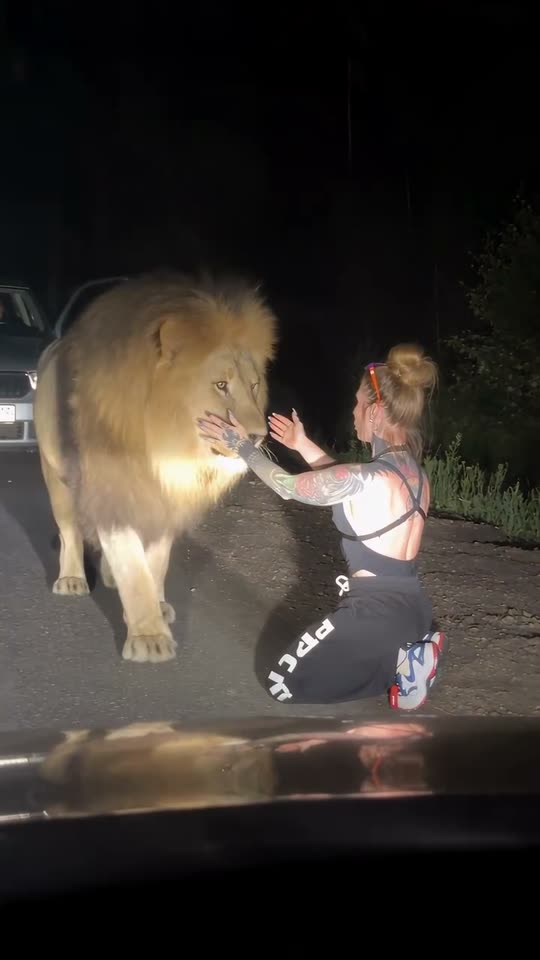
Filmed through a car windshield at night: you stand by an open car door, a big lion walks out of the dark, and instead of attacking it rubs its mane against you like an old friend. One photo in, a 10-second clip with night sounds out.

The original AI Lion Friend reel by @ten4icOriginal reel
  • 1 photo you add
  • 10 s clip with sound
  • 9:16 for TikTok, Reels, Shorts
  • No watermark

No prompt to write: Add your photo and tap once

Create your own

Ready in a few minutes · 56 credits

The AI lion trend is a night clip filmed through a car windshield: you stand on an empty road beside an open car door, a big male lion walks out of the dark toward you, and instead of attacking, it greets you like an old friend while you stroke its mane. You need one clear photo of yourself.

Example

What the AI Lion Friend video looks like

This is the original reel that started the trend. Your video is a new clip made from your photo in the same style, not a copy of these shots. No two runs come out the same.

Original reel by @ten4ic, 12 s

The original reel by @ten4ic: filmed from a car at night, a lion runs up to her on a dark road, she kneels, holds its face and hugs it as it lies down. With its own sound.

Step by step

How to make the AI Lion Friend video on MakeViral

Everything runs in the browser. No editing app, no prompt to write, no watermark.

  1. Add your photo

    Press "Create your own" and add your photo. Take it with the camera or pick it from your library.

  2. Press Generate

    The button shows the price. MakeViral builds the AI lion friend scene with your photos, then Kling 3.0 animates it for 10 seconds with original sound. You write no prompt.

  3. Download or share

    The video is ready in a few minutes as a 9:16 MP4. Download it, share it from your phone, or find it later in your Library.

Which photo works best?

Use one sharp photo of yourself, ideally head to toe, or at least from the knees up. The still puts you on a dark road beside a car, lit by headlights, so the model needs your face, your build and your clothes.

  • Face the camera with your eyes open and no sunglasses. The clip is filmed from a few meters away, so a sharp face matters most.
  • Your clothes stay as in the photo, so pick the outfit you want to wear in the clip.
  • One person in the photo. With two, the model may merge them or leave one out.
  • A calm, relaxed photo fits best: in this trend you are the one who is not scared.
  • Use your own photo, or a photo of an adult who agreed. Never a celebrity or a stranger.

Where did the AI Lion Friend trend start?

The scene started with one AI reel. On 20 August 2026 Tanya, a creator who posts in Russian as @ten4ic and puts herself into AI videos with animals, shared a clip on Instagram: filmed from a car at night, a lion runs up to her on a dark road, she kneels, holds its face and hugs it as it lies down. By 12 October it had 1.17 million likes.

The next day an X account shared it as "The lion reuniting with its old caretaker years later", and the reunion story spread with it. On 26 August the fact-checking site Lead Stories rated the video AI-generated.

On 5 September the CapCut template designer @k760z published a one-photo template of the same scene: you stand by your car at night and a lion walks up to be petted. By 12 October it had been used 3.9 million times. From 6 October, tutorials in Turkish, Urdu and French took it across TikTok; a French one, "how to make the video where you become friends with a lion", passed 1.3 million views.

  1. @ten4ic posts the AI reel on Instagram: a lion runs up to her on a night road and she hugs it. It has 1.17 million likes by 12 October. Instagram

  2. A "Real or AI?" TikTok account reposts the clip with the story that she raised the lion from a cub. The repost has 197,200 views by 12 October. TikTok

  3. Lead Stories rates the "lion reuniting with its old caretaker" video AI-generated: a watch on her right wrist disappears during the clip. Lead Stories

  4. The template designer @k760z publishes a CapCut AI template of the scene: one photo of you by a car at night, a lion walks up and you pet it. It has 3.9 million uses by 12 October. CapCut

  5. A French CapCut tutorial, "Comment créer cette vidéo où tu deviens ami avec un lion ?", is posted. It has 1.3 million views and 67,400 likes by 12 October. TikTok

Copy and paste

The AI Lion Friend prompts

You do not need these: the one-tap flow runs them for you. A photo prompt puts your photo into the scene, then a video prompt animates it. Want to change them? Copy them and edit them in AI Photo and AI Video.

1 photo: your photoKling 3.010 s · 1080p · 9:1656 credits
Step 1 · Photo prompt

Use the uploaded image as the base. Keep the person's face, facial features, skin tone, hair, age, body shape and clothes exactly the same as in the photo. Dashcam-style night footage: one frame of a real phone video filmed through the windshield of a car stopped on an empty two-lane country road at night, with the dark dashboard and the hood across the bottom of the frame. A few meters ahead, a plain light-colored car is stopped on the road with its red rear lights on and its door open. The person has just stepped out of that car and stands on the road beside the open door, full body in view, lit by our headlights, calm and relaxed, looking down the road. Farther down the road, at the edge of the headlight beam, a big adult male lion with a thick golden mane walks slowly out of the dark toward the person, calm, with its head low. Dark trees and tall grass on both sides of the road, a black sky, warm headlight glow and a light haze. Photorealistic, grainy low-light phone footage, not CGI, not a cartoon. Vertical 9:16. Exactly one person and one lion. No other people or animals, no readable license plates, no car badges, no text, no logos.

1156 characters
Step 2 · Video prompt

Dashcam-style night footage in one continuous shot, filmed through the windshield of a stopped car like a real phone video. Keep the person's face, hair and clothes and the lion exactly as in the image. The big male lion walks calmly out of the dark along the road toward the person, slow and relaxed, with its head low and its tail swinging gently. The person is not afraid: they smile and hold out a hand, like greeting an old friend. The lion stops right beside them and gently rubs its huge head and mane against their hand and side, like a friendly house cat. The person strokes its mane, scratches behind its ears and laughs softly, and the lion closes its eyes and leans into them, calm and happy. The lion stays calm and gentle the whole time: no roaring, no jumping up, no biting, no claws, no bared teeth. The camera stays still behind the windshield with a slight handheld sway, and the hood stays at the bottom of the frame. Audio: a quiet engine idle, crickets, the lion's soft low rumble and the person's soft laugh, and nothing else: no music, no dialogue. Exactly one person and one lion. No cuts, no extra people or animals, no extra limbs, no morphing, no text, no logos.

1189 characters

How many credits does it cost?

You pay per video in credits, and the create page shows the exact price on the Generate button before you spend anything. The one-tap price covers the scene photo and the video, charged once. One video is 56 credits, so the smallest one-time pack that covers it is $9.99 for 100 credits, with no subscription. The cheaper models are there if you run the prompts by hand in AI Video.

Video modelSettingsCredits
Kling 3.0 (this template)10 s, 1080p + 1 scene photo, one tap56
Seedance 2.0 Fast (by hand in AI Video)10 s, 720p + 1 photo68
Veo 3.1 Fast (by hand in AI Video)8 s, 720p + 1 photo14

One-time packs and plans are on the pricing page. A failed video gives its credits back.

What happens in the AI lion video, second by second?

Your clip is one continuous shot, filmed through the windshield of a car stopped behind yours, like a phone video taken by a friend in the passenger seat:

TimeWhat happens
0-4 sYou stand on the dark road next to the open door of your car. A big male lion walks out of the dark along the road toward you, slow and relaxed.
4-7 sYou smile and hold out a hand. The lion stops right beside you and rubs its huge head and mane against you, like a house cat.
7-10 sYou stroke its mane and scratch behind its ears. It closes its eyes and leans into you, calm and happy.

The sound is the night itself: a quiet engine, crickets, a soft low rumble from the lion and your laugh. No music.

Why does it work? The first second looks like danger: a wild lion, at night, on an open road. The payoff is the opposite, and that flip makes people watch it again. The original also came with a story, a lion that remembers the woman who raised it, and that is how most people shared it. In the comments under the French tutorial, the most liked jokes are about not wanting a lion as a friend.

How does MakeViral make it, and what does it cost?

The template works in two steps, so your face and your clothes stay yours:

  1. The still. Nano Banana 2 takes your photo and puts you on a dark country road at night, beside the open door of a stopped car, lit by headlights. Down the road, a lion walks out of the dark.
  2. The video. A video model animates the still for 10 seconds: the walk, the greeting, the petting and the night sounds.
Standard (default)Best
Video modelKling 3.0Seedance 2.5
Length10 s10 s
FrameVertical 9:16, 1080pVertical 9:16, 720p
SoundNight sounds, no musicThe same
PriceLowerHigher

The exact price shows on the Generate button before you spend anything, and the video waits in your Library when it is ready. You write no prompt.

Where do the prompts come from? No public prompt exists for this trend. The first creator invites followers to comment to learn her method, and the CapCut template does not show its prompt. Our prompts describe the same scene in plain words: the windshield view, the open car door, the lion that walks out of the dark, and a calm, friendly greeting.

What goes wrong, and how do you fix it?

ProblemFix
The clip cuts to another angleThe prompt asks for one shot. Run it again, or pick Best: Seedance keeps one take more often.
The lion moves too fast or looks strangeBig animals are hard for AI video. Run it again or pick Best.
You look less like your photoUse a sharper photo in good light, with your face turned to the camera. A head-to-toe photo helps the model keep your build.
The lion never reaches youRun it again. Every run is a new take.
Your clothes changeThe still keeps the clothes from your photo. Pick a photo in the outfit you want.
The video model refuses the photoSome photos get refused. The credits come back; try another photo.

How should you post your lion video?

Say it is AI. The original was shared as a real reunion and fact-checkers had to step in. Turn on the platform's AI-generated label, or write "AI" in your caption, and never post it as real footage.

Captions that fit: "He remembered me", "POV: you stop on the road to say hi to an old friend", or "When your cat is just a small lion".

Hashtags: #ailion (1,164 TikTok videos and 10.7 million views, all time, on 12 October 2026; the tag also holds the 2025 AI lion pet filter) and #ailiontrend. The trend's first creator is @ten4ic; tag her if you want to credit the original.

Want more scenes with your own photo? Try the AI hug video or the Unforgettable car trend.

FAQ

AI Lion Friend trend questions

What is the AI lion trend?
It is a viral AI video from 2026. Filmed through a car windshield at night, a person stands on a dark road by an open car door, a big lion walks out of the dark toward them, and instead of attacking, it greets them like an old friend while they pet its mane. On this page you make it with your own photo.
Is the lion video real?
No, it is AI. The fact-checking site Lead Stories rated the original video AI-generated on 26 August 2026, after it was shared as a lion reuniting with its old caretaker. One sign: a watch on the woman's wrist disappears during the clip.
Who made the original AI lion video?
Tanya, a creator who posts in Russian as @ten4ic and puts herself into AI videos with animals. She posted the clip on Instagram on 20 August 2026, and by 12 October it had 1.17 million likes. The CapCut template that made the trend big came later, on 5 September, from the template designer @k760z.
How do I make the AI lion video with my own photo?
Press "Create your own", add one clear photo of yourself and press Generate. MakeViral first makes a still of you on a dark road beside a car, with a lion in the distance, then animates it: the lion walks up, greets you and leans in while you pet it. You get a 10-second vertical clip with night sounds, and you write no prompt.
Is there an original prompt for the lion trend?
Not a public one. The first creator invites followers to comment to learn her method, and the CapCut template does not show its prompt. Our prompts describe the same scene in plain words, and they keep the lion calm and friendly from start to end.
Is this the CapCut lion template?
It is the same scene. The CapCut AI template by @k760z, published on 5 September 2026, had 3.9 million uses by 12 October. MakeViral makes the scene in your browser from one photo, with Kling 3.0 or Seedance 2.5, and you get the MP4 file.
Does the lion attack in the video?
No. The prompts keep the lion calm and gentle the whole time and ban roaring, jumping up, biting and claws. It walks up slowly, rubs its head against you and leans into you while you stroke its mane.
Is this the same as the AI lion pet filter?
No. The AI lion pet filter was a 2025 trend that put a lion next to you in a photo; two of its TikTok tutorials passed 300,000 views each in October and November 2025. The 2026 lion friend trend is a video: a lion walks up to you on a night road and greets you.
How long is the lion video, and does it have sound?
10 seconds, vertical 9:16, as an MP4 file: 1080p with Standard, 720p with Best. It has its own sound: a quiet engine, crickets, a soft rumble from the lion and your laugh, with no music.
Does the AI lion video cost credits?
Yes. Each video costs credits, and the create page shows the exact price on the Generate button before you spend anything. Standard (Kling 3.0) costs less than Best (Seedance 2.5). If a video fails, the credits come back.

Make your own AI Lion Friend video

Add one photo and tap once. No prompt to write. 56 credits.

No watermark. A failed video gives its credits back. Secure checkout by Stripe.