AI Airport Celebrity Video: Walk Out of Arrivals Like a Star
Fans behind the barriers, phones up, flashes going off, bodyguards clearing your path: you walk out of the arrival gate as a star, wave to a fan and get into a waiting car. One photo of you or your pet in, a 15-second clip with crowd sound out.
The AI airport celebrity video turns you into a star walking out of airport arrivals: bodyguards push back a screaming crowd, phones film you, cameras flash, a fan begs for a photo and you wave on your way to the car. It is one handheld 15-second shot. You need one clear photo of yourself or your pet.
Example
What the Airport Star Arrival video looks like
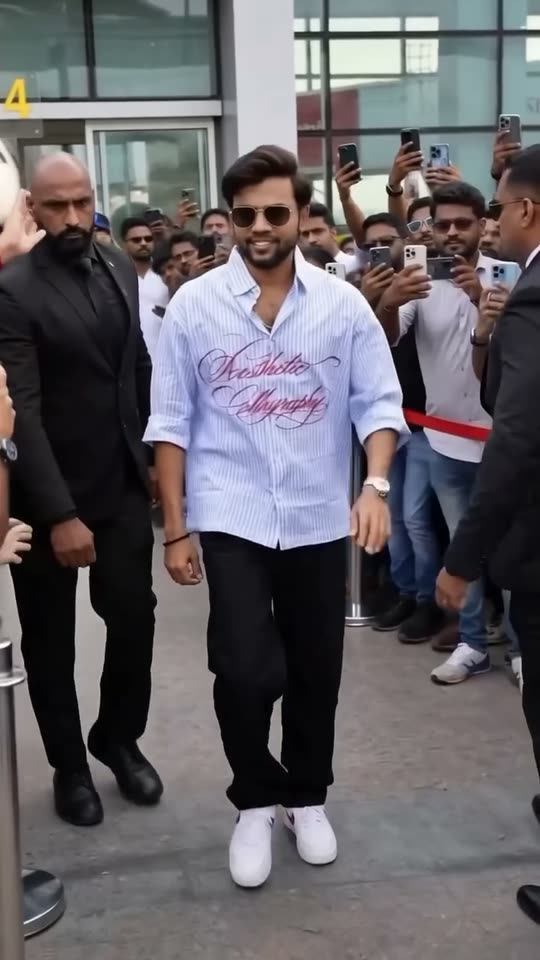
This is the original reel that started the trend. Your video is a new clip made from your photo in the same style, not a copy of these shots. No two runs come out the same.
Original reel by @ManojDey, 9 s
The original AI clip by Manoj Dey, made with the trend's Seedance 2.0 prompt and his own face: fans film from behind the barriers, bodyguards clear the way and he smiles on his way out of the gate. From his tutorial of 4 May 2026, with its own crowd sound.
Step by step
How to make the Airport Star Arrival video on MakeViral
Everything runs in the browser. No editing app, no prompt to write, no watermark.
Add your photo
Press "Create your own" and add your photo. Take it with the camera or pick it from your library.
Press Generate
The button shows the price. MakeViral builds the Airport star arrival scene with your photos, then Kling 3.0 animates it for 15 seconds with original sound. You write no prompt.
Download or share
The video is ready in a few minutes as a 9:16 MP4. Download it, share it from your phone, or find it later in your Library.
Which photo works best?
You need one sharp photo: of yourself for Human, of your pet for Pet.
Human: waist up or full body, face turned to the camera, in good light. The still gives you the trend's star look: a white shirt, loose jeans, white sneakers, a chain and black sunglasses, so the clothes in your photo do not matter.
No hat or hand over the face and no beauty filter. The sunglasses come from the prompt, so leave yours off.
Pet: the whole animal in view, ears to paws, in daylight. Your pet gets small black sunglasses and walks between the bodyguards on all four paws.
One person or one pet per photo.
Use your own photo, a photo of an adult who agreed, or your own pet. Never a celebrity or a stranger.
Where did the Airport Star Arrival trend start?
The trend started as a prompt for ByteDance's Seedance 2.0 video model: a timed script, from "0-3s" to "13-15s", for a celebrity entry filmed from inside the crowd. The earliest post we found is from 28 April 2026, when Turkish creator @onurbinayy put himself into an airport exit with bodyguards and fans and shared the prompt in his caption. By 12 October it had 678,100 views and 12,170 saves.
On 4 May the Indian YouTuber Manoj Dey posted a Hindi tutorial, "Ai Airport Celebrity Video Kaise Banaye?", with the full prompt in its description and an AI clip of himself at the gate. It reached 299,654 views, and more tutorials with the same prompt followed within days.
In October 2026 the scene came back as a CapCut AI template called "Celebrity airport arrival". A French tutorial for it, posted on 11 October, passed 309,000 views in its first 16 hours, and 79 videos had used its sound by the next morning.
@onurbinayy posts an AI airport exit of himself made with Seedance 2.0, with the prompt in the caption. It has 678,100 views, 15,300 likes and 12,170 saves by 12 October. TikTok
French creator @toujourshuss posts his own AI airport arrival made with Seedance 2.0 and offers the prompt to anyone who comments "prompt". TikTok
Manoj Dey posts a Hindi tutorial with the full timed prompt in the description. It has 299,654 views and 7,472 likes by 12 October. YouTube
A YouTube tutorial pairs the same video prompt with an image prompt for a first still: the two-step route this template uses. YouTube
A French tutorial for the CapCut AI template "Celebrity airport arrival" passes 309,000 views in 16 hours. By the next day it has 328,900 views and 5,340 shares. TikTok
The template's sound has 79 videos, all of its top 27 from the past three days. #aivipentry has 280 videos and 7.6 million views, #aipaparazzi 397 videos and 1.1 million views. TikTok
Copy and paste
The Airport Star Arrival prompts
You do not need these: the one-tap flow runs them for you. A photo prompt puts your photo into the scene, then a video prompt animates it. Want to change them? Copy them and edit them in AI Photo and AI Video.
Human
1 photo: your photoKling 3.015 s · 1080p · 9:1684 credits
Step 1 · Photo prompt
Use the uploaded image as the base. use same face, same hairstyle, same identity, realistic face match ultra realistic cinematic airport entrance scene, the person from the image walking confidently in center, wearing black sunglasses, clean white shirt, loose baggy jeans, high-top white sneakers, stylish modern look, slightly open shirt collar, chain visible, confident expression, celebrity attitude, multiple bodyguards on both sides wearing black suits, security formation, serious faces, walking with them, crowd of people around recording videos with phones, paparazzi, fans watching, busy airport exit gate, luxury glass building background, main subject in sharp focus, shallow depth of field, background slightly blurred, cinematic lighting, HDR, 8K ultra detailed, professional photography, dramatic entrance, slow walking pose, high status vibe, viral reel style, social media trending look. Vertical 9:16. No text, no logos, no brand prints on the clothes, no readable signs, no airline or airport names.
1018 characters
Step 2 · Video prompt
Style: Ultra realistic mass celebrity entry scene. Single continuous shot. Handheld camera from crowd perspective. Natural micro-shake. No cuts. Documentary realism. Audio: Only natural environment sound: loud crowd cheering, people shouting, rapid camera shutter clicks, airport announcements echoing, footsteps, distant engine idle and rev. Lighting: Natural daylight through airport glass panels. Main Character: the celebrity is the person in the image, with the same face, hair, skin tone, sunglasses and outfit in every frame. Calm, confident presence with a soft controlled expression. Face must remain consistent throughout. SCENE. 0–3s: Handheld camera starts from inside the crowd behind barricades. People partially block the view. Phones raised high. Crowd loud and restless. 3–6s: Camera lifts slightly above shoulder level, shaky but controlled. Focus shifts between heads, waving hands, glimpses of the arrival gate. Media cameras flash repeatedly. 6–10s: Security suddenly steps in, pushing the crowd slightly back. Through the gaps, the celebrity becomes visible in the distance, slightly blurred at first, then gradually clearer as they walk forward gracefully with bodyguards flanking both sides. 10–13s: Camera zooms slightly (natural handheld push-in feel). Celebrity now clearly visible, walking confidently in center. Security clears the path. Suddenly from the left side of the barricade, a fan screams: "Please, one photo!!" Celebrity turns slightly toward the voice, locks eyes with the fan, gives a warm genuine smile and a small acknowledging wave. Crowd erupts louder. 13–15s: Camera tilts and shifts trying to follow as they reach the convoy. Partial view of a black luxury car. Bodyguard opens the door. Celebrity enters gracefully but quickly. Engine revs. Vehicles begin moving. No music. No text, no logos, no readable signs, no airline or airport names, no car badges.
1 photo: your pet, whole bodyKling 3.015 s · 1080p · 9:1684 credits
Step 1 · Photo prompt
Use the uploaded image as the base. use same face, same fur, same markings, same identity, realistic match of the animal. Keep the animal's species, breed, body size, fur colors and markings exactly as in the photo. Ultra realistic cinematic airport entrance scene, the pet from the image walking confidently in center on all four paws, wearing small black sunglasses, confident expression, celebrity attitude, multiple bodyguards on both sides wearing black suits, security formation, serious faces, walking with it, crowd of people around recording videos with phones, paparazzi, fans watching, busy airport exit gate, luxury glass building background, low camera at the pet's eye level so the pet is big in the frame, main subject in sharp focus, shallow depth of field, background slightly blurred, cinematic lighting, HDR, 8K ultra detailed, professional photography, dramatic entrance, slow walking pose, high status vibe, viral reel style, social media trending look. Vertical 9:16. Exactly one animal. No clothes on the pet, no text, no logos, no readable signs, no airline or airport names.
1099 characters
Step 2 · Video prompt
Style: Ultra realistic mass celebrity entry scene. Single continuous shot. Handheld camera from crowd perspective. Natural micro-shake. No cuts. Documentary realism. Audio: Only natural environment sound: loud crowd cheering, people shouting, rapid camera shutter clicks, airport announcements echoing, footsteps, distant engine idle and rev. Lighting: Natural daylight through airport glass panels. Main Character: the celebrity is the pet in the image, with the same species, breed, face, fur colors, markings and small black sunglasses in every frame, walking on all four paws. Calm, confident presence. Face must remain consistent throughout. SCENE. 0–3s: Handheld camera starts from inside the crowd behind barricades. People partially block the view. Phones raised high. Crowd loud and restless. 3–6s: Camera lifts slightly above shoulder level, shaky but controlled. Focus shifts between heads, waving hands, glimpses of the arrival gate. Media cameras flash repeatedly. 6–10s: Security suddenly steps in, pushing the crowd slightly back. Through the gaps, the celebrity pet becomes visible in the distance, slightly blurred at first, then gradually clearer as it trots forward gracefully with bodyguards flanking both sides. 10–13s: Camera zooms slightly (natural handheld push-in feel). The pet now clearly visible, walking confidently in center. Security clears the path. Suddenly from the left side of the barricade, a fan screams: "Please, one photo!!" The pet turns its head toward the voice, looks at the fan and wags its tail. Crowd erupts louder. 13–15s: Camera tilts and shifts trying to follow as it reaches the convoy. Partial view of a black luxury car. Bodyguard opens the door. The pet hops in gracefully but quickly. Engine revs. Vehicles begin moving. No music. Exactly one animal. No text, no logos, no readable signs, no airline or airport names, no car badges.
You pay per video in credits, and the create page shows the exact price on the Generate button before you spend anything. The one-tap price covers the scene photo and the video, charged once. One video is 84 credits, so the smallest one-time pack that covers it is $9.99 for 100 credits, with no subscription. The cheaper models are there if you run the prompts by hand in AI Video.
Video model
Settings
Credits
Kling 3.0 (this template)
15 s, 1080p + 1 scene photo, one tap
84
Seedance 2.0 Fast (by hand in AI Video)
15 s, 720p + 1 photo
101
Veo 3.1 Fast (by hand in AI Video)
8 s, 720p + 1 photo
14
One-time packs and plans are on the pricing page. A failed video gives its credits back.
What happens in the airport star video, second by second?
Your clip follows the same timed prompt the trend's creators shared in April and May 2026, a little shorter and with their names and the car make taken out. It is one continuous handheld shot, filmed from inside the crowd:
Time
What happens
0-3 s
The camera is behind the barriers. Heads and raised phones block the view, and the crowd is loud.
3-6 s
The camera lifts above the shoulders. Press cameras flash, and you get glimpses of the arrival gate.
6-10 s
Security pushes the crowd back. Through the gaps you walk forward, with bodyguards on both sides.
10-13 s
The camera pushes in. A fan screams "Please, one photo!!", and you turn, smile and give a small wave.
13-15 s
A bodyguard opens the door of a black car, you get in, and the cars pull away.
The sound is the scene itself: cheering, shouting, camera clicks, airport announcements, footsteps and an engine. There is no music.
Why does it work? Everyone knows the look of a star's airport arrival from fan videos. Putting a normal person into it is a joke and a dream at the same time, and the shaky phone camera makes it feel like someone in the crowd filmed it.
Human or Pet, Standard or Best: what is the difference?
Human or Pet? Press "Create your own" and pick one. Human puts you in the star's place. Pet puts your cat or dog there, in tiny black sunglasses, with the same bodyguards, fans and flashes. The trend stars people; Pet is our version of the same script.
Both versions work in two steps, like a YouTube tutorial of 7 May 2026: first a still, then a video.
The still. Nano Banana 2 puts you or your pet at the arrival gate, in the middle of the bodyguards, with fans filming. Your face, or your pet's fur and markings, come from your photo.
The video. A video model plays the 15-second scene from that still, with its own sound.
Standard (default)
Best
Video model
Kling 3.0
Seedance 2.5
Length
15 s
15 s
Frame
Vertical 9:16, 1080p
Vertical 9:16, 720p
Sound
Crowd, cameras and engine, no music
The same
Price
Lower
Higher
The prompt was written for Seedance 2.0, and Best uses Seedance 2.5, its newer version. Standard costs less. The exact price shows on the Generate button before you spend anything, and you write no prompt.
What goes wrong, and how do you fix it?
Problem
Fix
Your face looks less like you when the camera pushes in
Use a sharp, front-facing photo in daylight, then run it again, or pick Best.
The clip cuts to a new shot
The prompt asks for one shot. Run it again or pick Best.
The crowd or the bodyguards look strange in the back
Crowds are hard for AI video. A second run comes out different.
Your pet looks small among the bodyguards
Use a photo with the whole animal in view, then run it again.
The car comes too late or not at all
The car is the last two seconds. Run it again if you want the full exit.
The video model refuses the photo
Some photos get refused. The credits come back; try another photo.
Every run is a new take, so results differ.
How should you post it?
Your clip comes with its own crowd sound, so it is ready to post as it is.
Captions that fit: "Just landed", "POV: you come home after one week of holiday", "How my family greets me at the airport", or "Me arriving at work on Monday". For a pet: "My cat after the vet trip".
Hashtags: #aivipentry (280 TikTok videos and 7.6 million views on 12 October 2026), #aipaparazzi (397 videos, 1.1 million views) and #aibodyguard (1,352 videos and 20.1 million views, all time). Keep the platform's AI label on. It is a fake celebrity arrival, so never post it as real news, and never use a real star's face.
Want more scenes like this? Stand still at the center of a crowd in black suits in the Storm AI trend, or get walked out at night by the police, as a joke, in the AI arrest trend.
FAQ
Airport Star Arrival trend questions
What is the AI airport celebrity video trend?+
It is an AI video of a normal person walking out of airport arrivals like a celebrity: bodyguards clear the way, fans film with their phones, cameras flash and a fan begs for a photo. It started with a Seedance 2.0 prompt in April 2026 and came back in October 2026 as a CapCut AI template called "Celebrity airport arrival".
Is the airport celebrity video real?+
No, it is AI. Creators upload a photo of themselves, and the AI makes the airport, the crowd, the bodyguards and the cameras. The first clips were made with Seedance 2.0, and the October clips with a CapCut AI template.
Which prompt do people use for the AI airport celebrity video?+
A timed Seedance 2.0 prompt that splits the 15 seconds into five beats, from the crowd behind the barriers to the star getting into a car. Creators in Turkey, France and India shared it in April and May 2026. This template uses the same prompt, a little shorter and with the creators' names and the car make taken out, so you write no prompt.
How do I make my own airport star arrival video?+
Press "Create your own", pick Human, pick Standard or Best, and add one clear photo of yourself. Press Generate; the button shows the price first. MakeViral makes a still of you at the arrival gate, then a 15-second video with crowd sound. It waits in your Library when it is ready.
Can my cat or dog arrive at the airport like a celebrity?+
Yes. Pick Pet and add a full-body photo of your pet. It walks out of the arrival gate in small black sunglasses, between the bodyguards, while the fans film it. The viral clips star people, so Pet is our own version of the same script.
Is this the CapCut "Celebrity airport arrival" template?+
No. The CapCut template is closed and shows no prompt. This is MakeViral's own template for the same scene, built on the prompt that the trend's creators shared in April and May 2026.
How long is the video, and does it have sound?+
15 seconds, vertical 9:16, as an MP4 file: 1080p with Standard, 720p with Best. It has its own sound: cheering, a fan shouting "Please, one photo!!", camera clicks, airport announcements and an engine. There is no music.
Can I use a friend's photo or a celebrity's photo?+
Use your own photo, or a photo of an adult who said yes. Never a celebrity or a stranger. The clip looks like real fan footage, so keep the AI label on when you post it and never present it as a real event.
Does the airport celebrity video cost credits?+
Yes. Each video costs credits, and the create page shows the exact price on the Generate button before you spend anything. Standard (Kling 3.0) costs less than Best (Seedance 2.5). If a video fails, the credits come back.
Why does my face look different in the video?+
The model rebuilds you from one photo, and the camera moves through a crowd, so a dark, blurry or side-on photo leaves it guessing. A sharp, front-facing photo in daylight helps most. Every run is different, so a second run can look more like you.