
The AI Hotel Lobby trend is a 10-second clip of two people or two pets in a flat orange booth, taking turns rapping into one hanging microphone. To make it, you need two full-body photos, a photo prompt that places them left and right in the booth, and a video prompt that animates the still with an original beat.
Below are the exact two prompts that made our example, the photo rules that decide whether it works, what it costs, and the fixes for the four things that usually go wrong. If you do not want to touch a prompt, the AI Hotel Lobby template runs both of them for you after you add two photos.
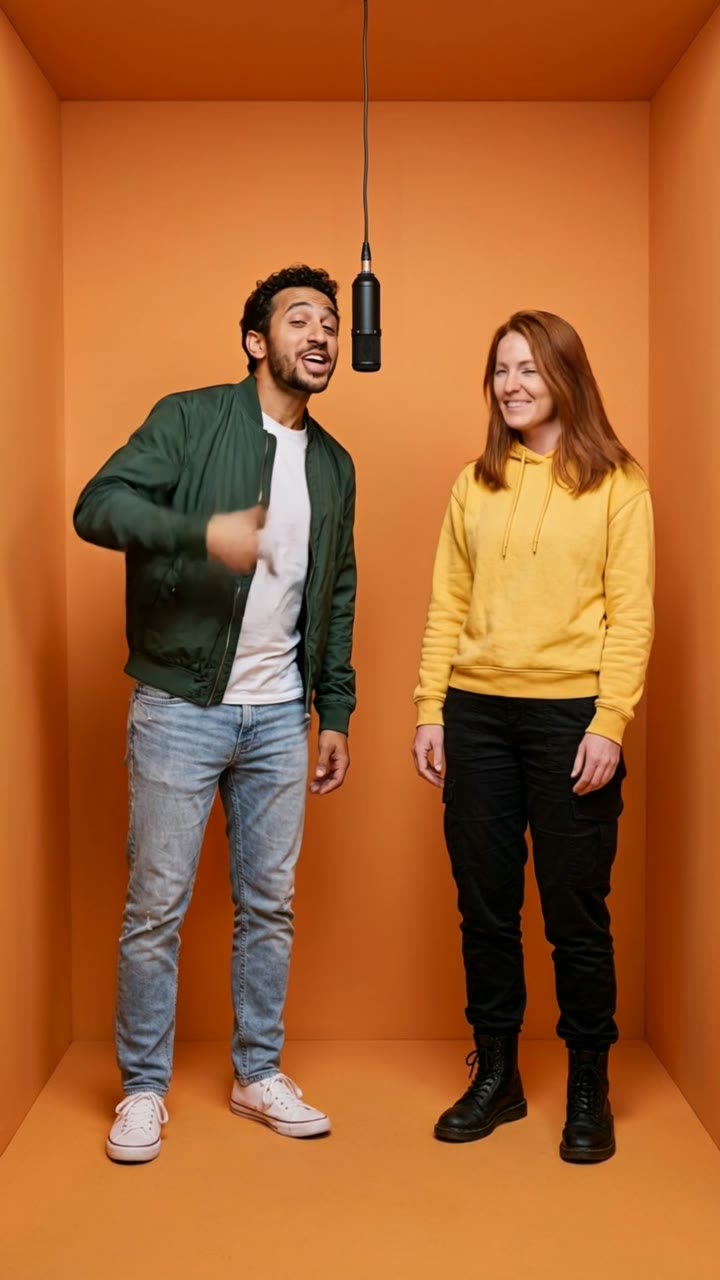
AI Hotel Lobby Trend: Make the Orange Booth Video
You and a friend, or your two pets, trade a rap into one hanging mic in a bright orange booth. Two photos in, a 10-second clip with sound out. No prompt to write. From $9.99, no subscription.
Where did the AI Hotel Lobby trend come from?
The set is real. Quavo and Takeoff performed "Hotel Lobby" on the YouTube show A COLORS SHOW, released on 17 June 2022: a flat orange wall and floor, one microphone on a cable, two performers side by side. By late September 2026 that video had more than 121 million YouTube views.
The AI version started in September 2026. XXL traced it to a TikTok clip of two cats in the booth in early September. Know Your Meme names a swap posted on 16 September as the first big one; it reached 1.7 million views in 12 days. A cat version on X passed 7.7 million views and 73,800 likes by 29 September, and Quavo reposted the original performance on 23 September. US Google searches for "ai hotel lobby" peaked on 25 September, according to the Google Trends data we pulled on 29 September.
| Date | What happened |
|---|---|
| 17 June 2022 | The original performance goes up on A COLORS SHOW |
| Early September 2026 | A two-cat AI clip starts the format on TikTok (XXL) |
| 16 September 2026 | First big AI swap on TikTok: 1.7M views in 12 days (Know Your Meme) |
| 23 September 2026 | Quavo reposts the performance; music press covers the trend |
| 25 September 2026 | US Google searches for "ai hotel lobby" peak |
Takeoff died in 2022, and some fans asked people to keep the swaps respectful. The format is a joke about who is in the booth, not about him. Keep it that way.
Why does the Hotel Lobby prompt need two steps?
Because a video model is bad at inventing two specific people and good at animating a picture it is given. If you hand a video model two separate photos and one long prompt, it has to build the booth, place two faces, keep left and right, and invent motion, all at once. It usually drops one of those.
So the work is split:
- The photo step builds one still: both people, full body, in the orange booth, with the microphone between them. This is where faces, clothes and positions get fixed. You check this still before you spend anything on video.
- The video step animates that still. It only has to add motion and sound, and it keeps what the still shows.
On MakeViral the photo step runs on Nano Banana 2 and the video step on Kling 3.0. Kling tied for the best result in our 29 September test of this trend and had the cleanest lip movement for two voices.
What is the exact Hotel Lobby AI prompt?
These are the prompts, word for word, that made the example on the template page. Every line is there for a reason, and the reasons are in the next section.
Step 1: photo prompt (two people). Upload the left person first, then the right person.
Use the two uploaded images as the base. The person in the first image stands on the LEFT. The person in the second image stands on the RIGHT. Keep each person's face, facial features, skin tone, hair, body shape and clothing exactly the same as in their own photo. Do not blend the two people and do not swap their clothes. Show both people full body, head to feet, standing upright side by side with a clear gap of floor between them. They stand inside a small seamless studio booth with a flat matte orange wall and floor, no corners and no furniture. One black studio microphone hangs on a thin cable from the top of the frame, in the gap between them. The left person has one hand raised as if about to rap. The right person stands relaxed with arms loose. Soft, even frontal light with a warm orange bounce. Photorealistic, sharp, vertical 9:16. No text, no logos, no watermarks, no other people.
Step 2: video prompt (10 seconds, with sound). Use the still from step 1 as the first frame.
Two friends perform a playful hip-hop duet in a small orange studio booth with one hanging microphone between them. Keep both faces, outfits and positions exactly as in the image. The left person always stays on the left and the right person always stays on the right. The left person leans toward the microphone and raps first with loose hand gestures while the right person nods to the beat and reacts. Then the right person takes the lead while the left person hypes them up. The timing feels natural and conversational, never mirrored. One locked-off, centered, wide shot. No cuts, no zoom, no camera movement. Audio: an original upbeat hip-hop beat with both voices rapping short, clean, playful lines. No text, no logos, no extra people.
The pet version of the prompt
The trend started with cats, and pet pairs still get some of the biggest numbers. The photo prompt stands both animals upright:
Use the two uploaded images as the base. The animal in the first image stands on the LEFT. The animal in the second image stands on the RIGHT. Keep each animal's breed, face, eye color, fur color, markings, collar and body shape exactly the same as in its own photo. Do not blend the two animals. Both animals stand upright on their hind legs in a confident, human-like pose, front paws loose like arms, with a clear gap between them. Show both full body, ears to paws. They stand inside a small seamless studio booth with a flat matte orange wall and floor. One black studio microphone hangs on a thin cable from the top of the frame between them. Soft, even frontal light with a warm orange bounce. Photorealistic, vertical 9:16. No text, no logos, no people.
And the video prompt gives them small cartoon voices:
Two pets stand upright in a small orange studio booth with one hanging microphone between them. Keep each animal's face, fur and markings exactly as in the image, and keep their positions. The left pet leans to the microphone first and "raps" with small paw gestures and head bobs while the right pet watches and reacts. Then the right pet takes its turn while the left pet bobs to the beat. Independent, conversational movement, never a synchronized dance. Static, centered, full-body shot. No cuts. Audio: an original funny hip-hop beat with small cartoonish pet voices. No extra paws, no merged bodies, no text, no logos.
Which parts of the prompt matter most?
Four phrases do most of the work. If you edit the prompts, keep these.
| Phrase | What it prevents |
|---|---|
| "The person in the first image stands on the LEFT" | Swapped positions. The model keeps upload order only when you say it. |
| "Do not blend the two people" | One face that is half of each person. This is the most common failure. |
| "flat matte orange wall and floor, no corners and no furniture" | A normal room painted orange. The trend reads as the booth only when the wall is seamless. |
| "never mirrored" and "conversational" | Both people rapping the same move at the same time, which looks like a glitch. |
"One locked-off, centered, wide shot. No cuts" matters too. The original performance is one static camera, and a moving camera makes the clip look like a different trend.
"An original upbeat hip-hop beat" is deliberate. The viral clips reuse the real song; a generated copy of it would put copyrighted audio in your file. Ask for original music and add the trending sound in the app when you post, if you want it.
How do you make the Hotel Lobby video step by step?
This is the one-tap route on MakeViral. The screenshots are from the live site on 30 September 2026, taken on a 390-pixel phone screen.
1. Add the two photos. Open the Hotel Lobby template and press "Make this video". Pick "Two people" or "Two pets", then add the left photo in slot 1 and the right photo in slot 2. You can take them with the camera or pick them from your library.

2. Make it yours (optional). Open "Make it yours" to pick a song style, write the lines they rap, set a mood or a language, and choose matching outfits. It does not change the price. Short lines work best, because the two people take turns line by line.

3. Press Generate. The button shows the credits first. MakeViral builds the booth still with your photos, then Kling 3.0 animates it for 10 seconds with sound. You can close the page; the video lands in your Library, and a notification tells you when it is ready if you allowed them.
4. Download or share it. The result is a 9:16 MP4 with sound. "Share to TikTok" opens your phone's share sheet with the video file and copies a caption for you to paste. "Download" saves the file.

If you would rather edit the prompts yourself, the template page has "Edit the prompts yourself": it opens AI Photo with the photo prompt filled in, and each finished still has a button that opens AI Video with the video prompt ready.
What photos work best for the AI Hotel Lobby trend?
The photo decides the result more than the prompt does.
- Full body, head to feet. The booth shot is full length. A cropped selfie leaves the model to invent legs and shoes, and it often gets them wrong.
- One person per photo. Two photos of one person each keep the faces apart.
- Plain clothes with one strong color. They read well against orange. An orange top disappears into the wall.
- Good, even light on the face. Harsh shadows turn into odd features in motion.
- For pets, the whole animal in focus. The prompt stands it upright, so the model needs to see the legs and tail.
Use photos of yourself, of adults who agreed to be in the video, or of your own pets. Never a celebrity or a stranger.
How much does an AI Hotel Lobby video cost?
On 30 September 2026 the prices on MakeViral were:
| Route | Settings | Credits |
|---|---|---|
| One-tap template, Kling 3.0 | 10 s + 1 scene photo, charged once | 56 |
| By hand in AI Video, Seedance 2.0 Fast | 10 s, 720p + 1 photo | 68 |
| By hand in AI Video, Veo 3.1 Fast | 8 s, 720p + 1 photo | 14 |
At the Starter plan rate (700 credits for 49.99 dollars a month), 56 credits is about 4 dollars. Veo 3.1 Fast is the cheapest route, but it makes 8 seconds instead of 10, and you run the two steps yourself. A failed video gives its credits back. Current prices are always on the template page and on the Generate button.
What goes wrong, and how do you fix it?
| Problem | Fix |
|---|---|
| One face looks like a blend of both people | Use sharper photos with one person each, then make the still again. |
| Left and right are swapped | Remove both photos and add them again, left person first. Check the still before you animate it. |
| The booth has corners or furniture | Generate the still again. The prompt asks for a seamless wall and a second run usually gets it. |
| Both people rap at the same time | Keep "never mirrored" and "conversational". Shorter lyric lines help. |
| A hand warps near the microphone | Common in 10-second clips. A second run, or 8 seconds instead of 10, often fixes it. |
| The video model refuses the photo | Some models refuse some real faces. The credits come back; try Veo 3.1 Fast. |
How do you post the Hotel Lobby video so it travels?
The format already does the hard part: viewers know the trend in the first frame, so the only question is who is in the booth. Put that answer in the caption or in on-screen text: "me and my sister", "our two cats", "the night shift at work".
- Post both people's accounts. A duet gets reposted twice when both people tag each other.
- Contrast sells. Most big copies in September 2026 paired opposites: a tiny cat and a huge one, a calm person and a hyper one.
- Add the trending sound in the app if you want the original song, from TikTok's or Instagram's music library. Your file keeps its original beat either way.
- Move fast. Visual trends like this one peak within two to four weeks. For the bigger picture on hooks, timing and trends, read how to go viral on TikTok.
For pet accounts and duo pages that want a steady stream of ideas, the faceless TikTok ideas list pairs well with the month's AI video templates, such as the AI dancing dog video and the 80s AI trend.
AI Hotel Lobby Trend: Make the Orange Booth Video
You and a friend, or your two pets, trade a rap into one hanging mic in a bright orange booth. Two photos in, a 10-second clip with sound out. No prompt to write. From $9.99, no subscription.