Back

AI Christmas Photo: A Christmas Photoshoot From One Selfie

Add one selfie. MakeViral turns it into a studio Christmas photoshoot: a lit tree and a Santa hat, a snow throw in the golden winter sun, a red gown among the gifts, candy canes, a cozy sweater, or a couple by the tree. Your face stays the same.

The original Christmas Photoshoot reel by @hanselouis1821Original reel
  • 1 photo you add
  • 2K photo you can turn into a video
  • 9:16 for TikTok, Reels, Shorts
  • No watermark

No prompt to write: Add your photo and tap once

Create your own

Ready in a few minutes · Photo · From 3 credits

An AI Christmas photo looks like a professional holiday photoshoot, but it starts from one ordinary selfie. The AI Christmas photoshoot trend spread through prompts people paste into Gemini and ChatGPT. Here you pick a look, add one photo (two for a couple) and get the picture in one tap, with your own face.

Also called Gemini Christmas photo · ChatGPT Christmas photo · Candy cane AI photo · AI winter photoshoot

Example

What the Christmas Photoshoot photo looks like

The first example is the trend's original AI photos from its earliest big post, made with the Studio tree prompt and shown as the short slideshow the creator posted, with the post's own sound. The second is our own Studio tree run on an AI-made woman, shown as a short before and after. Your result is one new still photo made from your own selfie with the version you pick, not a copy of these. No two runs come out the same.

Original reel by @hanselouis1821, 8 s

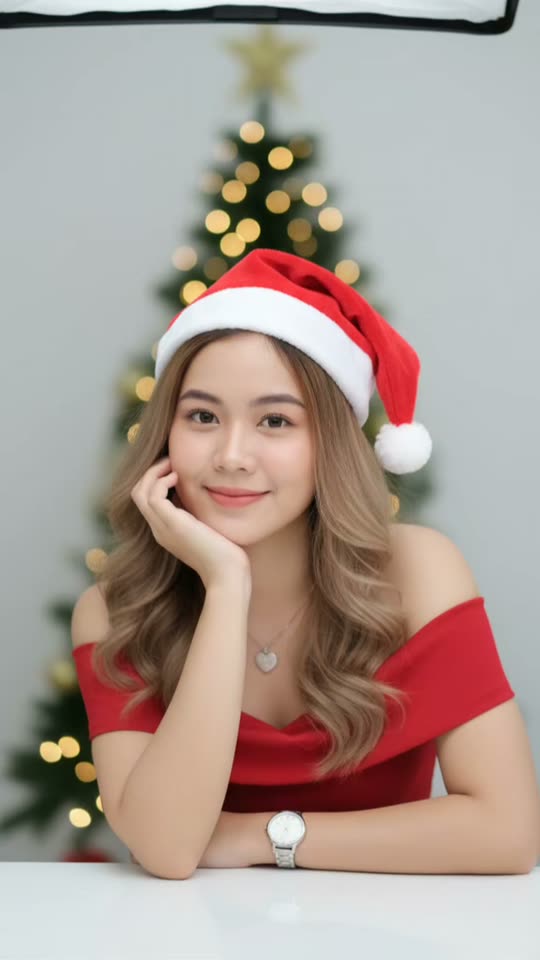
Studio tree, from the earliest big post by @hanselouis1821 (27 September 2025, 286,200 views): a red off shoulder dress, a Santa hat and a lit tree in a bright studio.

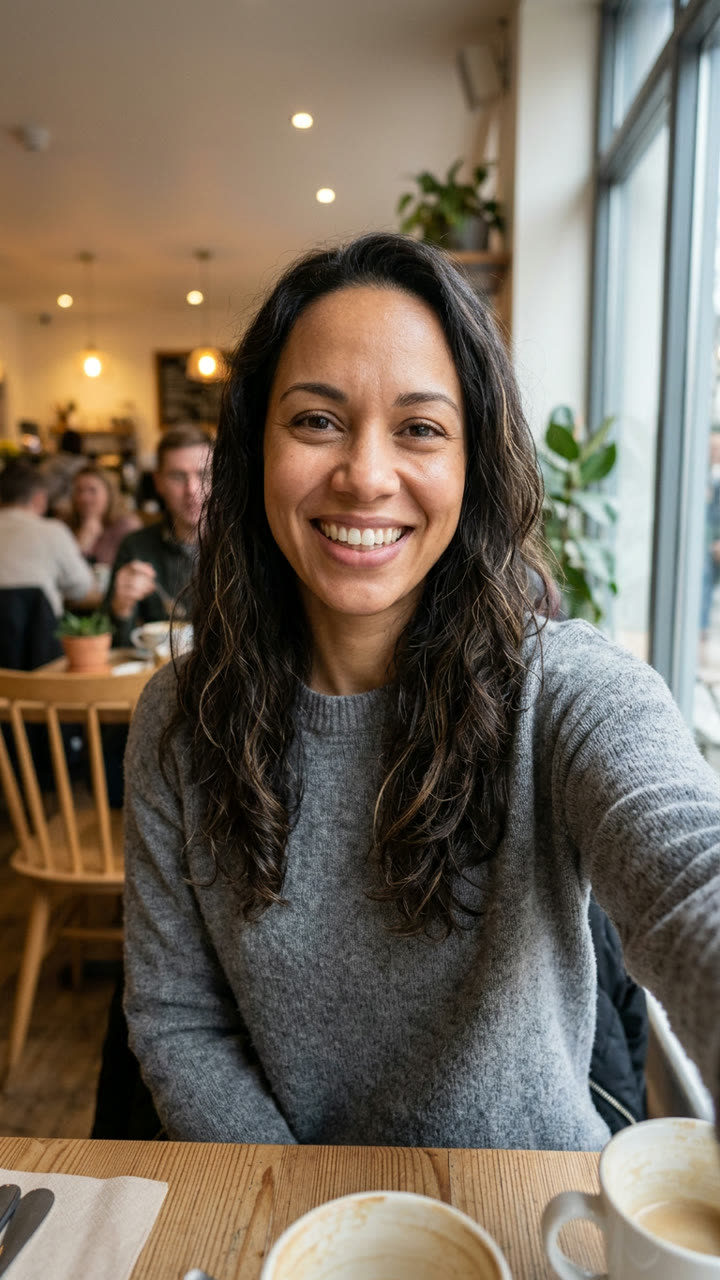
Input photo for Christmas Photoshoot example (AI-made person)
Input
Result, before and after

Studio tree, our own run on an AI-made woman: her cafe selfie becomes a studio Christmas portrait with a Santa hat, a red off shoulder dress and a lit tree. Her face, smile and hair stay.

Step by step

How to make the Christmas Photoshoot photo on MakeViral

Everything runs in the browser. No editing app, no prompt to write, no watermark.

  1. Add your photo

    Press "Create your own" and add you, waist up, face clear. Take it with the camera or pick it from your library.

  2. Press Generate

    The button shows the price. Nano Banana 2.1 puts your photo into the Christmas Photoshoot scene and makes one 2K photo. You write no prompt.

  3. Download or share

    The photo is ready in a few minutes as a 9:16 2K image. Download it, share it from your phone, turn it into a video, or find it later in My videos.

Which photo works best?

Use one sharp photo of yourself from the waist up, face to the camera. The prompts keep your face and hair from the photo and change the outfit, the set and the light, so a clear face is what matters most.

  • Daylight from the front, near a window. A dark or backlit face comes out flat.
  • No sunglasses, no hat, no hood. Clear glasses stay on.
  • Look into the camera with a relaxed smile. Every version is a camera-facing portrait.
  • Turn off beauty filters. A smoothed photo comes back smoothed.
  • Couple or friends: one photo of each person, you first. The first photo sits on the left.
  • Pet: your dog or cat whole, face to the camera, ears in view, not blurry.
  • Adults only, and only photos of you or of people who said yes. Never a stranger or a celebrity.

Where did the Christmas Photoshoot trend start?

The trend began as prompt posts on TikTok. On 27 September 2025, @hanselouis1821 shared a Gemini prompt for a studio photoshoot "against a plain, Christmas tree with Christmas lights backdrop", a red off shoulder dress and a Santa hat: 286,200 views. The same creator's couple version in matching pajamas by the tree followed on 9 November 2025 (459,000 views), and @marcosgrslss's cozy sweater and snowman prompt reached 193,800 views from 22 November 2025.

In December 2025 the AI Christmas photo trend peaked. US Google searches for "ai christmas photo" jumped from 1,900 in November to 74,000 in December 2025. Then came the candy cane look: a whimsical studio with giant peppermint props, a sequin outfit and a giant lollipop, from a prompt @awesomelikeangel posted on 19 December. The Tab printed it on 22 December under the line "It's everywhere right now".

In late October 2026 it came back: @ladyfire109 posted German winter photoshoot prompts, including Prompt 35, where you throw snow at the camera (31 October). On 3 November 2026 a CapCut "Christmas gown" template post by @marisolmoli28 had 139,800 views by the next day. By 4 November, #christmasphotoshoot counted 90,458 TikTok videos and over 1 billion views.

  1. @hanselouis1821 posts a Gemini Christmas photoshoot prompt (studio, lit tree, red off shoulder dress, Santa hat); it reaches 286,200 views. TikTok

  2. @hanselouis1821 posts the couple version, matching red and white pajamas by the tree: 459,000 views. TikTok

  3. US Google searches for "ai christmas photo" reach 74,000 in December 2025, up from 1,900 in November and 210 in October.

  4. The Tab explains the candy cane AI Christmas photo trend ("It's everywhere right now") and prints the ChatGPT prompt by @awesomelikeangel. The Tab

  5. @ladyfire109 posts Prompt 35, a winter photoshoot where you throw snow toward the camera, in a series of German winter prompts (29 to 31 October). TikTok

  6. A CapCut "Christmas gown" template post by @marisolmoli28 reaches 139,800 views and 3,876 likes within a day. TikTok

Copy and paste

The Christmas Photoshoot prompts

You do not need this: the one-tap flow runs it for you. The photo prompt puts your photo into the scene. Want to change it? Copy it and edit it in AI Photo.

Studio tree

1 photo: you, waist up, face clearNano Banana 2.1Photo · 2K · 9:163 credits
Photo prompt

Use the uploaded image as the base. Make a photoshoot of the person in the photo in a studio against a plain, Christmas tree with Christmas lights backdrop. She wears an off shoulder red dress showing elegant collar bone, giving off an elegant and minimalist vibe with Santa Hat. She keeps her own hair from the photo, the same length, color and style. Natural glam makeup, focusing on defined eyes, neat brows, soft blush, and natural pink lips, creates a feminine and flawless look. The woman poses with her head propped up on a white table, gazing at the camera and smile. The composition is a close-up, half-body shot, showcasing her natural, radiant skin. Professional studio lighting is used from above and in front (a softbox is visible above the frame), producing soft, even light without harsh shadows, highlighting facial details and skin texture. The overall atmosphere of the photo is clean, modern, and aesthetically pleasing, perfect for a premium beauty or skincare product photoshoot. Photo style: Beauty photography, clean studio look, minimalist, high-key lighting. Additional keywords: elegant, fresh, glowing skin, portrait photography, studio shoot, minimal background, professional lighting. If the person in the photo is a man, he wears a fitted red velvet blazer over a plain black shirt and the same Santa hat, with no makeup, and poses the same way, chin on his hand on the white table. Do not change the original face. Make it realistic. Vertical 9:16. Exactly one person. No text, no letters, no logo, no watermark, no sticker, no frame and no border.

1579 characters

Snow throw

1 photo: you, waist up, face clearNano Banana 2.1Photo · 2K · 9:163 credits
Photo prompt

Create an ultra-realistic, professional winter photoshoot with the person from the uploaded photo. Face, facial features, eyes, nose, lips and natural identity must stay true to the original. The woman stands in the middle of a deep snowy winter landscape and playfully throws snow toward the camera with both hands. She smiles brightly, looks straight into the camera and looks happy, lively and confident. Her own hair from the photo falls loose and slightly windswept over her shoulders. Outfit: a cozy, cream-white oversized teddy fleece jacket, a bright red chunky-knit turtleneck sweater, black tight leather leggings, black lace-up winter boots with fur trim and red gloves. Camera perspective: a dynamic shot from a slightly raised bird's-eye view with a wide-angle lens. The woman looks up at the camera, both arms stretched far forward. Whirled-up snowflakes float spectacularly around her, some large and out of focus right in front of the lens. The snow never covers the face. Light and atmosphere: warm, golden sunlight of the low winter sun, beautiful light reflections in the snow, soft shadows, warm skin tones and a fairy-tale winter feeling. Photo style: high-end fashion editorial photography, photorealistic skin texture, a razor-sharp face, natural proportions, cinematic depth of field, 35 mm wide-angle look, 8K detail quality, vertical 9:16 format. Important: no change or beautification of the face, no artificial doll skin, no distorted hands or body proportions. The result should look like a real, professional winter photo of the person. If the person in the photo is a man, he wears black slim winter pants instead of the leggings, with the same jacket, sweater, boots and gloves. Exactly one person. No text, no letters, no logo, no watermark, no sticker, no frame and no border.

1810 characters

Christmas gown

1 photo: you, waist up, face clearNano Banana 2.1Photo · 2K · 9:163 credits
Photo prompt

9:16 aspect ratio. 8K resolution. Use the photo I uploaded as my reference. Keep the facial features the same to create a hyper-realistic, highly stylized and dramatic holiday-themed portrait. The central figure is the woman from the photo, with her own hair. She is wearing a striking, floor-length deep red satin gown with a strapless neckline. The dress features a dramatic high slit, showcasing her right leg. She is wearing silver or white high-heeled sandals. Her posture is dynamic, with her right leg elevated as if stepping up or posing on a pile of gifts. She holds a medium-sized dark green gift box with a red ribbon against her chest or side. Her expression is serene and contemplative, looking toward the camera. The scene is dominated by an overwhelming abundance of Christmas gifts. Presents: the woman is surrounded and partially backed by a towering, wall-like stack of wrapped presents. They vary in size and wrapping paper, featuring colors like red, green, gold, and patterned paper, often tied with luxurious ribbons. Christmas tree: to the right of the woman is a large, fully decorated Christmas tree, heavily adorned with gold and bronze ornaments and illuminated by warm lights. Decor: the overall atmosphere is warm and opulent, suggesting a luxurious interior space. There are additional hints of festive decor, including a wreath or garland visible in the upper left background and more glowing lights scattered throughout the scene, creating a rich, warm ambiance. Lighting: the lighting is low-key and dramatic, using the warm glow of the Christmas lights to highlight the subject and the shimmering gifts, creating a sense of glamour and festive excitement. The image conveys a feeling of opulence, celebration, and high fashion associated with the Christmas season. If the person in the photo is a man, he wears a tailored deep red velvet tuxedo jacket, a black shirt, black trousers and black dress shoes instead of the gown and sandals, with one foot up on the pile of gifts. Exactly one person. No text, no letters, no logo, no watermark, no sticker, no frame and no border.

2110 characters

Candy cane

1 photo: you, waist up, face clearNano Banana 2.1Photo · 2K · 9:163 credits
Photo prompt

Use the uploaded image as the base. Create an ultra-realistic 8K Christmas portrait using a 55mm lens with bright, playful holiday lighting. The woman is in a whimsical candy-cane themed photoshoot, surrounded by pink giant peppermint decorations, snowy ground, festive trees, and oversized ornaments. Use her real facial features exactly as they are, do NOT change or alter her face in any way. Her makeup is festive glam: winged liner, warm eyeshadow, rosy cheeks, and a bold holiday soft pink lips. She wears a sparkly white long-sleeve pants jumpsuit, fitted and shimmering with sequins. The back of the jumpsuit has a scoop-back cut, keeping the holiday sparkle. She is sitting on a white cube block, posing with one leg lifted and crossed. Her expression is playful and confident, smiling warmly toward the camera. In her hand, she holds a giant pink-and-white peppermint lollipop prop, resting it over her shoulder in a fun, candy-land pose. Around her is a fully decorated Christmas set: snowy ground with fluffy artificial snow; Christmas trees dusted with frost, decorated with pink ornaments and string lights; oversized candy canes framing her, whimsical, beside her; a large shiny red Christmas ornament near her feet. Lighting should be bright, clean, and festive, capturing the glimmer of the sequins and the pink candy-themed props. The colors are vibrant reds, whites, and silvers, giving a magical North Pole holiday studio vibe. If the person in the photo is a man, he wears a sparkly white 3-piece suit, fitted and shimmering with sequins, with no makeup, in the same pose with the same lollipop. Vertical 9:16. Exactly one person. No text, no letters, no logo, no watermark, no sticker, no frame and no border.

1731 characters

Cozy sweater

1 photo: you, waist up, face clearNano Banana 2.1Photo · 2K · 9:163 credits
Photo prompt

Hyperrealistic portrait, cozy Christmas atmosphere. Using the reference image as a STRICT AND NON-NEGOTIABLE source, preserve the EXACT likeness, facial structure, body proportions, and natural hair of the person. Do not alter facial structure, skin texture, or hair type. Person sitting on rug, wearing red Christmas beanie, bright red knit sweater, straight black pants, wool socks. Looking gently at camera. Fully decorated glowing snowman with all accessories and full-size Christmas tree at normal scale. Clean composition with only these three elements. Warm ambient indoor lighting. Minimalist Christmas scene, proper scale elements, intimate portrait. Vertical 9:16, raw photo style. Exactly one person. No text, no letters, no logo, no watermark, no sticker, no frame and no border.

791 characters

Couple or friends

2 photos: you (left), waist up + your partner, friend or pet (right)Nano Banana 2.1Photo · 2K · 9:163 credits
Photo prompt

Use the two uploaded images. The person in image 1 sits on the LEFT, the person in image 2 sits on the RIGHT. Realistic couple Christmas portrait with exact faces, wearing a matching red and white Christmas long sleeve set with pajamas, sitting close together beside a decorated Christmas tree with fairy lights and ornaments. Wrapped gifts and a few candles are visible nearby. The couple leans gently against each other, smiling softly at the camera. Warm indoor lighting, peaceful and romantic atmosphere, cinematic realistic photo style. Mimic the real facial features and likeness of each person from their own photo. With a red xmas hat. Each person keeps their own face, hair, skin tone, age and body. Never blend the two faces and never swap them. If an image shows an animal, that place is that same animal in a small matching red-and-white knit sweater and a small red Christmas hat, sitting close, with its own face, fur and markings, not a person. Vertical 9:16, both people from head to knees. No text, no letters, no logo, no watermark, no sticker, no frame and no border.

1086 characters

Pet

1 photo: your pet, whole bodyNano Banana 2.1Photo · 2K · 9:163 credits
Photo prompt

Hyperrealistic portrait, cozy Christmas atmosphere. Using the reference image as a STRICT AND NON-NEGOTIABLE source, preserve the EXACT look of the pet: the same species and breed look, head shape, ears, eye color, fur colors, fur length, pattern and markings, with the natural body volume of that animal. The pet sitting on a rug, wearing a small red Christmas beanie and a bright red knit sweater, both sized for it, its ears in view. Looking gently at camera. Fully decorated glowing snowman with all accessories and full-size Christmas tree at normal scale. Clean composition with only these three elements. Warm ambient indoor lighting. Minimalist Christmas scene, proper scale elements, intimate portrait, the whole pet in view. Vertical 9:16, raw photo style, every hair of the fur crisp. Exactly the animals in the photo, no people. No text, no letters, no logo, no watermark, no sticker, no frame and no border.

920 characters

Snow throw video

1 photo: you, waist up, face clearKling 3.05 s · 1080p · 9:1629 credits
Step 1 · Photo prompt

Create an ultra-realistic, professional winter photoshoot with the person from the uploaded photo. Face, facial features, eyes, nose, lips and natural identity must stay true to the original. The woman stands in the middle of a deep snowy winter landscape and playfully throws snow toward the camera with both hands. She smiles brightly, looks straight into the camera and looks happy, lively and confident. Her own hair from the photo falls loose and slightly windswept over her shoulders. Outfit: a cozy, cream-white oversized teddy fleece jacket, a bright red chunky-knit turtleneck sweater, black tight leather leggings, black lace-up winter boots with fur trim and red gloves. Camera perspective: a dynamic shot from a slightly raised bird's-eye view with a wide-angle lens. The woman looks up at the camera, both arms stretched far forward. Whirled-up snowflakes float spectacularly around her, some large and out of focus right in front of the lens. The snow never covers the face. Light and atmosphere: warm, golden sunlight of the low winter sun, beautiful light reflections in the snow, soft shadows, warm skin tones and a fairy-tale winter feeling. Photo style: high-end fashion editorial photography, photorealistic skin texture, a razor-sharp face, natural proportions, cinematic depth of field, 35 mm wide-angle look, 8K detail quality, vertical 9:16 format. Important: no change or beautification of the face, no artificial doll skin, no distorted hands or body proportions. The result should look like a real, professional winter photo of the person. If the person in the photo is a man, he wears black slim winter pants instead of the leggings, with the same jacket, sweater, boots and gloves. Exactly one person. No text, no letters, no logo, no watermark, no sticker, no frame and no border.

1810 characters
Step 2 · Video prompt

A bright, happy winter shot. The person from the image stands in deep snow under the low golden winter sun, seen from slightly above with a wide-angle lens. Keep the face, hair and outfit exactly as in the image. The person scoops snow with both gloved hands and throws it up toward the camera, laughing. The powder snow bursts into the air and sparkles in the sunlight, big soft flakes drift past the lens, and the face stays clear. Then the person looks up into the camera with a big smile, hair moving a little in the wind. The camera drifts slowly back and up. One continuous shot, no cuts. Audio: the soft crunch of snow, a happy laugh, light winter wind and a gentle original music-box melody. No spoken words, no text, no logos.

735 characters

How many credits does it cost?

You pay per photo in credits, and the create page shows the exact price on the Generate button before you spend anything. The one-tap price covers one 2K photo, charged once. One photo is 3 credits, so the smallest one-time pack that covers it is $9.99 for 100 credits, with no subscription. A smaller 1K photo costs less if you run the prompt by hand in AI Photo.

ModelSettingsCredits
Studio tree: Nano Banana 2.1 (this template)2K photo, 9:16, one tap3
Snow throw: Nano Banana 2.1 (this template)2K photo, 9:16, one tap3
Christmas gown: Nano Banana 2.1 (this template)2K photo, 9:16, one tap3
Candy cane: Nano Banana 2.1 (this template)2K photo, 9:16, one tap3
Cozy sweater: Nano Banana 2.1 (this template)2K photo, 9:16, one tap3
Couple or friends: Nano Banana 2.1 (this template)2K photo, 9:16, one tap3
Pet: Nano Banana 2.1 (this template)2K photo, 9:16, one tap3
Snow throw video: Kling 3.0 (this template)5 s, 1080p + 1 scene photo, one tap29
Nano Banana 2.1 (by hand in AI Photo)1K photo, 9:16, same prompt2

One-time packs and plans are on the pricing page. A failed photo gives its credits back.

Which AI Christmas photoshoot should you pick?

Each version runs one of the trend's own prompts, the ones creators shared and others copied, so you get the same looks without writing anything. All of them start from your photo.

VersionWhat you addWhat you get
Studio tree (default)1 photoA bright studio, a lit Christmas tree behind, a Santa hat, a red off shoulder dress, chin on your hand on a white table. The first big Gemini prompt of the trend
Snow throw1 photoYou throw snow at the camera from deep snow, golden winter sun, a cream teddy jacket and a red turtleneck, shot from slightly above. Prompt 35 by @ladyfire109
Christmas gown1 photoA floor-length deep red satin gown with a high slit, one foot on a tower of wrapped gifts, a gold-lit tree, low dramatic light
Candy cane1 photoThe December 2025 candy cane look: a sparkly white sequin outfit on a white cube, a giant pink peppermint lollipop on your shoulder, frosted trees and pink props
Cozy sweater1 photoYou on a rug in a red beanie and a red knit sweater, with a glowing snowman and a full-size tree. Calm and minimal
Couple or friends2 photosThe two of you in matching red and white pajamas and Christmas hats by the tree, gifts and candles nearby
Pet1 pet photoYour dog or cat on a rug in a tiny red beanie and knit sweater, next to the snowman and the tree
Snow throw video1 photoThe Snow throw photo first, then a 5 second video of you throwing the snow, laughing and looking up, with its own sound

The looks on the Studio tree, Snow throw, Christmas gown and Candy cane prompts were written for women. If your photo shows a man, the same version gives him a man's outfit from the same scene: a red velvet blazer by the tree, black winter pants in the snow, a red velvet tuxedo jacket among the gifts, or the white sequin suit from the men's copy of the candy cane prompt.

Christmas photoshoot ideas: outfits, backdrops and props

These versions follow the Christmas photoshoot ideas people search for each December, done in a studio you never have to book:

  • The dress and the outfits. A red off shoulder dress, a red satin gown, a white sequin jumpsuit, a teddy jacket in the snow, a red knit sweater or matching pajamas. The Christmas photoshoot dress is the most searched look, so three versions have one.
  • The backdrop. A plain studio wall with a lit tree is the classic Christmas photoshoot studio backdrop. The gown version uses a wall of gifts, the candy cane version a pink candy set, the snow version a real winter landscape.
  • The props. A Santa hat, gift boxes, a giant lollipop and candy canes, a snowman, candles.
  • At home. Many Christmas photoshoot ideas at home need a tree, a clean wall and good light. Here the AI adds all three, so a selfie in your kitchen is enough.
  • A winter photoshoot or an editorial look. Snow throw is a winter photoshoot with a fashion feel; Christmas gown is the most editorial, close to a Christmas editorial photoshoot in a magazine.

Tip: post the picture as a set. Make three versions from the same selfie and share them together, like the creators who post numbered prompt series, one look a day.

Does the AI change my face?

It must not, and that is the main risk with AI Christmas pictures from any tool: a face that only looks a little like you, smoother skin, or a new hairstyle. Two of the viral prompts even asked for a new hairstyle ("long balayage wavy hair" in the first one), which changes how you look.

Our versions keep the creators' scene words and remove the parts that change the person: your own hair stays, the skin stays natural, and every face looks toward the camera. A face rule is added at the end of every prompt: the same face shape, eyes, brows, nose, lips, skin tone, age, hair and glasses as in your photo.

If a picture still looks off, run it again: each run is a little different. A sharp, well-lit selfie taken at eye level helps most. Full-body versions like Christmas gown and Snow throw show the face smaller than Studio tree, so pick Studio tree or Cozy sweater when the face matters most.

FAQ

Christmas Photoshoot trend questions

What is the AI Christmas photo trend?
People upload one selfie to an AI image tool with a long prompt, and AI Christmas photos come back. The prompt describes a Christmas photoshoot: the studio, the tree, the outfit, the pose and the light. The result looks like a professional holiday photo. It started with Gemini prompt posts in September 2025, peaked in December 2025 with 74,000 US searches for "ai christmas photo", and came back in late October 2026.
How do I make an AI Christmas photo of me?
Press "Create your own", pick a version (Studio tree, Snow throw, Christmas gown, Candy cane, Cozy sweater, Couple or friends, Pet), add your photo and press Generate. The picture lands in My videos. No prompt to write: it is a one-tap AI Christmas photo shoot.
What is the AI Christmas photo prompt?
There are several, and each version here uses one of them: the Studio tree Gemini prompt by @hanselouis1821 (September 2025), Prompt 35 by @ladyfire109 for the snow throw (October 2026, translated from German), a Christmas gown prompt, the candy cane ChatGPT prompt by @awesomelikeangel (December 2025), the cozy sweater prompt by @marcosgrslss and the couple pajama prompt. Each Christmas photoshoot AI prompt is on this page to copy: paste it into AI Photo and edit it.
How do I do the AI Christmas photo with the lollipop or the candy canes?
Pick Candy cane. It runs the December 2025 candy cane prompt: you sit on a white cube in a sparkly white sequin outfit with a giant pink-and-white peppermint lollipop on your shoulder, surrounded by candy canes, frosted trees and a big red ornament. It is the AI Christmas photo with lollipop that went around in December 2025, also searched as the AI Christmas photo candy cane look or a Christmas lollipop AI picture.
Can I make an AI Christmas photo with my partner or a friend?
Yes, with Couple or friends. Add your photo first, then theirs. You get one AI Christmas photo of the couple in matching red and white pajamas and Christmas hats by the tree. It is the couple prompt that reached 459,000 views in November 2025. It works for two friends too.
Can I make an AI Christmas photo of my dog or cat?
Yes. Pick Pet and add a photo of your dog or cat with its face to the camera. It sits on a rug in a tiny red beanie and knit sweater, next to a glowing snowman and a Christmas tree, and keeps its own fur, markings and eye color: an AI Christmas photo for pets, like a small Christmas photoshoot for your dog. You can also put your pet in the second slot of Couple or friends.
Does it work for men?
Yes, there is an AI Christmas photo for men in every version. Studio tree, Snow throw, Christmas gown and Candy cane were written for women, so each one has a man's outfit for the same scene: a red velvet blazer, black winter pants, a red velvet tuxedo jacket or a white sequin suit. Cozy sweater, Couple or friends and the video work for anyone as they are.
Is this the same as the Christmas pfp?
No. A Christmas pfp is a profile picture: a head-and-shoulders portrait in a Santa hat, made to crop into a circle. This page makes a whole Christmas photoshoot with a set, an outfit and a pose. For a profile picture, use our Christmas PFP template.
Did people make these with ChatGPT or Gemini?
Both. A Christmas AI photo from the 2025 prompt posts was mostly made with Gemini; the candy cane prompt and the 2026 German series were posted for ChatGPT. On MakeViral the same prompts run on a top image model with a face rule added, so you do not need either app.
Is there an AI Christmas photo app, maker or editor?
This is an online AI Christmas photo maker and AI Christmas photo generator that runs in your browser, so there is no app to install for your AI Christmas pics. It works like an AI Christmas photo editor with the looks built in, and as an AI Christmas photoshoot generator for any of the versions above.
Can I make it a video?
Yes. Pick Snow throw video: you get the Snow throw photo, then a 5 second video of you throwing snow at the camera, laughing and looking up, with its own sound. For any other look, press "Make it a video" under your finished photo.
Is this the AI Christmas photo trend on Facebook?
Yes, if you mean the Christmas photoshoot pictures made from one selfie with a long prompt. This page makes the same looks from your own photo; download the picture and post it on Facebook, TikTok or Instagram.
Can I get an AI Christmas photo with Santa?
Not with Santa himself: every version keeps you as the only person (or the two of you). Studio tree gives you the Santa hat. To have Santa show up on a home camera, use our Santa caught on camera template.
Can I make a family Christmas photo with kids?
Not on this page. It is made for adults and pets: you, your partner, your friends, your dog or cat. Use Couple or friends for two people.
Is my photo private?
Yes. MakeViral does not post your photo or the result anywhere and does not show them to other users. The result goes to your private My videos page, and you can delete it there at any time.
Does an AI Christmas photo cost credits?
Yes. The create page shows the exact price on the Generate button before you spend anything. A photo costs far fewer credits than a video, and if a run fails, the credits come back.
More trends

Other AI video templates

Template

Si Tú Eres la Que Resuelve: the Black Panther Mirror Photo

You stand at a dark marble mirror with your palm on the glass, and your reflection is a black panther pressing its paw to your hand, under the line "Si tú eres la que resuelve, ¿a qué le tienes miedo?".

Read more
Template

Lego Car Wash AI: Tiny Toy Workers Wash Your Ride

Add a photo of your truck, car or motorbike. AI turns it into a muddy toy-brick model, and tiny toy workers power-wash and foam it in a mini car wash until it shines, in a 10-second video with water and foam sounds.

Read more
Template

Facebook Marketplace Husband Meme: How Ima Look in a Couple Years

Add one photo of yourself. AI puts you on the porch of a white farmhouse in an oversized camo shirt, barefoot, staring at whatever your husband just brought home. Or be the husband, caught with another truck on the trailer.

Read more
Template

AI Pumpkin Head Photoshoot: The Halloween Trend From One Photo

Your outfit stays, your head becomes a glowing carved jack-o'-lantern in an open field at dusk, shot on film. No pumpkin to carve, no field to find. Solo, as a couple, or as a short video.

Read more
Template

Santa Caught on Camera: Santa Visits Your Home and Says a Name

One photo of your living room or porch becomes night footage from a home camera: Santa leaves presents, looks straight into the lens and says "Merry Christmas" with the name you type. A 10-second vertical clip with his voice.

Read more
Template

Christmas PFP: Turn Your Photo Into a Christmas Profile Picture

Add one selfie or one pet photo. MakeViral gives it a red Santa hat, falling snow and warm fairy lights, or redraws it as a Christmas cartoon, with your face in the middle for the profile picture circle.

Read more

Make your own Christmas Photoshoot photo

Add one photo and tap once. No prompt to write. 3 credits.

No watermark. A failed video gives its credits back. Secure checkout by Stripe.