Back

Airport Transition AI: From the Gate to a Neon City in One Cut

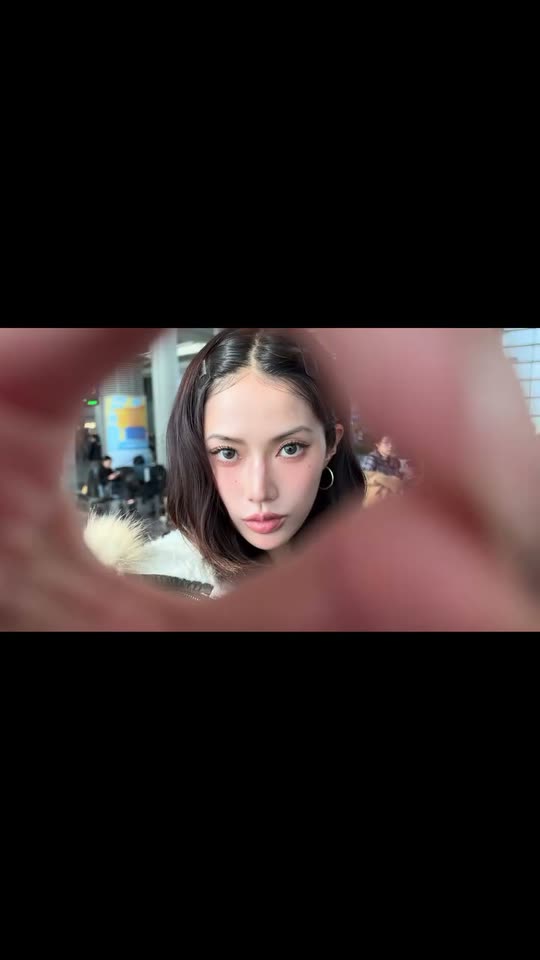
You sit at the airport gate, point at the camera and make a finger circle over the lens. The camera pushes through it, the beat drops, and you land on a neon street at night and spin. Add a photo and pick the city.

The original Airport Transition reel by @31.ioaOriginal reel
  • 1 photo you add
  • 8 s clip with sound
  • 16:9 like the original clip
  • No watermark

No prompt to write: Add your photo and tap once

Create your own

Ready in up to several minutes · 122 credits

The airport transition is a two-shot reel: you sit at the airport gate, point at the camera, make a finger circle over the lens, and the camera dives through it into a neon city street at night, where you walk out and spin as the beat drops. Add one photo and this template films both shots with your face.

Also called Teleport transition · Teleporting to Hong Kong · Teleportation trend · Finger circle transition · Travel transition

Example

What the Airport Transition video looks like

This is the creator's own reel, with its own sound. Your photo replaces her in both shots, so your video follows the same finger circle, cut, walk and spin with your face. No two runs come out the same.

Original reel by @31.ioa, 8 s

The original reel by @31.ioa: a finger circle over the lens at the airport gate, the camera pushes through, and she lands on a Hong Kong street at night. The Hong Kong city copies this reel.

Use this reference
Step by step

How to make the Airport Transition video on MakeViral

Everything runs in the browser. No editing app, no prompt to write, no watermark.

  1. Add your photo

    Press "Create your own" and add you, face clear and close. Take it with the camera or pick it from your library.

  2. Press Generate

    The button shows the price. Seedance 2.5 puts your photos into the Airport Transition trend clip and copies it shot by shot for 8 seconds, with the reel's original song. You write no prompt.

  3. Download or share

    The video is ready in up to several minutes as a 16:9 MP4. Download it, share it from your phone, or find it later in My videos.

Which photo works best?

Upload one photo for You and Pet, two photos for Couple (one person per photo).

  • People: a close, sharp photo of the face, front-facing, in good light. The reel goes from a big close-up inside the finger ring to a full-body shot, so a clear face matters most.
  • No sunglasses, no hat that hides the hair, no heavy beauty filter.
  • Your clothes come from the photo and stay the same in both shots. A photo that shows the whole outfit gives the best spin at the end.
  • Couple: photo 1 sits on the left and makes the finger circle, photo 2 sits on the right.
  • Pet: one animal, the whole body in view, in daylight.
  • Use your own photo, a friend who said yes, or your own pet. Never a celebrity or a stranger.

Where did the Airport Transition trend start?

Travel creators have filmed the airport transition for years: one shot at the airport, one hidden cut, and you are already at the destination. On TikTok, #airporttransition had 134 million views on 4,402 videos on 14 November 2026, and the wider #traveltransition tag had 846 million. Airport transitions are a staple of every trip, and a travel transition video often opens the trip vlog.

The finger circle transition is the version that took off in November 2026. On 14 November, the creator @31.ioa posted her teleport transition to Instagram with the caption "teleporting to hong kong n shi": she makes an OK sign over the lens in the departure lounge, the camera pushes through the ring, and on the hard cut she is standing on a Hong Kong street at night as the hook of Migos' "Walk It Talk It" drops. The reel had almost 110,000 likes on the day it was posted.

That is why people now search for the teleportation trend and for "teleporting to hong kong". This airport transition AI template makes the same cut from one photo, with no flight and no second location.

  1. On TikTok, #airporttransition has 134 million views on 4,402 videos, #traveltransition 846 million views and #teleporttransition 705,000 views. TikTok

  2. @31.ioa posts her finger circle airport transition, "teleporting to hong kong n shi", from an airport lounge to a Hong Kong street at night. 109,992 likes and 144 comments the same day. Instagram

Copy and paste

The Airport Transition prompts

You do not need these: the one-tap flow runs them for you, together with the trend clip. [Image 1] and [Image 2] are your two photos, and [Video 1] is the trend clip the video copies.

You

1 photo: you, face clear and closeSeedance 2.58 s · 720p · 16:9122 credits
Video prompt

Recreate the reference video [Video 1] shot for shot: two shots joined by a finger-circle transition. Shot 1 is a bright airport departure lounge by day; shot 2 is the same busy city street at night as in the video, with glowing shop lights, yellow road markings, metal railings and dark cars. The same wide 16:9 frame, the same handheld camera, cut, timing and moves. The ONLY change: the young woman in both shots is now the person in [Image 1]. [Video 1] is for the moves, the hand transition, the timing and the camera only. The woman = the person in [Image 1], in BOTH shots and in EVERY frame, also inside the finger ring and in the full-body shot at the end: copy the exact face from [Image 1] (the face shape, eye color and eye shape, eyebrows, nose, mouth, skin tone, age, hair color, hair length and hairstyle, and any beard, moustache, glasses or freckles). The same real person before and after the cut, so their friends instantly recognize them. Never morph, never drift back to the original woman's face: NO long straight black hair with a middle part, no hair bun, no hoop earrings unless [Image 1] shows them. The clothes come from [Image 1] and stay the same in both shots: never the olive puffer jacket with the fur hood, the white graphic T-shirt, the dark brown jacket, the short shorts or the knee-high boots from the video unless [Image 1] shows them. The shots, second by second: Shot 1 [0-4.0 s]: the person sits at a table in a bright airport departure lounge, close to the camera. 0-1.5 s: leans back and talks to the camera. 1.5-2.7 s: points one finger at the lens. 2.7-4.0 s: brings the hand to the lens and makes a circle with the thumb and index finger (an OK sign) right in front of it, the face framed inside the ring, and the camera pushes into the ring until the face fills it. Shot 2 [4.0-8.4 s]: hard cut through the ring: the same hand still makes the ring in front of the lens, now at night on the city street. 4.0-5.0 s: the hand opens and drops, and the person looks straight into the lens from close up. 5.0-6.5 s: turns and walks away into the middle of the road. 6.5-8.4 s: turns back to the camera, spins and poses with one knee up and the arms out, the whole body in the frame. Only replace the woman; the airport, the finger-circle push-in, the cut, the moves and the camera stay completely unchanged. Keep everything else the same. Anatomy rules: one head only, on the person's shoulders. Two arms, two legs, five fingers on each hand; the ring is made by the person's own thumb and index finger. No text, no captions, no logos, no watermark. No dialogue throughout the entire video. No background music.

2656 characters
Couple

2 photos: person 1 (left, makes the circle), face clear + person 2 (right), face clearSeedance 2.58 s · 720p · 16:9122 credits
Video prompt

Recreate the reference video [Video 1] shot for shot: two shots joined by a finger-circle transition. Shot 1 is a bright airport departure lounge by day; shot 2 is the same busy city street at night as in the video, with glowing shop lights, yellow road markings, metal railings and dark cars. The same wide 16:9 frame, the same handheld camera, cut, timing and moves. The ONLY change: the young woman in both shots is now two people side by side in both shots: the person in [Image 1] on the LEFT and the person in [Image 2] on the RIGHT. [Video 1] is for the moves, the hand transition, the timing and the camera only. The person on the LEFT = the person in [Image 1], in BOTH shots and in EVERY frame: copy the exact face from [Image 1] (the face shape, eye color and eye shape, eyebrows, nose, mouth, skin tone, age, hair color, hair length and hairstyle, and any beard, moustache, glasses or freckles). The person on the RIGHT = the person in [Image 2], in BOTH shots and in EVERY frame: copy the exact face from [Image 2] in the same way. Never blend their faces; each face stays the same before and after the cut, also in the full-body shot, so their friends recognize them at once. Both change: no one from the video stays. NO long straight black hair, no hair bun, no hoop earrings unless a photo shows them. Each wears the clothes from their own photo in both shots, never the jackets, shorts or boots from the video. The shots, second by second: Shot 1 [0-4.0 s]: the two sit side by side at a table in a bright airport departure lounge, close to the camera. 0-1.5 s: they lean in and talk to the camera. 1.5-2.7 s: the person on the LEFT points at the lens. 2.7-4.0 s: the same person makes a circle with the thumb and index finger right in front of the lens, both faces framed inside the ring, and the camera pushes into the ring. Shot 2 [4.0-8.4 s]: hard cut through the ring: the same hand still makes the ring in front of the lens, now at night on the city street. 4.0-5.0 s: the hand opens and drops, and the two look straight into the lens from close up, side by side. 5.0-6.5 s: they turn and walk away together into the middle of the road. 6.5-8.4 s: they turn back to the camera, spin and pose side by side, both whole bodies in the frame. Only replace the woman; the airport, the finger-circle push-in, the cut, the moves and the camera stay completely unchanged. Keep everything else the same. Anatomy rules: exactly two people, one head on each pair of shoulders, two arms and two legs each, five fingers on each hand; the ring is made by the left person's own thumb and index finger. No text, no captions, no logos, no watermark. No dialogue throughout the entire video. No background music.

2720 characters

Pet

1 photo: your pet, whole bodySeedance 2.58 s · 720p · 16:9122 credits
Video prompt

Recreate the reference video [Video 1] shot for shot: two shots joined by a finger-circle transition. Shot 1 is a bright airport departure lounge by day; shot 2 is the same busy city street at night as in the video, with glowing shop lights, yellow road markings, metal railings and dark cars. The same wide 16:9 frame, the same handheld camera, cut, timing and moves. The ONLY change: the young woman in both shots is now the pet in [Image 1], whole body. [Video 1] is for the moves, the hand transition, the timing and the camera only. The pet = the pet in [Image 1], whole body, in BOTH shots and in EVERY frame: the same species and breed, head shape, muzzle, eyes, eye color, ears, fur colors, fur length, markings and body shape as in [Image 1], with the natural body volume and proportions of that animal: never flattened, squashed, stretched or merged with anything, so its owner instantly recognizes it. The woman from the video never appears: no human face, no human body, only one human hand. If [Image 1] shows a dog, a cat or another animal, that animal takes her place. The shots, second by second: Shot 1 [0-4.0 s]: the pet sits on a seat at a table in a bright airport departure lounge, close to the camera, and looks at the lens. 0-2.7 s: it tilts its head and lifts one paw toward the camera. 2.7-4.0 s: a person's hand from behind the camera makes a circle with the thumb and index finger right in front of the lens, the pet's face framed inside the ring, and the camera pushes into the ring until the face fills it. Shot 2 [4.0-8.4 s]: hard cut through the ring: the same hand still makes the ring in front of the lens, now at night on the city street. 4.0-5.0 s: the hand opens and drops, and the pet looks straight into the lens from close up. 5.0-6.5 s: it turns and trots away into the middle of the road. 6.5-8.4 s: it turns back to the camera, spins once in a happy circle and stands, the whole body in the frame. Only replace the woman; the airport, the finger-circle push-in, the cut, the moves and the camera stay completely unchanged. Keep everything else the same. Real animal anatomy: one head, four legs ending in round furry paws, never human hands on the pet, one tail if the animal has one. Exactly one animal; the hand from behind the camera is the only human body part. No text, no captions, no logos, no watermark. No dialogue throughout the entire video. No background music.

2419 characters

How many credits does it cost?

You pay per video in credits, and the create page shows the exact price on the Generate button before you spend anything. The one-tap price covers the video, made in one step from your photos and the trend clip, charged once. One video is 122 credits, so the smallest one-time pack that covers it is $13.99 for 150 credits, with no subscription. The cheaper models are there if you run the prompts by hand in AI Video.

Video modelSettingsCredits
Seedance 2.5 (this template)8 s, 720p, copies the trend clip, one tap122

One-time packs and plans are on the pricing page. A failed video gives its credits back.

What happens in the airport transition video, second by second?

The default city, Hong Kong, copies the viral reel by @31.ioa, and your photo takes her place in both shots:

TimeYouPet
0 to 1.5 sYou sit at a table in a bright airport departure lounge and talk to the camera.Your pet sits on a seat in the lounge and looks at the camera.
1.5 to 4 sYou point at the lens, then make a finger circle over it, and the camera pushes into the ring.A hand from behind the camera makes the finger circle around your pet's face, and the camera pushes in.
4 sThe hard cut: the beat drops and the ring opens on a city street at night.The same cut.
4 to 8.4 sYou look into the lens, walk out into the road, turn back and spin.Your pet trots into the road, turns back and spins.

You get a wide 16:9 video of about 8 seconds at 720p, the same frame as the reel, with the reel's own song put back on after the run. TikTok and Reels show a wide clip with black bars above and below, just like the original. The AI makes your airport transition video with the best AI video models available, from your photo and the reel. A run takes 5 to 15 minutes, and the create page shows the exact price on the Generate button before you spend anything.

Which city and which version can you pick?

Every version has a City picker for the second shot:

  • Hong Kong (default): the original reel by @31.ioa, the safest pick and the true "teleporting to hong kong" clip.
  • Tokyo, Seoul, New York, Shanghai, Bangkok, Dubai and Paris: the same airport shot and finger circle, with that city's street at night after the cut. These seven are new and not tested yet: a run can keep some of the Hong Kong street. If it does, run it again or pick Hong Kong.

The versions:

  • You: one photo, you at the gate and in the city.
  • Couple: two photos, the two of you side by side, for an airport couple transition video. The reel has one person, so the AI adds the second one; it is new and not tested yet.
  • Pet: your dog, cat or other pet at the gate and on the night street. A hand from behind the camera makes the finger circle, because paws cannot.

What goes wrong, and how do you fix it?

ProblemFix
The face looks like the woman in the reelUse a close, sharp, front-facing photo and run it again.
The face changes after the cutThe two shots are two places, so the AI has to keep you twice. A sharp, well-lit photo keeps it best; run it again if it drifts.
Some of the Hong Kong street stays in another cityThe seven new cities draw a new street over the Hong Kong reel, and a take can keep a detail. Run it again or pick Hong Kong.
The hand looks odd in the finger circleHands move fast close to the lens. Run it again.
Only one person after the cut in CoupleThe reel shows one person. Use two sharp, close photos and run it again.
The model refuses a photoSome photos get refused. The credits come back; try another photo.

How should you post your airport transition?

Your clip comes with the reel's own song, the "Walk It Talk It" hook on the cut, so it is ready to post. Like most travel transition reels, it works best as the first clip of a trip post. The song belongs to its owners, and MakeViral gives you no rights to it.

Airport transition ideas for the caption: "teleporting to hong kong", "gate to the city in one second", "POV: you landed", or the name of the city you picked. Hashtags: #airporttransition, #teleporttransition, #traveltransition and #aitrend. Keep the platform's AI label on.

FAQ

Airport Transition trend questions

What is the airport transition trend?
It is a travel transition reel: one shot at the airport, a hidden cut, and the next shot is already at the destination. The airport transition trend in November 2026 uses a finger circle over the lens as the cut: @31.ioa's reel of 14 November goes from an airport lounge to a Hong Kong street at night.
How do I make an airport transition with AI from my photo?
Press "Create your own", pick You, Couple or Pet, choose a city and add your photo. Press Generate; the button shows the price first. The airport transition AI makes both shots with your face, and the video waits in My videos when it is ready. You write no prompt.
What is the finger circle transition?
You make a circle with your thumb and index finger, like an OK sign, right in front of the lens. The camera pushes into the ring, and the cut hides inside it, so the ring seems to open in a new place. In the reel it opens on a city street at night.
Is this the teleport transition?
Yes, people call it the teleport transition and the teleportation trend, because you seem to jump from the gate to another city in one cut. The original caption was "teleporting to hong kong".
Is there a teleport transition CapCut template?
CapCut users make the teleport transition effect by hand: two clips, a cut on the finger circle and a zoom. That needs you at the airport and in the city. This template makes both shots with AI from one photo, so you do not need either place.
What song is in the airport transition reels?
The original reel uses the hook of "Walk It Talk It" by Migos, and the beat drops on the cut. Your video gets the reel's own sound back after the run, and you can turn it off on the result screen.
Can I pick another city than Hong Kong?
Yes. Hong Kong is the default and copies the original reel. Tokyo, Seoul, New York, Shanghai, Bangkok, Dubai and Paris put that city's night street after the cut. Those seven are new and untested, so a take can keep a detail of Hong Kong; run it again if it does.
Can we make an airport couple transition video?
Yes. Pick Couple and add two photos, one person each: photo 1 sits on the left and makes the finger circle, photo 2 sits on the right. Both of you land in the city together. It is new and untested, because the reel shows one person.
Can my dog or cat do the airport transition?
Yes. Pick Pet and add one sharp photo of your pet. It sits at the gate, a hand makes the finger circle around its face, and it lands on the night street and spins.
Is the airport transition trend on TikTok too?
Yes. On TikTok, #airporttransition had 134 million views and the teleportation trend's tag #teleporttransition had 705,000 views on 14 November 2026. Your clip is wide 16:9 like the original, so TikTok and Reels show it with black bars, as in the reel.
How long is the video and what format is it?
About 8 seconds, a wide 16:9 MP4 at 720p, the same frame as the original reel, with the reel's own song. There is no watermark.
Does the airport transition cost credits?
Yes. Each video costs credits, and the create page shows the exact price on the Generate button before you spend anything. If a video fails, the credits come back.
Can I make other AI travel transition videos?
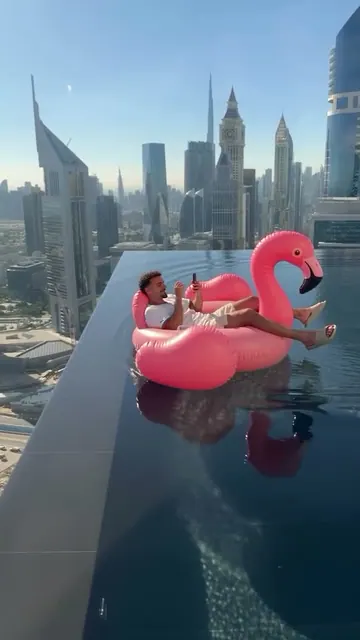
This template is one AI travel transition: the airport to a city at night. For a different transition, try the perfume transition, or float above a city in the flamingo float trend.
More trends

Other AI video templates

Make your own Airport Transition video

Add one photo and tap once. No prompt to write. 122 credits.

No watermark. A failed video gives its credits back. Secure checkout by Stripe.