Back

Le Dije a ChatGPT Que Me Pusiera Esto: Your AI Look Change

Add one selfie and pick a look from the trend: glasses and braces, blue eyes and long lashes, or tattoos and piercings. You get the same photo of you, with the new look on, ready for your "lo que me dio" reveal.

Le Dije a ChatGPT example video, made with AI-made peopleAI-made
  • 1 photo you add
  • 2K photo you can turn into a video
  • 9:16 for TikTok, Reels, Shorts
  • No watermark

No prompt to write: Add your photo and tap once

Create your own

Ready in a few minutes · Photo · 3 credits

Le dije a ChatGPT que me pusiera esto ("I told ChatGPT to put this on me") is a Spanish-language TikTok trend: you show a selfie, then the looks you asked for, then the AI result of you with glasses, braces, long lashes, blue eyes or tattoos. Add one photo, pick a look, get the edit. Your face stays yours.

Also called Le dije a la IA que me pusiera esto · I asked ChatGPT to put this on me · Lo que me dio

Example

What the Le Dije a ChatGPT photo looks like

Made from the prompt on this page. The people and pets are AI-made, not real persons. Your result will differ from run to run.

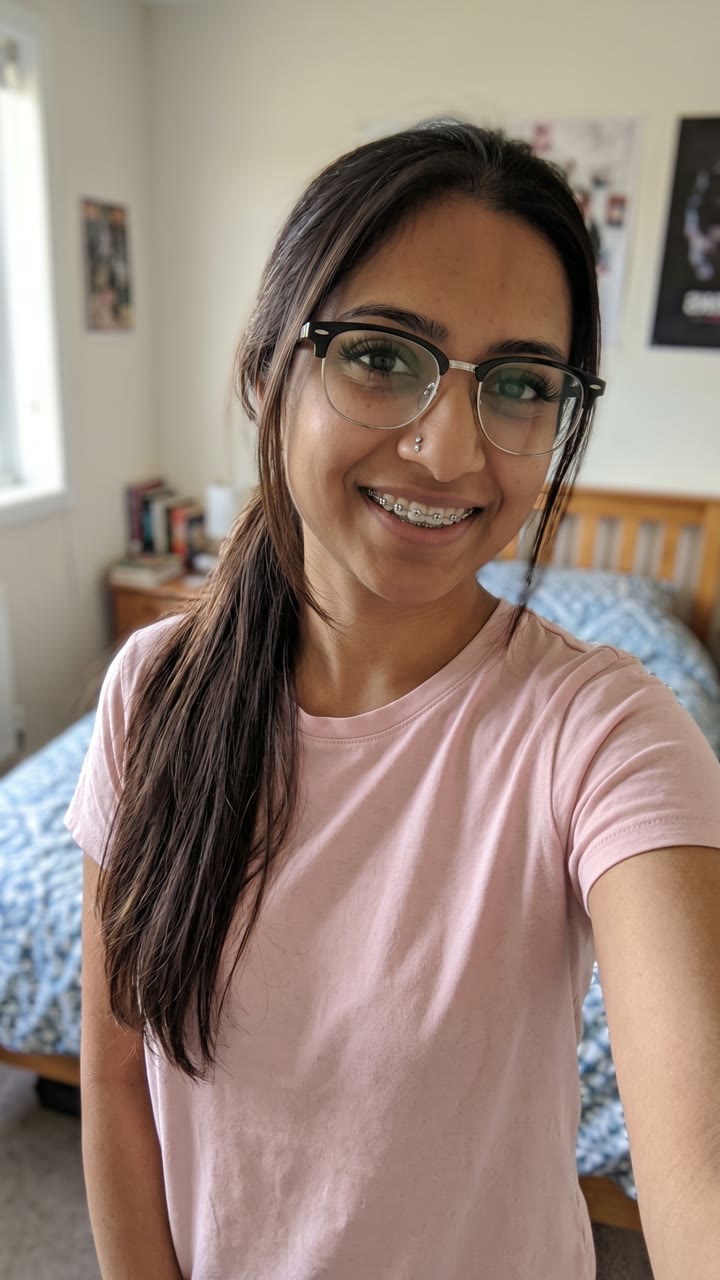
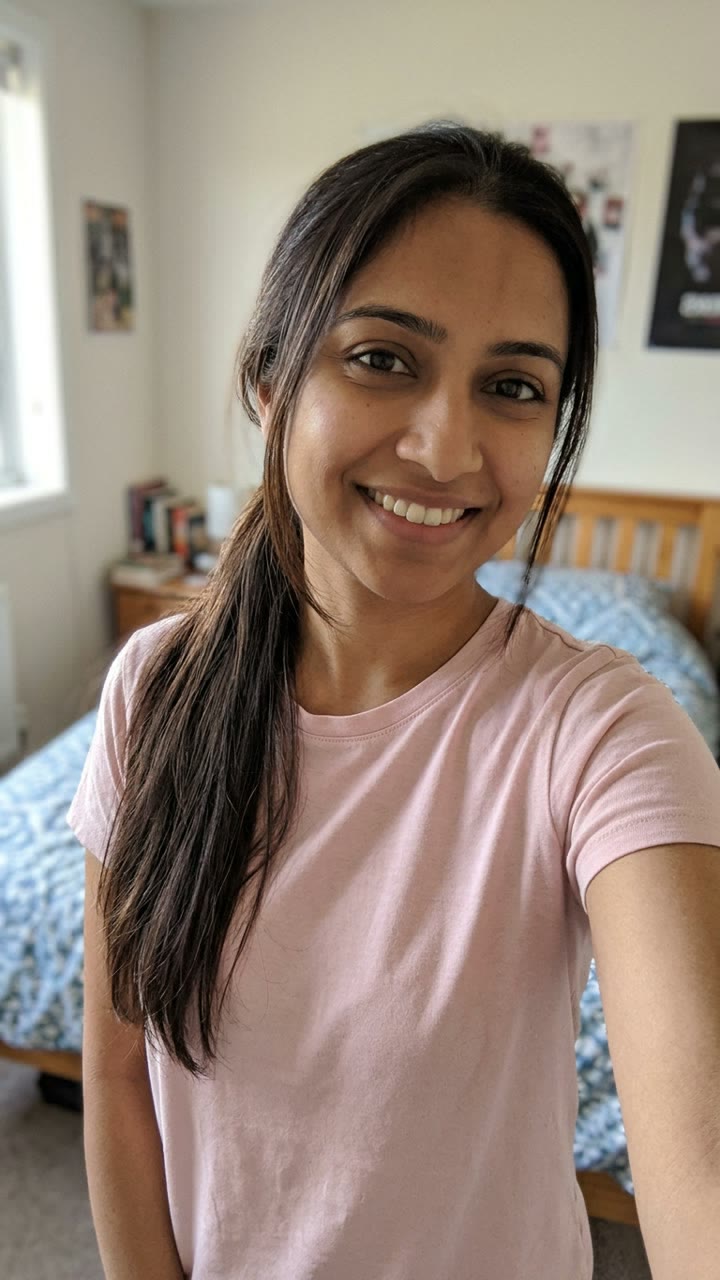
Input photo for Le Dije a ChatGPT example (AI-made person)
Input
Result, before and after

Made with MakeViral from one selfie of an AI-made woman (not a real person), Glasses + braces version: black browline glasses, braces, longer lashes and a small nose stud. Her face, pose and room stay the same.

Step by step

How to make the Le Dije a ChatGPT photo on MakeViral

Everything runs in the browser. No editing app, no prompt to write, no watermark.

  1. Add your photo

    Press "Create your own" and add you, smiling with your teeth showing. Take it with the camera or pick it from your library.

  2. Press Generate

    The button shows the price. Nano Banana 2.1 puts your photo into the Le Dije a ChatGPT scene and makes one 2K photo. You write no prompt.

  3. Download or share

    The photo is ready in a few minutes as a 9:16 2K image. Download it, share it from your phone, turn it into a video, or find it later in My videos.

Which photo works best?

Use one sharp selfie of yourself from the chest up, face to the camera, in good light. The edit keeps your pose, background, clothes and light, and adds only the new look.

  • Smile with your teeth showing for the braces look. The braces go on the teeth that show.
  • Put one hand near your face (a peace sign works, like in the trend) if you want the new nails. With no hand in the photo, there are no nails to change.
  • Show your arms or neck for the tattoo look. Tattoos go only on the skin that shows in the photo.
  • Take off your own glasses if you want the trend's black browline glasses instead.
  • One person per photo, and only a photo of you, or of an adult who said yes.

Where did the Le Dije a ChatGPT trend start?

The trend took off on TikTok in Mexico and the Spanish-speaking US in late October 2026. Each post has three parts: a normal clip of the creator with the caption "Le dije a ChatGPT...", a collage of what they asked for ("que me pusiera esto": black browline glasses, braces with small gems, long lashes, French-tip nails, a nose stud), and then "lo que me dio", the creator with that whole look on.

The earliest big post we found is by @nahomi.rios65 in Mexico on 21 October 2026: 141,200 views and 155 comments by 29 October, most of them people showing their own result. The next day the how-to posts arrived. A tutorial by @mg8111195 on 22 October is the most viewed post of the trend so far, with 327,500 views by 29 October, and its caption lists what people ask for: braces, long lashes, blue eyes, acrylic and French nails, long hair, a beard and moustache, earrings. By 26 October a men's version with tattoos, a lip piercing and earrings had its own tutorials ("le dije a chat gpt que me pusiera esto tatuaje").

  1. @nahomi.rios65 (Mexico) posts "Le dije a ChatGPT que me pusiera esto" with glasses, braces, lashes, French nails and a nose stud; 141,200 views and 155 comments by 29 October. TikTok

  2. @mg8111195 posts a how-to for the trend; with 327,500 views and 7,362 likes by 29 October it is the most viewed post of the trend. TikTok

  3. @rosalind4833 posts a second how-to, "Le pedí a ChatGPT que me pusiera esto"; 151,100 views and 2,621 likes by 29 October. TikTok

  4. The hashtag #ledijeachatgptquemepusieraesto starts; by 29 October it has 53 videos and 113,026 views, against 12 videos for #lepediachatgptquemepusieraesto.

  5. A men's version spreads: a how-to by @fyhw7gdw76 adds tattoos, a lip piercing, earrings and defined brows ("le dije a chat gpt que me pusiera esto tatuaje"). TikTok

Copy and paste

The Le Dije a ChatGPT prompts

You do not need this: the one-tap flow runs it for you. The photo prompt puts your photo into the scene. Want to change it? Copy it and edit it in AI Photo.

Glasses + braces

1 photo: you, smiling with your teeth showingNano Banana 2.1Photo · 2K · 9:163 credits
Photo prompt

Use the uploaded image as the base. This is a photo edit of the same real person in the same photo, not a new portrait: keep the same pose, framing, background, clothes and light. Keep the face shape, eye shape, eye color, eyebrows, nose, lips, skin tone, skin texture and age exactly as in the photo. Add only this new look, as if the person really had it when the photo was taken: (1) black browline glasses with a thick black top rim and a thin silver wire bottom rim, sitting naturally on the nose, with real lens reflections and no distortion of the eyes; (2) metal braces on the teeth that show: small silver brackets joined by a thin wire, with a few tiny clear sparkly gems on the brackets, on the person's own teeth; if the lips are closed, part them into the person's own natural smile so the braces show; (3) long, full, dark lash extensions on the upper lashes; (4) if the hair is long, it stays long and becomes straight, sleek and glossy in its own color, with the same hairline and parting; short hair keeps its length; (5) if a hand shows in the photo, short almond nails with a black French tip and a tiny black star on two nails; never add a hand that is not in the photo; (6) a small sparkling silver stud on one side of the nose. Nothing else changes. A real phone photo with natural skin: no beauty filter, no smoothing, no slimmer face, no bigger eyes, no other makeup. Exactly one person. No text, no captions, no stickers, no emojis, no logos, no app interface.

1485 characters

Blue eyes

1 photo: you, face close and clearNano Banana 2.1Photo · 2K · 9:163 credits
Photo prompt

Use the uploaded image as the base. This is a photo edit of the same real person in the same photo, not a new portrait: keep the same pose, framing, background, clothes, hair and light. Keep the face shape, eye shape, nose, lip shape, skin tone, skin texture and age exactly as in the photo. Add only this new look, as if the person really had it when the photo was taken: (1) light, clear blue eyes with a natural iris texture, a darker blue ring at the edge and real catchlights, in the person's own eye shape and size; (2) long, full, dark lash extensions on the upper lashes; (3) neatly defined, softly filled-in eyebrows in their natural shape and color; (4) soft glossy pink lips in the person's own lip shape; (5) if a hand shows in the photo, long almond acrylic nails in nude pink with white French tips; never add a hand that is not in the photo; (6) a small sparkling silver stud on one side of the nose. Nothing else changes. A real phone photo with natural skin: no beauty filter, no smoothing, no slimmer face, no bigger eyes, no heavy makeup. Exactly one person. No text, no captions, no stickers, no emojis, no logos, no app interface.

1151 characters

Tattoos

1 photo: you, with your arms or neck in frameNano Banana 2.1Photo · 2K · 9:163 credits
Photo prompt

Use the uploaded image as the base. This is a photo edit of the same real person in the same photo, not a new portrait: keep the same pose, framing, background, clothes and light. Keep the face shape, eyes, eye color, nose, skin tone, skin texture and age exactly as in the photo. Add only this new look, as if the person really had it when the photo was taken: (1) black-and-grey tattoos on the skin that shows on the arms, the hands and the side of the neck: roses, clocks, stars and fine line shapes, healed and realistic, following the curve of the skin; no letters, words or numbers in any tattoo, and no tattoo on the face; (2) a small silver hoop in each earlobe that shows; (3) a thin silver ring at one corner of the lower lip; (4) neat, defined eyebrows in their own color and smooth, healthy lips in their own shape; (5) a fresh, neat version of the person's own hairstyle in the same color; (6) if the person is a man, a short, neat, well-groomed beard and moustache in his own hair color; a woman gets no facial hair. Nothing else changes. A real phone photo with natural skin: no beauty filter, no smoothing, no slimmer face, no bigger eyes. Exactly one person. No text, no captions, no stickers, no emojis, no logos, no app interface.

1249 characters

Pet

1 photo: your pet, face clearNano Banana 2.1Photo · 2K · 9:163 credits
Photo prompt

Use the uploaded image as the base. Keep the animal's species, breed, face, eye color, fur color, fur length, markings and body size exactly the same as in the photo, in the same pose, background and light. Add only this new look, as a cute, funny photo: (1) tiny black browline glasses that fit the pet's face, sitting on its muzzle in front of its own eyes; (2) long, full, dark eyelashes; (3) the mouth open in a happy grin that shows its front teeth with small silver braces and a few tiny sparkly gems on them; (4) a small sparkling gem charm on its collar, with a thin black collar if it has none. The glasses and the braces fit its real face shape. Nothing else changes. A real phone photo with natural fur detail, the pet in sharp focus. Exactly one animal, no people. No text, no captions, no stickers, no emojis, no logos, no app interface.

850 characters

How many credits does it cost?

You pay per photo in credits, and the create page shows the exact price on the Generate button before you spend anything. The one-tap price covers one 2K photo, charged once. One photo is 3 credits, so the smallest one-time pack that covers it is $9.99 for 100 credits, with no subscription. A smaller 1K photo costs less if you run the prompt by hand in AI Photo.

ModelSettingsCredits
Nano Banana 2.1 (this template)2K photo, 9:16, one tap3
Nano Banana 2.1 (by hand in AI Photo)1K photo, 9:16, same prompt2

One-time packs and plans are on the pricing page. A failed photo gives its credits back.

Which look should you pick?

The trend has a few looks that come back in almost every post. Each one is a version on the create page, so you pick it before you press Generate. The face, the pose and the background stay the same in all of them.

VersionWhat you getFrom the trend
Glasses + braces (default)Black browline glasses, metal braces with small sparkly gems, long full lashes, long straight glossy hair (long hair only), black French-tip nails with a tiny star, a small nose studThe collage in the first big post, 21 October
Blue eyesLight blue eyes, long lashes, defined brows, glossy pink lips, long nude acrylic nails with white French tips, a small nose studThe most viewed how-to, 22 October
TattoosBlack-and-grey tattoos on the arms, hands and neck, small silver hoop earrings, a thin lip ring, defined brows, a neat hairstyle; a short beard and moustache on a manThe men's version, 26 October
PetYour dog or cat with tiny browline glasses, long lashes, sparkly braces in a happy grin and a little gem on the collarOur own take for pets

This is a different trend from the AI makeup filter, which is a full glam video. Here it is a photo with things added: glasses, braces, piercings, tattoos, a new eye color.

How to post your "lo que me dio" reveal

The trend's posts follow one order, and you can copy it with your own photos:

  1. The before: a short clip or your original selfie, with the text "Le dije a ChatGPT que me pusiera esto" or "Le pedí a ChatGPT que me pusiera esto".
  2. The asks: a quick collage of what you wanted: the glasses, the braces, the lashes, the nails, the tattoos.
  3. The after: your result from MakeViral, with "lo que me dio" or "y esto fue lo que me dio".

Put the three in any video editor, add a sound you like, and post. Many people end by asking their friends in the comments to show theirs. Under the first big post, most comments are exactly that: "a mi me puso así" and a photo.

Want it to move? Under your finished photo, press "Make it a video" to turn the after into a short clip.

Is it really ChatGPT?

The trend's name says ChatGPT, and some people do it in a chat app: they send their selfie with the collage and type "ponme esto". Most of the viral how-to posts, though, use a ready-made video editor template, and many people say in the comments that the result was not what they asked for: "no más los braquets no me los puso" (it did not give me the braces) or "me quedó toda rara" (I came out all weird). That is the honest risk of a general AI edit: it can skip one of the asks, or change your face.

MakeViral is not ChatGPT and does not use it. Each version here has its own written prompt that names every ask one by one, and a face lock that keeps your face shape, eyes, nose, lips, skin and age the same. The photo is made by a top-quality AI image model in 2K. If one ask is missing in your result, run it again: each run is a little different.

FAQ

Le Dije a ChatGPT trend questions

What does "le dije a ChatGPT que me pusiera esto" mean?
It is Spanish for "I told ChatGPT to put this on me". In the trend, people show a selfie, then a collage of the looks they want (glasses, braces, lashes, nails, tattoos), then the AI result of themselves with that look, captioned "lo que me dio" (what it gave me).
How do I do the le pedí a ChatGPT que me pusiera esto trend?
Press "Create your own", add one selfie from the chest up, pick a look (Glasses + braces, Blue eyes, Tattoos or Pet) and press Generate. You get the same photo with the new look, in 2K. Post it after your before photo with "lo que me dio".
Is there a le dije a chat gpt que me pusiera esto tutorial?
Yes, many: the most viewed how-to of the trend is by @mg8111195 on 22 October 2026, with 327,500 views by 29 October. Most of them walk through a video editor template. On MakeViral there is nothing to set up: one photo, one tap.
Is this the le pedí a ChatGPT que generara esto filter?
Yes, it is the same trend under another name. People write "le pedí a ChatGPT que generara esto" (I asked ChatGPT to make this), "le dije a chat gpt que me pusiera esto" or "le dije a la IA". The result is always the same idea: a cambio de look con ChatGPT, with the new look on your own photo.
Is there a men's version, le dije a chat gpt que me pusiera esto hombre?
Yes. Pick the Tattoos version: black-and-grey tattoos on the arms, hands and neck, small hoop earrings, a thin lip ring, defined brows and a neat hairstyle. On a man it also adds a short, neat beard and moustache, the poner barba y bigote con ChatGPT look. It is the le dije a chat gpt que me pusiera esto tatuaje version of the trend.
Which look is le dije a chat gpt que me pusiera esto mujer?
Most women's posts use the Glasses + braces look or the Blue eyes look. Glasses + braces adds black browline glasses, braces, long lashes, French nails and a nose stud. Blue eyes adds light blue eyes, long lashes, defined brows, pink lips and long acrylic nails, the poner ojos azules en una foto con IA, poner pestañas largas con ChatGPT and poner uñas acrílicas con ChatGPT asks in one photo.
Can I put braces on a photo with AI?
Yes. The Glasses + braces version is the trend's way to poner brackets en una foto con IA: metal braces with small sparkly gems on the teeth that show. Smile with your teeth in the photo. It works like a braces filter, but on a still photo, not a live camera filter, and people who asked le pedí a chat gpt que me pusiera brackets get them in place.
Is it a braces filter for TikTok?
It is the photo version of what people look for as a braces filter on TikTok: an AI braces filter that edits your photo instead of your live camera. Save the result and add it to your TikTok post. There is no app to install: it runs in your browser.
Is this the ChatGPT glow up trend?
It is close. People search for a ChatGPT glow up, a ChatGPT glow up prompt or an AI glow up filter, and this trend is one of the AI glow up trend formats of October 2026: the glow up is the things you ask for, put on your own face. Our prompts for each look are on the create page, so you see exactly what the edit asks for.
Can I do a cambio de look with AI online?
Yes. This is a cambio de look con IA that runs online in your browser: a cambio de look mujer IA with glasses, braces, lashes or blue eyes, or a cambio de look hombre IA with tattoos, piercings and a beard. Add one photo and pick the look.
Can I get tattoos, piercings and earrings on my photo?
Yes, with the Tattoos version: the foto con IA with tatuaje, piercing and aretes from the trend. The tattoos go only on skin that shows in your photo, so show your arms, hands or neck. The tattoos have no words or letters.
Will the AI change my face?
It should not. Every version keeps your face shape, eyes, nose, lips, skin tone and age, and adds only the asks of that look. The blue eyes look changes the eye color on purpose. If a result looks off, or one ask is missing, run it again. A sharp, well-lit selfie helps most.
Can I do it with my pet?
Yes. Pick the Pet version and add a photo of your dog or cat with the face clear: it gets tiny browline glasses, long lashes, sparkly braces in a happy grin and a little gem on its collar. The pet stays the same breed, fur and markings.
Can I make it a video?
Yes. Under your finished photo, press "Make it a video": it opens AI Video with your new look as the first frame, and you choose what happens, like a smile and a wave. The video costs its own credits.
Does it cost credits?
Yes. The create page shows the exact price on the Generate button before you spend anything. A photo costs far fewer credits than a video, and if a run fails, the credits come back.
More trends

Other AI video templates

Template

Button Eye Doll AI: The Coraline Filter Trend From One Photo

Button eyes reveal: you sweep a hand across the lens and come back as a porcelain doll with black button eyes. Doll photo: four stop-motion film frames of a button-eyed puppet doll of you. One selfie either way.

Read more
Template

Atatürk ile Fotoğraf: Your Photo Next to the Portrait, for 29 Ekim and 10 Kasım

You stand full body, in formal clothes, next to a large framed black-and-white portrait of Atatürk in a bright marble hall, with sunlight on the floor. One photo of you. A photo for 29 Ekim, a calm one for 10 Kasım, or a short clip in which only you move.

Read more
Template

Facebook Marketplace Husband Meme: How Ima Look in a Couple Years

Add one photo of yourself. AI puts you on the porch of a white farmhouse in an oversized camo shirt, barefoot, staring at whatever your husband just brought home. Or be the husband, caught with another truck on the trailer.

Read more
Template

Chat GTT Lookin' Ahh AI: You or Your Pet in the Card Declined Meme

"The card declined. The card declined." "I heard you the first time, bro. Why you keep saying it like a robot?" Add one photo, and you or your dog play the customer on the phone in the viral checkout clip, with the original audio.

Read more
Template

80s AI Trend: Your 1985 Photo and Home Video

One selfie becomes a faded 1985 snapshot with big hair and a date stamp. Stop there for the photo, or animate it into a 10-second camcorder home video with sound.

Read more
Template

AI Makeup Filter: Watch Your Full Glam Happen on Video

Add one photo with a bare face. AI makes the 10-second glow-up: a makeup artist's hands do your base, eyes, liner, lashes and lips, then you open your eyes and smile in full glam.

Read more

Make your own Le Dije a ChatGPT photo

Add one photo and tap once. No prompt to write. 3 credits.

No watermark. A failed video gives its credits back. Secure checkout by Stripe.