Back

Christmas Princess AI: Step Out of the Carriage in a Red Gown

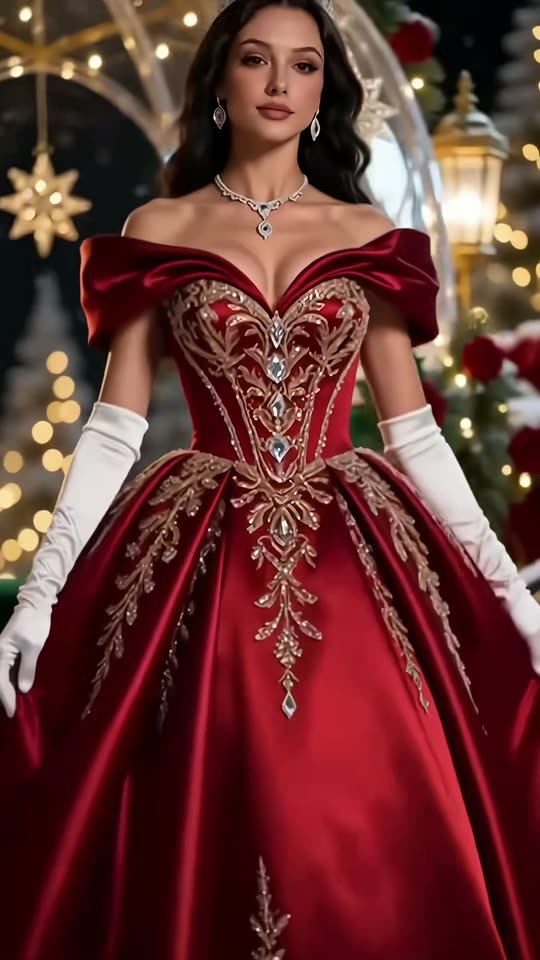
A jeweled heel on the carriage step, a red satin gown with gold embroidery, a tiara and a spin in the snow. Add one selfie and you, a prince or your pet star in the Christmas princess carriage video, with the trend's song.

The original Christmas Princess reel by @m52e0cw9o3Original reel
  • 1 photo you add
  • 10 s clip with sound
  • 9:16 for TikTok, Reels, Shorts
  • No watermark

No prompt to write: Add your photo and tap once

Create your own

Ready in up to several minutes · 160 credits

The Christmas princess trend, also called the Christmas princess carriage or princesa navideña trend, turns one selfie into a short AI video: you step out of an illuminated carriage at night in a red satin gown with gold embroidery, long white gloves and a tiara, then spin in the snow. Add one photo of yourself or your pet.

Also called Christmas carriage princess · Christmas queen AI

Example

What the Christmas Princess video looks like

This is the original reel. Your photos replace its characters, so your video follows the same shots with your faces. No two runs come out the same.

Original reel by @m52e0cw9o3, 10 s

The original AI reel by @m52e0cw9o3: two takes of the Christmas princess template. A jeweled heel steps down from the lit crystal carriage, the camera rises along the red satin gown with gold embroidery, and the princess in long white gloves and a tiara spins in the snow. Shown with the trend's song.

Use this reference
Step by step

How to make the Christmas Princess video on MakeViral

Everything runs in the browser. No editing app, no prompt to write, no watermark.

  1. Add your photo

    Press "Create your own" and add you, face clear. Take it with the camera or pick it from your library.

  2. Press Generate

    The button shows the price. Seedance 2.5 puts your photos into the Christmas Princess Carriage trend clip and copies it shot by shot for 10 seconds, with the reel's original song. You write no prompt.

  3. Download or share

    The video is ready in up to several minutes as a 9:16 MP4. Download it, share it from your phone, or find it later in My videos.

Which photo works best?

Upload one photo: of yourself for Princess or Prince, of your pet for Pet.

  • Face to the camera, sharp and in good light, from the chest up or closer. The video shows your face in the close-up at the end and in the spin, so a clear face matters most.
  • Your hair and face come from the photo. The gown, gloves, tiara and heels (or the prince's coat, crown and boots) come from the clip, so your own clothes do not matter.
  • No sunglasses, no hat and no beauty filter.
  • Pet: one animal, head and chest in view, eyes open, in daylight. Its fur, ears and markings come from your photo.
  • Use your own photo, a friend who said yes, or your own pet. Adults and pets only: this template does not take photos of children.

Where did the Christmas Princess trend start?

The trend is a CapCut AI template that took off in the first week of November 2026, with Spanish captions on US accounts. On 4 November @krjxejaig5 posted a tutorial, "create this amazing video where you step out of a crystal carriage wearing this elegant Christmas gown", that passed 100,000 views. The same day @m52e0cw9o3 posted two takes of the template and a caption that reads like a prompt: "this elegant red satin dress with gold embroidery, a Christmas scene with lights and snow ... a Christmas queen with a tiara, long gloves and an illuminated carriage at night". It had 709,900 views by 8 November.

Copies spread fast. A silver-gown version by @migf149 ("Christmas princess transformation from the carriage", 6 November) reached 582,600 views, and at least 23 accounts posted the same tutorial captions in Spanish, English and Portuguese between 4 and 9 November. Most use a clip of "All I Want for Christmas Is You" as the sound.

This page copies the @m52e0cw9o3 clip with your own face, a prince look or your pet, so you do not need the CapCut template.

  1. US Google searches for "christmas princess" peak at 5,400 a month, after 2,400 in November 2025; the average is 1,000 a month (Google Ads data).

  2. @krjxejaig5 posts a CapCut tutorial for the Christmas carriage gown video at 04:05 UTC. It has 100,200 views by 8 November. TikTok

  3. @m52e0cw9o3 posts two takes of the template, a red satin gown with gold embroidery and a lit crystal carriage in the snow. It has 709,900 views, 10,700 likes and 2,754 saves by 8 November. TikTok

  4. @migf149 posts a silver-gown version, "Transformación de princesa navideña desde el carruaje". It has 582,600 views and 12,300 likes by 8 November. TikTok

  5. At least 23 TikTok accounts have posted the same Christmas princess carriage tutorial captions in Spanish, English and Portuguese since 4 November.

Copy and paste

The Christmas Princess prompts

You do not need these: the one-tap flow runs them for you, together with the trend clip. [Image 1] and [Image 2] are your two photos, and [Video 1] is the trend clip the video copies.

Princess

1 photo: you, face clearSeedance 2.510 s · 720p · 9:16160 credits
Video prompt

Recreate the reference video [Video 1] shot for shot: a Christmas scene with lights and snow at night: an illuminated crystal carriage with gold trim, garlands with red roses, warm string lights, a lantern, snow on the ground and soft falling snowflakes, the same camera moves, cuts, timing and moves. The ONLY change: the woman in the gown, in both takes, is now the person in [Image 1]. The princess = the person in [Image 1], in EVERY shot of both takes: copy the exact face from [Image 1] - face shape, eye color and eye shape, eyebrows, nose, mouth, skin tone, age, hair color, hair length and hairstyle, and any beard, moustache, glasses or freckles exactly as in the photo. The same real person in every frame, from the first second to the last, so their friends instantly recognize them, also while she turns and spins. Never morph, never drift back to the original women's faces. NO long blue hair and not the long dark wavy hair of the second take, unless [Image 1] shows it: the hair is the hair of [Image 1], with the crown or tiara on top. THE LOOK, the same in every shot: an elegant red satin dress with gold embroidery, a Christmas queen with a tiara, long gloves and an illuminated carriage at night. A red satin off-shoulder ball gown with a full skirt and a fitted bodice embroidered in gold, long white satin opera gloves, a sparkling crown or tiara, a diamond necklace, jeweled red high heels. The person wears ONLY this look, never the clothes from [Image 1]. The shots of [Video 1], in the same order and timing: 00:00-00:02.4: low close-up of the feet: a jeweled high heel steps down from the carriage step onto the snow, the gown hem lifted. 00:02.4-00:03.6: the camera rises along the satin skirt as it sways. 00:03.6-00:05.0: medium shot from behind, the crown on the head, she turns. 00:05.0-00:05.8: she faces the camera, then a fast motion blur. 00:05.8-00:06.9: close-up, a jeweled heel steps onto the snow. 00:06.9-00:08.0: the camera rises along the gown to the bodice. 00:08.0-00:08.9: chest-up shot of the face, the tiara and the necklace, a soft smile at the camera. 00:08.9-00:10.4: wide shot in front of the lit carriage: she spins once, the skirt flares, and she ends facing the camera. Real live-action footage, cinematic, clear facial features, no distortion. No dialogue throughout the entire video. No background music. Anatomy rules: one head only, on the princess's shoulders. A face never appears on the gown, the hands or the carriage. Two arms, two hands in gloves, two legs and two feet. Exactly one person in every shot. No text, no captions, no logos, no watermark, no sparkle icon.

2638 characters

Prince

1 photo: you, face clearSeedance 2.510 s · 720p · 9:16160 credits
Video prompt

Recreate the reference video [Video 1] shot for shot: a Christmas scene with lights and snow at night: an illuminated crystal carriage with gold trim, garlands with red roses, warm string lights, a lantern, snow on the ground and soft falling snowflakes, the same camera moves, cuts, timing and moves. The ONLY change: the woman in the gown, in both takes, is now the person in [Image 1] as a Christmas prince. The prince = the person in [Image 1], in EVERY shot of both takes: copy the exact face from [Image 1] - face shape, eye color and eye shape, eyebrows, nose, mouth, skin tone, age, hair color, hair length and hairstyle, and any beard, moustache, glasses or freckles exactly as in the photo. The same real person in every frame, from the first second to the last, so their friends instantly recognize them, also while turning. Never morph, never drift back to the original women's faces, never long hair unless [Image 1] shows it. THE LOOK, the same in every shot: an elegant red satin prince's tailcoat with gold embroidery on the chest, the cuffs and the collar, gold buttons, a white shirt, white gloves, dark tailored trousers, polished black leather boots and a slim gold crown, a Christmas king with a crown and gloves before an illuminated carriage at night. NO gown, NO dress, NO skirt, NO high heels, NO necklace. Never the clothes from [Image 1]. The shots of [Video 1], in the same order and timing: 00:00-00:02.4: low close-up of the feet: a polished black boot steps down from the carriage step onto the snow, the coat tails swinging. 00:02.4-00:03.6: the camera rises along the red coat and the trousers. 00:03.6-00:05.0: medium shot from behind, the crown on the head, he turns. 00:05.0-00:05.8: he faces the camera, then a fast motion blur. 00:05.8-00:06.9: close-up, a black boot steps onto the snow. 00:06.9-00:08.0: the camera rises along the coat to the gold embroidery on the chest. 00:08.0-00:08.9: chest-up shot of the face, the crown, a soft smile at the camera. 00:08.9-00:10.4: wide shot in front of the lit carriage: he turns once on the spot, the coat tails swing out, and he ends facing the camera. Real live-action footage, cinematic, clear facial features, no distortion. No dialogue throughout the entire video. No background music. Anatomy rules: one head only, on the prince's shoulders. Two arms, two hands in gloves, two legs and two boots. Exactly one person in every shot. No text, no captions, no logos, no watermark, no sparkle icon.

2487 characters

Pet

1 photo: your pet, face clearSeedance 2.510 s · 720p · 9:16160 credits
Video prompt

Recreate the reference video [Video 1] shot for shot: a Christmas scene with lights and snow at night: an illuminated crystal carriage with gold trim, garlands with red roses, warm string lights, a lantern, snow on the ground and soft falling snowflakes, the same camera moves, cuts, timing and moves. The ONLY change: the woman in the gown, in both takes, is now the pet in [Image 1], standing upright on its hind legs like a little princess. The pet = the pet in [Image 1], in EVERY shot of both takes: the same species and breed, face, eyes, ears, muzzle, fur colors, fur length and markings as in [Image 1], with the natural body volume and proportions of that animal: never flattened, squashed, stretched or merged with anything. Whether [Image 1] shows a dog, a cat or another animal, it stays that animal, with its own animal head, never a human face, no human hair. The same pet in every frame, so its owner instantly recognizes it. THE LOOK: an elegant red satin dress with gold embroidery, a Christmas queen with a tiara, long gloves and an illuminated carriage at night. The pet wears a red satin ball gown sized to its own body, with a full skirt and a bodice embroidered in gold, a small sparkling tiara between its own ears and a diamond necklace. Its front legs end in its own furry paws (no gloves needed), and in the close-ups of the feet its own furry hind paws step down onto the snow, never human legs, never high heels. The shots of [Video 1], in the same order and timing: 00:00-00:02.4: low close-up of the feet: a furry hind paw steps down from the carriage step onto the snow, the gown hem lifted. 00:02.4-00:03.6: the camera rises along the satin skirt as it sways. 00:03.6-00:05.0: medium shot from behind, the crown on the head, she turns. 00:05.0-00:05.8: she faces the camera, then a fast motion blur. 00:05.8-00:06.9: close-up, a furry paw steps onto the snow. 00:06.9-00:08.0: the camera rises along the gown to the bodice. 00:08.0-00:08.9: chest-up shot of the pet's own face, the tiara and the necklace, a calm proud look at the camera. 00:08.9-00:10.4: wide shot in front of the lit carriage: she spins once, the skirt flares, and she ends facing the camera. No dialogue throughout the entire video. No background music. Anatomy rules: one head only, one muzzle. Animal paws, never human hands or feet. No people, no extra animals. No text, no captions, no logos, no watermark, no sparkle icon.

2434 characters

How many credits does it cost?

You pay per video in credits, and the create page shows the exact price on the Generate button before you spend anything. The one-tap price covers the video, made in one step from your photos and the trend clip, charged once. One video is 160 credits, so the smallest one-time pack that covers it is $39.99 for 450 credits, with no subscription. The cheaper models are there if you run the prompts by hand in AI Video.

Video modelSettingsCredits
Seedance 2.5 (this template)10 s, 720p, copies the trend clip, one tap160

One-time packs and plans are on the pricing page. A failed video gives its credits back.

What happens in the Christmas princess carriage video?

Each version copies the viral clip shot for shot, two takes of about 5 seconds each, and your photo takes the princess's place in both:

TimeWhat you see
0 to 2.4 sA low close-up: a jeweled red high heel steps down from the lit carriage onto the snow.
2.4 to 5.8 sThe camera rises along the red satin gown; from behind you see the crown, then you turn to the camera.
5.8 to 8 sSecond take: a heel on the snow, then the camera rises along the gold embroidery of the bodice.
8 to 8.9 sYour face up close, with the tiara and the necklace, a soft smile.
8.9 to 10.4 sA wide shot in front of the crystal carriage: you spin, the skirt flares, and you end facing the camera.

How the princess carriage AI works: top-quality AI video models, including Seedance 2.5, edit the clip itself: they swap the princess for the person or pet in your photo and keep the carriage, the lights, the snow and the camera. You get about 10 seconds at 720p, vertical 9:16, with the trend's song (a clip of "All I Want for Christmas Is You") put back on after the run. A run takes 5 to 15 minutes, and the exact price shows on the Generate button before you spend anything. Every run is a new take, so results differ.

Princess, Prince or Pet: which one should you make?

  • Princess is the trend as it went viral, the Christmas princess dress: the red satin off-shoulder ball gown with gold embroidery, long white gloves, a tiara and jeweled heels. Your face and hair stay yours.
  • Prince is the same clip with a Christmas prince look: a red satin tailcoat with gold embroidery, white gloves, black boots and a slim gold crown, turning in the snow. The clip was made for a gown, so the coat can come out long; run it again if it does.
  • Pet puts your dog or cat on its hind legs in a red gown and a tiara, stepping onto the snow with its own paws. A calm pet photo with a clear face works best.

Want a still photo instead of a video? The AI Christmas photoshoot makes Christmas portraits. For a 90s Christmas movie scene, try Don't You Dare.

What goes wrong, and how do you fix it?

ProblemFix
You get blue hair or long dark wavesThe women in the original clip have long blue hair and long dark wavy hair. The prompt bans both unless your photo shows them. Use a sharp photo where your hair is clear and run it again.
The face looks like someone else in the close-upA small or side-on face in the photo is the usual cause. Use a front-facing photo from the chest up.
The prince's coat looks like a long skirtThe clip was made for a ball gown. Run it again for a new take.
Your pet loses part of the gown or the tiaraCostumes on pets are the hardest part. Run it again with a photo where the pet sits still and faces the camera.
The model refuses a photoSome photos get refused. The credits come back; try another photo.

How to post your Christmas princess video

Your clip comes with the trend's song, about 10 seconds, so it is ready to post. You can turn the sound off on the result screen. The song belongs to its owners, and MakeViral gives you no rights to it: check the platform's rules before you use it in an ad or a paid post.

Hashtags: #christmasdress and #vestidonavideño, the tags of the trend's first tutorial (92,064 and 1,663 TikTok videos on 8 November 2026), plus #christmasprincess (600 videos). Keep the platform's AI label on.

Caption ideas: "Main character of the Christmas party", "How I arrive at the family dinner", "Christmas queen mode", or the trend's own line, "princesa navideña".

FAQ

Christmas Princess trend questions

What is the Christmas princess AI trend?
It is a November 2026 AI video trend from a CapCut template: one selfie becomes a Christmas princess who steps out of an illuminated carriage at night in a red satin gown with gold embroidery, long gloves and a tiara, then spins in the snow. The most viewed post, by @m52e0cw9o3 on 4 November 2026, had 709,900 views by 8 November.
How do I make the Christmas princess carriage video with my photo?
Press "Create your own", pick Princess, Prince or Pet and add one clear photo. Press Generate; the button shows the price first. You get a Christmas princess AI video of about 10 seconds with the trend's song, and it waits in My videos when it is ready. You write no prompt.
Is this the CapCut template? Do I need CapCut?
No. The trend started as a CapCut template, and many tutorials show the Christmas princess CapCut template. This page makes the same carriage and red gown video on MakeViral from one photo, with no app to install and no editing.
Which prompt does the Christmas princess transformation use?
No creator shared a full prompt, and the CapCut template shows none. The creator caption of the most viewed reel describes the look: "an elegant red satin dress with gold embroidery, a Christmas scene with lights and snow, a Christmas queen with a tiara, long gloves and an illuminated carriage at night". This template uses those words as its Christmas dress AI prompt, with the shots of the clip and rules that keep your face from the photo.
Can a man make it? Is there a Christmas prince AI version?
Yes. Pick Prince: the same carriage clip with a red satin tailcoat with gold embroidery, white gloves, black boots and a gold crown instead of the gown. Pick Princess for the gown.
Can my dog or cat be a Christmas princess?
Yes. Pick Pet. Your pet stands on its hind legs in the red satin gown with a tiara, steps onto the snow with its own paws and spins in front of the lit carriage. Use a sharp photo of one animal with the head and chest in view.
Can I make it with a child's photo?
No. This template is for adults and pets only. Please do not upload photos of children.
What does "princesa navideña" mean?
It is Spanish for "Christmas princess". The trend spread with Spanish captions, such as "Transformación de princesa navideña desde el carruaje" ("Christmas princess transformation from the carriage"), and many posts call the lit carriage "carruaje navideño" or "carroza iluminada".
Is it a Christmas princess filter or a princess transformation app?
It is neither a live filter nor a separate app. It is an AI princess transformation that makes a new video from your photo, on the MakeViral website. You see the result after the run, not live in the camera.
Where did the Christmas princess trend on TikTok start?
On TikTok, with Spanish-language CapCut tutorial accounts on 4 November 2026: @krjxejaig5 posted first (100,200 views), and @m52e0cw9o3 posted the most viewed version the same day. By 9 November at least 23 accounts had posted the same Christmas princess TikTok captions.
Can I change the dress? Is there a Christmas outfit AI for other looks?
This template keeps the trend's red satin gown with gold embroidery (or the prince's coat), so your video matches the viral clip. For other Christmas outfit AI looks, try the AI Christmas photoshoot, or make your own princess dress AI video on the AI video page with your own prompt.
How long is the video and what format is it?
About 10 seconds as an MP4 at 720p, vertical 9:16, with the trend's song. It plays on TikTok, Reels and Shorts, and there is no watermark.
Does the Christmas queen video cost credits?
Yes. Each video costs credits, and the create page shows the exact price on the Generate button before you spend anything. If a video fails, the credits come back.
Is the video real?
No. Your face is put into an AI-made clip from one still photo, and nobody filmed it. The women in the original clip are AI-made too. Keep the AI label on when you post it.
More trends

Other AI video templates

Template

Babydoll Dance AI: Do the Viral Jamie Miller Dance From One Photo

Bouncy chugs toward the camera, circling arms, steps out to the side, ball changes and an arm thrown up high, all on the beat. Add a photo of you or your pet, or three photos of you and two friends, and get your own Babydoll dance video with the song.

Read more
Template

Bby Wow Guy AI: Put Your Face in the Guy Dancing at a Quince Meme

Dance up to the camera at a quinceañera, bite the concha, chew with full cheeks while you stare into the lens, then dance away. Add one photo and become the bby wow guy, with the song.

Read more
Template

End of Watch Locker Scene AI: Show Your Gear to the Camera

Add one photo of you. You take the place of the man in the viral AI locker scene clip: you stand in a dark locker room in black tactical gear and hold your pistol, a flash, a knife, handcuffs, a radio and a spray up to the camera, one by one, then salute. 11 seconds, wide, with the clip's sound.

Read more
Template

90s Christmas AI: The Don't You Dare Snowball Romance

You two in a 1990s Christmas romantic comedy: you bump into each other on a snowy square at night, a snowball flies, "Don't you dare!", a chase through the lights and a truce under the big tree. Two photos, or one with an AI-made partner.

Read more
Template

AI Christmas Photo: A Christmas Photoshoot From One Selfie

Add one selfie. MakeViral turns it into a studio Christmas photoshoot: a lit tree and a Santa hat, a snow throw in the golden winter sun, a red gown among the gifts, candy canes, a cozy sweater, or a couple by the tree. Your face stays the same.

Read more
Template

Santa Sleigh AI: Point at the Sky, the Reindeer Sleigh Lands

You sit on a chair in a snowy clearing and point at the sky. A reindeer sleigh flies in on a rocket-like flame, lands behind you in a burst of snow, and the reindeer run past your chair. Add one photo, pick a look, and you or your pet star in the Santa sleigh AI video.

Read more

Make your own Christmas Princess video

Add one photo and tap once. No prompt to write. 160 credits.

No watermark. A failed video gives its credits back. Secure checkout by Stripe.