Back

Ukwu Template: Color, Then Slow-Motion Black and White From One Photo

You vibe to the beat in full color, then the beat drops and the clip cuts to a closer, slow-motion black-and-white shot of you. One photo in, a 10-second vertical video with the Ukwu sound out. Works with your pet too.

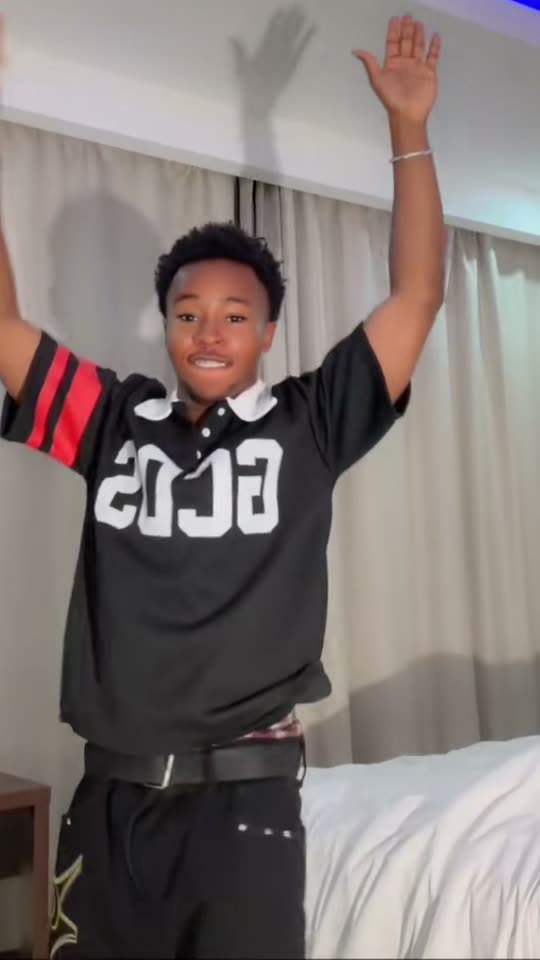
The original Ukwu Template reel by @charles.chimaOriginal reel
  • 1 photo you add
  • 10 s clip with sound
  • 9:16 for TikTok, Reels, Shorts
  • No watermark

No prompt to write: Add your photo and tap once

Create your own

Ready in up to several minutes · 152 credits

The Ukwu template is a CapCut template trend from October 2026: five seconds of you vibing to the beat in full color, then a hard cut on the beat drop to a closer shot in slow motion and black and white. You need no clip of your own: one clear photo of you, or of your pet, is enough.

Also called Black and white slow motion template · Color to black and white trend

Example

What the Ukwu Template video looks like

This is the most viewed Ukwu post we found, made with the CapCut template, not a MakeViral result. Your photo replaces the dancer, so your video follows the same shots, the same cut on the beat and the same black-and-white slow motion, with your face. No two runs come out the same.

Original reel by @charles.chima, 10 s

The Ukwu post by @charles.chima (25 October 2026, 1.3 million plays and 169,200 likes by 7 November): he dances with his arms up in color, then the beat drops into slow-motion black and white. With the trend's sound.

Use this reference
Step by step

How to make the Ukwu Template video on MakeViral

Everything runs in the browser. No editing app, no prompt to write, no watermark.

  1. Add your photo

    Press "Create your own" and add you, knees up, face clear. Take it with the camera or pick it from your library.

  2. Press Generate

    The button shows the price. Seedance 2.5 puts your photos into the Ukwu template trend clip and copies it shot by shot for 10 seconds, with the reel's original song. You write no prompt.

  3. Download or share

    The video is ready in up to several minutes as a 9:16 MP4. Download it, share it from your phone, or find it later in My videos.

Which photo works best?

Use one sharp photo of yourself standing, from the knees up or head to toe, with your face to the camera.

  • Daylight or a bright room, in focus, eyes open. The black-and-white half is a closer shot, so a sharp face matters most.
  • Your outfit carries over: wear what you want to be seen in. If the photo shows only your head and shoulders, the AI invents the rest of the outfit.
  • Keep your arms clear and nothing in front of your face: no phone, no sunglasses unless you want them in the video.
  • One person per photo. With two, the AI may merge them.
  • For your pet, pick Pet and use a whole-body photo, ears to paws, in good light.
  • Use your own photo, or a photo of an adult who agreed to it.

Where did the Ukwu Template trend start?

The Ukwu trend comes from a Nigerian template maker who posts as MRSOFT EDITZ (@mrsoftedit, 2.5 million followers). On 24 October 2026 the account published a CapCut template called "Ukwu" together with its own sound, captioned "#CapCut Ukwu template". The edit is simple: the picture fades up from black on someone dancing in color, and exactly on the beat drop at five seconds it cuts to a closer shot that plays in slow motion, graded to black and white, until the end.

The copies came within hours. @makuochii posted a copy the same evening that passed 670,000 plays. On 25 October the creator Charles Chima (@charles.chima) posted his, captioned "New viral template": by 7 November it had 1.3 million plays and 169,200 likes, the most viewed post of the sound that we found. By 7 November the CapCut template showed 699,440 uses and the TikTok sound 116,500 videos.

"Ukwu" is an Igbo word for the waist and hips, and it also means great. The template's maker has not explained the name.

  1. MRSOFT EDITZ posts the "Ukwu" CapCut template with its own sound. The post has 146,200 plays and 15,500 likes by 7 November. TikTok

  2. @makuochii posts one of the first copies, "Ukwu 🔥". It has 672,200 plays by 7 November. TikTok

  3. @charles.chima posts "New viral template". By 7 November it has 1.3 million plays and 169,200 likes, the most viewed post of the sound we found. TikTok

  4. @iam_esabella posts "If them beat us we run". It has 684,100 plays and 54,500 shares by 7 November. TikTok

  5. The CapCut template "Ukwu" shows 699,440 uses, and the TikTok sound shows 116,500 videos. CapCut

Copy and paste

The Ukwu Template prompts

You do not need these: the one-tap flow runs them for you, together with the trend clip. [Image 1] and [Image 2] are your two photos, and [Video 1] is the trend clip the video copies.

Human

1 photo: you, knees up, face clearSeedance 2.510 s · 720p · 9:16152 credits
Video prompt

Recreate the reference video [Video 1] shot for shot: the same hotel room with the white curtains, the white bed and the blue light strip along the ceiling, the same fixed phone camera, the same fade up from black, the same hard cut on the beat drop at 00:05 to a closer, slightly pushed-in slow-motion shot graded to black and white, the same framing, timing and moves. The ONLY change: the young man who dances with his arms up is now the person in [Image 1]. Replace the person in [Video 1] with the person in [Image 1]: the same place in the frame, the same moves, the same expressions. Keep the face, hair, skin tone, build, outfit and accessories from [Image 1] recognisable both in the colour half and in the slow black-and-white half. Keep the cut on the beat drop, the push-in, the slow motion and the black-and-white grade where [Video 1] has them, keep the framing, the background, the light and the length of [Video 1] exactly as they are. The same person from the first frame to the last, no morphing, no extra people, no logo, no watermark. Sexually explicit (NSFW) content is strictly prohibited. The dancer = the person in [Image 1], in EVERY frame: copy the exact face from [Image 1] - face shape, eye color and eye shape, eyebrows, nose, mouth, skin tone, age, hair color, hair length and hairstyle, and any beard, moustache, glasses or freckles exactly as in the photo. The dancer wears the outfit from [Image 1]; if [Image 1] shows only the head or the upper body, invent the rest so it matches naturally. The same real person in every frame, so their friends instantly recognize them, also in the black-and-white close shot and in the open-mouthed grin. Never morph, never drift back to the original dancer's face, never add or remove facial hair. NO black jersey with red-striped sleeves and big white letters unless [Image 1] shows it. THE CLIP, second by second, exactly as in [Video 1]: 00:00-00:01.5: the picture fades up from black. Full colour, the fixed phone camera, the whole body in view by the bed, both arms raised high, hands open, vibing to the beat. 00:01.5-00:03: both arms up and waving to the beat, a big smile at the camera. 00:03-00:04: turns a little sideways, one arm stretched out to the side, a cheeky look at the camera. 00:04-00:05: faces the camera again, one arm high, the other out to the side. 00:05: a hard cut exactly on the beat drop. 00:05-00:10: a closer, slightly pushed-in shot from the knees up, in slow motion, graded to a soft, low-contrast black and white: both arms raised, one hand behind the head, a wide, relaxed grin at the camera, a slow sway. The slow black-and-white half runs to the end, with no colour coming back. ONLY THE MOTION OF [Video 1]: the dancer does exactly what the original dancer does and nothing else. No dialogue throughout the entire video. No background music. Anatomy rules: one head only, on the dancer's shoulders. Two arms and two hands, five fingers on each hand. Exactly one person in the room. No text, no captions, no logos, no watermark.

3042 characters
Pet

1 photo: your pet, whole bodySeedance 2.510 s · 720p · 9:16152 credits
Video prompt

Recreate the reference video [Video 1] shot for shot: the same hotel room with the white curtains, the white bed and the blue light strip along the ceiling, the same fixed phone camera, the same fade up from black, the same hard cut on the beat drop at 00:05 to a closer, slightly pushed-in slow-motion shot graded to black and white, the same framing, timing and moves. The ONLY change: the young man who dances with his arms up is now the pet in [Image 1], standing upright on its hind legs. Replace the person in [Video 1] with the pet in [Image 1]: the same place in the frame, the same moves, the same expressions. Keep the face, fur, markings and build from [Image 1] recognisable both in the colour half and in the slow black-and-white half. Keep the cut on the beat drop, the push-in, the slow motion and the black-and-white grade where [Video 1] has them, keep the framing, the background, the light and the length of [Video 1] exactly as they are. The same pet from the first frame to the last, no morphing, no extra people or animals, no logo, no watermark. The dancer = the pet in [Image 1], whole body, in EVERY frame: the same species and breed, head shape, face, eyes, ears, muzzle, fur colors, fur length and markings as in [Image 1], with the natural body volume and proportions of that animal: never flattened, squashed, stretched or merged with anything, so its owner instantly recognizes it, also in the black-and-white close shot. It stands upright on its hind legs like a person the whole time and raises its front legs where the man raises his arms. The man from [Video 1] never appears, and the pet wears no jersey and no clothes unless [Image 1] shows them. Whether [Image 1] shows a dog, a cat or another animal, it stays that animal and dances in the same place with the same moves. THE CLIP, second by second, exactly as in [Video 1]: 00:00-00:01.5: the picture fades up from black. Full colour, the fixed phone camera, the whole body in view by the bed, both front legs raised high, paws open, vibing to the beat. 00:01.5-00:03: both front legs up and waving to the beat, a happy look at the camera. 00:03-00:04: turns a little sideways, one front leg stretched out to the side, a cheeky look at the camera. 00:04-00:05: faces the camera again, one front leg high, the other out to the side. 00:05: a hard cut exactly on the beat drop. 00:05-00:10: a closer, slightly pushed-in shot, in slow motion, graded to a soft, low-contrast black and white: both front legs raised, one paw behind the head, a happy open-mouthed look at the camera, a slow sway. The slow black-and-white half runs to the end, with no colour coming back. ONLY THE MOTION OF [Video 1]: the pet does exactly what the original dancer does and nothing else. No dialogue throughout the entire video. No background music. Anatomy rules: one head only, one tail if the animal has one. Two hind legs on the floor and two front legs: animal paws, never human hands, no extra legs. No people, no extra animals. No text, no captions, no logos, no watermark.

3051 characters

How many credits does it cost?

You pay per video in credits, and the create page shows the exact price on the Generate button before you spend anything. The one-tap price covers the video, made in one step from your photos and the trend clip, charged once. One video is 152 credits, so the smallest one-time pack that covers it is $39.99 for 450 credits, with no subscription. The cheaper models are there if you run the prompts by hand in AI Video.

Video modelSettingsCredits
Seedance 2.5 (this template)10 s, 720p, copies the trend clip, one tap152

One-time packs and plans are on the pricing page. A failed video gives its credits back.

What happens in the Ukwu template, second by second?

Your clip copies the beats of the viral Ukwu post, filmed with a phone on a stand in a hotel room:

TimeWhat you see
0-1.5 sThe picture fades up from black. You stand by the bed in full color, both arms up, vibing to the beat.
1.5-5 sArms up and waving, a turn to the side, a cheeky look at the camera.
5 sA hard cut exactly on the beat drop.
5-10 sA closer, slightly pushed-in shot in slow motion, graded to soft black and white: arms up, one hand behind your head, a wide grin. It stays black and white to the end.

Why does it work? The color half is loud and moving, the black-and-white half is slow and calm, and the switch lands on the beat. The slow, grainy close shot looks like a film still that keeps moving, so everyone looks good in it. That is why so many people posted it with captions like "Ukwu 🔥" and "If them beat us we run".

How does MakeViral make it, and what does it cost?

The CapCut template needs a clip of you. MakeViral needs only one photo: top-quality AI video models, including Seedance 2.5, take the viral Ukwu post itself and put you in place of the dancer, shot for shot. The fade, the cut on the beat drop, the push-in, the slow motion and the black-and-white grade stay as in the post, and the Ukwu sound goes back on your video.

HumanPet
Photos1 photo of you1 photo of your pet
What changesThe dancer becomes you, with your face and outfitThe dancer becomes your pet, standing up on its hind legs
Length10 s10 s
FrameVertical 9:16, 720pVertical 9:16, 720p
SoundThe Ukwu sound of the postThe same

The exact price shows on the Generate button before you spend anything, and the video waits in My videos when it is ready. A run can take up to several minutes. You write no prompt, and you can turn the sound off on the result screen.

One honest limit: the room is the room of the viral post (a hotel room with white curtains and a bed), not your own room. Your photo gives the face, the hair and the outfit; the post gives the place, the moves and the edit.

What goes wrong, and how do you fix it?

ProblemFix
The face looks less like you in the black-and-white halfUse a sharper photo in daylight with your face straight to the camera, then run it again.
Your outfit is not the one in your photoUse a photo that shows your outfit from at least the knees up. A head-only photo makes the AI invent the clothes.
The jersey of the original dancer comes backRun it again. It happens less often with a photo that shows your own top clearly.
A hand blurs when the arms waveFast arm moves can blur in AI video. Run it again if it bothers you.
Your pet looks squashed, or gets human handsUse a whole-body photo of your pet. Every run is a new take, so a second run often fixes it.
The video model refuses the photoSome photos get refused. The credits come back; try another photo.

Which caption, sound and hashtags should you post it with?

Your video comes with the Ukwu sound already on it, the "original sound" by MRSOFT EDITZ, so you can post it as it is. On TikTok you can also tap the sound of any Ukwu post and add it to your own upload.

Captions that did well are short: "Ukwu 🔥", "New viral template", "If them beat us we run" or "Viral template 🥹💕". Many posts credit the template maker with "cc: @mrsoftedit".

Hashtags: the big Ukwu posts use #CapCut and template tags such as #viraltemplate (402,700 TikTok videos, all time, on 7 November 2026), plus #ukwu and #ukwutemplate. Keep the platform's AI label on.

Like a beat drop that changes the look? Try the glitch makeup AI transition, the Let's break up trend or the Toc Toc dance.

FAQ

Ukwu Template trend questions

What is the Ukwu template?
It is a CapCut template trend from October 2026, also called the Ukwu trend. A clip of someone dancing fades up in full color, and on the beat drop at five seconds it cuts to a closer shot in slow motion and black and white. The template maker MRSOFT EDITZ posted it on 24 October 2026, and by 7 November it showed 699,440 uses on CapCut.
What does ukwu mean?
Ukwu is an Igbo word. Its meaning in Igbo is the waist and hips, and it also means great or big, as in place names like Igbo-Ukwu. The template maker has not said why the template has this name.
What is the Ukwu song or sound?
The Ukwu sound on TikTok is "original sound" by MRSOFT EDITZ, the template maker, and it had 116,500 videos by 7 November 2026. The template plays it, and your MakeViral video comes with it too. It is not Flavour's or Timaya's older songs named Ukwu.
Is the Ukwu trend the same as the Ukwu dance?
No. The Ukwu dance (egwu ukwu) is an older Igbo waist dance, and songs named Ukwu by Flavour and Timaya go with it. The Ukwu TikTok trend is a CapCut edit: color first, then slow-motion black and white on the beat drop. You do not need to know any dance for it.
How do I make the Ukwu template from one photo?
Press "Create your own", add one clear photo of yourself from the knees up and press Generate. MakeViral puts you into the viral Ukwu post shot for shot: the color half, the cut on the beat and the slow-motion black-and-white half, with the Ukwu sound. You get a 10-second vertical video and you write no prompt.
Is there an Ukwu template AI version, without CapCut?
Yes, this page. The CapCut template needs a clip that you film yourself. The Ukwu template AI version here needs one photo: the AI makes the dance, the cut and the black-and-white slow motion for you. It is an Ukwu AI trend video with your own face.
Can my pet do the Ukwu trend?
Yes. Pick Pet and add one whole-body photo of your dog, cat or other pet. Your pet stands up on its hind legs, raises its paws to the beat in color, then the clip cuts to a closer black-and-white slow-motion shot of it, with the same sound.
Where do I find the black and white slow motion CapCut template?
The CapCut template black and white slow motion trend you see on TikTok is this one, the Ukwu black and white slow motion template. On TikTok, open any Ukwu post and tap "CapCut · Try this template" above the caption, or search "Ukwu" in CapCut's templates. It needs a clip of you. If you have only a photo, or you want your pet in it, make it on this page instead.
How long is the Ukwu video, and does it have sound?
10 seconds, vertical 9:16, 720p, as an MP4 file: about five seconds in color and five in slow-motion black and white. It comes with the Ukwu sound of the viral post, and you can turn the sound off on the result screen.
Why is my video in a hotel room and not in my room?
Because MakeViral copies the viral Ukwu post itself, shot for shot: its room, its moves and its edit. Your photo gives the face, the hair and the outfit. That keeps the cut on the beat and the black-and-white half exactly like the trend.
Does the Ukwu template cost credits?
Yes. Each video costs credits, and the create page shows the exact price on the Generate button before you spend anything. If a video fails, the credits come back.
Can I make a color to black and white video of myself with AI?
Yes. The Ukwu template is a color to black and white video: it starts in full color and switches to a slow motion black and white video on the beat drop. Add one photo, and the switch, the slow motion and the sound are done for you.
Why do people post it as a new viral template?
Because the Ukwu template spread as a "new viral template" on TikTok: @charles.chima's post with that caption reached 1.3 million plays in under two weeks, and template accounts reposted it with #viraltemplate.
More trends

Other AI video templates

Template

End of Watch Locker Scene AI: Show Your Gear to the Camera

Add one photo of you. You take the place of the man in the viral AI locker scene clip: you stand in a dark locker room in black tactical gear and hold your pistol, a flash, a knife, handcuffs, a radio and a spray up to the camera, one by one, then salute. 11 seconds, wide, with the clip's sound.

Read more
Template

Bby Wow Guy AI: Put Your Face in the Guy Dancing at a Quince Meme

Dance up to the camera at a quinceañera, bite the concha, chew with full cheeks while you stare into the lens, then dance away. Add one photo and become the bby wow guy, with the song.

Read more
Template

It's My Life Dog AI: Your Dog Sings in the Car

The road rolls by on top, your dog sits buckled in below and belts out "It's My Life", stops dead, puts on sunglasses and sings on. Add one photo of your dog, your cat or yourself.

Read more
Template

Toc Toc Dance AI: Do the Viral Jean Phil Dance From One Photo

One-foot hops with a knee up, a fist that knocks on an invisible door, kicks and a wide-arm finish, all on the toc toc beat. Add a photo of you, of you and a friend, or of your pet, and get the dance with the sound.

Read more
Template

Glitch Makeup AI Transition: From Paint Swipe to Cyber Look

Add one photo of your face. AI makes the 10-second transition: you paint green stripes on your face, the picture glitches on the beat drop, and you are back in neon circuit-line makeup with a platinum wig.

Read more
Template

Let's Break Up Trend AI: From Tired Selfie to Glow Up

Add one photo. AI makes the 10-second Let's break up glow up: a tired selfie of you with the caption, a sparkle change, then two glowed-up shots of you, with the trend's sound.

Read more

Make your own Ukwu Template video

Add one photo and tap once. No prompt to write. 152 credits.

No watermark. A failed video gives its credits back. Secure checkout by Stripe.