Back

Come and Get It Trend AI: The Rose Petal Edit From One Photo

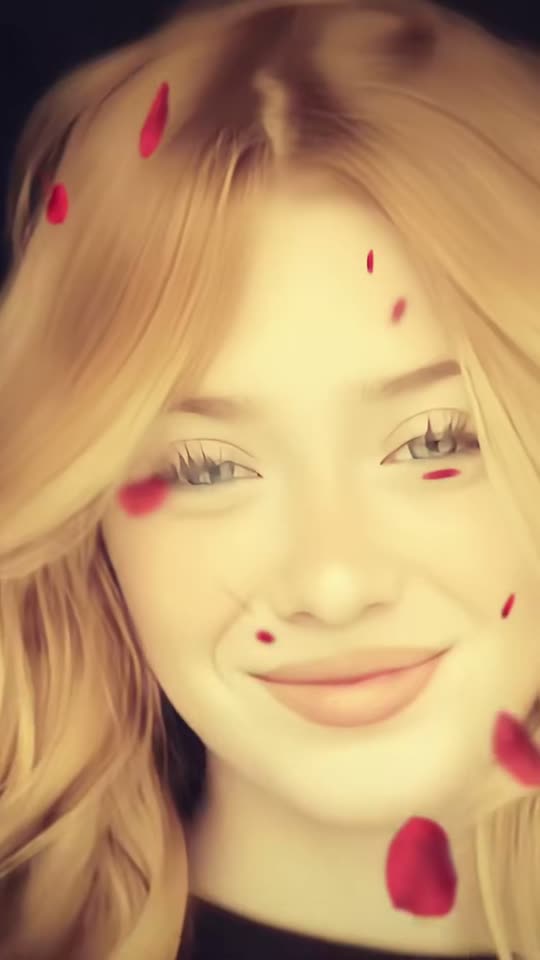
A dreamy close-up that flips from black and white to warm golden color on every beat while red rose petals fall in front of your face, on the na-na-na hook of Come & Get It. Add a selfie, a photo of you and a friend, or your pet.

The original Come and Get It reel by @1nymariaOriginal reel
  • 1 photo you add
  • 12 s clip with sound
  • 9:16 for TikTok, Reels, Shorts
  • No watermark

No prompt to write: Add your photo and tap once

Create your own

Ready in up to several minutes · 183 credits

The Come and Get It trend is the rose petal edit of late October 2026: a slow, dreamy close-up that flips between black and white and warm golden color on every beat while red rose petals fall, set to a short cut of Selena Gomez's song Come & Get It. You need one selfie, or two photos for a duo.

Also called Come & Get It edit · Come and Get It rose petal trend · Rose petal edit

Example

What the Come and Get It video looks like

These are the trend's own template clips, shown with their creators' credit. Both are 9:16 crops of the wide posts. Your video puts your face into the same edit.

Original reel by @1nymaria, 12 s

The template clip by @1nymaria that started the wave: she smiles, runs her hands through her hair and looks into the lens while the picture flips between black and white and gold and rose petals fall. Solo copies this clip.

Use this reference
Original reel by @stormcapcutx, 12 s

The night version by @stormcapcutx: the hair blows up into a bright backlight, then she sings along into the lens, with red flashes and falling petals. Night copies this clip.

Use this reference
Step by step

How to make the Come and Get It video on MakeViral

Everything runs in the browser. No editing app, no prompt to write, no watermark.

  1. Add your photo

    Press "Create your own" and add your selfie, face close and clear. Take it with the camera or pick it from your library.

  2. Press Generate

    The button shows the price. Seedance 2.5 puts your photos into the Come and Get It trend clip and copies it shot by shot for 12 seconds, with the reel's original song. You write no prompt.

  3. Download or share

    The video is ready in up to several minutes as a 9:16 MP4. Download it, share it from your phone, or find it later in My videos.

Which photo works best?

You need one photo for Solo, Night and Pet, and two for Duo.

  • Solo and Night: a close selfie or portrait, face to the camera, sharp and well lit. The whole clip is a close-up, so the face matters most. Long or short hair both work: your own hair moves the way the hair in the clip does.
  • Duo: photo 1 is the friend on the left, photo 2 the friend on the right. One person per photo, faces sharp and to the camera. Your clothes come from your photos.
  • Pet: a sharp photo of your pet's face and head, eyes open, fur colors clear.
  • No sunglasses and no hat over the face.
  • Use your own photo, a photo of an adult who said yes, or your own pet. Never a celebrity or a stranger.

Where did the Come and Get It trend start?

The trend is a CapCut template. Its sound, a 12-second cut of the na-na-na hook of Selena Gomez's 2013 song Come & Get It, was posted on TikTok on 13 October 2026. The next day the template account @1nymaria posted the first big clip: a woman with long blonde hair smiles, runs her hands through her hair and looks into the lens while the picture flips between black and white and gold and rose petals drift past. It had 2.2 million views by 7 November.

The wave came at the end of October. On 27 October @1nymaria posted a new clip that reached 3.1 million views, and the same day @stormcapcutx posted a night version, with wind-blown hair, a bright backlight and red flashes, that reached 2.6 million. Tutorials call it the Come and Get It CapCut template or the Come and Get It rose petal filter, and say the template turns one portrait photo into the clip. By 7 November the sound was in 33,000 TikTok videos, and #comeandgetit held 39,376 videos and 308 million views.

  1. The trend's sound, a 12-second cut of the hook of Come & Get It, is posted on TikTok; it is in 33,000 videos by 7 November. TikTok sound

  2. @1nymaria posts the first big Come and Get It clip: a golden and black-and-white close-up with falling rose petals; it has 2.2 million views and 159,400 likes by 7 November. TikTok

  3. @1nymaria posts a new clip on the template that reaches 3.1 million views and 307,100 likes by 7 November. TikTok

  4. @stormcapcutx posts the night version, with wind-blown hair, a bright backlight and red flashes; it has 2.6 million views and 300,200 likes by 7 November. TikTok

  5. How-to posts for the "Come & Get It" CapCut edit go up every day; the most viewed, by @hollycbw8da, has 51,400 views by 7 November. TikTok

  6. #comeandgetit holds 39,376 TikTok videos and 308 million views.

Copy and paste

The Come and Get It prompts

You do not need these: the one-tap flow runs them for you, together with the trend clip. [Image 1] and [Image 2] are your two photos, and [Video 1] is the trend clip the video copies.

Solo

1 photo: your selfie, face close and clearSeedance 2.512 s · 720p · 9:16183 credits
Video prompt

Edit [Video 1]: recreate it shot for shot, a dreamy slow-motion music edit with warm golden tones and floating rose petals: one continuous close-up of a young woman in a black top against a dark background, the same framing, the same slow push-in, the same head tilts, hair moves and mouth moves. The same edit: the whole picture flips between black and white and warm golden color on every beat, several times a second, exactly when [Video 1] flips, and red rose petals drift down slowly in front of the face all the time (dark gray in the black-and-white moments), a dreamy slow-motion look with soft grain. The ONLY change: the woman is now the person in [Image 1]. Only replace the person; the moves, the timing, the camera, the color flips and the petals stay completely unchanged. Keep everything else the same. The person = the person in [Image 1], in EVERY frame: copy the exact face from [Image 1]: face shape, eye color and eye shape, eyebrows, nose, mouth, skin tone, age, hair color, hair length and hairstyle, and any beard, moustache, glasses or freckles exactly as in the photo. Their own hair from [Image 1], loose and moving the way the woman's hair moves. The clothes from [Image 1]; a plain dark top if the photo shows only the face. The same real person in every frame, also in the extreme close-ups at the end, with the eyes closed and with the head tipped back, so their friends recognize them at once. Never morph, never drift back to the original woman's face. NO long wavy blonde hair unless [Image 1] shows it. If [Image 1] shows an animal, the person is that animal, with its own face, ears, fur and markings and the natural body volume and proportions of that animal, and paws instead of hands. The performance, second by second, as in [Video 1]: 00:00-00:02: faces the camera with a soft smile and small head tilts, mouthing the hook of the song. 00:02-00:05: lifts both hands into the hair and runs them through it, eyes closed, a playful wink, the head tipping back. 00:05-00:08: lets the hair fall, tilts the head to one side and looks into the lens. 00:08-00:12: the camera is very close, the face fills the frame: a pout, a slow smirk, a confident smile into the lens. The mouth opens, closes, pouts and smiles exactly when the woman's mouth does in [Video 1]. No dialogue throughout the entire video. No background music. Anatomy rules: one head only, on the person's shoulders. Two hands with five fingers each, only when [Video 1] shows hands. Exactly one person in the frame. No text, no captions, no logos, no watermark, no extra people, no morphing, no facial distortion.

2615 characters

Night

1 photo: your selfie, face close and clearSeedance 2.512 s · 720p · 9:16183 credits
Video prompt

Edit [Video 1]: recreate it shot for shot, a cinematic night edit: one continuous close-up of a young woman with long dark hair in a dark jacket, at night on a city street with blurred golden lights at both sides, a bright light right behind her head that backlights her hair, the wind blowing her hair up wildly, the same framing, head moves and mouth moves. The same edit: the picture flips between black and white and deep red-tinted color on every beat, exactly when [Video 1] flips, the backlit hair glows red in the color moments, and rose petals fall all the time. The ONLY change: the woman is now the person in [Image 1]. Only replace the person; the moves, the timing, the camera, the wind, the light, the color flips and the petals stay completely unchanged. Keep everything else the same. The person = the person in [Image 1], in EVERY frame: copy the exact face from [Image 1]: face shape, eye color and eye shape, eyebrows, nose, mouth, skin tone, age, hair color, hair length and hairstyle, and any beard, moustache, glasses or freckles exactly as in the photo. Their own hair color and length from [Image 1], blown up by the wind the way the woman's hair is. The clothes from [Image 1]; a dark jacket if the photo shows only the face. The same real person in every frame, also in the dark moments and when hair crosses the face, so their friends recognize them at once. Never morph, never drift back to the original woman's face. If [Image 1] shows an animal, the person is that animal, with its own face, ears, fur and markings and the natural body volume and proportions of that animal. The performance, second by second, as in [Video 1]: 00:00-00:04: the head tipped back, eyes half closed, the hair blowing up into the bright light. 00:04-00:07: lowers the head to the camera, hair whipping across the face, lips parted. 00:07-00:12: looks into the lens and sings along with the mouth open, the hair glowing red at the edges. The mouth opens and closes exactly when the woman's mouth does in [Video 1]. No dialogue throughout the entire video. No background music. Anatomy rules: one head only, on the person's shoulders. Exactly one person in the frame. No text, no captions, no logos, no watermark, no extra people, no morphing, no facial distortion.

2276 characters

Duo

2 photos: friend on the left + friend on the rightSeedance 2.512 s · 720p · 16:9183 credits
Video prompt

Edit [Video 1]: recreate it shot for shot, a dreamy slow-motion music edit with warm golden tones and floating rose petals: two young women side by side from the chest up, in front of a large world map board, one continuous shot, the same framing, poses, head moves and mouth moves. The same edit: the whole picture flips between black and white and warm golden color on every beat, several times a second, exactly when [Video 1] flips, and red rose petals drift down slowly in front of the face all the time (dark gray in the black-and-white moments), a dreamy slow-motion look with soft grain. The ONLY change: the two women are now the people in [Image 1] and [Image 2]. Only replace the people; the moves, the timing, the camera, the color flips and the petals stay completely unchanged. Keep everything else the same. Both change: no one from the video stays, also when a head turns away. The woman on the LEFT = the person in [Image 1], in EVERY frame: copy the exact face from [Image 1]: face shape, eye color and eye shape, eyebrows, nose, mouth, skin tone, age, hair color, hair length and hairstyle, and any beard, moustache, glasses or freckles exactly as in the photo. The woman on the RIGHT = the person in [Image 2], in EVERY frame: copy the exact face from [Image 2]: face shape, eye color and eye shape, eyebrows, nose, mouth, skin tone, age, hair color, hair length and hairstyle, and any beard, moustache, glasses or freckles exactly as in the photo. [Image 1] is the sole face reference for the left person, [Image 2] for the right person, [Video 1] is for the poses, the moves, the mouths and the camera only. Never blend or swap their faces. Each face stays the same from the first frame to the last, so their friends recognize them at once. Never drift back to the original women's faces. Each wears the clothes from their own photo: NO graduation caps, NO black gowns and NO gold stoles unless the photos show them. If an image shows an animal, that person is that animal, with its own face, fur and markings and the natural body volume and proportions of that animal. The performance, second by second, as in [Video 1]: 00:00-00:06: both face the camera; the left one smiles calmly, the right one holds one hand up by her face in a playful pose and sways toward the left one. 00:06-00:09: the right one turns her face toward the left one and both smile wide into the lens. 00:09-00:12: the left one keeps smiling into the lens, the right one turns her head away to the right, the hair swinging. The mouths open, close and smile exactly when the women's mouths do in [Video 1]. No dialogue throughout the entire video. No background music. Anatomy rules: one head per person, on their own shoulders. Exactly two people. Five fingers on each hand. No readable words on the board, no text, no captions, no logos, no watermark, no extra people, no morphing, no facial distortion.

2903 characters
Pet

1 photo: your pet, face clearSeedance 2.512 s · 720p · 9:16183 credits
Video prompt

Edit [Video 1]: recreate it shot for shot, a dreamy slow-motion music edit with warm golden tones and floating rose petals: one continuous close-up against a dark background, the same framing, the same slow push-in, the same head tilts. The same edit: the whole picture flips between black and white and warm golden color on every beat, several times a second, exactly when [Video 1] flips, and red rose petals drift down slowly in front of the face all the time (dark gray in the black-and-white moments), a dreamy slow-motion look with soft grain. The ONLY change: the young woman is now the pet in [Image 1]. Only replace the woman with the pet; the timing, the camera, the color flips and the petals stay completely unchanged. Keep everything else the same. The pet = the pet in [Image 1], in EVERY frame: the same species and breed, face, eyes, ears, muzzle, fur colors, fur length and markings as in [Image 1], with the natural body volume and proportions of that animal: never flattened, squashed, stretched or merged with anything. Whether [Image 1] shows a dog, a cat or another animal, it stays that animal, its head and shoulders filling the close-up like the woman's. The same pet in every frame, also in the extreme close-ups at the end, so its owner recognizes it at once. Never drift back to the woman: NO human face, NO human hair, NO black top. The performance, second by second, as in [Video 1]: 00:00-00:02: faces the camera, small head tilts, the mouth opening a little on the beat. 00:02-00:05: lifts both front paws up beside its head, eyes closed, the head tipping back, the fur ruffling. 00:05-00:08: lowers the paws, tilts the head to one side and looks into the lens. 00:08-00:12: the camera is very close, the face fills the frame: a slow blink, a proud, confident look into the lens. No dialogue throughout the entire video. No background music. Anatomy rules: one head only, one muzzle, natural teeth and tongue. Animal paws, never human hands. No extra animals, no people. No text, no captions, no logos, no watermark, no morphing.

2065 characters

How many credits does it cost?

You pay per video in credits, and the create page shows the exact price on the Generate button before you spend anything. The one-tap price covers the video, made in one step from your photos and the trend clip, charged once. One video is 183 credits, so the smallest one-time pack that covers it is $39.99 for 450 credits, with no subscription. The cheaper models are there if you run the prompts by hand in AI Video.

Video modelSettingsCredits
Seedance 2.5 (this template)12 s, 720p, copies the trend clip, one tap183

One-time packs and plans are on the pricing page. A failed video gives its credits back.

What happens in the Come and Get It edit, second by second?

Solo copies the clip that started the trend. It is one close-up with a slow push-in, and the picture flips between black and white and warm golden color on the beat the whole time:

TimeWhat you see
0 to 2 sYou face the camera with a soft smile and small head tilts, on the na-na-na hook.
2 to 5 sBoth hands go up into your hair, eyes closed, a wink, the head tips back.
5 to 8 sThe hair falls, you tilt your head and look into the lens.
8 to 12 sThe camera is very close: a pout, a smirk and a confident smile.

The rose petal video effect runs all the way through: red petals drift down in front of your face, and in the black-and-white moments they turn dark gray. The exact price of each version shows on the Generate button before you spend anything. Every run is a new take, so results differ.

Solo, Night, Duo or Pet: which Come and Get It video should you make?

Press "Create your own" and pick a version, or press the button under a clip on this page.

SoloNightDuoPet
Photos1, you1, you2, you and a friend1, your pet
The lookGolden and black-and-white close-up in a dark roomNight street lights, wind-blown hair, a bright backlight, red flashesTwo friends side by side in front of a map board, golden and black-and-whiteYour pet in the golden close-up
PetalsRed rose petalsRed rose petalsRed rose petalsRed rose petals
Format9:16, 12 s9:16, 12 sWide 16:9, 12 s9:16, 12 s
SoundThe Come & Get It cut of the trend, put back on after the runThe sameThe sameThe same

Solo is the classic Come and Get It edit. Night is the darker version with the hair blowing up into the light. Duo puts you and a friend into a two-person clip of the trend, each in your own clothes. Pet gives your cat or dog the golden close-up, petals and all.

Each version copies a real clip of the trend with the best AI video models available, so the moves, the color flips and the petals stay the trend's own.

What goes wrong, and how do you fix it?

ProblemFix
Long blonde waves show up (Solo)The woman in the trend clip has them. The prompt bans them unless your photo has them; run it again.
The face looks less like you in the extreme close-ups at the endUse a sharp, close photo with the face to the camera. A far or side-on photo gives the model too little of the face.
A graduation cap or gown shows up (Duo)The friends in the clip wear them. The prompt bans them unless your photos have them; run it again.
The two faces swap or blend (Duo)Use two sharp photos with one person each, then run it again.
Your pet gets human hands (Pet)The clip has hands in the hair. The prompt asks for paws; run it again.
The model refuses a photoSome photos get refused. The credits come back; try another photo.

Which sound, caption and hashtags fit the Come and Get It trend?

Your clip comes with the sound of the clip it copies: the short cut of the na-na-na hook of Come & Get It that the whole trend uses, put back on after the run, so it is ready to post. You can turn it off on the result screen and pick the sound when you post instead. Some people post the song sped up; the trend's own sound is the cut on your clip. The song belongs to its owners, and MakeViral gives you no rights to it.

Caption ideas: "When you're ready, come and get it", "Main character energy", "POV: you tried the rose petal filter", "My cat has the main character edit now". Or write your own.

Hashtags: #comeandgetit is the big one, with 39,376 TikTok videos and 308 million views on 7 November 2026. #rosepetaltrend is new (52 videos on the same day). Keep the platform's AI label on.

Want another edit made for one face? Try the Opa Opa bouncy hair trend or the Pray For Me slow mo trend.

FAQ

Come and Get It trend questions

What is the Come and Get It TikTok trend?
It is a TikTok edit from October 2026: one dreamy close-up that flips between black and white and warm golden color on every beat while red rose petals fall, set to a 12-second cut of Selena Gomez's song Come & Get It. The first big clip, by @1nymaria on 14 October, had 2.2 million views by 7 November.
What song is used in the Come and Get It trend?
Come & Get It, Selena Gomez's 2013 single: a short cut of its na-na-na hook. It is not a Bruno Mars song; a Bruno Mars sped-up lip sync went around TikTok in the same weeks, but that is a different sound. Because of the song, many people call this one the Selena Gomez Come and Get It trend. Your clip comes with the trend's cut of Come & Get It, and you can turn it off.
Is the Come and Get It edit a CapCut template?
Yes. The Come and Get It template started in CapCut, and tutorials call it the Come & Get It edit, the rose petal edit or the Come and Get It filter. The CapCut template works only inside the app. Here an AI video generator makes the same edit from your photo, with the sound and no prompt to write.
How do I make the Come and Get It AI video with my photo?
Press "Create your own", pick Solo, Night, Duo or Pet, and add your photo, or two photos for Duo. Press Generate; the button shows the price first. You get a 12-second clip with the sound, and it waits in My videos when it is ready. You write no prompt.
Can I do the Come and Get It trend with a friend?
Yes, with Duo. Add a photo of you and a photo of your friend. The AI puts the two of you into a two-person clip of the trend, side by side, with the color flips and the falling petals, each in your own clothes. Duo is wide 16:9. Use a friend's photo only with their OK.
Can my pet do the Come and Get It trend?
Yes, with Pet. Add one sharp photo of your pet's face. Your cat, dog or other pet takes the place of the woman in the original clip: the same golden and black-and-white flips, the same falling petals, with its own fur and markings and paws instead of hands.
Is the Come and Get It trend a lip sync?
Partly. In the clips the person smiles, pouts and mouths along to the hook, and the Night clip sings along into the lens. Your video copies those mouth moves from the clip, so it is close to the words but not exact lip sync.
What prompt does the Come and Get It AI trend use?
No creator shared a prompt, and the CapCut template is closed. Our versions copy the trend's own clips with the words the tutorials use for the edit (dreamy slow motion, warm golden tones, floating rose petals, a black-and-white flip), plus rules that keep your face in every frame. You write no prompt yourself.
How long is the video and what format is it?
12 seconds, the length of the trend's sound. Solo, Night and Pet are vertical 9:16; Duo is wide 16:9 like its clip. All are MP4 files at 720p with the sound and no watermark, ready for TikTok, Reels or Shorts.
Where do I find the Come and Get It trend on Tik Tok?
Search #comeandgetit on Tik Tok: it held 39,376 videos and 308 million views on 7 November 2026. The clips by @1nymaria and @stormcapcutx are the best known. Many posts also call it the Come and Get It rose petal trend.
Is the rose petal filter real?
No. The petals, the color flips and your moves are made by AI from a still photo. Use only your own photo, a photo of an adult who agreed, or your own pet, and keep the AI label on when you post.
More trends

Other AI video templates

Template

End of Watch Locker Scene AI: Show Your Gear to the Camera

Add one photo of you. You take the place of the man in the viral AI locker scene clip: you stand in a dark locker room in black tactical gear and hold your pistol, a flash, a knife, handcuffs, a radio and a spray up to the camera, one by one, then salute. 11 seconds, wide, with the clip's sound.

Read more
Template

Bby Wow Guy AI: Put Your Face in the Guy Dancing at a Quince Meme

Dance up to the camera at a quinceañera, bite the concha, chew with full cheeks while you stare into the lens, then dance away. Add one photo and become the bby wow guy, with the song.

Read more
Template

It's My Life Dog AI: Your Dog Sings in the Car

The road rolls by on top, your dog sits buckled in below and belts out "It's My Life", stops dead, puts on sunglasses and sings on. Add one photo of your dog, your cat or yourself.

Read more
Template

Opa Opa Opa Trend AI: Bounce Your Hair to the Viral Sound

Bounce on the spot while your hair flies on every beat of "slysh ty zalip, opa opa op". Add one selfie and get the viral selfie clip with your face and the sound, or turn yourself into the anime version.

Read more
Template

Pray For Me Trend AI: The Slow Mo Dance and Run, From Your Photos

Add one photo and you do the pray for me slow mo dance in a bright room, with the song. Add two or three photos and your crew does the slow mo run past the camera, one by one.

Read more
Template

AI Concert Video: Sing and Rap on a Huge Concert Stage From One Photo

A giant blue LED wall, truss towers, sweeping spotlights and a crowd with phone lights: you are the star at the front of the stage, mic in hand, rapping, leaning low and throwing an arm in the air.

Read more

Make your own Come and Get It video

Add one photo and tap once. No prompt to write. 183 credits.

No watermark. A failed video gives its credits back. Secure checkout by Stripe.