Back

Tus Ojos Me Reflejan el Sentimiento: The Cafuné Eye Close-Up Trend

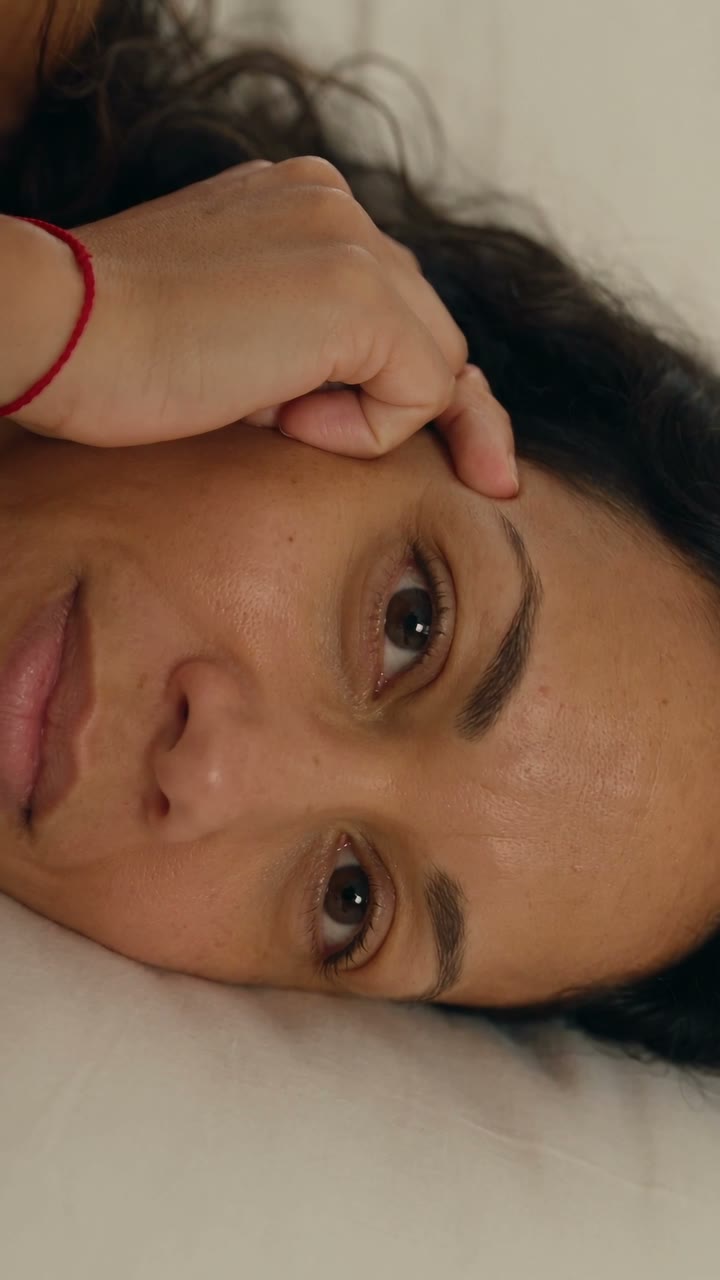
You lie on your side, a hand rests on your cheek, warm light falls on your face, and the camera slowly moves in until your eyes fill the screen while the line plays. One photo in, an 8-second vertical clip with the trend's song out.

Tus Ojos Me Reflejan example video, made with AI-made peopleAI-made
  • 1 photo you add
  • 8 s clip with sound
  • 9:16 for TikTok, Reels, Shorts
  • No watermark

No prompt to write: Add your photo and tap once

Create your own

Ready in a few minutes · 101 credits

Tus ojos me reflejan el sentimiento is the cafuné eye close-up trend, also called the foto de ojos trend: a super close photo of the eyes, the face on its side, a hand on the cheek and a line from "Cafuné" by Micro TDH. Here it becomes a short video from one face photo, a couple's two photos or a pet photo.

Also called Cafuné template · Cafuné eye close-up · Foto de ojos cafuné

Example

What the Tus Ojos Me Reflejan video looks like

Made from the Human prompt on this page with an AI-made woman, not a real person. The song is put on after the run, the same as on your video. Your result will differ from run to run.

Input photo for Tus Ojos Me Reflejan example (AI-made person)
Input
Result, 8 s, with sound

Our own run of the Human version on an AI-made woman: her face on the pillow, a hand on her cheek, then the camera moves in until her eyes fill the screen.

Step by step

How to make the Tus Ojos Me Reflejan video on MakeViral

Everything runs in the browser. No editing app, no prompt to write, no watermark.

  1. Add your photo

    Press "Create your own" and add you, face close, eyes open. Take it with the camera or pick it from your library.

  2. Press Generate

    The button shows the price. Seedance 2.5 films the Tus Ojos Me Reflejan scene straight from your photo, with no in-between picture, for 8 seconds, with the trend's original song. You write no prompt.

  3. Download or share

    The video is ready in a few minutes as a 9:16 MP4. Download it, share it from your phone, or find it later in My videos.

Which photo works best?

Use one sharp, close photo of your face with both eyes open. Your eyes fill the whole screen at the end, so they matter more than anything else.

  • Daylight or soft lamp light, in focus, looking into the lens. A selfie from arm's length is perfect.
  • No sunglasses, and nothing covering the eyes: hair, a hand or a filter.
  • Your eye color, lashes and freckles come from the photo, so skip beauty filters if you want them to look like you.
  • Couple: photo 1 is the one whose eyes fill the screen, photo 2 is the partner whose hand rests on that cheek. Use a clear face photo of each.
  • Pet: one sharp photo of your cat or dog with both eyes open and the face in view.
  • Use your own photos, or photos of an adult who said yes.

Where did the Tus Ojos Me Reflejan trend start?

The line "Tus ojos me reflejan el sentimiento, justo en tus pupilas se deduce que es real" ("your eyes reflect the feeling back to me, right in your pupils you can tell it is real") comes from the song "Cafuné" by Micro TDH. TikTok had a small hashtag for it since August 2025, with 58 videos.

The trend itself is new. In the last week of October 2026, people in Colombia and Mexico began posting one kind of photo over that part of the song: a very close shot of the eyes, the face turned on its side, a hand resting on the cheek like a caress, soft warm light, often a red string bracelet on the wrist, and the line written across the middle. Among the earliest posts we found, @zz.tey's on 24 October has 90,700 views and @secrex165's on 25 October has 81,100.

The hashtag #tusojosmereflejan started on 27 October. From 28 October, CapCut and photo app template accounts turned the look into a one-tap plantilla cafune and posted step-by-step guides; the biggest has 3.1 million views. By 7 November the hashtag had 821 videos and 10 million views.

  1. @zz.tey posts a close-up of her eyes with the line over the "Cafuné" sound, one of the earliest posts of the trend. It has 90,700 views by 7 November. TikTok

  2. The hashtag #tusojosmereflejan starts on TikTok.

  3. A template account posts a step-by-step guide with the recipe in its caption: a close photo, a hand on the cheek, only the eyes in view, soft warm light and a red string bracelet. It has 827,600 views by 7 November. TikTok

  4. @blakearia64 posts the CapCut plantilla cafune with the same recipe. It has 1.4 million views and 73,800 likes by 7 November. TikTok

  5. @willislittle2 posts the template guide that becomes the biggest post of the hashtag: 3.1 million views and 229,700 likes by 7 November. TikTok

  6. #tusojosmereflejan has 821 videos and 10 million views.

Copy and paste

The Tus Ojos Me Reflejan prompts

You do not need this: the one-tap flow runs it for you. [Image 1] is your photo: the video model takes it as a reference and films the scene straight from it, with no photo step first.

Human

1 photo: you, face close, eyes openSeedance 2.58 s · 720p · 9:16101 credits
Video prompt

One continuous close-up shot, vertical 9:16, photorealistic, like a soft phone photo that slowly comes alive. The cafuné eye close-up: a super close shot with one hand resting on the cheek like a gentle caress, showing only the eyes and part of the face. Soft, warm light gives the whole frame an intimate, tender mood. A thin red string bracelet on the wrist of that hand. Brightness and warm tones stay gentle, so the image looks soft and natural, with no exaggerated filters. THE PERSON is the person in [Image 1], in every frame: copy the exact face from [Image 1] (the face shape, eye color and eye shape, eyebrows, nose, mouth, skin tone, age, hair color, hair length and hairstyle, and any beard, moustache, glasses or freckles). The eye color, the eye shape, the eyelashes and the eyebrows come from [Image 1] exactly: they fill the picture. Keep the real skin texture, freckles and marks from [Image 1]; no beauty filter and no makeup unless [Image 1] shows makeup. The same real person from the first frame to the last, so their friends recognize them at once. Never morph, never a different face. If [Image 1] shows an animal, that animal lies there instead, with its own face, eyes and fur, and a human hand strokes its cheek. THE FRAME: they lie on their side with the head on a soft white pillow, so the face is sideways in the vertical frame: one eye above the other, the face filling the frame from the forehead to the lips. Their own hand rests lightly on the cheek below the eyes, the fingertips on the cheekbone, the wrist with the red string bracelet in view. The eyes are open and look straight into the lens. THE MOVE: [0-2.5 s] Almost still: a slow breath, the eyes calm and on the lens. [2.5-8 s] One very slow, smooth push-in toward the eyes until the two eyes fill the frame. At about 4 s, one slow blink. A warm point of light drifts across the pupils and the irises glisten. The fingers stroke the cheek once, very gently. In the last second a soft smile shows in the eyes. Avoid: cuts, a second shot, a split screen, a mirror image, extra hands or fingers, a hand over the eyes, eyes closed longer than one blink, a fast zoom, camera shake, a cartoon look, plastic skin, text, captions, lyrics, subtitles, logos, watermarks, morphing.

2267 characters

Couple

2 photos: the eyes: you, face close, eyes open + the hand: your partner, face clearSeedance 2.58 s · 720p · 9:16101 credits
Video prompt

One continuous close-up shot, vertical 9:16, photorealistic, like a soft phone photo that slowly comes alive. The cafuné eye close-up: a super close shot with one hand resting on the cheek like a gentle caress, showing only the eyes and part of the face. Soft, warm light gives the whole frame an intimate, tender mood. A thin red string bracelet on the wrist of that hand. Brightness and warm tones stay gentle, so the image looks soft and natural, with no exaggerated filters. WHO IS WHO: THE EYES are the person in [Image 1], in every frame: copy the exact face from [Image 1] (the face shape, eye color and eye shape, eyebrows, nose, mouth, skin tone, age, hair color, hair length and hairstyle, and any beard, moustache, glasses or freckles), with the eye color, eye shape, eyelashes and eyebrows exactly as in [Image 1]. THE PARTNER, whose hand rests on that cheek, is the person in [Image 2]: copy the exact face from [Image 2] (the face shape, eye color and eye shape, eyebrows, nose, mouth, skin tone, age, hair color, hair length and hairstyle, and any beard, moustache, glasses or freckles), and the skin tone of the hand matches [Image 2]. The roles come ONLY from the photo order, never from gender. Never swap them, never blend the two faces. Keep the real skin texture of both; no beauty filter. Each face stays the same from the first frame to the last, so their friends recognize them at once. THE FRAME: the two lie face to face on one soft white pillow, very close, seen from just above, both faces turned three-quarters toward the camera. The partner from [Image 2] rests one hand on the cheek of the person from [Image 1], the fingertips on the cheekbone, a thin red string bracelet on that wrist. THE MOVE: [0-2.5 s] Both faces in view, calm, foreheads almost touching; the partner looks at the person from [Image 1], who looks into the lens. [2.5-8 s] One very slow, smooth push-in toward the eyes of the person from [Image 1] until those two eyes fill the frame; the partner's face slides out of the frame, the partner's hand stays on the cheek. At about 4 s, one slow blink. A warm point of light drifts across the pupils, and a tiny reflection of the partner shows in them. The partner's thumb strokes the cheek once, very gently. In the last second a soft smile shows in the eyes. Exactly two people, two hands in view at most. Avoid: cuts, a second shot, a split screen, a mirror image, extra hands or fingers, a hand over the eyes, eyes closed longer than one blink, a fast zoom, camera shake, a cartoon look, plastic skin, text, captions, lyrics, subtitles, logos, watermarks, morphing.

2620 characters
Pet

1 photo: your pet, face close, eyes openSeedance 2.58 s · 720p · 9:16101 credits
Video prompt

One continuous close-up shot, vertical 9:16, photorealistic, like a soft phone photo that slowly comes alive. The cafuné eye close-up of a pet: a super close shot with a human hand resting on the pet's cheek like a gentle caress, showing only the eyes and part of the face. Soft, warm light gives the whole frame an intimate, tender mood. A thin red string bracelet on the wrist of that hand. Brightness and warm tones stay gentle, so the image looks soft and natural, with no exaggerated filters. THE PET is the pet in [Image 1], in every frame: the same species and breed, face, eyes, eye color, ears, muzzle, whiskers, fur colors, fur length and markings as in [Image 1], with the natural proportions of that animal: never flattened, squashed, stretched or merged with anything. Its owner recognizes it at once. It keeps its own animal face: no human eyes, no human expression. THE FRAME: the pet lies on its side with its head on a soft white blanket, so its face is sideways in the vertical frame: one eye above the other, the face filling the frame. One human hand (no face, no body) rests lightly on its cheek, the fingertips in the fur, the wrist with the red string bracelet in view. The eyes are open and look into the lens. THE MOVE: [0-2.5 s] Almost still: a slow breath, the whiskers move a little. [2.5-8 s] One very slow, smooth push-in toward the eyes until the two eyes fill the frame. At about 4 s, one slow, content blink. A warm point of light drifts across the pupils and the eyes glisten. The fingers stroke the cheek once, very gently; the pet leans into the hand. One animal and one human hand only. Avoid: cuts, a second shot, a split screen, a mirror image, extra hands or fingers, a hand over the eyes, eyes closed longer than one blink, a fast zoom, camera shake, a cartoon look, plastic skin, text, captions, lyrics, subtitles, logos, watermarks, morphing.

1889 characters

How many credits does it cost?

You pay per video in credits, and the create page shows the exact price on the Generate button before you spend anything. The one-tap price covers the scene photo and the video, charged once. One video is 101 credits, so the smallest one-time pack that covers it is $13.99 for 150 credits, with no subscription. The cheaper models are there if you run the prompts by hand in AI Video.

Video modelSettingsCredits
Seedance 2.5 (this template)8 s, 720p, straight from your photos, one tap101

One-time packs and plans are on the pricing page. A failed video gives its credits back.

What happens in the tus ojos me reflejan trend video?

Your clip follows the look of the cafuné photo template and brings it to life with a slow push-in:

TimeWhat you see
0-2.5 sYou lie on your side with your head on a white pillow, your face turned sideways in the frame, one eye above the other. Your hand rests on your cheek, a thin red string bracelet on the wrist. Warm, soft light. You look into the lens.
2.5-8 sThe camera moves in very slowly until your eyes fill the screen. You blink once, a warm light drifts across your pupils, your fingers stroke your cheek, and a soft smile shows in your eyes.

The song starts at its first line, and the famous line "Tus ojos me reflejan el sentimiento, justo en tus pupilas se deduce que es real" plays from about 3 seconds to the end.

Why does it work? It is the most intimate frame a phone can take: just the eyes, a touch and one line about love. Captions on the big posts call it the ideal format to dedicate to someone, and the comments fill up with people tagging their special person.

Human, Couple or Pet: which version should you pick?

VersionPhotosWhat you get
Human1: youYour own eye close-up, your hand on your cheek. The classic trend.
Couple2: you, then your partnerBoth faces close on one pillow, your partner's hand on your cheek, then the camera moves into your eyes, with your partner reflected in them. The eye trend TikTok couple version, the foto de ojos en pareja.
Pet1: your petYour cat or dog lies on its side while a hand strokes its cheek, and the camera moves into its eyes. It ends on a slow blink.

Every version is 8 seconds, vertical 9:16, with the trend's song put on after the video. The video is made straight from your photos with the best AI video models available, with no in-between picture, so the faces stay close to your photos. You write no prompt, and the exact price shows on the Generate button before you spend anything.

How do you add the lyric line, and what should you post it with?

On TikTok, the line is written across the middle of the photo. Your video comes without text on purpose: AI often misspells a long Spanish line. Add it in the TikTok or CapCut text tool when you post, in a plain dark grey or white sans serif, over your hand:

Tus ojos me reflejan el sentimiento, justo en tus pupilas se deduce que es real.

The song is already on your video. You can turn it off on the result screen if you want to pick the TikTok sound yourself.

Hashtags: #tusojosmereflejan (10 million views by 7 November 2026), #cafune and #microtdh. Keep the platform's AI label on.

What goes wrong: the eyes can come out a little different from your photo when the photo is dark, far away or filtered, so use a sharp close selfie in daylight. A hand can sometimes cover more of the face than you want; run it again. Every run is a new take.

Want another eye trend? Put your initials in your eyes with the couple eye trend, or become an anime twin with the anime eye trend.

FAQ

Tus Ojos Me Reflejan trend questions

What is the tus ojos me reflejan el sentimiento trend?
It is the cafuné trend, a TikTok photo trend from Colombia and Mexico that started in late October 2026. People post a super close photo of their eyes, the face on its side, a hand resting on the cheek and warm soft light, with the line "Tus ojos me reflejan el sentimiento, justo en tus pupilas se deduce que es real" from the song "Cafuné" by Micro TDH. The hashtag #tusojosmereflejan had 10 million views by 7 November 2026.
What song is the cafune TikTok trend?
"Cafuné" by Micro TDH. The trend uses the start of the song: "Me mostraste lo importante que es amar", then the line "Tus ojos me reflejan el sentimiento, justo en tus pupilas se deduce que es real". On this page the song is put on your video after it is made.
What does cafuné mean?
The cafuné meaning comes from Portuguese: it is a word for the gentle act of running your fingers through someone's hair or stroking their face with love. That is why the trend shows a hand resting on the cheek. The song "Cafuné" by Micro TDH gave the template its name, the plantilla cafune.
What do the lyrics, the letra, mean in English?
"Tus ojos me reflejan el sentimiento, justo en tus pupilas se deduce que es real" means "Your eyes reflect the feeling back to me, right in your pupils you can tell it is real." The cafune Micro TDH lyrics are about a love you can see in someone's eyes, so the trend is a close-up of the eyes.
How do I make the eye close up trend with AI?
Press "Create your own", pick Human, add one sharp, close photo of your face with your eyes open and press Generate. You get an 8-second vertical video: you lie on your side with your hand on your cheek, and the camera moves in until your eyes fill the screen, with the trend's song. You write no prompt.
Is there an eye close up trend prompt?
No creator shared an AI prompt, so there is no trending prompt to copy: the trend started as a CapCut and photo app template. The template's own recipe, repeated in the captions of the big posts, is the base of our prompt: a close photo, one hand resting on the cheek, only the eyes and part of the face in view, soft warm light, a red string bracelet, and gentle warm tones without heavy filters. We added the slow push-in and the blink for the video.
Can I do the eye trend TikTok couple version?
Yes. Pick Couple and add two photos: photo 1 is the one whose eyes fill the screen, photo 2 is the partner whose hand rests on that cheek. Both faces show at the start, close together on one pillow, then the camera moves into the eyes of photo 1, with a tiny reflection of the partner in them.
Can I make it with my cat or dog?
Yes. Pick Pet and add one sharp photo of your pet with both eyes open. Your pet lies on its side, a hand strokes its cheek, and the camera moves in until its eyes fill the screen, ending on a slow blink.
Does the video have the lyric text on it?
No. AI video models often misspell a long Spanish line, so the video comes without text. Add the line in the TikTok or CapCut text tool when you post; the page above has it ready to copy.
How long is the video, and does it have sound?
8 seconds, vertical 9:16, 720p, as an MP4 file. It comes with the trend's song from its first line, and the famous line plays from about 3 seconds to the end. You can turn the song off on the result screen.
Does it cost credits?
Yes. Each video costs credits, and the create page shows the exact price on the Generate button before you spend anything. If a video fails, the credits come back.
¿Cómo hacer el trend de tus ojos me reflejan el sentimiento con IA?
Toca "Create your own", elige Human y sube una foto de cerca de tu cara con los ojos abiertos. La IA te acuesta de lado con la mano en la mejilla, con luz cálida, y la cámara se acerca hasta que tus ojos llenan la pantalla, con la canción "Cafuné" de Micro TDH. Es un video vertical de 8 segundos. La frase la agregas como texto al publicar.
¿Se puede hacer la foto de ojos en pareja o con mi mascota?
Sí. Elige Couple y sube dos fotos: la foto 1 es quien muestra los ojos y la foto 2 es la pareja que pone la mano en la mejilla. Con Pet subes una foto de tu gato o perro y la cámara se acerca a sus ojos. Es la misma plantilla de ojos del trend de ojos de TikTok, en video.
Can I get the tus ojos me reflejan el sentimiento plantilla for CapCut instead?
This page makes a video, not a CapCut file. The CapCut and photo app templates of the trend turn your photo into the eye trend TikTok picture with the line; here an eye close up AI video moves into your eyes with the song, from the same kind of photo. Keep the AI label on when you post it.
More trends

Other AI video templates

Template

End of Watch Locker Scene AI: Show Your Gear to the Camera

Add one photo of you. You take the place of the man in the viral AI locker scene clip: you stand in a dark locker room in black tactical gear and hold your pistol, a flash, a knife, handcuffs, a radio and a spray up to the camera, one by one, then salute. 11 seconds, wide, with the clip's sound.

Read more
Template

Bby Wow Guy AI: Put Your Face in the Guy Dancing at a Quince Meme

Dance up to the camera at a quinceañera, bite the concha, chew with full cheeks while you stare into the lens, then dance away. Add one photo and become the bby wow guy, with the song.

Read more
Template

It's My Life Dog AI: Your Dog Sings in the Car

The road rolls by on top, your dog sits buckled in below and belts out "It's My Life", stops dead, puts on sunglasses and sings on. Add one photo of your dog, your cat or yourself.

Read more
Template

Le Dije a ChatGPT Que Me Pusiera Esto: Your AI Look Change

Add one selfie and pick a look from the trend: glasses and braces, blue eyes and long lashes, or tattoos and piercings. You get the same photo of you, with the new look on, ready for your "lo que me dio" reveal.

Read more
Template

Anime Face Trend: Your Own Anime Twin in the Star Eye Photo

Add one selfie. AI draws an original anime version of you, cuts a star from its face, puts it right over your eye and adds three or four anime stickers of your twin around you.

Read more
Template

Couple Eye Trend: Your Initials Drawn in Red Eye Veins

Upload a close face photo of you and one of your partner, then type two letters. You get one extreme close-up photo: your eyes cheek to cheek, and red veins in the white of each eye spell the other one's initial.

Read more

Make your own Tus Ojos Me Reflejan video

Add one photo and tap once. No prompt to write. 101 credits.

No watermark. A failed video gives its credits back. Secure checkout by Stripe.