Back

Pixie Cut Filter: See Yourself With a Short, Layered Pixie Haircut

Add one clear photo of your face. AI gives you a short, layered pixie haircut with soft, wispy layers and your own hair color, as a photo or a short before-and-after reveal video. No scissors, no regrets.

The original Pixie Cut Filter reel by @justwengieOriginal reel
  • 1 photo you add
  • 2K photo you can turn into a video
  • 9:16 for TikTok, Reels, Shorts
  • No watermark

No prompt to write: Add your photo and tap once

Create your own

Ready in a few minutes · Photo · From 3 credits

The pixie cut filter is the AI photo trend where people turn one selfie into a picture of themselves with a short, layered pixie haircut. It started in the Philippines in November 2026, with a shared ChatGPT haircut prompt and before-and-after posts. Here, you add one photo and AI does the rest.

Also called pixie layered haircut trend · layered pixie haircut AI photo · ChatGPT haircut trend · short hair AI trend

Example

What the Pixie Cut Filter photo looks like

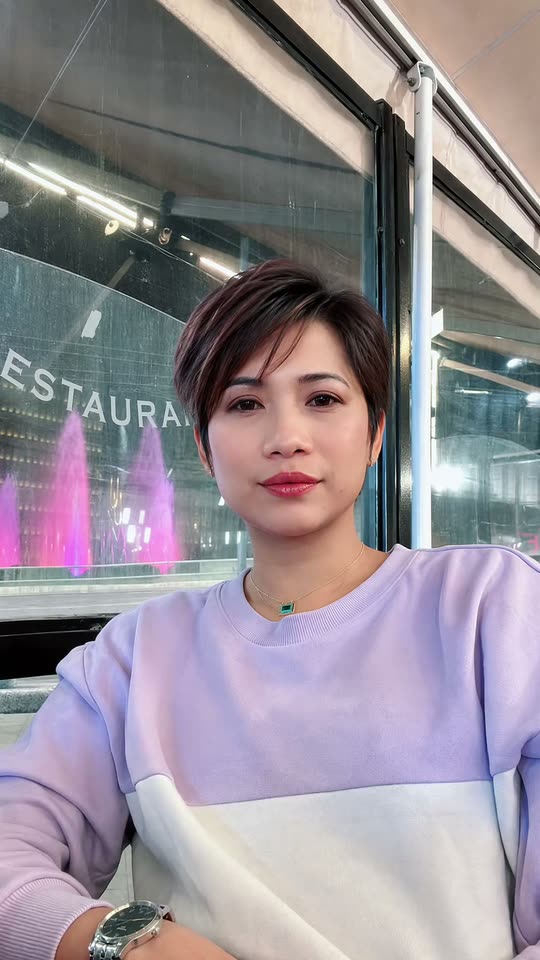
This is a creator's own before-and-after from the trend, made with an AI template from one photo of her, with the template's sound. Pixie photo gives you one new still photo of you with the cut; Reveal video gives you a 10-second before-and-after clip. No two runs come out the same.

Original reel by @justwengie, 15 s

The original reel by @justwengie: she sits still with her long hair down, and in one second it turns into a short, layered pixie with soft side bangs. An AI template made it from one photo of her: nothing was cut.

Step by step

How to make the Pixie Cut Filter photo on MakeViral

Everything runs in the browser. No editing app, no prompt to write, no watermark.

  1. Add your photo

    Press "Create your own" and add your photo, face to the camera. Take it with the camera or pick it from your library.

  2. Press Generate

    The button shows the price. Nano Banana 2.1 puts your photo into the Pixie Cut Filter scene and makes one 2K photo. You write no prompt.

  3. Download or share

    The photo is ready in a few minutes as a 9:16 2K image. Download it, share it from your phone, turn it into a video, or find it later in My videos.

Which photo works best?

Upload one photo of one person, face to the camera. It works for Pixie photo and Reveal video.

  • Face the camera in good light, from the chest up, with the face large and sharp. Daylight shows your true hair color, and the cut keeps it.
  • Hair in view. Long or medium hair shows the change best, but any length works: the result is always the same short, layered pixie.
  • No sunglasses, no hat, no hair clip, and no hand in front of the face.
  • Reveal video: take the photo where you want the video to happen. The clip keeps that place and your clothes.
  • Pet: one pet, head and face in view, in good light. Fluffy and long-haired pets change the most.
  • Use your own photo, or a photo of a friend who said yes. Never a child, a celebrity or a stranger.

Where did the Pixie Cut Filter trend start?

The pixie layered haircut trend started in the Philippines in the first days of November 2026, after a Filipina actress showed a new short, layered pixie cut and fans wanted to see the same look on themselves. Nobody wanted to cut their hair to find out, so they asked AI instead: upload a selfie to ChatGPT, Gemini or the Hypic app with a pixie layered haircut prompt, or use a CapCut template, and post the before-and-after.

The first how-to to pass a million views came from @dreamina_tao on 2 November; by 9 November it had 1.4 million views. The next day two more how-tos took off: @lisa602275's reached 2.1 million views and @farhanikeda's 2.5 million, with 76,400 likes and 34,000 shares. The prompt itself spread word for word in captions and comments. Filipinos abroad carried it into the Gulf states, Greece and Singapore, and the before-and-after reveals kept coming every day.

  1. @dreamina_tao posts a how-to for the pixie layered haircut photo with Hypic and ChatGPT; it is the first post of the trend to pass a million views (1.4 million views and 27,800 likes by 9 November). TikTok

  2. @dimpledcmbr shares the full prompt in a caption: "Give the person in this photo a short, layered pixie haircut ...". The same words show up again in comments under the biggest how-tos. TikTok

  3. @lisa602275's pixie layered haircut how-to goes up; it has 2.1 million views by 9 November, and its sound is in 707 TikTok videos, most of them CapCut before-and-after reveals. TikTok

  4. @farhanikeda posts the biggest how-to of the trend: 2.5 million views, 76,400 likes and 34,000 shares by 9 November. TikTok

  5. @justwengie, a Filipina in Athens, posts her own before-and-after: long hair to a short, layered pixie in one second. It is the example on this page. TikTok

Copy and paste

The Pixie Cut Filter prompts

You do not need this: the one-tap flow runs it for you. The photo prompt puts your photo into the scene. Want to change it? Copy it and edit it in AI Photo.

Pixie photo

1 photo: your photo, face to the cameraNano Banana 2.1Photo · 2K · 9:163 credits
Photo prompt

Give the person in this photo a short, layered pixie haircut. Keep the haircut feminine, modern, and slightly textured, with soft, wispy layers on top, natural volume at the crown, neatly tapered sides, and a slightly longer, feathered back. Make the hairstyle look natural and effortless, with realistic hair strands and texture. Keep the original hair color. Soft side-swept bangs over the forehead, the ears partly showing, the same highlights as in the photo. Keep everything else exactly as in the photo: the face, the expression, the skin, the makeup, the glasses, the jewelry, the clothes, the pose, the background and the light, like a real phone photo taken right after a salon visit. Vertical 9:16: if the photo is wider, extend the background naturally. Nobody added. No hair clips, no hat, no text, no logos, no watermark, no filter look. The only change is the haircut: the identity rules below apply to the face and the hair color, and the hairstyle is the new pixie cut described above.

1001 characters

Reveal video

1 photo: your photo, face to the cameraSeedance 2.510 s · 720p · 9:16126 credits
Video prompt

A viral AI haircut reveal video: the person from [Image 1] goes from their own hair to a short, layered pixie haircut in one quick, smooth change, filmed like a real phone video on a stand. Photorealistic, natural light, fine phone-camera grain, vertical 9:16. The person is the one in [Image 1], in every frame: copy the exact face from [Image 1] (the face shape, eye color and eye shape, eyebrows, nose, mouth, skin tone, age, and any beard, moustache, glasses, piercings or freckles), and the clothes and any jewelry from [Image 1]. The same face from the first frame to the last, so their friends recognize them at once, also during the change. Never morph the face, never beautify, never change the age. THE HAIR. 0-2 s: exactly the hair from [Image 1], with the same color, highlights, length, texture and parting. From 3 s to the end: the same hair color and highlights, cut into a short, layered pixie haircut: feminine, modern, and slightly textured, with soft, wispy layers on top, natural volume at the crown, neatly tapered sides, a slightly longer, feathered back and soft side-swept bangs. The hair color never changes. If the hair in [Image 1] is already short, it becomes this neat layered pixie. The place is the place behind the person in [Image 1], with the same walls and light; if [Image 1] shows little of it, a plain, bright room. The phone stands still in front of the person, framed from the chest up, the face large and sharp. One continuous shot, no cuts. 0-2 s: the person sits still and looks calmly into the camera, with one blink. 2-3 s: in one smooth, quick change, the long hair shortens and settles into the layered pixie cut, like a before-and-after; the face, the clothes, the light and the place do not change. 3-6 s: they turn the head slowly to one side and back, so the tapered sides and the feathered back show, then touch the soft layers on top with one hand. 6-10 s: they look into the camera with a soft, happy smile and a small nod. Audio: a soft whoosh at the change, quiet room tone and a small happy laugh. No music, no lyrics, no talking. Anatomy rules: one head, two hands, five fingers on each hand. Exactly one person: no hairdresser, nobody else. No scissors, no cut hair falling. No text, no captions, no logos, no watermark.

2285 characters

Pet

1 photo: your pet, head and face in viewNano Banana 2.1Photo · 2K · 9:163 credits
Photo prompt

Give the pet in this photo a short, layered pixie-style groom. Keep the groom cute, modern, and slightly textured, with soft, wispy layers of fur on top of the head, natural volume at the crown, neatly trimmed short fur on the cheeks and the body, and slightly longer, feathered fur at the back of the head and on the ears. Make the groom look natural and effortless, with realistic fur strands and texture. Keep the original fur colors and markings. Keep everything else exactly as in the photo: the face, the eyes, the nose, the shape of the ears, the collar or clothes, the pose, the background and the light, like a real phone photo taken right after a visit to the groomer. Photorealistic, not a drawing, not a 3D render. Vertical 9:16: if the photo is wider, extend the background naturally. Exactly one animal and no people. No bows, no clips, no hat, no text, no logos, no watermark. The only change is the fur length and the groom: the identity rules below apply to the pet's face, eyes, ears, fur colors and markings, and the groom is the new short, layered cut described above.

1088 characters

How many credits does it cost?

You pay per photo in credits, and the create page shows the exact price on the Generate button before you spend anything. The one-tap price covers one 2K photo, charged once. One photo is 3 credits, so the smallest one-time pack that covers it is $9.99 for 100 credits, with no subscription. A smaller 1K photo costs less if you run the prompt by hand in AI Photo.

ModelSettingsCredits
Pixie photo: Nano Banana 2.1 (this template)2K photo, 9:16, one tap3
Reveal video: Seedance 2.5 (this template)10 s, 720p, straight from your photos, one tap126
Pet: Nano Banana 2.1 (this template)2K photo, 9:16, one tap3
Nano Banana 2.1 (by hand in AI Photo)1K photo, 9:16, same prompt2

One-time packs and plans are on the pricing page. A failed photo gives its credits back.

What does the pixie cut filter make?

Three versions, all from one photo:

VersionWhat you get
Pixie photoOne 2K vertical photo of you with a short, layered pixie haircut: soft, wispy layers on top, natural volume at the crown, neatly tapered sides, a slightly longer, feathered back and soft side bangs. Your face, your hair color, your clothes and the place stay as in your photo.
Reveal videoA 10-second vertical before-and-after: you look into the camera with your own hair, it turns into the pixie in one smooth change, then you turn your head and smile so the layers show. 720p, with its own soft sound (a whoosh and a small laugh, no music).
PetOne photo of your dog or cat with a short, layered groom in the same style, with its own face and fur colors.

Pixie photo uses the same pixie layered haircut prompt the trend shared, run by a top AI image model. Reveal video is made by top-quality AI video models straight from your photo, with no in-between picture, so the face stays close to yours. The trend's sounds are not in the result: to post it like the trend, add a trending sound in TikTok.

The create page shows the exact price on the Generate button before you spend anything, and every run is a new take.

Is there a pixie layered haircut prompt? The one the trend uses

Yes. This is the ChatGPT haircut prompt the trend shared, word for word, from a creator's caption on 3 November 2026; the same words then spread in comments under the biggest how-tos:

Give the person in this photo a short, layered pixie haircut inspired by [the actress]'s hairstyle. Keep the haircut feminine, modern, and slightly textured, with soft, wispy layers on top, natural volume at the crown, neatly tapered sides, and a slightly longer, feathered back. Make the hairstyle look natural and effortless, with realistic hair strands and texture. Keep the original hair color.

It works as a pixie cut prompt in ChatGPT, and as a pixie cut Gemini prompt too. Pixie photo uses it without the actress's name, plus the soft side bangs from the trend's captions and rules that keep your face, clothes and background as they are. You do not need to copy anything: the prompt is already built in.

Pixie photo or Reveal video: which one should you make?

  • Pixie photo is the trend as most people post it, and the quick way to answer "what would I look like with a pixie cut?" before you book a real one. Post your selfie and the result side by side as a before-and-after.
  • Reveal video is the before-and-after as one clip, like the CapCut reveals on TikTok: long hair, one smooth change, then the new pixie. Pick it for TikTok or Reels.
  • Pet is the fun extra: your dog or cat with a short, layered groom.

Caption ideas: "Should I cut it?", "Pixie cut or no?", "AI gave me a pixie and now I'm scared", or "Bagay ba?" ("Does it suit me?"), the question the trend asks in Tagalog. For a chin-length cut instead, see the bob filter.

What goes wrong, and how do you fix it?

ProblemFix
The hair color changedThe prompt keeps your original hair color. Use a photo in daylight, where the color looks true.
The face looks a little differentUse a sharp, front-facing photo in good light, with no sunglasses and no hair over the face. Every run is a new take.
The cut is longer or shorter than you hopedAI reads "pixie" a little differently each time. Run it again.
Not much changesYour hair was already a short pixie. Use a photo with your hair down, where the old length shows.
The place is not your room (Reveal video)The AI only knows what your photo shows. Take the photo with more of the room behind you.
A run fails, or the model refuses a photoThe credits come back. Try another photo.
FAQ

Pixie Cut Filter trend questions

What is the pixie cut filter trend?
It is an AI photo trend from the Philippines, from November 2026: people upload a selfie to an AI tool with a pixie layered haircut prompt and post the before-and-after of themselves with a short, layered pixie haircut. It took off after a Filipina actress showed a new pixie cut, and the biggest how-tos passed 2 million views within days. People also call it the pixie haircut filter or the AI pixie haircut.
How do I use the pixie cut filter?
Press "Create your own", pick Pixie photo, Reveal video or Pet, add one clear photo and press Generate. MakeViral makes the result and puts it in My videos. You need no ChatGPT, no Hypic, no CapCut template and no prompt.
What would I look like with a pixie cut?
Pick Pixie photo and add one clear selfie. The AI pixie cut changes only your hair, into a short, layered pixie with your own hair color, so you can see the cut on your own face before a salon visit. If you are not sure, run it twice: each run is a new take on the same cut.
What is the ChatGPT haircut prompt for the pixie layered haircut?
"Give the person in this photo a short, layered pixie haircut ... Keep the haircut feminine, modern, and slightly textured, with soft, wispy layers on top, natural volume at the crown, neatly tapered sides, and a slightly longer, feathered back. Make the hairstyle look natural and effortless, with realistic hair strands and texture. Keep the original hair color." The full words, as the trend shared them, are in the section above. Pixie photo uses the same words for you.
Is there a pixie cut Gemini prompt, or an AI prompt for a pixie cut that works in any app?
The same pixie cut prompt works in ChatGPT and in Gemini: upload your photo and paste it. The trend's how-tos also use it in Hypic. On MakeViral the prompt is already built in, with extra rules that keep your face and your background.
Is there a pixie cut filter app, or a filter on TikTok, Instagram or Snapchat?
The trend did not start as a TikTok, Instagram or Snapchat filter: people made the photos with AI apps (ChatGPT, Gemini, Hypic) and CapCut templates. MakeViral works as a pixie cut filter online in your browser, so you need no app. Post the result on TikTok, Instagram or anywhere else.
Is this an AI pixie cut generator, or a short hair filter?
Both. It is an AI pixie cut generator, a pixie cut AI made for one look, the short, layered pixie of the trend, and it works like a short hair filter or a short haircut AI try-on: only the hair changes.
Does it work for men, or on short hair?
The pixie layered haircut for women is what the trend is about, and the prompt keeps the cut feminine. Men can use it too: the cast rules keep the gender of the photo. If your hair is already a short pixie, little changes; a photo with longer hair shows the change best.
Is it the same as the AI haircut filter or the bob filter?
It is the same idea as the AI haircut filter, with another cut: a short, layered pixie instead of a chin-length bob. The bob filter is its own trend, with a scissors-cut prank video; see the bob filter page for that.
Can I give my pet a pixie cut?
Yes. Pick Pet and add one photo of your dog or cat: you get a photo of your pet with a short, layered groom in the same style, with its own face, eyes and fur colors.
Does the Reveal video have sound?
Yes, its own: a soft whoosh at the change and a small laugh, with no music. The trend's TikTok sounds are not in the result; add a trending sound in TikTok when you post it.
Does the pixie cut filter cost credits?
Yes. Pixie photo and Pet cost a few credits; Reveal video costs more, because it is a video. The create page shows the exact price on the Generate button before you spend anything, and if a run fails, the credits come back.
Is my photo private?
Yes. MakeViral does not post your photo or the result anywhere or show them to other users. The result goes to your private My videos page, and you can delete it there at any time.
Where can I find a chat gpt pixie cut prompt tutorial?
The trend's how-tos on TikTok (search "pixie layered haircut prompt") show the steps in ChatGPT and Hypic. On MakeViral there is no tutorial to follow: add your photo and press Generate.
Is there a short haircut prompt for other short cuts?
This page makes one cut, the short, layered pixie. For a chin-length cut, use the bob filter; for a new hair color instead of a new cut, use the hair dye filter.
More trends

Other AI video templates

Template

Bob Filter Prank: AI Cuts Your Long Hair Into a Bob

Add one photo with your hair down. AI makes a phone video of you cutting it into a blunt, chin-length bob with scissors, or a photo of you with the new bob to send. Nothing gets cut, so tell people it is AI when you share it.

Read more
Template

You Look Lonely, I Can Fix That: The AI Hologram Video

A giant glowing hologram leans down out of a rainy neon sky to someone small on a bridge and says: "You look lonely. I can fix that." Put your faces in both roles, or make it a wallpaper.

Read more
Template

AI School Photo: Classic School Pictures From a Phone Photo

Take a photo of your child at home. MakeViral turns it into a classic picture day portrait: mottled blue backdrop, soft studio light, head and shoulders. The face stays exactly the same.

Read more
Template

AI Dog Costume: Your Dog or Cat in Any Halloween Costume

Add one photo of your dog or cat and pick a costume: a pumpkin, a hot dog, a ghost or anything you type. Add your own photo for matching costumes, or make it a short video with sound.

Read more
Template

Hair Dye Filter: AI Dyes Your Hair Burgundy From One Photo

Add one photo. AI makes a phone video of you painting burgundy dye onto your hair from a bowl, then showing off long, sleek, glossy burgundy hair and big curls, or a photo of you with burgundy hair. Nothing gets dyed, so say it is AI when you share it.

Read more
Template

Opa Opa Opa Trend AI: Bounce Your Hair to the Viral Sound

Bounce on the spot while your hair flies on every beat of "slysh ty zalip, opa opa op". Add one selfie and get the viral selfie clip with your face and the sound, or turn yourself into the anime version.

Read more

Make your own Pixie Cut Filter photo

Add one photo and tap once. No prompt to write. 3 credits.

No watermark. A failed video gives its credits back. Secure checkout by Stripe.