Back

Quiet on the Creek Dance AI: Do the Shush and the Bounce From One Photo

A finger to the lips, a head tilt and a bounce on the beat: the viral TikTok dance to Saucy Santana's "Quiet on the Creek". Add a photo of you, of two friends or of your pet and get the clip with the trend's sound.

The original Quiet on the Creek reel by @pibblefluencerOriginal reel
  • 1 photo you add
  • 8 to 15 s clip with sound
  • 9:16 for TikTok, Reels, Shorts
  • No watermark

No prompt to write: Add your photo and tap once

Create your own

Ready in a few minutes · From 49 credits

The Quiet on the Creek dance trend is the TikTok dance where you hush the camera with a finger to your lips, then bounce on the beat of Saucy Santana's "Quiet on the Creek". From one photo, MakeViral plays the dance in your own place, puts two friends into the most viewed duo take, or puts your pet into the AI dog version by a creek.

Also called Shh Quiet on the Creek dance · QOTC dance · Quiet on the Creek challenge

Example

What the Quiet on the Creek video looks like

These are the original reels: an AI-made dog for Pet and the creators' own takes for Solo and Duo. Solo takes only the moves and plays them in your photo's place; Duo and Pet put your photos into the reel itself. No two runs come out the same.

Original reel by @pibblefluencer, 15 s

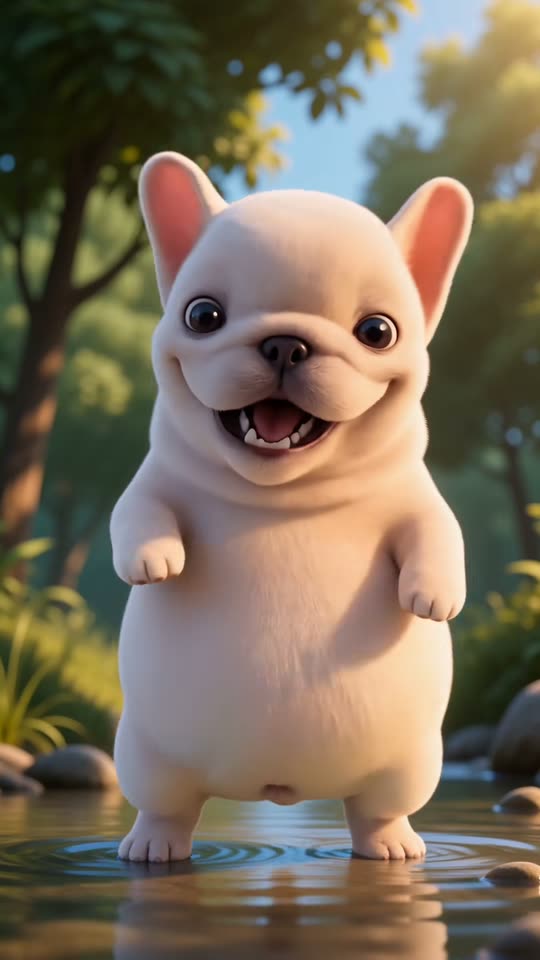
The original reel by @pibblefluencer: an AI-made dog peeks out from behind a rock, winks, bounces on its hind legs by the creek and wiggles in the water. Pet copies this reel.

Use this reference
Original reel by @lauryn.kyle0, 12 s

The original solo take by @lauryn.kyle0: she lip-syncs the creek line, leans in for the shush, flexes both arms in a deep squat, flips her hair and turns. Solo takes the moves of this clip.

Use this reference
Original reel by @angelaandchelsea, 8 s

The original duo reel by @angelaandchelsea: two friends cover their eyes, then their mouths, hush the camera and sway with open palms, in sync. Duo copies this reel.

Use this reference
Step by step

How to make the Quiet on the Creek video on MakeViral

Everything runs in the browser. No editing app, no prompt to write, no watermark.

  1. Add your photo

    Press "Create your own" and add you, head to toes. Take it with the camera or pick it from your library.

  2. Press Generate

    The button shows the price. Kling 3.0 Motion Control takes the moves of the Quiet on the Creek clip and plays them with the one in your photo, in your photo's own scene, for about 12 seconds, with the reel's original sound. You write no prompt.

  3. Download or share

    The video is ready in a few minutes as a 9:16 MP4. Download it, share it from your phone, or find it later in My videos.

Which photo works best?

You need one photo for Solo or Pet, two for Duo.

  • Solo: stand up, head to toes in view, face turned to the camera, arms away from your body. The video keeps the place and the frame of your photo, so a vertical photo in a tidy room looks best. Your clothes stay.
  • Duo: two photos, one adult in each, faces sharp and turned to the camera: photo 1 dances on the left, photo 2 on the right. Two separate full-body photos work best; the clip is a wide shot of you both.
  • Pet: a sharp photo with the whole animal in view and the face clear. Fur colors, markings and ear shape come from the photo.
  • No sunglasses, no hat that hides the face, no beauty filter. Use a photo of yourself, of an adult who agreed, or of your own pet. Never a celebrity or a stranger.

Where did the Quiet on the Creek trend start?

"Quiet on the Creek" started as a line, not a dance. On a TikTok Live, the rapper Saucy Santana told a story about fishing as a child: you have to be real quiet on the creek, or the fish swim away. The clip went around in early July 2026, and people started to use the phrase for "keep it quiet" or "keep it low-key". On 15 July he posted a teaser of a song built on the line, captioned "QOTC! 7/17" (3.1 million views by 1 November), and on 17 July @kai_lanier's "The quiet on the creek meme explained" reached 4.7 million views.

The dance grew on the song's opening, the spoken line and the beat: a shush, hands over the eyes and the mouth, a head tilt and a bounce. @lauryn.kyle0 posted an early solo take on 23 July (326,000 views), and the duo take by @angelaandchelsea on 12 August became the most viewed Quiet on the Creek dance video, with 4.1 million views. Pets joined fast: an AI-made dog dancing by a creek went up on @pibblefluencer on 11 August. In late October a car clip of streamers doing the dance brought it back, and AI templates and "madi quiet on the creek" tutorials followed from 27 October. By 1 November, #quietonthecreek had 262,723 TikTok videos and 1.82 billion views.

  1. Saucy Santana posts a teaser of the song, captioned "QOTC! 7/17"; it has 3.1 million views and 379,900 likes by 1 November. TikTok

  2. Know Your Meme explains the phrase: a line from his TikTok Live about staying quiet while fishing, turned into a song. Know Your Meme

  3. @lauryn.kyle0 posts an early solo take of the dance; it has 326,000 views and 17,300 likes by 1 November. TikTok

  4. An AI-made dog does the dance by a creek on @pibblefluencer; the clip has 78,600 views and 5,811 shares by 1 November. TikTok

  5. @angelaandchelsea post the duo take that becomes the most viewed dance clip of the trend: 4.1 million views by 1 November. TikTok

  6. #quietonthecreek has 262,723 TikTok videos and 1.82 billion views; AI versions of the dance have spread since 27 October.

Copy and paste

The Quiet on the Creek prompts

You do not need these: the one-tap flow runs them for you, together with the trend clip. [Image 1] and [Image 2] are your two photos, and [Video 1] is the trend clip the video copies.

Solo

1 photo: you, head to toesKling 3.0 Motion Control12 s · 720p · 9:1649 credits
Video prompt

Track the exact camera movement, framing, facial expressions, and body movements from the reference video. Keep the face, hairstyle, body, clothing, and overall appearance exactly the same as in the reference image, with no changes or distortion. Use the place from the reference image as the background. Keep every move of the dance in time with the beat, the finger-to-lips shush, the head tilt and the bounce, from the first move to the last. Output in 9:16 vertical format. Exactly one adult dancer, the person from the reference image, with natural human anatomy: two arms and two hands with five fingers each, also in the arm flex, the deep squat and the turn. No white tank top, no light blue flared pants, no necklace and no long brown hair unless the reference image shows them. No text, no captions, no watermark.

823 characters

Duo

2 photos: you (18+), on the left + your friend (18+), on the rightSeedance 2.58 s · 720p · 9:16122 credits
Video prompt

Recreate the reference video [Video 1] shot for shot: the same empty parking lot at night with the lit city towers far behind, the same fixed phone camera, framing, timing and dance moves, one continuous take with no cuts. The ONLY change: the dancer on the LEFT is now the person in [Image 1], and the dancer on the RIGHT is now the person in [Image 2]. Dancer on the left = the person in [Image 1], in EVERY frame: copy the exact face from [Image 1]: face shape, eye color and eye shape, eyebrows, nose, mouth, skin tone, age, hair color, hair length and hairstyle, and any beard, moustache, glasses or freckles exactly as in the photo. They wear the clothes and shoes from [Image 1]. NO black tank top, no black or denim shorts and no long straight dark hair unless [Image 1] shows them. Dancer on the right = the person in [Image 2], in EVERY frame: copy the exact face from [Image 2]: face shape, eye color and eye shape, eyebrows, nose, mouth, skin tone, age, hair color, hair length and hairstyle, and any beard, moustache, glasses or freckles exactly as in the photo. They wear the clothes and shoes from [Image 2]. NO black tank top, no black or denim shorts and no long straight dark hair unless [Image 2] shows them. The same real people in every frame, from the first second to the last, so their friends instantly recognize them, also when the hands cover the eyes and the mouth. Never morph, never drift back to the original dancers' faces, never add or remove facial hair. Do not mix the two faces: [Image 1] is only the dancer on the left, [Image 2] is only the dancer on the right. Both change: no one from the video stays. The dance, both in perfect sync, matching the reference second by second: every move of the dance in time with the beat, the finger-to-lips shush, the head tilt and the bounce, from the first move to the last. 0-0.5 s: both stand side by side facing the camera, arms loose. 0.5-1.5 s: both cover their eyes with both hands. 1.5-2.5 s: both cover their mouths with both hands. 2.5-4 s: the hands drop to the waist and both bounce on the beat, hands out at the hips. 4-4.5 s: one finger to the lips: the shush, eyes on the camera. 4.5-7 s: elbows bent, palms up and open at shoulder height, both sway side to side on the beat. 7-7.5 s: both drop the pose and step toward the camera. Anatomy rules: one head per person, on that person's own shoulders. A face never appears on hands, legs or clothes. Two arms and two hands with five fingers each. Exactly two people. No extra dancers, no text, no logos, no watermark. No dialogue throughout the entire video. No background music.

2622 characters
Pet

1 photo: your pet, whole bodySeedance 2.515 s · 720p · 9:16228 credits
Video prompt

Recreate the reference video [Video 1] shot for shot: the same sunny forest creek with round wet stones, ferns, tall trees, shallow clear water and a small turtle on a mossy rock, the same warm, soft 3D animated look and golden light, the same camera angles, cuts, timing and moves. The ONLY change: the dog who dances on its hind legs by the creek is now the pet in [Image 1]. The dancer = the pet in [Image 1], in EVERY shot: the same species and breed, head shape, muzzle, eyes, ears, fur colors, fur length, markings and body shape as in [Image 1], with the natural body volume and proportions of that animal: never flattened, squashed, stretched or merged with anything, so its owner instantly recognizes it, also in the close-up of its face. It is drawn in the reel's soft 3D animated style, but its colors, markings and ear shape come only from [Image 1]. It stands and bounces on its hind legs like a person the whole time. Never drift back to the dog of the original video: not its cream-white coat and not its big pink upright ears, unless [Image 1] shows them. If [Image 1] shows a cat or another animal, that animal dances in the same place with the same moves. Every move of the dance in time with the beat, the head tilt and the bounce, from the first move to the last, matching the reference shot by shot: Shot 1 [0-3.1 s]: wide shot: the pet peeks out from behind a big rock, steps out on its hind legs and bounces with its front paws at its chest. Shot 2 [3.1-3.9 s]: hard cut, close-up of its face: it squints and winks at the camera. Shot 3 [3.9-5.3 s]: hard cut, medium shot: it bounces on its hind legs on the stones, front paws up. Shot 4 [5.3-10.1 s]: hard cut, wide shot, the pet small at the water's edge: it bounces, turns away and wiggles its rear, then, closer again, it bounces in the shallow water with small splashes. Shot 5 [10.1-12.4 s]: hard cut, medium shot in the shallow water: a big open-mouth smile, front paws up, bouncing on the beat. Shot 6 [12.4-14.6 s]: hard cut: it turns side-on and spins to wiggle its rear at the camera, splashing. Shot 7 [14.6-15 s]: hard cut: it faces the camera again with a big smile. Anatomy rules: one head only, one tail. Two hind legs and two front legs with round furry paws, never human hands, no fingers. No people, no extra animals except the small turtle, no text, no logos, no watermark. No dialogue throughout the entire video. No background music.

2431 characters

How many credits does it cost?

You pay per video in credits, and the create page shows the exact price on the Generate button before you spend anything. The one-tap price covers the video, made in one step from your photos and the trend clip, charged once. Each version has its own price: Solo 49 credits, Duo 122 credits, Pet 228 credits. The cheaper models are there if you run the prompts by hand in AI Video.

Video modelSettingsCredits
Solo: Kling 3.0 Motion Control (this template)12 s, 720p, copies the moves of the trend clip, one tap49
Duo: Seedance 2.5 (this template)8 s, 720p, copies the trend clip, one tap122
Pet: Seedance 2.5 (this template)15 s, 720p, copies the trend clip, one tap228

One-time packs and plans are on the pricing page. A failed video gives its credits back.

What happens in each version of the Quiet on the Creek dance video?

VersionPhotosWhat you getLength
Solo1You do the dance of an early viral solo take, in the place from your photo: the creek line, a lean-in shush, both arms flexed in a deep squat, a hair flip and a turn.12 s
Duo2You and a friend take the places of the two dancers of the most viewed duo take: hands over the eyes, hands over the mouth, the shush and a sway with open palms, in sync, in a parking lot at night.about 7.5 s
Pet1Your pet takes the place of the AI dog by the creek: it peeks out from behind a rock, winks, bounces on its hind legs and wiggles in the water, in the reel's soft animated look.15 s

Solo copies the body moves and the face acting of the clip, not the dancer: your face, hair and clothes stay, and so does the place in your photo. Duo and Pet put your photos into the reel itself, so the scene, the camera and the cuts are the reel's.

All three come with the trend's sound, put back on after the run, and you can turn it off on the result screen. Press "Create your own" and pick Solo, Duo or Pet; the exact price shows on the Generate button before you spend anything. MakeViral uses top-quality AI video models, and every run is a new take, so results differ.

Quiet on the Creek dance steps, beat by beat

You do not have to learn it, but this is what the Quiet on the Creek dance tutorial clips teach, and what the Duo version copies:

  1. Stand side by side, arms loose, and catch the beat.
  2. Cover your eyes with both hands.
  3. Cover your mouth with both hands.
  4. Drop the hands to the waist and bounce.
  5. One finger to the lips: the shush, eyes on the camera.
  6. Elbows bent, palms up and open, sway side to side on the beat.

The solo takes add their own style after the shush: a lean-in, a flex, a hair flip, a turn. That is why the Solo version has its own clip.

Which sound and hashtags should you post it with?

Your clip comes with the trend's sound (Quiet on the Creek, Saucy Santana), cut to the same seconds the reel uses: his spoken creek line and the beat. We cut parts with no explicit words. You can turn the sound off on the result screen and pick the sound when you post instead. The song belongs to its owners, and MakeViral gives you no rights to it; check the music rules of the platform before you use the clip in an ad.

Hashtags: #quietonthecreek is the big one, with 262,723 TikTok videos and 1.82 billion views on 1 November 2026. Smaller tags: #quietonthecreektrend (369 videos) and #quietonthecreekdance (139 videos). The same tags work on Instagram Reels. Keep the platform's AI label on.

What goes wrong, and how do you fix it?

ProblemFix
The face looks less like you (Solo, Duo)Use a sharp photo with the face turned to the camera and good light, then run it again.
A white tank top or light blue flared pants show up (Solo)The dancer in the trend clip wears them. The prompt bans them unless your photo has them; run it again.
The legs look stiff in the squat (Solo)Use a photo where you stand, head to toes in view. A sitting photo gives the moves less to work with.
The two faces swap or blend (Duo)Use two photos with one clear face each, then run it again.
Your pet looks too much like the reel dog (Pet)The dog in the reel is cream-white with big pink ears. Use a sharp photo where the fur and the ears are clear.
Your pet looks animatedPet keeps the soft animated look of the AI reel on purpose; your pet's colors and markings come from your photo.
The video model refuses the photoSome photos get refused. The credits come back; try another photo.
FAQ

Quiet on the Creek trend questions

What is the Quiet on the Creek trend?
It is a viral TikTok trend from July 2026 built on a line by the rapper Saucy Santana: "you gotta be real quiet on the creek". People use the phrase as a meme for keeping something quiet, and they do a short dance to the song: a shush with a finger to the lips, hands over the eyes and mouth, and a bounce. By 1 November 2026, #quietonthecreek had 262,723 TikTok videos and 1.82 billion views.
What does Quiet on the Creek mean?
The Quiet on the Creek meaning is literal at first: when you fish, you stay quiet so you do not scare the fish away. Saucy Santana told that story about fishing as a child on a TikTok Live. Online it now means "keep it quiet", "keep it low-key" or "say nothing", which is why the dance starts with a shush, and why many people search for it as the shh Quiet on the Creek trend.
Who started the Quiet on the Creek trend?
Saucy Santana started it with the line on his TikTok Live and the song he teased on 15 July 2026. Where did the Quiet on the Creek trend come from as a dance? Creators made up the original Quiet on the Creek dance on the song's opening: @lauryn.kyle0 posted an early solo take on 23 July, and the duo take by @angelaandchelsea on 12 August is the most viewed dance clip, with 4.1 million views.
What song is used in the Quiet on the Creek dance TikTok trend?
It is the Quiet on the Creek song by Saucy Santana, which opens with his spoken line from the Live. The trend clips use that opening and the beat. Your MakeViral clip comes with the same seconds, cut to parts with no explicit words; the full song and its lyrics have explicit lines, so we do not use them. The song belongs to its owners, and MakeViral gives you no rights to it.
How do I make the Quiet on the Creek AI dance video?
Press "Create your own", pick Solo, Duo or Pet, and add one clear photo (two for Duo). Press Generate; the button shows the price first. You get a Quiet on the Creek AI dance video of 12 seconds (Solo), about 7.5 seconds (Duo) or 15 seconds (Pet), with the trend's sound. You write no prompt and never film yourself, and the video waits in My videos when it is ready.
Can I do the Quiet on the Creek dance as a couple or with a friend?
Yes. Pick Duo and add two photos: photo 1 dances on the left, photo 2 on the right, both adults who agreed. It copies the most viewed duo take of the Quiet on the Creek dance, in sync, so it works as a couple video, a best friends video or a sibling video. Your own clothes stay.
Can my dog or cat do the Quiet on the Creek dance?
Yes. Pick Pet. It copies the AI Quiet on the Creek dog clip from @pibblefluencer: your pet peeks out from behind a rock by a creek, winks, bounces on its hind legs and wiggles in the water. It keeps the reel's soft animated look, and the fur colors and markings come from your photo. A cat or another pet works too.
What is the Madi Quiet on the Creek AI trend?
In late October 2026 a clip of streamers doing the dance in a car went viral, and phone-editor AI templates started to put people's faces into that clip, with "madi quiet on the creek" tutorials from 27 October. Is there a Quiet on the Creek CapCut template? Yes, the CapCut ones copy that car clip. MakeViral does not use the streamers' clip: Solo copies the moves of a creator's own dance take and plays them in your photo's place.
Is Quiet on the Creek an AI song?
No. Quiet on the Creek is a song by Saucy Santana, built on his own spoken line from a TikTok Live. The AI part of the trend is the videos: AI pets doing the dance since August, and AI templates that put your face in the dance since late October. MakeViral did not make the song and has no ties to the artist.
Do I have to learn the Quiet on the Creek dance?
No. Your Quiet on the Creek dance video comes from a photo: AI plays every move, from the shush to the bounce, so you never film yourself or watch a tutorial.
Where does the background of my video come from?
Solo keeps the place from your photo, because it takes only the moves of the trend clip. Duo keeps the night parking lot of the duo reel, and Pet keeps the creek of the AI dog reel, because your photos go into those reels themselves.
Will the people from the original clips be in my video?
No. Solo plays the moves with the person in your photo, and Duo replaces both dancers of the reel with your two photos. Use photos of yourself or of adults who agreed, never a celebrity or a stranger.
How long is the video and what format is it?
Solo makes 12 seconds at 720p in the frame of your photo, so a vertical photo gives a vertical 9:16 clip. Duo makes about 7.5 seconds and Pet 15 seconds, both vertical 9:16 at 720p. All are MP4 files with the trend's sound and no watermark.
More trends

Other AI video templates

Template

Bby Wow Guy AI: Put Your Face in the Guy Dancing at a Quince Meme

Dance up to the camera at a quinceañera, bite the concha, chew with full cheeks while you stare into the lens, then dance away. Add one photo and become the bby wow guy, with the song.

Read more
Template

Bad Times AI Trend: Argue With the Camera From One Photo

Hands on the head, a hand on the hip, stop palms and a long stare at whoever is filming: the viral routine to Imael Angel's "Bad Times". Add one photo of you or your pet and get the clip with the song.

Read more
Template

Stones to Castle AI Trend: They Threw Stones, You Built a Castle

A crowd of angry women throws stones toward you across a green mountain valley. You stay calm, pick the stones up, and they rise into a huge Gothic castle while you smile down from its window. One photo, 15 seconds, with the reel's own song.

Read more
Template

Birthday Car Trend: Drift In, Lean Out, Blow Out the Candles

Add one photo and you are the driver in the viral birthday car reel: a friend holds a birthday cake with lit candles on a desert lot at sunset, you drift in, lean out of the window, blow out every candle, and the clip freezes in black and white.

Read more
Template

Toc Toc Dance AI: Do the Viral Jean Phil Dance From One Photo

One-foot hops with a knee up, a fist that knocks on an invisible door, kicks and a wide-arm finish, all on the toc toc beat. Add a photo of you, of you and a friend, or of your pet, and get the dance with the sound.

Read more
Template

Wassup in a Minute Trend: Your Own Swaying Anime Character

Your photo becomes a full-body anime drawing of you in baggy streetwear, cash in hand, on a clean white background. Then you sway side to side on the beat, just like the viral edits. One photo, 10 seconds.

Read more

Make your own Quiet on the Creek video

Add one photo and tap once. No prompt to write. 49 credits.

No watermark. A failed video gives its credits back. Secure checkout by Stripe.