Back

AI Makeup Filter: Watch Your Full Glam Happen on Video

Add one photo with a bare face. AI makes the 10-second glow-up: a makeup artist's hands do your base, eyes, liner, lashes and lips, then you open your eyes and smile in full glam.

The original AI Makeup Filter reel by @zee42867Original reel
  • 1 photo you add
  • 10 s clip with sound
  • 9:16 for TikTok, Reels, Shorts
  • No watermark

No prompt to write: Add your photo and tap once

Create your own

Ready in a few minutes · From 3 credits

The AI makeup filter is a TikTok trend where one photo turns into a full makeup video: a makeup artist's hands come into the frame, build a full glam step by step, and you end up smiling at the camera. Here you add one photo, pick a look, and AI makes the whole AI makeup video.

Also called AI Quick Makeup · AI Fast Makeup Effect · AI Instant Makeup · Instant Glow-Up · AI Makeup in Seconds · Maquillage IA

Example

What the AI Makeup Filter video looks like

This is the original reel that started the trend. Your video is a new clip made from your photo in the same style, not a copy of these shots. No two runs come out the same.

Original reel by @zee42867, 9 s

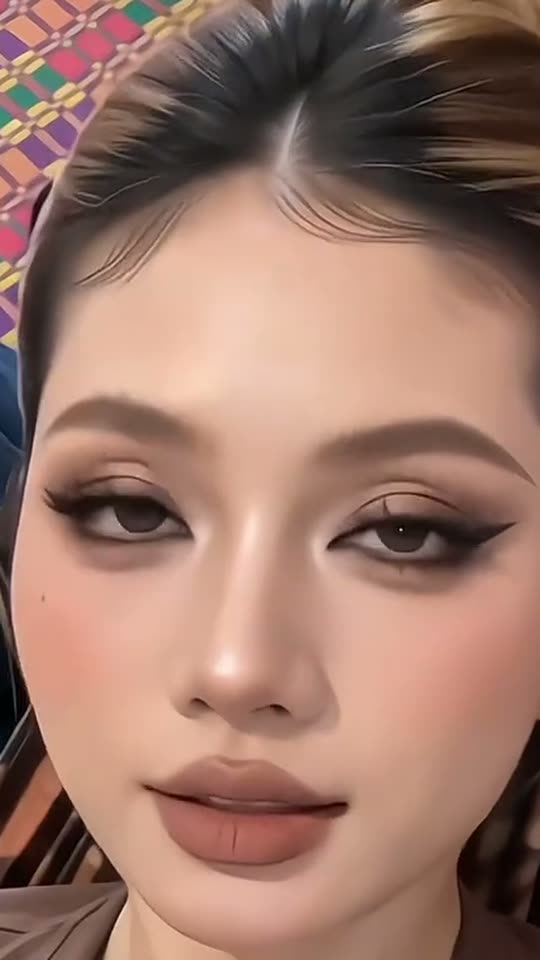
The original reel by @zee42867 (429,100 views): two results of the AI makeup template, a pink glam with flower earrings and a brown smoky soft glam, each built by a makeup artist's hands. Our template makes the same kind of video from your photo.

Step by step

How to make the AI Makeup Filter video on MakeViral

Everything runs in the browser. No editing app, no prompt to write, no watermark.

  1. Add your photo

    Press "Create your own" and add you, chest up, face clear. Take it with the camera or pick it from your library.

  2. Press Generate

    The button shows the price. Seedance 2.5 films the AI Makeup Filter scene straight from your photo, with no in-between picture, for 10 seconds with original sound. You write no prompt.

  3. Download or share

    The video is ready in a few minutes as a 9:16 MP4. Download it, share it from your phone, or find it later in My videos.

Which photo works best?

Upload one sharp photo of yourself, from the chest up, looking into the camera. A bare face or light makeup works best: the video starts from your photo and the glam builds up from there.

  • Face the camera in even light. Window light is ideal. Avoid hard shadows across the face.
  • Keep your face clear. No sunglasses, no hat, no hair over the eyes. Glasses are fine and stay on.
  • Hair back is a plus. The trend's best results show the whole face and the hairline.
  • One person per photo, and an adult. Use your own photo, or a photo of a friend who said yes. Never a celebrity, a stranger or a child.
  • Anyone can do it. The makeup works on any face; the AI keeps your own features and gender.

Where did the AI Makeup Filter trend start?

The AI makeup trend comes from a CapCut AI template called "Maquillage" (French for makeup). You add one photo and the template plays an 11-second clip: hands with a sponge and brushes do your foundation, contour, eyeshadow, liner, lashes and lips. On 25 April 2026 the template page showed 15,000 uses; on 19 October 2026 it showed 5.1 million.

The first big post was a French-language AI makeup tutorial by @y8uqc9aoz0 on 25 April 2026, captioned "AI Fast Makeup Effect Tutorial", which reached 2.2 million views. The biggest so far is @martaescalantexim's version of 10 May 2026, with 4.6 million views and 126,400 likes. Promoters then copied the same caption in many languages: "AI Quick Makeup Tutorial | Instant Glow-Up" in the Philippines, "efek AI makeup" in Indonesia, "trang điểm AI" in Vietnam, where one account's posts reached 3.1 million views in August and 1 million in September. It is not a one-week trend: on 19 October 2026 a Filipino how-to by @zee42867 passed 429,000 views, and new AI makeup TikTok posts keep coming.

  1. @y8uqc9aoz0 posts a French AI Fast Makeup Effect Tutorial for the "Maquillage" template, the first post of the trend with big views; it reaches 2.2 million views and 53,700 likes. TikTok

  2. @martaescalantexim posts the same tutorial in English; it becomes the biggest post of the trend, with 4.6 million views and 126,400 likes. TikTok

  3. The Filipino caption "AI Quick Makeup Tutorial | Instant Glow-Up" appears; @kalawakan527's post reaches 684,800 views. TikTok

  4. A Vietnamese-language post of the template by @yjzc1whu1w428 reaches 3.1 million views. TikTok

  5. @zee42867's Filipino how-to (the example on this page) reaches 429,100 views by 22 October; the template page in it shows 5.1 million uses. TikTok

Copy and paste

The AI Makeup Filter prompts

You do not need this: the one-tap flow runs it for you. [Image 1] is your photo: the video model takes it as a reference and films the scene straight from it, with no photo step first.

Glam video

1 photo: you, chest up, face clearSeedance 2.510 s · 720p · 9:16126 credits
Video prompt

A viral AI makeup video: a makeup artist's hands do a full glam on the person from [Image 1], step by step, filmed like a real phone video on a tripod. Photorealistic, soft natural light, fine phone-camera grain, vertical 9:16. The person is the one in [Image 1], in every frame: copy the exact face from [Image 1] (the face shape, eye color and eye shape, eyebrows, nose, mouth, skin tone, age, and any beard, moustache, glasses, piercings, freckles or face marks), and the hair, the clothes and any jewelry from [Image 1]. The same face from the first frame to the last, so their friends recognize them at once, also with the eyes closed and under the full makeup. The makeup only adds color: never a slimmer nose, bigger eyes, a new jaw or a lighter or darker skin tone. The eyes keep their own natural color from [Image 1]: no colored contact lenses. The place is the place behind the person in [Image 1], with the same light; if [Image 1] shows little of it, a plain, bright room in soft daylight. The camera does not move: framed from the chest up, the face large, centered and sharp. 0-1.5 s: the person, with a bare face and no makeup, looks into the camera with a small smile, then calmly closes the eyes. Two hands of an unseen makeup artist come in from the edges of the frame; one gently holds the hair back at the hairline. 1.5-3 s: a soft makeup sponge dabs foundation and concealer over the face; the skin looks smooth and even, in the person's own skin tone. 3-5 s: a fluffy brush sweeps contour, blush and highlighter along the cheekbones, then a small brush blends a warm brown and bronze smoky eyeshadow, darker in the outer corners on the closed eyelids. 5-6.5 s: a fine brush draws a sharp black winged liner, and full, fluffy lashes appear. 6.5-8 s: a lip brush paints the lips a soft nude-brown matte color with a slightly darker lip line. 8-10 s: the hands leave the frame. The person opens the eyes, looks straight into the lens and smiles in full glam: soft glam with warm brown smoky eyes, a sharp wing, full lashes, sculpted cheeks with a peach blush and a soft glow, and nude-brown matte lips. Hold that look to the end. Audio: soft brush taps and swishes and a light, upbeat original beat. No lyrics, no talking. Exactly one person on camera: the hands belong to an unseen makeup artist, and no other face, arm or body comes into the frame. Anatomy rules: one head, five fingers on each hand. The makeup stays on the face: never on the hair, the clothes or the lens. Plain, unbranded brushes and sponge: no product tubes, no palettes with names, no packaging. No text, no subtitles, no logos, no watermark.

2641 characters
Glam photo

1 photo: you, chest up, face clearNano Banana 2.1Photo · 2K · 9:163 credits
Photo prompt

Using the uploaded photo, generate a 9:16 vertical photo of the same person with a full soft glam makeup look done by a professional makeup artist: smooth, even skin in the person's own skin tone, warm brown and bronze smoky eyeshadow, a sharp black winged liner, full fluffy lashes, sculpted cheekbones with a peach blush and a soft glow, and nude-brown matte lips. Keep the face shape, the facial features, the eye color, the skin tone, the hair and the clothes exactly as in the photo: the makeup only adds color. The person looks into the camera with a small, confident smile, framed from the chest up. The place from the photo, with the same light. Realistic photo with natural skin texture under the makeup, sharp eyes and lashes. Exactly one person. No makeup tools or products in the frame. No text, no logos, no watermark.

831 characters

How many credits does it cost?

You pay per video in credits, and the create page shows the exact price on the Generate button before you spend anything. The one-tap price covers the scene photo and the video, charged once. Each version has its own price: Glam video 126 credits, Glam photo 3 credits. The cheaper models are there if you run the prompts by hand in AI Video.

Video modelSettingsCredits
Glam video: Seedance 2.5 (this template)10 s, 720p, straight from your photos, one tap126
Glam photo: Nano Banana 2.1 (this template)2K photo, 9:16, one tap3

One-time packs and plans are on the pricing page. A failed video gives its credits back.

What does the AI makeup filter make?

You get a 10-second vertical video with sound, like the AI makeup effect and AI makeup transformation clips on TikTok.

TimeWhat happens
0 to 1.5 sYou, bare-faced, smile at the camera and close your eyes. A makeup artist's hands come into the frame
1.5 to 5 sA sponge does the base in your own skin tone, then brushes add contour, blush, highlighter and eyeshadow
5 to 8 sA fine brush draws the liner, lashes appear, a lip brush paints the lips
8 to 10 sThe hands leave. You open your eyes and smile in full glam

That makes it an AI makeup before and after in one clip: your bare face at the start, the full glam at the end.

How MakeViral makes it: your photo goes straight to the best AI video models available, with no picture in between, so your face stays yours. The prompt keeps your face shape, skin tone and eye color: the makeup only adds color. The model makes its own light beat. The create page shows the exact price on the Generate button.

The AI makeup looks: Soft glam, Pink glam, Red lips, or a photo

The trend's posts show a few AI makeup looks again and again, so the video has three:

  • Soft glam (the default): soft glam makeup with warm brown smoky eyes, a sharp black wing, full lashes, a peach blush and nude-brown matte lips.
  • Pink glam: the template's signature, a pink glam makeup with a hot-pink cut crease, a sharp wing, glossy pink lips and a big pink flower earring at each ear.
  • Red lips: a classic red lip makeup with a champagne shimmer eye, a black wing and bold matte red lips.

Want a still instead? The Glam photo version gives you an AI makeup photo with the soft glam look, at a much lower price. It also works as an AI makeup look generator: try the photo first, then make the video of the look you like.

AI makeup filter vs a makeup filter on TikTok

A live makeup filter on TikTok, or a makeup filter online, paints color over your face in real time. It looks flat, and it stays a filter. The AI makeup filter trend is different: it is an AI glow up video, where you see the makeup go on, brush by brush, and the result looks like a real full glam.

The AI glow up filter clips on TikTok come from the CapCut template, and under one of the biggest posts a viewer wrote that everyone ends up looking the same. This template keeps your own face: the same eyes, nose, skin tone and face shape, under the makeup.

What goes wrong, and how do you fix it?

What goes wrongWhat our prompt does, and what you can do
The glam face looks less like youThe prompt keeps your face shape, skin tone and eye color: the makeup only adds color. A sharp, front-facing photo helps most
Your skin looks lighter or darkerThe base is asked in your own skin tone. Use a photo in natural light, not under a colored lamp
Colored eyesThe prompt bans colored lenses: your eyes keep their own color
An extra person or a face in the frameOnly the artist's hands come in: one person on camera
Odd fingers on the brush handsThe prompt asks for five fingers on each hand. Run it again if a hand looks wrong
Text, logos or product namesThe prompt bans them: the brushes and the sponge have no brand

If a run fails, the credits come back.

FAQ

AI Makeup Filter trend questions

What is the AI makeup filter trend?
It is an AI makeup trend on TikTok: one photo becomes a short video in which a makeup artist's hands do a full glam on your face, from the base to the lips, and you end up smiling at the camera. It started with a CapCut AI template in April 2026 and still gets new posts every day.
How do I do the AI makeup filter?
Press "Create your own", add one sharp photo of yourself, pick a look (Soft glam, Pink glam or Red lips) and press Generate. MakeViral makes the 10-second AI makeup video and puts it in My videos. You need no app and no template.
Is this the CapCut AI makeup template?
No, it is our own version of the trend. The capcut ai makeup posts use a template called "Maquillage", and the capcut makeup filter tutorials only show how to open it; on CapCut the template costs credits. The AI makeup filter here makes the same kind of video in the browser, with three looks and a photo version, and it keeps your own face. An older capcut makeup effect from 2025 only painted makeup on a still photo; this trend is the video one.
Is there an AI makeup tutorial or prompt for this trend?
The AI makeup tutorial posts only show the template steps; no creator has shared a prompt, because the template is closed. Our prompt is written from the trend's clips, beat by beat: the hands at the hairline, the sponge, the brushes, the liner, the lashes, the lips and the smile.
Is this an AI makeup generator?
Yes. It works as an AI makeup video generator: one photo in, a 10-second glam video out. The Glam photo version is the photo AI makeup generator: one photo in, one glam portrait out.
Is there an AI makeup filter app?
You do not need an AI makeup filter app: MakeViral works in the browser on a phone or a computer. The Glam photo version also works like an AI makeup try on: see a full soft glam on your own face before you buy or book anything.
Is it an AI glow up?
Yes. The trend's posts call it an "Instant Glow-Up", and many people search for an AI glow up or an AI glow up filter. Here it is an AI glow up you can watch happen: bare face to full glam in 10 seconds.
Can men use the AI makeup filter?
Yes. The AI keeps your own face, features and gender, and adds the makeup of the look you pick. The result is a full glam, so it suits anyone who wants the makeup trend.
What do people call this trend?
AI makeup filter, AI Quick Makeup, the AI Fast Makeup Effect, AI Instant Makeup, Instant Glow-Up and AI Makeup in Seconds. In French it is maquillage IA, and in Indonesian posts it is the efek makeup AI.
Does the video have sound?
Yes. The model makes its own light beat with soft brush sounds. You can also add a trending sound when you post it on TikTok.
Does the AI makeup filter cost credits?
Yes. The video and the photo cost credits, the create page shows the exact price on the Generate button before you spend anything, and if a run fails, the credits come back.
Is my photo private?
Yes. MakeViral does not post your photo or the video anywhere or show them to other users. The video goes to your private My videos page, and you can delete it there at any time.
More trends

Other AI video templates

Template

Bby Wow Guy AI: Put Your Face in the Guy Dancing at a Quince Meme

Dance up to the camera at a quinceañera, bite the concha, chew with full cheeks while you stare into the lens, then dance away. Add one photo and become the bby wow guy, with the song.

Read more
Template

Bad Times AI Trend: Argue With the Camera From One Photo

Hands on the head, a hand on the hip, stop palms and a long stare at whoever is filming: the viral routine to Imael Angel's "Bad Times". Add one photo of you or your pet and get the clip with the song.

Read more
Template

Tecktonik Dance AI: Your Turn on the String-Light Stage

Arms out wide, hands to the head, both arms up, then a flurry of sharp arm moves on a small stage under string lights: the 2000s electro dance that Cheba Man brought back in 2026. Add one photo of you or your pet and get the dance with the song.

Read more
Template

Catrina Makeup AI: See Yourself in Day of the Dead Makeup

Add one selfie and get a 2K portrait of you in full Catrina sugar skull makeup, with a crown of red roses and a lit candle in your hands. Your face stays yours. A Catrín look for men and a marigold field look are one tap away.

Read more
Template

Glitch Makeup AI Transition: From Paint Swipe to Cyber Look

Add one photo of your face. AI makes the 10-second transition: you paint green stripes on your face, the picture glitches on the beat drop, and you are back in neon circuit-line makeup with a platinum wig.

Read more
Template

Hair Dye Filter: AI Dyes Your Hair Burgundy From One Photo

Add one photo. AI makes a phone video of you painting burgundy dye onto your hair from a bowl, then showing off long, sleek, glossy burgundy hair and big curls, or a photo of you with burgundy hair. Nothing gets dyed, so say it is AI when you share it.

Read more

Make your own AI Makeup Filter video

Add one photo and tap once. No prompt to write. 126 credits.

No watermark. A failed video gives its credits back. Secure checkout by Stripe.