Back

Rugrats Filter: Your Group Photo as a 90s Cartoon

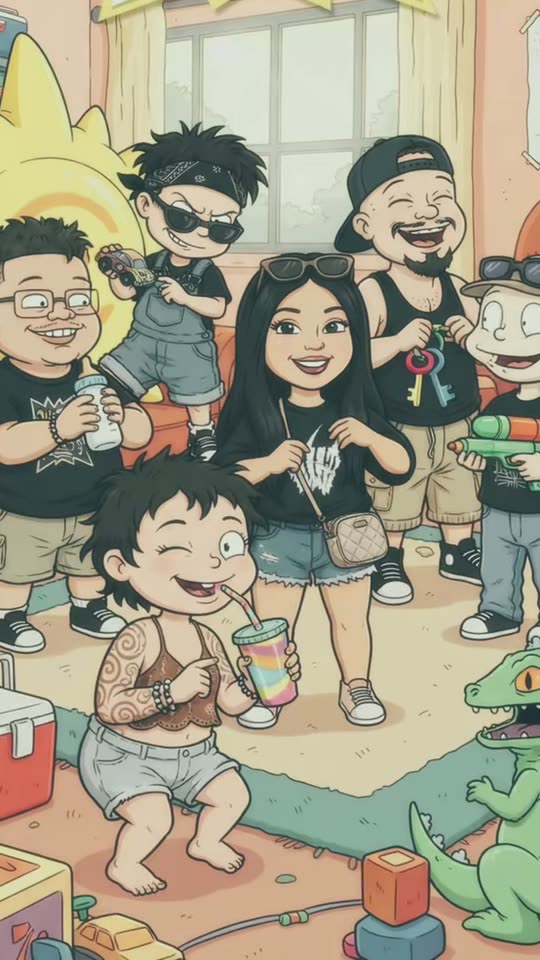
Add a group photo, a family photo, a selfie or your pet. AI redraws it as a hand-drawn 90s cartoon with thick wobbly outlines, flat colors and big heads, in a pastel playroom full of toys. Everyone keeps their pose, hair and outfit.

The original Rugrats Filter reel by @yoyo.559Original reel
  • 1 photo you add
  • 2K photo you can turn into a video
  • 9:16 for TikTok, Reels, Shorts
  • No watermark

No prompt to write: Add your photo and tap once

Create your own

Ready in a few minutes · Photo · 3 credits

The Rugrats filter is the TikTok trend where one photo becomes a frame of a 90s cartoon in the style of Rugrats: thick wobbly outlines, flat colors, big heads on small bodies and a toy-filled playroom behind. Everyone keeps their pose, hair, glasses and clothes. Here you add one group photo, one photo of you, or your pet.

Also called Rugrats AI Cartoon Transformation · Rugrats AI cartoon · Rugrats cartoon conversion · 90s baby filter

Example

What the Rugrats Filter photo looks like

This is a creator's own post of the trend's template, not a MakeViral result. Your result is a new cartoon photo made from your own picture in the same style. No two runs come out the same.

Original reel by @yoyo.559, 13 s

The original post by @yoyo.559 (9 October 2026): a group of friends in Fresno becomes a cartoon crew in a 90s playroom. The sunglasses, caps, tattoos, bag and drinks all made it into the cartoon. The template's title is cropped out.

Step by step

How to make the Rugrats Filter photo on MakeViral

Everything runs in the browser. No editing app, no prompt to write, no watermark.

  1. Add your photo

    Press "Create your own" and add your group or family photo, 2 to 6 people. Take it with the camera or pick it from your library.

  2. Press Generate

    The button shows the price. Nano Banana 2.1 puts your photo into the Rugrats Cartoon Filter scene and makes one 2K photo. You write no prompt.

  3. Download or share

    The photo is ready in a few minutes as a 9:16 2K image. Download it, share it from your phone, turn it into a video, or find it later in My videos.

Which photo works best?

Upload one sharp photo: for Group, one group or family photo with 2 to 6 people; for Just you, a photo of you alone, waist up or full body; for Pet, your pet with its whole body in view.

  • Everyone's face in view, in good light. The cartoon keeps what it can see: hairstyles, beards, glasses, hats, tattoos and jewelry.
  • Pose like you want the cartoon to pose. The filter keeps each pose and gesture, so a piggyback, a peace sign or a drink in the hand comes through.
  • Wear what you want your cartoon to wear. Clothes keep their colors and prints.
  • Family photos: your own kids are fine in your own photo. Nobody's face should be cut off at the edge.
  • Use your own photos, or photos of friends who said yes. Never a celebrity or a stranger.

Where did the Rugrats Filter trend start?

The Rugrats cartoon trend runs on a CapCut AI template, the kind people call the Rugrats AI Cartoon Transformation. You add a photo, the photo wipes away, and a cartoon version of the same picture appears in a pastel 90s playroom with alphabet blocks and toys on the rug. The template's sound, an "original sound" by Xochitl Ramire, was first posted on 2 October 2026 and was in 1,488 TikTok videos by 1 November. One of the first posts with real reach was @yoyo.559's group of friends in Fresno on 9 October (2,008 views), the clip at the top of this page.

Through October, people used it on group photos, couples and family pictures, and the most viewed post on the sound reached 17,400 views on 29 October. Rugrats was everywhere that Halloween too: a salon's Rugrats costume post had 329,000 views on 30 October. On 31 October a wave of US tutorial accounts started posting "how to do the rugrats cartoon trend", and Spanish posts call it the tendencia de caricatura IA Rugrats. The name is older: in 2024 a TikTok baby-face effect also went around as the Rugrats filter.

  1. @vikingfinds posts "Rugrats characters in real life", made with Midjourney; it has 5.2 million views by 1 November 2026, the biggest Rugrats AI post we found. TikTok

  2. A TikTok baby-face effect spreads under #rugratsfilter; one duet by @happyfacedoctor reaches 296,000 views. TikTok

  3. The sound of the CapCut cartoon template, an "original sound" by Xochitl Ramire, is first posted. It is in 1,488 TikTok videos by 1 November. TikTok

  4. @yoyo.559 posts a group of friends in Fresno as a cartoon crew in a 90s playroom, one of the first template posts with real reach (2,008 views). TikTok

  5. Rugrats Halloween costumes take off: a costume post by @sweet.haven.salon reaches 329,000 views. TikTok

  6. At least nine US tutorial accounts post "how to do the rugrats cartoon trend" on the same day, each still under 1,000 views. TikTok

Copy and paste

The Rugrats Filter prompts

You do not need this: the one-tap flow runs it for you. The photo prompt puts your photo into the scene. Want to change it? Copy it and edit it in AI Photo.

Group

1 photo: your group or family photo, 2 to 6 peopleNano Banana 2.1Photo · 2K · 9:163 credits
Photo prompt

Use the uploaded image as the base. Redraw the whole photo as one frame of a classic 1990s hand-drawn TV cartoon. Turn every person in the photo into a cute cartoon character, redrawn as a classic hand-drawn 1990s TV cartoon with cute bold cartoon lines: thick, slightly wobbly black outlines, flat bright colors with simple shading, a slightly faded retro TV look, big round heads on small chubby bodies, big simple eyes, small noses, simple mouths and scratchy, sketchy line work. Keep the photo's composition: draw exactly as many characters as there are people in the photo, in the same places and the same order from left to right, with the same poses, gestures, hand positions and funny facial expressions as in the photo (a peace sign stays a peace sign, a piggyback stays a piggyback, a drink in the hand stays in the hand). Each person keeps their own age look and gender, drawn with the big head and small body of the style. Each character keeps everything that makes that one person recognizable, as simple cartoon shapes: the exact hairstyle, hair length and hair color, any beard, moustache or stubble, glasses or sunglasses, hats, caps, headbands, earrings, jewelry, tattoos and freckles, the skin tone, and the clothes with their colors and prints from the photo, plus anything they hold. Never blend two people, never swap hair, glasses or clothes between them, and never add or drop a person. If the photo also shows a pet, it becomes a cartoon animal in the same style, in its place. Behind, in the same flat cartoon style: a warm retro 1990s family living room and playroom, with pastel pink and peach walls, a few framed pictures on the wall, a big window with yellow curtains, a soft rug on the floor and toys scattered around: wooden alphabet blocks, a ball, stuffed animals, a toy rocket and a small toy chest. Vertical 9:16, everyone in view, from head to feet when the photo shows them that way. No title, no logo, no text, no letters, no watermark, no frame. No green toy dinosaur, and no existing cartoon characters: only cartoons of the subjects in the photo. Every face is a flat hand-drawn cartoon face in this style, never a photo face: the identity rules below apply to each cartoon's face shape, hair, facial hair, glasses, skin tone, gender and clothes.

2287 characters

Just you

1 photo: you, waist up or full bodyNano Banana 2.1Photo · 2K · 9:163 credits
Photo prompt

Use the uploaded image as the base. Redraw the photo as one frame of a classic 1990s hand-drawn TV cartoon. Turn the person in the photo into a cute cartoon character, redrawn as a classic hand-drawn 1990s TV cartoon with cute bold cartoon lines: thick, slightly wobbly black outlines, flat bright colors with simple shading, a slightly faded retro TV look, big round heads on small chubby bodies, big simple eyes, small noses, simple mouths and scratchy, sketchy line work. Keep the pose, the gesture, the hand position and the funny facial expression from the photo, and anything the person holds. They keep their own age look and gender, drawn with the big head and small body of the style. If the photo is a close selfie, draw the character from the knees up, sitting or standing on the playroom rug, with the same expression. The character keeps everything that makes the person recognizable, as simple cartoon shapes: the exact hairstyle, hair length and hair color, any beard, moustache or stubble, glasses or sunglasses, hats, caps, headbands, earrings, jewelry, tattoos and freckles, the skin tone, and the clothes with their colors and prints from the photo. Exactly one character. Behind, in the same flat cartoon style: a warm retro 1990s family living room and playroom, with pastel pink and peach walls, a few framed pictures on the wall, a big window with yellow curtains, a soft rug on the floor and toys scattered around: wooden alphabet blocks, a ball, stuffed animals, a toy rocket and a small toy chest. Vertical 9:16, the character in the middle, in the lower two thirds of the picture. No title, no logo, no text, no letters, no watermark, no frame. No green toy dinosaur, and no existing cartoon characters: only cartoons of the subjects in the photo. The face is always a flat hand-drawn cartoon face in this style, never a photo face: the identity rules below apply to the cartoon's face shape, hair, facial hair, glasses, skin tone, gender and clothes.

1978 characters

Pet

1 photo: your pet, whole bodyNano Banana 2.1Photo · 2K · 9:163 credits
Photo prompt

Use the uploaded image as the base. Redraw the photo as one frame of a classic 1990s hand-drawn TV cartoon. Turn the pet in the photo into a cute cartoon animal, redrawn as a classic hand-drawn 1990s TV cartoon with cute bold cartoon lines: thick, slightly wobbly black outlines, flat bright colors with simple shading, a slightly faded retro TV look, big round heads on small chubby bodies, big simple eyes, small noses, simple mouths and scratchy, sketchy line work. Keep the pet's pose and expression from the photo. It keeps everything that makes this pet recognizable, as simple cartoon shapes: the same species, the fur colors, fur pattern, markings and spots, the ear shape, the tail, and any collar, tag, bandana or sweater from the photo. If the photo shows more than one pet, draw each one, never blended. No people. Behind, in the same flat cartoon style: a warm retro 1990s family living room and playroom, with pastel pink and peach walls, a few framed pictures on the wall, a big window with yellow curtains, a soft rug on the floor and toys scattered around: wooden alphabet blocks, a ball, stuffed animals, a toy rocket and a small toy chest. The pet sits or stands on the rug, its whole body in view, in the lower two thirds of the picture. Vertical 9:16. No title, no logo, no text, no letters, no watermark, no frame. No green toy dinosaur, and no existing cartoon characters: only cartoons of the subjects in the photo. The face is always a flat hand-drawn cartoon face in this style: the identity rules below apply to the cartoon's fur colors, markings, ears and accessories.

1596 characters

How many credits does it cost?

You pay per photo in credits, and the create page shows the exact price on the Generate button before you spend anything. The one-tap price covers one 2K photo, charged once. One photo is 3 credits, so the smallest one-time pack that covers it is $9.99 for 100 credits, with no subscription. A smaller 1K photo costs less if you run the prompt by hand in AI Photo.

ModelSettingsCredits
Nano Banana 2.1 (this template)2K photo, 9:16, one tap3
Nano Banana 2.1 (by hand in AI Photo)1K photo, 9:16, same prompt2

One-time packs and plans are on the pricing page. A failed photo gives its credits back.

What does the Rugrats cartoon filter keep, and what does it change?

The template's own description sums it up: it turns a real photo into the Rugrats art style "keeping all of your poses, outfits and funny expressions". In the original post at the top of this page, the sunglasses, the caps, the tattoos, the bag and the drinks all made it into the cartoon.

Stays from your photoBecomes 90s cartoon
Who is in it, in the same order from left to rightFaces: simple hand-drawn cartoon faces with big eyes
Poses, gestures and expressionsBodies: big heads on small, chubby bodies
Hairstyle, hair color, beards, glasses, hatsLines: thick, slightly wobbly black outlines
Clothes with their colors and prints, jewelry, tattoosColors: flat, bright and a little faded, like an old TV cartoon
Skin tone and genderThe place: a pastel 90s playroom with alphabet blocks and toys

How MakeViral makes it: your photo goes to a top-quality AI image model with our own prompt, because the CapCut template is closed and no creator has shared one. The prompt describes the Rugrats cartoon style in plain words (outlines, colors, proportions, the playroom) instead of naming the show, and asks for no title and no text. You get one 2K vertical picture (9:16). The create page shows the exact price on the Generate button, and every run draws you a little differently.

Group, Just you or Pet: which version should you pick?

All three take one photo and give you one picture in the same 90s playroom.

  • Group is the Rugrats cartoon trend as most people post it: friends, a couple or a family photo, everyone redrawn side by side in their own pose. It is the version for a Rugrats family photo, and works best with 2 to 6 people.
  • Just you turns a selfie or a photo of you alone into a Rugrats character with your own hair, glasses and outfit. It is the one for a Rugrats pfp, or to see the Rugrats version of me that everyone asks about.
  • Pet turns your dog or cat into a cartoon animal in the same style, with its own fur colors, markings and ears. People search the Rugrats filter dog version too, but the template itself only takes people, so this one is ours.

A pet in a group photo comes along too: it becomes a cartoon animal next to the people.

How do you do the Rugrats cartoon trend?

On TikTok the trend runs on a Rugrats CapCut template: tutorial accounts show you how to find the Rugrats AI cartoon template (some call it the Rugrats cartoon template), tap Use Template and add a photo. That is what the Rugrats cartoon AI tutorial videos from 31 October show, and why people search for the Rugrats filter CapCut way.

On MakeViral you skip the app hunt: press Create your own, pick a version, add one photo and press Generate. The 90s cartoon AI filter keeps everyone's pose and outfit, and you can turn yourself into a Rugrats character, or your whole crew, in about a minute. The result is your own Rugrats AI art, not a copy of the show's characters.

  • Post it like the trend: your real photo first, then the cartoon, as a two-photo carousel, or press Make it a video for a moving clip.
  • Hashtags: #rugrats, #rugratsfilter (475 videos on 1 November 2026) and #rugratscartoon. Keep the platform's AI label on.
  • Sound: most posts use the template's "original sound" by Xochitl Ramire. Tap the sound on any template post to use it.

What goes wrong with a Rugrats AI photo, and how do you fix it?

The trend is new, so there are few complaints yet. These are the risks of any cartoon filter, and what our prompt does about them.

What goes wrongWhat our prompt does, and what you can do
A person is missing, or an extra one appearsThe prompt asks for exactly as many characters as people, in the same order. Make sure no face is cut off at the edge
Two people get mixed upIt bans blending or swapping hair, glasses and clothes. A sharp photo with every face in view helps most
An adult looks like a toddlerBig heads on small bodies is the style. Run it again if it went too far: each run draws a little differently
A title or text shows upThe prompt asks for no logo, no title and no text
It does not look like youA bright, sharp photo taken face to the camera gives the cartoon the most to work with

If a run fails, the credits come back.

FAQ

Rugrats Filter trend questions

What is the Rugrats filter?
It is a TikTok trend from October 2026: a CapCut AI template redraws a photo as a frame of a 90s cartoon in the style of Rugrats, the Nickelodeon show about a group of babies. Everyone in the photo keeps their pose, hair and outfit, and the scene becomes a pastel playroom full of toys. Tutorial posts also call it the Rugrats AI Cartoon Transformation, the Rugrats cartoon conversion or the 90s baby filter.
How do I do the Rugrats cartoon trend?
Press "Create your own", pick Group, Just you or Pet, add one photo and press Generate. MakeViral turns it into a 90s cartoon and puts the picture in My videos. You need no CapCut template and no prompt.
Is this the official Rugrats AI filter?
No. MakeViral has no link to Rugrats, Nickelodeon or CapCut. The trend uses the show's name as a label for the look. Our template draws an original cartoon of your own photo in a hand-drawn 90s style, not a character from the show, and shows no logo or title.
Is there a Rugrats AI prompt?
The CapCut template behind the trend is closed, and none of the tutorials, captions or comments we checked on 1 November 2026 shares a prompt. So we wrote our own from the template's description and its frames: thick wobbly outlines, flat colors, big heads on small bodies, the same poses and outfits, and a pastel 90s playroom with toys.
Can I do it with a family photo?
Yes. Pick Group and add one family photo with 2 to 6 people. Everyone, kids included, becomes a cartoon character side by side in the same order and pose as in your photo, each with their own hair and clothes.
Does the Rugrats filter work on dogs and cats?
Yes. Pick Pet and add a photo of your dog, cat or other pet with its whole body in view. It comes out as a cartoon animal in the same 90s style, with its own fur colors, markings and ears, in the playroom.
Can I make myself a Rugrats character?
Yes. Pick Just you and add one photo of you alone. The AI redraws you as a cartoon with a big head and thick outlines, keeping your hair, glasses and outfit, so you make yourself a Rugrats character from a real photo.
Is there a Rugrats filter on TikTok or Instagram?
The Rugrats filter TikTok trend runs on CapCut templates, not on a built-in TikTok or Instagram effect. MakeViral runs in the browser and gives you the picture to post anywhere. In Spanish people call it the filtro Rugrats.
What is the Rugrats art style?
It is the scratchy, hand-drawn look of the 1990s TV cartoon: thick black outlines that wobble a little, flat bright colors, big round heads on small chubby bodies, big eyes and pastel rooms full of toys. That is the Rugrats cartoon style the filter copies, without copying any of the show's characters.
Can I use it as a profile picture?
Yes. The picture is 2K and vertical, so you can crop it to a square for a profile picture or a group chat avatar. Just you works best for a single pfp.
Can I turn it into a video?
Yes. Under your finished picture, press "Make it a video": it opens AI Video with the cartoon as the first frame, and you choose what happens. The video costs its own credits.
Does the Rugrats AI filter cost credits?
Yes, a few. A picture costs far fewer credits than a video, the create page shows the exact price on the Generate button before you spend anything, and if a run fails, the credits come back.
Is my photo private?
Yes. MakeViral does not post your photo or the result anywhere or show them to other users. The picture goes to your private My videos page, and you can delete it there at any time.
More trends

Other AI video templates

Template

Button Eye Doll AI: The Coraline Filter Trend From One Photo

Button eyes reveal: you sweep a hand across the lens and come back as a porcelain doll with black button eyes. Doll photo: four stop-motion film frames of a button-eyed puppet doll of you. One selfie either way.

Read more
Template

Atatürk ile Fotoğraf: Your Photo Next to the Portrait, for 29 Ekim and 10 Kasım

You stand full body, in formal clothes, next to a large framed black-and-white portrait of Atatürk in a bright marble hall, with sunlight on the floor. One photo of you. A photo for 29 Ekim, a calm one for 10 Kasım, or a short clip in which only you move.

Read more
Template

Facebook Marketplace Husband Meme: How Ima Look in a Couple Years

Add one photo of yourself. AI puts you on the porch of a white farmhouse in an oversized camo shirt, barefoot, staring at whatever your husband just brought home. Or be the husband, caught with another truck on the trailer.

Read more
Template

South Park Filter: You as a Paper Cut-Out Cartoon

Add a photo of you, your friends or your pet. AI redraws it as a flat paper cut-out cartoon with a big round head and oval eyes, standing in the snow of a small mountain town. Your hair, beard, glasses and outfit come along.

Read more
Template

AI School Photo: Classic School Pictures From a Phone Photo

Take a photo of your child at home. MakeViral turns it into a classic picture day portrait: mottled blue backdrop, soft studio light, head and shoulders. The face stays exactly the same.

Read more
Template

80s AI Trend: Your 1985 Photo and Home Video

One selfie becomes a faded 1985 snapshot with big hair and a date stamp. Stop there for the photo, or animate it into a 10-second camcorder home video with sound.

Read more

Make your own Rugrats Filter photo

Add one photo and tap once. No prompt to write. 3 credits.

No watermark. A failed video gives its credits back. Secure checkout by Stripe.