Back

Halloween Ceiling Fan Trend: A New Costume on Every Blade Pass

The camera looks straight down through a slow ceiling fan, and every blade pass brings a new Halloween costume: a witch, a vampire, a skeleton, then a red devil. Write your own costumes if you like, or put your dog or cat in it. One photo in, a vertical clip with the reel's sound out.

Halloween Ceiling Fan example video, made with AI-made peopleAI-made
  • 1 photo you add
  • 13 to 15 s clip with sound
  • 9:16 for TikTok, Reels, Shorts
  • No watermark

No prompt to write: Add your photo and tap once

Create your own

Ready in a few minutes · From 168 credits

The Halloween ceiling fan trend is the ceiling fan outfit change in costume: you lie on the floor under a turning fan, a blade sweeps across the lens, and each time it passes you wear a new Halloween costume. Your face stays uncovered in every look. You need one photo with your face clear, or one photo of your pet.

Also called Halloween fan transition · Ceiling fan trend, Halloween edition · Spooky fan outfit change

Example

What the Halloween Ceiling Fan video looks like

The people and pets are AI-made, not real persons. The reel versions copy the original clip and come with its original song, which you can turn off; the other versions have original sound. Your result will differ from run to run.

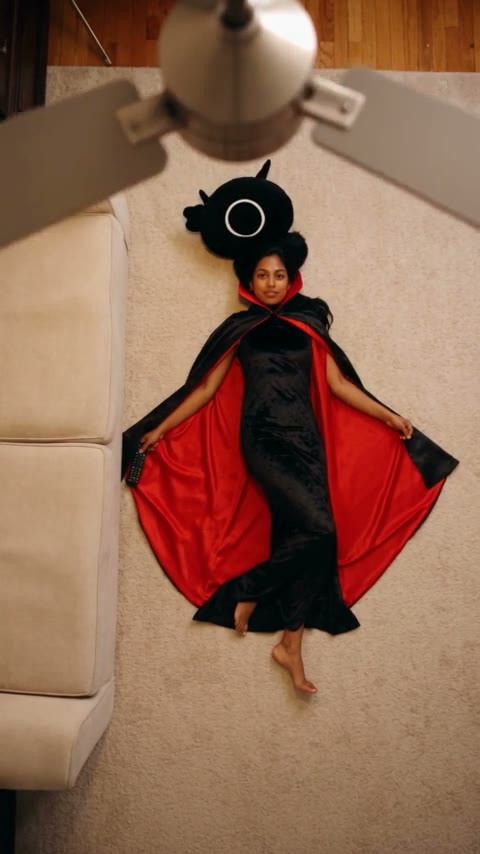
Input photo for Halloween Ceiling Fan example (AI-made person)
Input
Result, 13 s, with sound

Human, one photo: an AI-made woman turns from a witch into a vampire, a skeleton and a red devil as the fan blades sweep past.

Use this reference
Original reel by @mariaxpfps2, 15 s

The original reel by @mariaxpfps2, which the Pet version copies: an AI-made cat flops onto a green carpet under a ceiling fan and gets a new outfit on every blade pass. In the Pet version, the outfits become Halloween costumes.

Use this reference
Step by step

How to make the Halloween Ceiling Fan video on MakeViral

Everything runs in the browser. No editing app, no prompt to write, no watermark.

  1. Add your photo

    Press "Create your own" and add you, face clear. Take it with the camera or pick it from your library.

  2. Press Generate

    The button shows the price. Genjutsu Motion puts your photos into the Halloween ceiling fan trend clip and copies it shot by shot for 13 seconds, with the reel's original song. You write no prompt.

  3. Download or share

    The video is ready in a few minutes as a 9:16 MP4. Download it, share it from your phone, or find it later in My videos.

Which photo works best?

Human: use one sharp photo with your face clear and big enough to see well, from the waist up or closer. The video looks down at you on the floor, so the face is small in the frame. A clear, front-facing face keeps you looking like you in every costume.

  • The costumes come from the version or from your own words, never from your photo. Only your face and hair go into the video.
  • Face visible: no sunglasses, no hat, no heavy filter.
  • One person per photo. Use your own photo, or one of an adult who said yes.

Pet: one sharp photo of your dog or cat with its face and whole body in view, in good light, and no other animals or people in the photo.

Where did the Halloween Ceiling Fan trend start?

The ceiling fan trend started on TikTok in September 2026 as an outfit change: an AI clip by @shabastudio20 with four outfits under a wooden fan passed 1.3 million plays by 8 October. The full story is on the AI ceiling fan trend page.

The ceiling fan trend, Halloween edition, came with October. On 13 October 2026 an AI video app posted its own Halloween take on Instagram with the line "The fan outfit change trend is getting spooky", and the reel had 152,000 likes by 29 October. On 24 October @creator.leia posted "The ceiling fan trend, but make it Halloween edition!" on TikTok, and on 28 October template sites added Halloween fan wipe effects for pets.

It rides on a much bigger habit, the Halloween costume transition: every October, Halloween costume transitions fill TikTok. On 29 October 2026, #halloweentransition held 82,351 TikTok videos and 1.66 billion views.

  1. @shabastudio20 posts an AI ceiling fan clip with four outfits under a wooden fan; it has 1.3 million plays on 8 October. TikTok

  2. An AI video app posts a Halloween costume version of the fan outfit change on Instagram; it has 152,000 likes on 29 October.

  3. @creator.leia posts "The ceiling fan trend, but make it Halloween edition!" on TikTok. TikTok

  4. AI template sites add Halloween fan wipe effects that dress a pet in a new costume on every blade pass.

  5. #halloweentransition holds 82,351 TikTok videos and 1.66 billion views.

Copy and paste

The Halloween Ceiling Fan prompts

You do not need these: the one-tap flow runs them for you, together with the trend clip. [Image 1] and [Image 2] are your two photos, and [Video 1] is the trend clip the video copies.

Human

1 photo: you, face clearGenjutsu Motion13 s · 480p · 9:16168 credits
Video prompt

Replace the young woman with long chestnut-brown hair who lies on her back on the cream carpet under the ceiling fan with the person from image 1: keep that face, hair and skin tone exactly, in every costume, with the face always uncovered. Take only the face, hair and skin tone from image 1, never the clothes: in every shot the person wears the costume of the video. Keep every Halloween costume (the witch, the vampire, the skeleton and the red devil), every costume change under the fan blades, the sofa, the room, the light, the motion and the camera of the video.

570 characters

Pet

1 photo: your pet, face and whole bodySeedance 2.515 s · 720p · 9:16228 credits
Video prompt

Recreate the reference video [Video 1] shot for shot: the same fixed vertical top-down camera, the same green carpet, the same orange velvet sofa edge on the left, the same ceiling fan with brown wooden blades very close to the lens, the same framing, light, timing and moves, one continuous take. Two changes only: the cat that drops in from the sofa and lies on its back in the middle of the green carpet is now the pet in [Image 1], and every outfit of the video is now a Halloween costume. The pet = the pet in [Image 1], in EVERY frame: the same species and breed, head shape, muzzle, eyes, ears, fur colors, fur length and markings as in [Image 1], with the natural body volume and proportions of that animal: never flattened, squashed, stretched or merged with anything, so its owner instantly recognizes it in every costume. A dog stays a dog and a cat stays a cat: if [Image 1] shows a dog or another animal, that animal drops in, rolls onto its back and lies in the same spot, with its own face, ears, whiskers and tail. Never drift back to the cat of the original video: not the coat, face, ears or tail of the cat in the video, unless [Image 1] shows them. The pet's face is always uncovered: no mask, no face paint. Never a collar or clothes from [Image 1]. The looks, at the times of [Video 1], each a Halloween costume in place of the outfit of the video: 0-1.5 s: the pet drops in from the sofa on the left and rolls onto its back in the middle of the carpet. 1.5-5 s: it lies on its back, paws up, no clothes, nothing in its mouth. 6-7.75 s: a witch costume: a small pointed black witch hat with a purple band and a short black cape. 8.5-10.75 s: a vampire costume: a high-collared black cape lined in red, over a white ruffled shirt front; one front paw waves by the face. 11.5-13.75 s: a pumpkin costume: a round, padded orange pumpkin suit with a small green stem cap. 14.5-15 s: a skeleton costume: a black bodysuit with white bones printed on it. Never the tweed jacket, the berets, the glasses, the cardigan, the skirts, the bags, the pearls or the lace gown of the video. The ceiling fan above keeps rotating through the whole video. Every costume change happens when the fan blades pass in front of the camera, at 5-6 s, 7.75-8.5 s, 10.75-11.5 s and 13.75-14.5 s. The blades are very close to the lens, so they look enlarged with natural motion blur and briefly cover the pet and the center of the frame. When a blade covers the pet, the costume changes; when it moves away, the next full costume shows. The pet stays in the same spot before and after each blade, with no jump. No glow, no particles, no dissolve, no flash. Never mix pieces of two costumes, never leave a piece of the previous costume. The costumes fit the pet's own body, with real folds. Real animal anatomy: one head, four legs, furry paws, never human hands or fingers. Exactly one animal, no people, no extra animals. No text, no captions, no logos, no watermark.

2964 characters
How many credits does it cost?

You pay per video in credits, and the create page shows the exact price on the Generate button before you spend anything. The one-tap price covers the video, made in one step from your photos and the trend clip, charged once. Each version has its own price: Human 168 credits, Pet 228 credits. The cheaper models are there if you run the prompts by hand in AI Video.

Video modelSettingsCredits
Human: Genjutsu Motion (this template)13 s, 480p, copies the trend clip, one tap168
Pet: Seedance 2.5 (this template)15 s, 720p, copies the trend clip, one tap228

One-time packs and plans are on the pricing page. A failed video gives its credits back.

How does the Halloween ceiling fan transition work?

The fan blade is the edit. A phone looks straight down past a slowly turning fan at someone lying on the floor. Each time a wide blade sweeps across the lens, it covers the person for a split second, and that is where the cut hides. When the blade has passed, the person is back in the same spot in a new Halloween costume. That makes it a Halloween costume change on every blade pass. People call it the Halloween fan trend, and it is a Halloween transition trend with no editing to do.

Human copies a viral AI ceiling fan reel by @delinquent_doll, with its four outfits turned into four costumes. MakeViral first makes a close portrait from your photo, so only your face and hair go into the reel. Then the best AI video models available put you in place of the woman in the reel, shot by shot, so every blade pass and every costume change lands where it does in the reel.

Pet copies @mariaxpfps2's AI cat reel and gives your pet four Halloween costumes in place of the reel's outfits.

Which costumes are in the video, and can you write your own?

Human has four costumes, one per blade pass, and your face stays uncovered in all of them:

  1. A witch: a tall pointed black hat and a long black dress.
  2. A vampire: a high-collared black cape lined in red.
  3. A skeleton: a black bodysuit with white bones.
  4. A red devil: a red outfit with small red horns.

Your outfits: on the create page, open Your outfits and write any costume you want for any of the four looks, or tap a quick pick: a pirate, a black cat with ears, a scarecrow, a bat with big wings, a fairy with wings and more. Name the clothes, the colors and the props. Every look you leave empty stays as above. A written costume costs a few credits more, because MakeViral first changes the costumes in the reel itself, and that is what keeps every change on a blade pass. Logos, brand names and copies of famous characters are left out.

Pet has four costumes too: a witch hat with a black cape, a vampire cape lined in red, a round orange pumpkin suit, then a skeleton suit. For more Halloween transition ideas and Halloween costume transition ideas, see the related templates below.

What can go wrong, and how do you fix it?

We made the Human example with an AI-made adult test photo. The Pet version is new, and we have not run it with test photos yet. These are the problems to look out for:

What goes wrongWhyWhat to do
The face looks less like youThe face is small in a top-down shotUse a sharp, front-facing photo with the face big and in good light, then run it again.
The witch hat stays on the floor after the first look (Human)The hat is in the costume reel we useNothing to fix: it lies next to you until the last look.
A written costume looks a little different from your wordsThe model draws the look in the reel's pose and lightName fewer things, for example a color and one piece of clothing, and run it again.
Your pet wears an outfit of the original reel, not a costume (Pet)The reel's own outfits are strongRun it again. Every run is a new take.
Your pet looks a little like the cat of the reel (Pet)The pet is small in a top-down shotUse a sharp photo with your pet's face and whole body in view.

Which sound and hashtags should you post it with?

Every version comes with the original sound of the reel it copies, so the clip is ready to post. You can turn the sound off on the result screen. The sound belongs to its owners, and MakeViral gives you no rights to it. To use a trending Halloween sound, add it in TikTok, Instagram or YouTube when you post, from their licensed library.

Hashtags: #halloweentransition, #ceilingfantransition, #ceilingfantrend and #halloweencostume.

FAQ

Halloween Ceiling Fan trend questions

What is the Halloween ceiling fan trend?
It is the Halloween version of the ceiling fan outfit change from September 2026. The camera looks straight down through a slowly turning ceiling fan at someone lying on the floor, and each time a blade sweeps across the lens, they appear in a new Halloween costume. The AI version makes the whole clip from one photo, with no fan and no filming.
How do I do the ceiling fan Halloween trend without a ceiling fan?
Press "Create your own" on this page, pick Human or Pet, add one photo and press Generate. MakeViral puts you or your pet into a viral ceiling fan reel, so each blade pass gives a new costume. You write no prompt, and the clip lands in My videos as a vertical MP4.
Can I make an AI Halloween costume transition with my own costumes?
Yes. In the Human version, open Your outfits and write your own costume for any of the four looks, or tap a quick pick such as a pirate, a scarecrow or a bat with big wings. MakeViral changes those looks in the reel first, so each new costume still appears under a blade. You can do a Halloween character costume transition this way, with the character described in words. Copies of famous characters, logos and brand names are left out.
Can my dog or cat do the Halloween ceiling fan trend?
Yes. Pick **Pet** and add one sharp photo of your dog or cat with its face and whole body in view. Your pet flops onto a green carpet under the fan, and each blade pass brings a new costume: a witch hat and cape, a vampire cape, a pumpkin suit, then a skeleton suit. It keeps its own face, fur and markings. It is a pet Halloween costume transition, and it works as a dog Halloween costume change too. The clip is 15 seconds, vertical, with the reel's sound.
Is this the same as the AI ceiling fan trend?
It is the same transition as a Halloween outfit transition: Halloween costumes in place of the everyday outfits. For everyday looks, the Women's and Men's packs and the pet outfits are on the [AI ceiling fan trend](/templates/ai-ceiling-fan-trend) page.
Is it a ceiling fan Halloween costume, like dressing up as a fan?
No. Some people search for a ceiling fan Halloween costume to dress up as a fan. This template is the video trend: a ceiling fan costume change, where the fan blade hides each switch from one costume to the next.
Will it still look like me in every costume?
Yes. The Human version puts your face, hair and skin tone into every shot of the reel, and your face stays uncovered in every costume, so the Halloween costume transformation still looks like you. A sharp photo with your face clear helps most. If a look drifts, run it again: every run is different.
How long is the video, and does it cost credits?
Human makes 13 seconds and Pet makes 15 seconds, vertical 9:16, with the reel's sound, in a few minutes. Each video costs credits, and the create page shows the exact price on the Generate button before you spend anything. Your own costumes cost a few credits more. If a video fails, the credits come back.
Can I post my Halloween ceiling fan video on TikTok or Instagram?
Yes. The MP4 has no watermark, so you can post it to TikTok, Reels or Shorts as it is. Keep the platform's AI label on, and tag it #halloweentransition or #ceilingfantransition. The reel's sound belongs to its owners: check the platform's music rules before you use the clip in an ad.
More trends

Other AI video templates

Template

Stones to Castle AI Trend: They Threw Stones, You Built a Castle

A crowd of angry women throws stones toward you across a green mountain valley. You stay calm, pick the stones up, and they rise into a huge Gothic castle while you smile down from its window. One photo, 15 seconds, with the reel's own song.

Read more
Template

Bby Wow Guy AI: Put Your Face in the Guy Dancing at a Quince Meme

Dance up to the camera at a quinceañera, bite the concha, chew with full cheeks while you stare into the lens, then dance away. Add one photo and become the bby wow guy, with the song.

Read more
Template

Hit the Road Dude: Be the Private Property Meme Driver

"State? This? It ain't. Hit the road, dude. This ain't no state property. This is private property." Add one photo, and you, your dog or your cat play the grumpy pickup driver from the viral clip, with the original audio.

Read more
Template

AI Ceiling Fan Trend: Change Your Outfit on Every Blade Pass

The camera looks straight down through a slow ceiling fan at you on the floor. Each blade wipes across the lens, and you come back in a new outfit. Pick a pack of four looks or write your own outfits. One photo in, a vertical clip with the reel's sound out.

Read more
Template

AI Halloween Costume Try-On: See Yourself in a Costume Before You Buy

Add one full-body photo, type or pick a costume, and see yourself in it at a Halloween party. Two photos make a matching couple costume, and a short costume transition video shows the change.

Read more
Template

Halloween Makeup Filter: Flip Your Hair, Reveal a Pro SFX Look

Soft glam, one hair flip, and you come up in full Halloween SFX makeup. Add one photo, pick a look, and get the 10-second makeup transition with the original sound.

Read more

Make your own Halloween Ceiling Fan video

Add one photo and tap once. No prompt to write. 168 credits.

No watermark. A failed video gives its credits back. Secure checkout by Stripe.