Back

Bécane Yamê AI Trend: Sing Bécane in the Orange Studio

Hand over the mouth, head back, arms wide open: add one photo, and you, your dog or your cat take the singer's place at the hanging mic in the bright orange studio, with the opening of Bécane.

The original Bécane AI reel by @chloe4ccOriginal reel
  • 1 photo you add
  • 10 s clip with sound
  • 9:16 for TikTok, Reels, Shorts
  • No watermark

No prompt to write: Add your photo and tap once

Create your own

Ready in up to several minutes · 152 credits

The Bécane AI trend puts you in a music performance TikTok has watched tens of millions of times: Yamê singing "Bécane" at a hanging mic in a bare orange studio on A COLORS SHOW. AI versions swap the singer for anyone. Add one photo, and you or your pet sing becane yame with the same hand moves, with the song.

Also called Yamê Bécane AI trend · Bécane orange studio trend · Bécane AI swap

Example

What the Bécane AI video looks like

This is the original reel. Your photos replace its characters, so your video follows the same shots with your faces. No two runs come out the same.

Original reel by @chloe4cc, 10 s

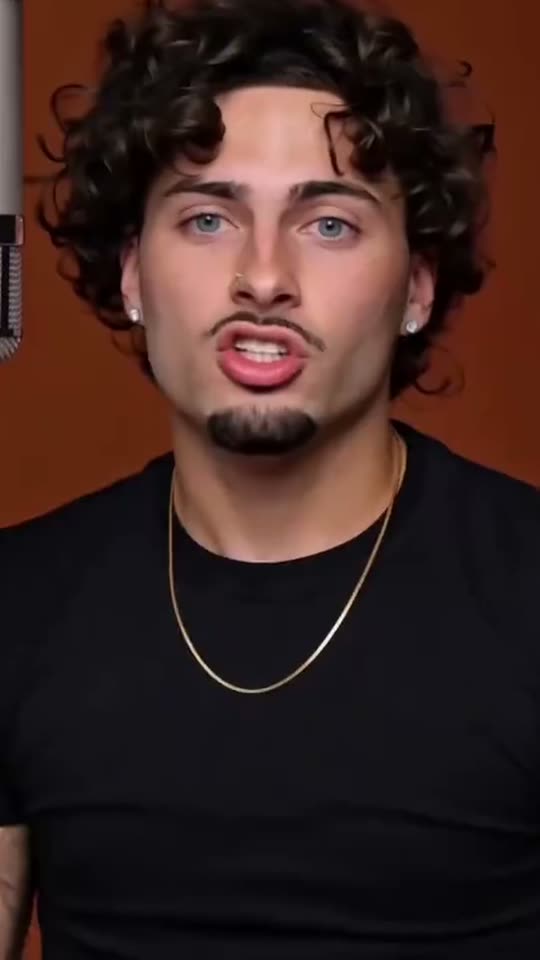
An early Bécane AI version by @chloe4cc, made with a one-photo AI template on 26 September 2026: a singer in a black T-shirt at the hanging mic in the orange studio, hand to the mouth, then arms open, with the opening of the song. Human and Pet put your photo in his place.

Use this reference
Step by step

How to make the Bécane AI video on MakeViral

Everything runs in the browser. No editing app, no prompt to write, no watermark.

  1. Add your photo

    Press "Create your own" and add you, face clear. Take it with the camera or pick it from your library.

  2. Press Generate

    The button shows the price. Seedance 2.5 puts your photos into the Bécane trend clip and copies it shot by shot for 10 seconds, with the reel's original song. You write no prompt.

  3. Download or share

    The video is ready in up to several minutes as a 9:16 MP4. Download it, share it from your phone, or find it later in My videos.

Which photo works best?

Upload one photo: of yourself for Human, of your pet for Pet.

  • Human: chest up or waist up, face to the camera, sharp and in good light. The video starts on a close-up of your face, so a clear, front-facing photo matters most.
  • You keep your own clothes from the photo. A plain T-shirt or a jacket with a bold pattern fits the studio best; a big logo on the shirt can come out blurred.
  • No sunglasses, no hat that hides the face and no beauty filter.
  • Pet: one animal, head and chest in view, eyes open, in daylight. The face, the fur colors, the ears and the markings come from your photo.
  • Any background works: the orange studio, the hanging mic and the camera come from the clip.
  • Use your own photo, a friend who said yes, or your own pet. Never a celebrity, a child or a stranger.

Where did the Bécane AI trend start?

"Bécane" is a song by Yamê, a French Cameroonian singer. His performance of it on A COLORS SHOW, a Berlin music channel that films each artist alone in a bare studio painted one color, came out on 1 June 2023. In the clip he stands in an orange room in a fur jacket, cups a hand over his mouth, throws his head back and opens his arms wide as he sings. The single followed on 13 June 2023, and the song went viral on TikTok that winter: a repost of the clip from 15 December 2023 has 53.4 million views.

On 26 July 2026 the show's own TikTok posted the clip again as "A COLORS MOMENT". That repost has 30.2 million views and 3.3 million likes, and it brought the song back.

The Bécane A COLORS SHOW AI wave followed. On 26 September 2026 the first AI versions swapped the singer for film characters, and the first one-photo CapCut AI templates put ordinary people at the hanging mic, like the clip this page copies. Tutorials followed from 29 September, an AI video app added a one-tap template on 21 October, and several AI template sites added a becane ai page the same week.

  1. Yamê's performance of "Bécane" on A COLORS SHOW comes out; the single follows on 13 June 2023. Wikipedia

  2. A TikTok repost of the performance by @below_moods takes off. By 27 October 2026 it has 53.4 million views and 4.5 million likes. TikTok

  3. The show's TikTok posts the clip again as "A COLORS MOMENT". It has 30.2 million views and 3.3 million likes by 27 October 2026. TikTok

  4. The AI wave starts: AI clips swap the singer for film characters, and the first one-photo CapCut AI template posts put people at the hanging mic, among them @chloe4cc's, the clip this page copies. TikTok

  5. @bella.moore54 posts a Bécane AI tutorial that reaches 174,900 views, and the #becaneai hashtag is created. TikTok

  6. #becane holds 29,706 TikTok videos and 951.9 million views; #yamebecane 1,016 videos and 81.2 million views. TikTok

Copy and paste

The Bécane AI prompts

You do not need these: the one-tap flow runs them for you, together with the trend clip. [Image 1] and [Image 2] are your two photos, and [Video 1] is the trend clip the video copies.

Human

1 photo: you, face clearSeedance 2.510 s · 720p · 9:16152 credits
Video prompt

Recreate the reference video [Video 1] shot for shot: a bare studio with every wall painted one flat, bright burnt-orange color, a silver studio condenser microphone hanging from above at the left of the frame, soft even studio light, the same single take that starts on a close-up and slowly pulls back to a waist-up shot, the same framing, timing, gestures and mouth moves. The ONLY change: the young man with curly black hair and a goatee in the black T-shirt is now the person in [Image 1]. Make the person in [Image 1] perform the same movements as the subject in the [Video 1] reference; also copy the camera shots as in the [Video 1] reference. Do not change the face of the person in [Image 1]. The singer = the person in [Image 1], in EVERY frame: copy the exact face from [Image 1]: face shape, eye color and eye shape, eyebrows, nose, mouth, skin tone, age, hair color, hair length and hairstyle, and any beard, moustache, glasses or freckles exactly as in the photo. The singer wears the clothes from [Image 1]; if [Image 1] shows only the head or the upper body, invent the rest so it matches naturally. The same real person in every frame, from the first second to the last, so their friends recognize them at once, also while a hand covers the mouth and while the head tilts back. Never morph, never drift back to the original singer's face. NO curly black hair, NO goatee, NO gold chain and NO arm tattoos unless [Image 1] shows them. No black T-shirt and no grey sweatpants unless [Image 1] shows them. THE PERFORMANCE, beat by beat, exactly as the singer in [Video 1] does it, singing a soulful French song with deep feeling: 00:00-00:00.6: close-up, sings straight to the camera, one hand rising to the chin. 00:00.6-00:02.5: cups one hand over the mouth and nose, eyes closed, head tipped back. 00:02.5-00:04.5: the hand drops, the head tilts back and to the side, eyes half closed, singing up toward the hanging microphone. 00:04.5-00:07: the camera pulls back to a waist-up shot; both hands open, palms up, in front of the body, swaying with the music. 00:07-00:09.8: turns a little to the side, one arm stretched out to the side with an open hand, still singing. ONLY THE MOTION OF [Video 1]: no movement, smile or laugh the original singer does not do. LIP SYNC: the mouth copies the original singer's mouth in [Video 1] frame for frame, opening, closing and rounding at exactly the same instants, never early, never late, never a loose flapping jaw. Real live-action footage, clear facial features, no distortion. Avoid: text, captions, subtitles, logos, watermarks, an AI label in the corner, brand prints on the clothes, extra characters, extra limbs, morphing, facial distortion. Anatomy rules: one head only, on the singer's shoulders. Two arms and two hands, five fingers on each hand. Exactly one person in the studio.

2853 characters
Pet

1 photo: your petSeedance 2.510 s · 720p · 9:16152 credits
Video prompt

Recreate the reference video [Video 1] shot for shot: a bare studio with every wall painted one flat, bright burnt-orange color, a silver studio condenser microphone hanging from above at the left of the frame, soft even studio light, the same single take that starts on a close-up and slowly pulls back, the same framing, timing and gestures. The ONLY change: the young man in the black T-shirt is now the pet in [Image 1], standing upright on its hind legs at the microphone. Make the pet in [Image 1] perform the same movements as the subject in the [Video 1] reference; also copy the camera shots as in the [Video 1] reference. Do not change the face of the pet in [Image 1]. The singer = the pet in [Image 1], in EVERY frame, completely replaced: the WHOLE body, not just the head. The same species and breed, face, eyes, ears, muzzle, fur colors, fur length and markings as in [Image 1], with the natural body volume and proportions of that animal: never flattened, squashed, stretched or merged with anything. Real furry paws and its own tail: never a human face, human hands, human arms or human skin. Do NOT dress it in the black T-shirt or the grey sweatpants, no gold chain, no clothes. The same pet from the first second to the last, so its owner recognizes it at once. Never drift back to the man from [Video 1]. THE PERFORMANCE, beat by beat, with paws in place of hands, exactly in [Video 1]'s timing: 00:00-00:00.6: close-up, the pet looks straight into the camera, mouth opening as if singing. 00:00.6-00:02.5: one front paw goes up to its muzzle, eyes closed, head tipped back. 00:02.5-00:04.5: the paw drops, the head tilts back and to the side toward the hanging microphone, mouth opening and closing. 00:04.5-00:07: the camera pulls back; the pet stands upright with both front paws open in front of its chest, swaying. 00:07-00:09.8: it turns a little to the side, one front paw stretched out to the side. The pet's mouth opens and closes at the same instants as the singer's mouth in [Video 1], with the deep feeling of a soulful singer. Real live-action footage. Avoid: text, captions, logos, watermarks, an AI label in the corner, extra animals, people, extra limbs, morphing. Exactly one animal in the studio, on its own two hind legs.

2265 characters

How many credits does it cost?

You pay per video in credits, and the create page shows the exact price on the Generate button before you spend anything. The one-tap price covers the video, made in one step from your photos and the trend clip, charged once. One video is 152 credits, so the smallest one-time pack that covers it is $39.99 for 450 credits, with no subscription. The cheaper models are there if you run the prompts by hand in AI Video.

Video modelSettingsCredits
Seedance 2.5 (this template)10 s, 720p, copies the trend clip, one tap152

One-time packs and plans are on the pricing page. A failed video gives its credits back.

What happens in the Bécane AI video, second by second?

Both versions copy one AI version of the trend, and your photo takes the singer's place. The studio, the mic, the camera and the song come from the clip. It is one take that starts on a close-up and slowly pulls back:

TimeHumanPet
0 to 0.6 sA close-up: you sing straight to the camera, a hand rising to your chin.Your pet looks into the camera at the mic.
0.6 to 2.5 sYou cup a hand over your mouth, eyes closed, head back.A front paw goes up to its muzzle, eyes closed.
2.5 to 4.5 sYour head tilts back and to the side, singing up to the hanging mic.Its head tips back toward the mic.
4.5 to 7 sThe camera pulls back: both hands open, palms up, swaying.It stands upright with both front paws open.
7 to 10 sYou turn a little and stretch one arm out to the side.One paw goes out to the side.

How it works: the best AI video models available edit the clip itself: they swap the singer for the person or pet in your photo and keep everything else. You get 10 seconds, vertical 9:16, at 720p, with the opening of Bécane put back after the run. The mouth follows the clip, so it is close to the song but not exact lip sync. A run takes 5 to 15 minutes, and the exact price shows on the Generate button before you spend anything. Every run is a new take, so results differ.

Human or Pet: which Bécane version should you make?

  • Human is the classic becane trend: you at the hanging mic with your own face and clothes, doing the hand over the mouth and the open arms of the original performance. It works for anyone: post it of yourself, your best friend or your dad (with a yes).
  • Pet puts your dog or cat at the mic, standing up and singing with its paws. The becane yame cat and dog clips are some of the funniest takes. Pet has two quality options: Best keeps your pet's face and fur closest; Standard is cheaper, and the face can look a little less like your pet.

Caption ideas: "Me singing in the car like it's a COLORS show", "My cat when I open a can", "POV: you know every word but not one word of French", "Dad found the song". Or write your own.

Want more music trends? Do the two-person Hotel Lobby in the same kind of orange studio, play an office-desk concert in the Tiny Desk trend, or walk the mansion hallway as a Popstar.

What goes wrong, and how do you fix it?

ProblemFix
You get curly black hair, a goatee or a gold chain (Human)The singer in the clip has them. The prompt bans them unless your photo shows them. Use a sharp, recent photo and run it again.
The face looks less like you when the hand covers the mouthThat is the hardest part of the clip. A front-facing photo with the face clear and big helps most.
Your pet gets human hands or a T-shirt (Pet)The prompt asks for real paws and no clothes. Run it again with a sharp photo of the whole head and chest.
The mouth moves a little off the songThe mouth follows the clip, and the song goes on after the run. Run it again for a new take.
The model refuses a photoSome photos get refused. The credits come back; try another photo.

Which sound, caption and hashtags should you post it with?

Your clip comes with the same 10 seconds of the song as the clip it copies, the opening of Bécane, so it is ready to post. You can turn it off on the result screen and pick the Bécane sound on TikTok instead. The song belongs to Yamê and its owners, and MakeViral gives you no rights to it; check the platform's music rules before you use the clip in an ad or a paid post.

Hashtags: #becane (29,706 TikTok videos and 951.9 million views on 27 October 2026), #yamebecane (1,016 videos and 81.2 million views) and the new #becaneai. Keep the platform's AI label on.

Keep it a joke. Make it with your own face, your own pet or a friend who said yes. Do not use it to make a real singer or a stranger look like they sang it.

FAQ

Bécane AI trend questions

What is the Bécane AI trend?
It is the becane tiktok trend of autumn 2026: AI videos that put a new person or a pet in Yamê's place at the hanging mic in the bright orange studio of his A COLORS SHOW performance of "Bécane". The singer cups a hand over the mouth, throws the head back and opens the arms wide, with the song playing. It started on 26 September 2026 with AI face swaps and one-photo CapCut templates.
What is Bécane by Yamê?
"Bécane" is a song by Yamê, a French Cameroonian singer. His live performance of it on A COLORS SHOW, the clip many people search as becane colors, came out on 1 June 2023 and the single on 13 June 2023. It went viral on TikTok in late 2023 and again in 2026, after the show reposted the clip on 26 July 2026 (30.2 million views).
What does becane mean in English?
The becane meaning is simple: "bécane" is French slang for a motorbike. In the song the motorbike stands for freedom: Yamê said he chose it because it let him go anywhere and see his friends. In English you could say "bike".
Is Yamê in my video?
No. This template never uses Yamê's face or the A COLORS SHOW footage. It copies an AI version of the trend made with a one-photo AI template, and your photo replaces the singer in every frame.
Can my dog or cat sing Bécane?
Yes. Pick Pet: your dog, cat or other pet stands upright at the hanging mic in the orange studio, puts a paw to its muzzle and opens its paws wide while the song plays. Use a sharp photo of one animal with the head and chest in view.
How do I make the Bécane AI video with my photo?
Press "Create your own", pick Human or Pet and add one clear photo. Press Generate; the button shows the price first. You get a 10-second vertical clip with the song, and it waits in My videos when it is ready. You write no prompt, so this page is the whole Bécane A COLORS SHOW tutorial, with no app to install.
Which prompt does this template use?
No creator shared a prompt. The one-tap template of an AI video app shows one in its tutorials, in short: replace the subject of the video with the subject of the image, make it perform the same movements as the subject in the video reference, also copy the camera shots, and do not change the face. This template keeps those words and adds the moves second by second and rules that keep your face or your pet's fur from the photo.
How long is the video and is the song on it?
10 seconds, as a vertical 9:16 MP4 at 720p, with no watermark. It comes with the same 10 seconds of Bécane as the clip it copies (the opening of the song), and you can turn it off on the result screen.
Is this the same as the Hotel Lobby COLORS show AI trend?
No. Both are colors show ai video trends in an orange studio with a hanging mic, but Hotel Lobby is a two-person rap duo to another song. Bécane is one singer, with Yamê's hand moves and his song. Make the duo on the [Hotel Lobby page](/templates/ai-hotel-lobby-trend).
Where can I find the Bécane lyrics in English?
This page does not print the lyrics, because they belong to Yamê and his publishers. Look for a licensed lyrics site or the song's page on your music app for the lyrics in English.
Does the Bécane AI video cost credits?
Yes. Each video costs credits, and the create page shows the exact price on the Generate button before you spend anything. Pet Standard costs less than Best. If a video fails, the credits come back.
Is the video real?
No. The person or pet at the mic is put into the clip by AI from one still photo, and nobody filmed it. Keep the AI label on when you post it.
More trends

Other AI video templates

Template

Stones to Castle AI Trend: They Threw Stones, You Built a Castle

A crowd of angry women throws stones toward you across a green mountain valley. You stay calm, pick the stones up, and they rise into a huge Gothic castle while you smile down from its window. One photo, 15 seconds, with the reel's own song.

Read more
Template

Bby Wow Guy AI: Put Your Face in the Guy Dancing at a Quince Meme

Dance up to the camera at a quinceañera, bite the concha, chew with full cheeks while you stare into the lens, then dance away. Add one photo and become the bby wow guy, with the song.

Read more
Template

Hit the Road Dude: Be the Private Property Meme Driver

"State? This? It ain't. Hit the road, dude. This ain't no state property. This is private property." Add one photo, and you, your dog or your cat play the grumpy pickup driver from the viral clip, with the original audio.

Read more
Template

Hotel Lobby AI: Make the Hotel Lobby Trend Video

You and a friend, or your two pets, trade a rap into one hanging mic in a bright orange booth. Step into the real clip or the viral cat version with the original song, or get a new 10-second version with an original beat.

Read more
Template

Tiny Desk AI: Sing Lead at Your Own Office-Desk Concert

You belt the high note, laugh in the middle of the line and hand the solo to the sax, in front of packed bookshelves. Put a friend on the sax and one on the keys. 10 seconds, with sound.

Read more
Template

Popstar AI: Star in the Popstar Music Video From One Photo

Walk down the wood-panelled hallway of a mansion toward the camera, a champagne bottle in your hand, arms swinging wide, rapping straight into the lens. One photo in, a 10-second clip with the trend's sound out.

Read more

Make your own Bécane AI video

Add one photo and tap once. No prompt to write. 152 credits.

No watermark. A failed video gives its credits back. Secure checkout by Stripe.