Smash and Grab AI Video: Spot It, Smash the Window, Run

Your item sits on the back seat of a parked car. You walk up to the side window, the glass shatters in a movie-stunt moment, you grab it and run down the street. Add a photo of you and a photo of the item. A fictional AI heist, made with your own photo.

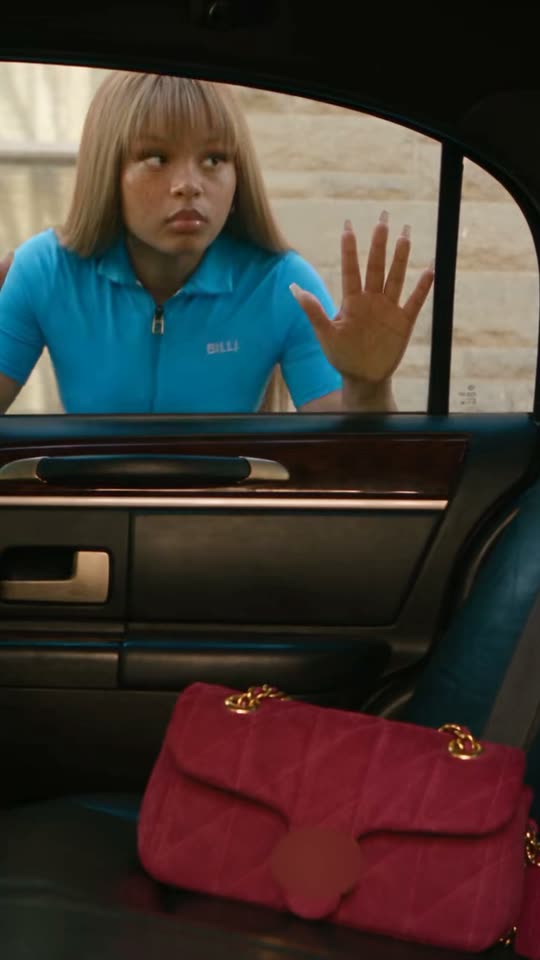
The original Smash and Grab AI reel by @billionheirkcOriginal reel
  • 2 photos you add
  • 10 s clip with sound
  • 9:16 for TikTok, Reels, Shorts
  • No watermark

No prompt to write: Add your photos and tap once

Create your own

Ready in a few minutes · 126 credits

The smash and grab AI video is a fictional car-window heist: a fixed camera inside a parked car shows an item on the back seat, you walk up, the glass shatters like a movie stunt, and you grab the item and run. You need a photo of yourself and one of the item, or of your pet and its treats.

Example

What the Smash and Grab AI video looks like

This is the original reel that started the trend. Your video is a new clip made from your photo in the same style, not a copy of these shots. No two runs come out the same.

Original reel by @billionheirkc, 10 s

An early reel of the trend by @billionheirkc, made with his own AI character: she spots a red handbag on the back seat, smashes the window, grabs the bag and runs from two officers. Shown as a vertical crop of his wide clip, with the bag's logo blurred. Your photo and your item take their place in a new take of the scene.

Step by step

How to make the Smash and Grab AI video on MakeViral

Everything runs in the browser. No editing app, no prompt to write, no watermark.

  1. Add the two photos

    Press "Create your own" and add you, full body if you can, then the item you grab (a bag, a drink, a box). Add them in this order, because the order decides who is who in the scene. Take them with the camera or pick them from your library.

  2. Press Generate

    The button shows the price. Seedance 2.5 films the Smash and Grab scene straight from your photos, with no in-between picture, for 10 seconds with original sound. You write no prompt.

  3. Download or share

    The video is ready in a few minutes as a 9:16 MP4. Download it, share it from your phone, or find it later in your Library.

Which photo works best?

Upload two photos: first you (or your pet, in the Pet version), then the item you grab.

  • You: full body if you can, face to the camera, no sunglasses. You keep your face, clothes and shoes from the photo, and the getaway shot shows you running.
  • One person per photo, sharp and in good light.
  • The item: one object on a plain background, like a bag, a drink, a sneaker box or a camera. Things you can carry in one or two hands work best.
  • Pet version: a clear photo of your pet's face and body, then a photo of its treats or a toy.
  • Brand names and logos on the item come out plain or blurred on purpose.
  • Use your own photo, or one of an adult who said yes. Never a celebrity, a stranger or a child.

Where did the Smash and Grab AI trend start?

Smash and Grab is a template format more than a meme. Higgsfield added a "Smash and grab" AI effect in early September 2026: its example clips are dated 8 September, and it takes a character photo and a product photo. The beats never change. The camera sits inside a parked car with the product on the back seat, the character smashes the side window and snatches it, and the clip cuts to a getaway shot with police lights behind. Higgsfield pitched it for "bold product reveals, playful action edits, and dynamic lifestyle ads".

AI creators tried it within days. On 11 September Los Angeles AI creator @billionheirkc posted a version with his own AI character and a red handbag, "created with Higgsfield's Smash and Grab template". A spec soda ad with "the Smash and Grab effect" followed on 17 September. Other AI video sites added their own Smash and Grab templates: Kapwing on 8 September, Pollo AI by 16 September, imageat on 22 September and Media.io, whose trend page with copy-ready prompts went up on 6 October. It is still a niche format: on 14 October TikTok had no #smashandgrabai tag, and Google showed no measurable US searches yet.

  1. Higgsfield's "Smash and grab" effect shows its first example clips: a character photo and a product photo become a car-window smash and a getaway shot. Higgsfield

  2. @billionheirkc posts a version with his own AI character and a red handbag, made with Higgsfield's template; it has 1,007 views and 24 likes by 14 October. TikTok

  3. imageat adds a Smash and Grab page: a 15-second clip from a photo of you and a photo of any object. imageat

  4. Media.io publishes Smash and Grab pages with copy-ready prompts for a handbag, a drink, a sneaker box and a camera, plus pet and cartoon versions. Media.io

  5. The format is still niche: TikTok has no #smashandgrabai or #smashandgrabtrend tag, and US Google searches for "smash and grab ai" are too few to measure over the past 90 days.

Copy and paste

The Smash and Grab AI prompts

You do not need this: the one-tap flow runs it for you. [Image 1] and [Image 2] are your photos, in the order you add them: the video model takes them as a reference and films the scene straight from them, with no photo step first.

Human

2 photos: you, full body if you can + the item you grab (a bag, a drink, a box)Seedance 2.510 s · 720p · 9:16126 credits
Video prompt

Create a fictional cinematic 9:16 video. Use [Image 1] for the adult character, preserving their face, hairstyle, clothing, and shoes. Use [Image 2] for the item, preserving its shape, color, material, any handles, and scale. Begin with a locked camera inside a parked vintage sedan, showing the item on the back seat and the character outside the intact side window. The character notices the item; the glass shatters in a stylized movie-stunt moment. They then reach through the opening, visibly grasp the item, and lift it out in one continuous shot. Cut to an exterior tracking shot as the same character runs away carrying the same item. Add warm street lighting and optional distant police lights. Avoid hands passing through intact glass, duplicate items, changing faces, and prop teleportation. The character is the person in [Image 1], in every frame: copy the exact face from [Image 1] (the face shape, eye color and eye shape, eyebrows, nose, mouth, skin tone, age, hair color, hair length and hairstyle, and any beard, moustache, glasses or freckles), so their friends recognize them at once, also through the side window and while running. They wear the clothes and shoes from [Image 1]; if [Image 1] shows only the head or the upper body, invent the rest so it matches naturally. The same face from the first frame to the last: never morph, never drift to another face. If [Image 1] shows an animal, the character is that animal standing upright, with its own face, fur and markings, not a person. The item is the object in [Image 2], in every shot: the same kind of object, shape, size, colors and material as in [Image 2]. If [Image 2] shows people or other things around it, take only the main object. The character holds it the way it fits: a bag by its handle, a drink around its body, a box with both hands. No brand names, logos, readable labels or lettering on the item, even if [Image 2] shows them. The beats: 0-2 s, the camera stays still at seat height inside the car, with the item on the back seat in the lower part of the frame; the character walks up to the closed side window, the face and chest clearly visible through the glass. 2-4 s: they spot the item and lean in close to the glass with wide eyes and a cheeky look. 4-6 s: the glass shatters into small, harmless pieces; only then does one hand reach through the opening, take the item and pull it out. 6-10 s: a hard cut outside to a warm street at sunset: a tracking shot of the character running toward the camera with the item, framed from the knees up so the face stays big and clear, with a surprised, guilty grin; far behind, two officers in plain dark uniforms run after them and a patrol car's lights flash. Audio: the glass shattering, quick footsteps and distant sirens, with an original tense, playful score. No dialogue, no lyrics. Exactly one character and one item, one head, two arms, five fingers on each hand. No weapons, no blood, no injuries. No badges, patches or force names you can read on the uniforms or the car, no readable number plates, no text, no captions, no logos, no watermark.

3100 characters
Pet

2 photos: your pet, face and body clear + its treats or a toySeedance 2.512 s · 720p · 9:16152 credits
Video prompt

Create a playful 12-second 9:16 cartoon parody. [Image 1] defines the only pet: preserve its species, facial markings, fur colors, ears, and expression while giving it a compact upright 3D animated body and natural forepaws. [Image 2] defines the treat pouch (the treats or the toy in [Image 2]). A pouch sits inside a miniature cartoon car. Start with a fixed interior view. The pet spots the treats with wide eyes; the magical window bursts into soft bubbles and sparkling particles. The pet picks up the pouch with both forepaws and hugs it. Cut to a low exterior tracking shot as it scampers away, followed slowly by a wind-up toy patrol car. Keep the fur markings and pouch consistent. No sharp glass, human fingers, extra pets, or injuries. The pet is the animal in [Image 1], in every frame: the same species and breed, face, eyes, ears, muzzle, fur colors, fur length and markings as in [Image 1], so its owner recognizes it at once, with the natural body volume of that animal: never flattened, squashed, stretched or merged with anything. The pouch is the treats or the toy from [Image 2]: the same shape and colors, with no brand names, logos or readable words, even if [Image 2] shows them. Audio: soft bubble pops, sparkly chimes, tiny paw steps and a playful original tune. No dialogue, no lyrics. No text, no captions, no logos, no watermark.

1359 characters

How many credits does it cost?

You pay per video in credits, and the create page shows the exact price on the Generate button before you spend anything. The one-tap price covers the scene photo and the video, charged once. One video is 126 credits, so the smallest one-time pack that covers it is $14.99 for 150 credits, with no subscription. The cheaper models are there if you run the prompts by hand in AI Video.

Video modelSettingsCredits
Seedance 2.5 (this template)10 s, 720p, straight from your photos, one tap126

One-time packs and plans are on the pricing page. A failed video gives its credits back.

What happens in the smash and grab AI video, second by second?

Your clip follows the beats of the trend, in two shots:

TimeWhat you see
0-2 sA fixed camera inside a parked car. Your item sits on the back seat, and you walk up to the closed side window.
2-4 sYou spot it and lean in close to the glass, wide-eyed.
4-6 sThe window shatters in one stylized movie-stunt moment. Your hand reaches through the opening, takes the item and pulls it out.
6-10 sCut outside: a tracking shot of you running down a warm street with the same item, police lights far behind you.

The sound is made with the clip: the glass, your footsteps, distant sirens and an original tense score, with no lyrics. The Pet version is a playful 12-second cartoon: your pet, as a little 3D animated version of itself, spots its treats in a toy car, the window bursts into soap bubbles, and it scampers off with a wind-up toy patrol car slowly behind.

Why does it work? The first frame shows the prize before anything happens, so the smash lands as a payoff. That is also why brands use it: the item is the hero of the clip. Higgsfield sold its effect for product reveals and lifestyle ads from the start.

How does MakeViral make it, and what does it cost?

Seedance 2.5 films the scene straight from your two photos, with no AI picture in between, so your face and your item stay yours from the first frame to the last.

HumanPet
PhotosYou, then the itemYour pet, then its treats or a toy
LookLive-action movie scenePlayful 3D cartoon
Length10 s12 s
FrameVertical 9:16, 720pVertical 9:16, 720p
SoundGlass, footsteps, sirens, original scoreBubbles, chimes, paw steps, original tune

The exact price shows on the Generate button before you spend anything. You write no prompt. The prompts start from Media.io's copy-ready Smash and Grab prompts ("Classic Handbag Getaway" and "Pet Treat Heist", published on 6 October 2026), kept in their words and order, with our photo words and rules that keep your face, your outfit and your item the same in every shot. Higgsfield's template does not show its prompt, and the creators' posts share none.

Is it a copy of a real reel? No. The trend has no single original reel: every version comes from a template. Your clip is a new take of the same scene, so the car, the street and the moves differ from run to run. A run takes a few minutes.

What goes wrong, and how do you fix it?

ProblemFix
Your face looks less like youUse a sharp photo with your face turned to the camera and no sunglasses, then run it again.
The item changes size or shapeUse a photo of the item alone on a plain background, the whole object in view. Small items that fit in one or two hands work best.
The hand goes through the glass before it breaksThe prompt orders the break first, then the reach. Run it again.
Two copies of the item, or it jumps into the handThe prompt bans both. Run it again.
The logo on your item is goneThat is on purpose: the prompt asks for no brand names, logos or readable labels. If it is your own product, add your logo in an editor.
Letters or a badge show up on an officer or the carThe prompt bans them, but AI can still draw garbled letters. Run it again, and never post a take that looks like a real police force.
The video model refuses a photoSome photos get refused. The credits come back; try another photo.

Every run is a new take, so results differ.

How should you post it: the AI label, captions and hashtags

Say it is AI and fiction. The clip looks like a movie scene of a real crime. Turn on TikTok's AI-generated label, write "AI" in your caption, and keep it an obvious joke about yourself or an ad for your own product. Never send it to someone as real, never make one of a person who did not say yes, and never try it for real: breaking into a car is a crime.

Captions: "Some things are worth it", "It was on the back seat", "Saw it. Wanted it. Took it." Or, for a product: "So good, people break into cars for it".

Hashtags: #smashandgrab is an older tag that also holds real crime clips and memes, so add #aivideo and #aitrend. The clip comes with its own sound; you can turn it off on the result screen and pick a sound when you post.

Want another fictional run-in with the police? Try the AI arrest trend, or let a truck fly over you in the car jump AI video.

FAQ

Smash and Grab AI trend questions

What is the smash and grab AI video trend?
It is an AI video format from September 2026. A fixed camera inside a parked car shows an item on the back seat; a character walks up, the side window shatters like a movie stunt, they grab the item and run, and the clip cuts to a getaway shot with police lights behind. You upload a photo of yourself and a photo of the item, and AI makes the scene.
Where did the Smash and Grab trend come from?
From Higgsfield's "Smash and grab" AI effect, whose example clips are dated 8 September 2026. It takes a character photo and a product photo. AI creators posted their versions from 11 September, and Kapwing, Pollo AI, imageat and Media.io added their own Smash and Grab templates between 8 September and 6 October.
Is the smash and grab video real?
No. Everything in it is AI-made: the car, the glass, the street and the officers. Only your face, clothes and item come from your photos. Keep the AI label on when you post it, never pass it off as real, and never try it for real.
How do I make a smash and grab AI video?
Pick Human or Pet, press "Create your own" and add two photos: first you (or your pet), then the item. Press Generate; the button shows the price first. You get a vertical clip with sound in a few minutes, and it waits in your Library when it is ready. You write no prompt.
Can I use it as an ad for my own product?
Yes, that is what the format was built for: the product is the hero of the clip. Use a clean photo of the product on a plain background. Brand names, logos and labels come out plain or blurred on purpose, so add your logo in an editor afterwards.
Can I make it with my dog or cat?
Yes. The Pet version turns your pet into a little 3D cartoon version of itself that spots its treats in a toy car. The window bursts into soap bubbles, it hugs the treats and scampers off with a wind-up toy patrol car behind. Add a clear photo of your pet, then a photo of its treats or a toy.
Which prompt does this template use?
Higgsfield's template does not show its prompt, and the creators shared none. Our prompts start from Media.io's copy-ready Smash and Grab prompts ("Classic Handbag Getaway" and "Pet Treat Heist", 6 October 2026), word for word and in order, with our photo words and rules that keep your face and your item the same in every shot and keep logos off.
How long is the video, and does it have sound?
Human is 10 seconds and Pet is 12 seconds, both vertical 9:16 MP4s at 720p with no watermark. The sound is made with the clip: glass, footsteps and sirens with an original score, or bubbles and a playful tune for Pet. You can turn it off on the result screen.
Can I put a friend or a celebrity in it?
A friend only if they say yes, and only as an obvious joke. Never a celebrity, a stranger or a child: a clip of someone breaking into a car can embarrass them or be taken as true.
Does the smash and grab AI video cost credits?
Yes. Each video costs credits, and the create page shows the exact price on the Generate button before you spend anything. If a video fails, the credits come back.

Make your own Smash and Grab AI video

Add two photos and tap once. No prompt to write. 126 credits.

No watermark. A failed video gives its credits back. Secure checkout by Stripe.