Crazy Frog AI Trend: You on the Invisible Motorbike

Sit in the air, fists forward, and race down a futuristic highway while a car chases you. Add one photo, two with a friend at the wheel, or three with your own car, and AI puts you into the viral clip, with its sound.

The original Crazy Frog AI reel by @tonnatushaOriginal reel
  • 1 photo you add
  • 11 s clip with sound
  • 16:9 like the original clip
  • No watermark

No prompt to write: Add your photo and tap once

Create your own

Ready in up to several minutes · 168 credits

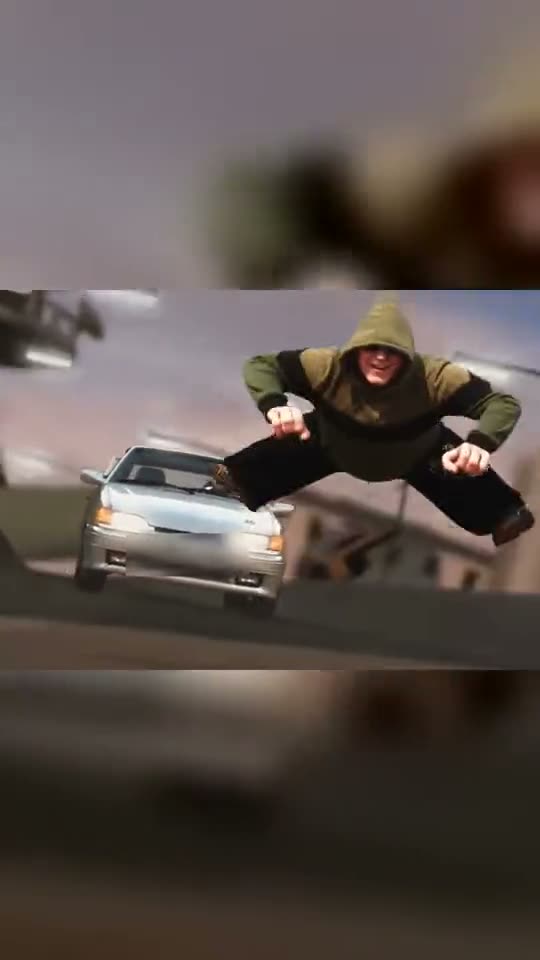
The Crazy Frog AI trend recreates the chase from the 2005 Crazy Frog music video with real people: you sit in the air on an invisible motorbike, fists forward, and race down a futuristic highway while a car chases you. Add one photo, two with a friend at the wheel, or three with your own car.

Example

What the Crazy Frog AI video looks like

This is the original reel. Your photos replace its characters, so your video follows the same shots with your faces. No two runs come out the same.

Original reel by @tonnatusha, 11 s

The original reel by @tonnatusha, the AI clip that started the trend: he and a friend put their own faces into the chase, one on the invisible motorbike, the other at the wheel of the silver car. Your photos take their places. Shown: the wide clip in a vertical frame, with the number plate blurred.

Use this reference
Step by step

How to make the Crazy Frog AI video on MakeViral

Everything runs in the browser. No editing app, no prompt to write, no watermark.

  1. Add your photo

    Press "Create your own" and add you, the rider. Take it with the camera or pick it from your library.

  2. Press Generate

    The button shows the price. Seedance 2.5 puts your photos into the Crazy Frog AI trend clip and copies it shot by shot for 11 seconds, with the reel's original song. You write no prompt.

  3. Download or share

    The video is ready in up to several minutes as a 16:9 MP4. Download it, share it from your phone, or find it later in your Library.

Which photo works best?

Upload one photo of you for Just you, two photos for You and a friend (you first, then your friend), or three for Plus your car (you, your friend, then the vehicle).

  • Waist up or full body, face to the camera. The clip shows the rider's whole body in the air, and it takes your clothes from the photo, so wear what you want to ride in.
  • Sharp and well lit, no sunglasses. The rider in the original clip wears sunglasses; the AI adds glasses only when your photo has them.
  • One person per photo, so the AI picks the right face.
  • The vehicle photo: the whole vehicle in view, from the front or a front corner, in daylight. The creator's prompt takes any ride: a car, a motorbike, a bike or a scooter.
  • Use photos of people who said yes. Never a celebrity or a stranger.

Where did the Crazy Frog AI trend start?

The trend started on 7 October 2026, when TikTok creator @tonnatusha from Belarus posted an 11-second AI clip of the chase from the 2005 Crazy Frog music video with himself and a friend in the main roles. One sits in the air on an invisible motorbike with his fists forward, the other chases him in a silver car. He promised to share the prompt if the clip took off. It did: 196,000 views, 33,100 likes and 17,800 shares by 14 October.

On 8 October he kept his word. The prompt, a long Russian text in a file on Yandex Disk, tells the AI to use the original video as the base and to replace the two people and the vehicle with three uploaded photos, completely, clothes included, while every move, cut and camera angle stays. He made the clip with Seedance 2.5 at 720p.

More versions followed. A Polish AI clip from 12 October had 185,500 views a day later, and from 12 October CapCut template how-tos spread the trend in Spanish, English and Portuguese.

  1. @tonnatusha posts the first AI clip of the chase with himself and a friend; it has 196,000 views, 33,100 likes and 17,800 shares by 14 October. TikTok

  2. He shares his prompt in a file on Yandex Disk: the original video as the base, three photos for the two people and the vehicle, made with Seedance 2.5 at 720p. TikTok

  3. A Polish AI version of the chase follows and has 185,500 views a day later. CapCut template how-tos start the same day in Spanish, English and Portuguese. TikTok

  4. The CapCut template's sound, which started on 12 October, is in 145 TikTok videos a day and a half after the Polish clip it comes from.

  5. The #crazyfrogtrend hashtag holds 167 TikTok videos and 436,600 views.

Copy and paste

The Crazy Frog AI prompts

You do not need these: the one-tap flow runs them for you, together with the trend clip. [Image 1] and [Image 2] are your two photos, and [Video 1] is the trend clip the video copies.

Just you

1 photo: you, the riderSeedance 2.511 s · 720p · 16:9168 credits
Video prompt

Use the reference video [Video 1] as the basis for the result, and the uploaded image [Image 1] as the reference for replacing the person. [Image 1] is the person to replace: the rider in the olive-green hoodie who rides an invisible motorbike down the futuristic highway, sitting in the air with the knees bent and the fists forward. Analyze the original video yourself and identify the main person who must be replaced by the reference. Do not ask the user for any extra description of the objects, and do not invent other objects to replace. Completely replace the rider with the person from [Image 1]. The replacement must be complete, including the head, face, hair, body, build, clothes and visible parts of the body, not only a face swap. Keep the natural anatomy and appearance of the person from the reference. Keep the original direction of the video. The movements, poses, gestures, facial expressions, actions, trajectories, speed, the interaction between the people and the vehicle, the position of objects in the frame, the timing, the editing, the camera moves, the angles, the perspective and the composition must match the original video as closely as possible. Do not change the plot, the order of events, the background or the surroundings unless it is necessary. Do not add new characters, objects or actions. All replaced objects must move naturally and exactly repeat the matching movements of the original objects. Correctly account for perspective, scale, scene depth, overlaps between objects, foreground and background, contact with surfaces and the interaction between the replaced objects. Keep the identity of the person from the reference for the whole video. Do not allow changes of the face or appearance between frames, identity drift, flicker, random changes of clothes, changes of build, morphing or a gradual return to the original character. The silver car is not replaced: keep it as in [Video 1]. For the vehicle, also keep a stable look for the whole video. Do not allow deformations, changes of its construction, random changes of the vehicle type, details or size. Reproduce the lighting of the source video exactly. Keep natural shadows, reflections, highlights, contact shadows and the lighting on the people and the vehicle in line with the surrounding scene. If after the replacement areas become visible that the original objects hid, use smart inpainting or fill them in only where it is needed for a natural result. This can include body parts, clothes, hair, the vehicle, shadows, reflections, the road surface or small areas of the surrounding background. When filling in, do not change the existing scene more than needed. New elements must look as if they were really in the scene during filming. Keep the source quality and visual character of the video: the natural sharpness, grain, compression, motion blur, depth of field and the traits of the source camera. Do not add artificial HDR, too much sharpening, a cinematic filter, a beauty filter or any other new visual style. The main priority is the closest possible match to [Video 1], with a complete and realistic replacement of the rider by the person from [Image 1]. The result must not look like an AI generation on top of the original video, but like real footage in which the person from [Image 1] was there from the start. The rider = the person in [Image 1], in EVERY shot, also when small in the wide shots: copy the exact face from [Image 1] - face shape, eye color and eye shape, eyebrows, nose, mouth, skin tone, age, hair color, hair length and hairstyle, and any beard, moustache, glasses or freckles exactly as in the photo. The rider wears the clothes from [Image 1]. NO sunglasses: no glasses of any kind on the rider unless [Image 1] shows glasses. No olive-green hoodie and no hood unless [Image 1] shows them. If [Image 1] shows an animal, the rider is that animal, sitting upright in the air with its front paws forward, with its own face, fur and markings and the natural body volume and proportions of that animal: never flattened, squashed, stretched or merged with anything. The same real person in every frame, from the first shot to the last, so their friends instantly recognize them. Never morph, never drift back to the original rider's face, never add or remove facial hair. The driver of the silver car is not replaced: he stays the small figure behind the windshield, as in [Video 1], and never gets the face from [Image 1]. Shots, matching the reference: 1. 0 to 3.6 s: low shot on the highway at dusk: the rider ([Image 1]) sits in the air on the invisible motorbike, knees bent, fists forward as if on handlebars, grins and leans into the curve; the silver car chases right behind; at the end the rider kicks off and flies with the legs spread. 2. 3.6 to 8.9 s: wide shots of the curving futuristic highway between giant pillars and towers: the small rider races ahead, the silver car follows and passes the camera. 3. 8.9 s to the end: medium shot: the rider rides straight at the camera on the invisible motorbike, fists forward, with a big grin - clearly the person from [Image 1]. Anatomy rules: one head only, on the rider's shoulders. A face never appears on knees, legs, hands, clothes or the car. The motorbike stays invisible: the rider sits on nothing. Exactly one rider and the one driver in the car. No text, no logos, no readable license plate.

5420 characters

You and a friend

2 photos: you, the rider + your friend, the driverSeedance 2.511 s · 720p · 16:9175 credits
Video prompt

Use the reference video [Video 1] as the basis for the result, and the two uploaded images [Image 1] and [Image 2] as references for replacing the people. [Image 1] is the first person to replace: the rider in the olive-green hoodie who rides an invisible motorbike down the futuristic highway, sitting in the air with the knees bent and the fists forward. [Image 2] is the second person to replace: the driver in red sunglasses at the wheel of the silver car that chases the rider. Analyze the original video yourself and identify the two main people who must be replaced by the matching references. Do not ask the user for any extra description of the objects, and do not invent other objects to replace. Completely replace the first and the second person with the people from [Image 1] and [Image 2] respectively. The replacement must be complete, including the head, face, hair, body, build, clothes and visible parts of the body, not only a face swap. Keep the natural anatomy and appearance of the people from the references. Keep the original direction of the video. The movements, poses, gestures, facial expressions, actions, trajectories, speed, the interaction between the people and the vehicle, the position of objects in the frame, the timing, the editing, the camera moves, the angles, the perspective and the composition must match the original video as closely as possible. Do not change the plot, the order of events, the background or the surroundings unless it is necessary. Do not add new characters, objects or actions. All replaced objects must move naturally and exactly repeat the matching movements of the original objects. Correctly account for perspective, scale, scene depth, overlaps between objects, foreground and background, contact with surfaces and the interaction between the replaced objects. Keep the identity of the people from the references for the whole video. Do not allow changes of the face or appearance between frames, identity drift, flicker, random changes of clothes, changes of build, morphing or a gradual return to the original character. The silver car is not replaced: keep it as in [Video 1]. For the vehicle, also keep a stable look for the whole video. Do not allow deformations, changes of its construction, random changes of the vehicle type, details or size. Reproduce the lighting of the source video exactly. Keep natural shadows, reflections, highlights, contact shadows and the lighting on the people and the vehicle in line with the surrounding scene. If after the replacement areas become visible that the original objects hid, use smart inpainting or fill them in only where it is needed for a natural result. This can include body parts, clothes, hair, the vehicle, shadows, reflections, the road surface or small areas of the surrounding background. When filling in, do not change the existing scene more than needed. New elements must look as if they were really in the scene during filming. Keep the source quality and visual character of the video: the natural sharpness, grain, compression, motion blur, depth of field and the traits of the source camera. Do not add artificial HDR, too much sharpening, a cinematic filter, a beauty filter or any other new visual style. The main priority is the closest possible match to [Video 1], with a complete and realistic replacement of the two people by the people from [Image 1] and [Image 2]. The result must not look like an AI generation on top of the original video, but like real footage in which the people from [Image 1] and [Image 2] were there from the start. The rider = the person in [Image 1], in EVERY shot, also when small in the wide shots: copy the exact face from [Image 1] - face shape, eye color and eye shape, eyebrows, nose, mouth, skin tone, age, hair color, hair length and hairstyle, and any beard, moustache, glasses or freckles exactly as in the photo. The rider wears the clothes from [Image 1]. NO sunglasses: no glasses of any kind on the rider unless [Image 1] shows glasses. No olive-green hoodie and no hood unless [Image 1] shows them. If [Image 1] shows an animal, the rider is that animal, sitting upright in the air with its front paws forward, with its own face, fur and markings and the natural body volume and proportions of that animal: never flattened, squashed, stretched or merged with anything. The driver = the person in [Image 2], in EVERY shot where the driver shows: the close-up at the wheel and the small figure behind the windshield. Copy the exact face from [Image 2] - face shape, eye color and eye shape, eyebrows, nose, mouth, skin tone, age, hair color, hair length and hairstyle, and any beard, moustache, glasses or freckles exactly as in the photo. The driver wears the clothes from [Image 2]. NO red sunglasses: no glasses of any kind on the driver unless [Image 2] shows glasses, and no moustache unless [Image 2] shows one. No white-and-navy track jacket unless [Image 2] shows it. The same real people in every frame, from the first shot to the last, so their friends instantly recognize them. Never morph, never drift back to the original people's faces, never add or remove facial hair. Both people change: neither person from the video stays anywhere, also in the wide shots and when only a small figure shows. Do not mix the two faces: [Image 1] is only the rider, [Image 2] is only the driver. Shots, matching the reference: 1. 0 to 0.7 s: close-up of the driver ([Image 2]) at the wheel, both hands on the wheel, a cool stare. 2. 0.7 to 4.3 s: low shot on the highway at dusk: the rider ([Image 1]) sits in the air on the invisible motorbike, knees bent, fists forward as if on handlebars, grins and leans into the curve; the silver car chases right behind, with the driver ([Image 2]) behind the windshield; at the end the rider kicks off and flies with the legs spread. 3. 4.3 to 9.6 s: wide shots of the curving futuristic highway between giant pillars and towers: the small rider races ahead, the silver car follows and passes the camera. 4. 9.6 s to the end: medium shot: the rider rides straight at the camera on the invisible motorbike, fists forward, with a big grin - clearly the person from [Image 1]. Anatomy rules: one head per person, on that person's own shoulders. A face never appears on knees, legs, hands, clothes or the vehicle. The motorbike stays invisible: the rider sits on nothing. Exactly two people. No text, no logos, no readable license plate.

6476 characters

Plus your car

3 photos: you, the rider + your friend, the driver + your car or ride, whole vehicleSeedance 2.511 s · 720p · 16:9175 credits
Video prompt

Use the reference video [Video 1] as the basis for the result, and the three uploaded images [Image 1], [Image 2] and [Image 3] as references for replacing objects. [Image 1] is the first person to replace: the rider in the olive-green hoodie who rides an invisible motorbike down the futuristic highway, sitting in the air with the knees bent and the fists forward. [Image 2] is the second person to replace: the driver in red sunglasses at the wheel of the silver car that chases the rider. [Image 3] is the vehicle to replace: the silver car. The rider's motorbike stays invisible. Analyze the original video yourself and identify the two main people and the main vehicle that must be replaced by the matching references. Do not ask the user for any extra description of the objects, and do not invent other objects to replace. Completely replace the first and the second person with the people from [Image 1] and [Image 2] respectively. The replacement must be complete, including the head, face, hair, body, build, clothes and visible parts of the body, not only a face swap. Keep the natural anatomy and appearance of the people from the references. Completely replace the vehicle with the vehicle from [Image 3]. [Image 3] is universal and may contain absolutely any kind of vehicle. Do not assume in advance that it is a car or any other specific type of vehicle. It can be a car, a motorcycle, a bicycle, a bus, a truck, a van, a train, a tram, an airplane, a helicopter, a boat, a motorboat, a yacht, a quad bike or any other vehicle. The type, look and features of the vehicle are defined only by [Image 3]. Keep the original direction of the video. The movements, poses, gestures, facial expressions, actions, trajectories, speed, the interaction between the people and the vehicle, the position of objects in the frame, the timing, the editing, the camera moves, the angles, the perspective and the composition must match the original video as closely as possible. Do not change the plot, the order of events, the background or the surroundings unless it is necessary. Do not add new characters, objects or actions. All replaced objects must move naturally and exactly repeat the matching movements of the original objects. Correctly account for perspective, scale, scene depth, overlaps between objects, foreground and background, contact with surfaces and the interaction between the replaced objects. Keep the identity of the people from the references for the whole video. Do not allow changes of the face or appearance between frames, identity drift, flicker, random changes of clothes, changes of build, morphing or a gradual return to the original character. For the vehicle, also keep a stable look for the whole video. Do not allow deformations, changes of its construction, random changes of the vehicle type, details or size. Reproduce the lighting of the source video exactly. Keep natural shadows, reflections, highlights, contact shadows and the lighting on the people and the vehicle in line with the surrounding scene. If after the replacement areas become visible that the original objects hid, use smart inpainting or fill them in only where it is needed for a natural result. This can include body parts, clothes, hair, the vehicle, shadows, reflections, the road surface or small areas of the surrounding background. When filling in, do not change the existing scene more than needed. New elements must look as if they were really in the scene during filming. Keep the source quality and visual character of the video: the natural sharpness, grain, compression, motion blur, depth of field and the traits of the source camera. Do not add artificial HDR, too much sharpening, a cinematic filter, a beauty filter or any other new visual style. The main priority is the closest possible match to [Video 1], with a complete and realistic replacement of the two people and the vehicle by the objects from [Image 1], [Image 2] and [Image 3]. The result must not look like an AI generation on top of the original video, but like real footage in which the people from [Image 1] and [Image 2] and the vehicle from [Image 3] were there from the start. The rider = the person in [Image 1], in EVERY shot, also when small in the wide shots: copy the exact face from [Image 1] - face shape, eye color and eye shape, eyebrows, nose, mouth, skin tone, age, hair color, hair length and hairstyle, and any beard, moustache, glasses or freckles exactly as in the photo. The rider wears the clothes from [Image 1]. NO sunglasses: no glasses of any kind on the rider unless [Image 1] shows glasses. No olive-green hoodie and no hood unless [Image 1] shows them. If [Image 1] shows an animal, the rider is that animal, sitting upright in the air with its front paws forward, with its own face, fur and markings and the natural body volume and proportions of that animal: never flattened, squashed, stretched or merged with anything. The driver = the person in [Image 2], in EVERY shot where the driver shows: the close-up at the wheel and the small figure behind the windshield. Copy the exact face from [Image 2] - face shape, eye color and eye shape, eyebrows, nose, mouth, skin tone, age, hair color, hair length and hairstyle, and any beard, moustache, glasses or freckles exactly as in the photo. The driver wears the clothes from [Image 2]. NO red sunglasses: no glasses of any kind on the driver unless [Image 2] shows glasses, and no moustache unless [Image 2] shows one. No white-and-navy track jacket unless [Image 2] shows it. The same real people in every frame, from the first shot to the last, so their friends instantly recognize them. Never morph, never drift back to the original people's faces, never add or remove facial hair. Both people change: neither person from the video stays anywhere, also in the wide shots and when only a small figure shows. Do not mix the two faces: [Image 1] is only the rider, [Image 2] is only the driver. Shots, matching the reference: 1. 0 to 0.7 s: close-up of the driver ([Image 2]) at the wheel, both hands on the wheel, a cool stare. 2. 0.7 to 4.3 s: low shot on the highway at dusk: the rider ([Image 1]) sits in the air on the invisible motorbike, knees bent, fists forward as if on handlebars, grins and leans into the curve; the vehicle from [Image 3] chases right behind, with the driver ([Image 2]) behind the windshield; at the end the rider kicks off and flies with the legs spread. 3. 4.3 to 9.6 s: wide shots of the curving futuristic highway between giant pillars and towers: the small rider races ahead, the vehicle from [Image 3] follows and passes the camera. 4. 9.6 s to the end: medium shot: the rider rides straight at the camera on the invisible motorbike, fists forward, with a big grin - clearly the person from [Image 1]. Anatomy rules: one head per person, on that person's own shoulders. A face never appears on knees, legs, hands, clothes or the vehicle. The motorbike stays invisible: the rider sits on nothing. Exactly two people. No text, no logos, no readable license plate.

7090 characters
How many credits does it cost?

You pay per video in credits, and the create page shows the exact price on the Generate button before you spend anything. The one-tap price covers the video, made in one step from your photos and the trend clip, charged once. One video is 168 credits, so the smallest one-time pack that covers it is $39.99 for 450 credits, with no subscription. The cheaper models are there if you run the prompts by hand in AI Video.

Video modelSettingsCredits
Seedance 2.5 (this template)11 s, 720p, copies the trend clip, one tap168

One-time packs and plans are on the pricing page. A failed video gives its credits back.

What happens in the Crazy Frog AI video, shot by shot?

MakeViral puts you into @tonnatusha's original AI clip itself. The highway, the chase, the cuts and the camera stay as in the clip:

TimeWhat you see
0 to 0.7 sA close-up of the driver at the wheel of the silver car: your friend in the two- and three-photo versions. Just you starts with the next shot.
0.7 to 4.3 sYou sit in the air on the invisible motorbike, knees bent and fists forward, grin and lean into the curve. The car chases right behind you, and at the end you push off and fly with your legs spread.
4.3 to 9.6 sWide shots of the curving highway between giant towers at dusk: you race ahead, and the car follows and roars past the camera.
9.6 to 11.4 sYou ride straight at the camera, fists forward, with a big grin.

How it works: Seedance 2.5, the model the trend's creator used, edits the clip itself. It swaps the people, and in Plus your car the car too, for the ones in your photos and keeps everything else. You get 11 seconds (about 10.5 in Just you) at 720p, with the clip's own sound put back after the run. You can turn the sound off on the result screen. A run takes 5 to 15 minutes, and the exact price shows on the Generate button before you spend anything. Every run is a new take, so results differ.

Why is it wide? The original clip is wide, and so is your video (16:9). In the chase shots the car and the rider are side by side, so a vertical crop would cut one of them out.

Just you, a friend, or your own car: which one should you make?

  • Just you (1 photo): you ride the invisible motorbike in every shot. The car still chases you, with its driver as a small figure behind the windshield, and the clip starts on your first shot in the air.
  • You and a friend (2 photos): photo 1 rides, photo 2 drives the car that chases you, and the video opens on a close-up of your friend at the wheel. This is how the original was made: the creator and a friend.
  • Plus your car (3 photos): the same as You and a friend, and photo 3 replaces the silver car with your own ride. It is the creator's full recipe: his prompt takes two people and a vehicle.

All three use the same clip, the same sound and the same model. Want to swap roles? Make You and a friend twice with the photos the other way round, and post both.

What goes wrong, and how do you fix it?

ProblemFix
A face looks like someone elseUse a sharp, front-facing photo in good light, without sunglasses. Run it again.
The original rider's sunglasses or green hoodie come backThe prompt bans them unless your photo has them. Run it again.
The two faces mixUse one person per photo, each face clear. Check the order: photo 1 rides, photo 2 drives.
Your car looks different in some shotsUse a photo of the whole vehicle from the front or a front corner, in daylight.
The number plate is blurredThat is on purpose: we blurred the plate in the original clip, and the prompt asks for no readable plate.
The model refuses a photoSome photos get refused. The credits come back; try another photo.

Which sound, caption and hashtags fit the Crazy Frog trend?

Hashtags: #crazyfrogtrend had 167 TikTok videos and 436,600 views on 14 October 2026. Add #crazyfrog, the big one with over 106,000 videos, and #crazyfrogai. Keep the platform's AI label on.

Caption ideas: "No license, no problem", "Me and the bestie on the way to work", "Late again", or a joke about who is chasing whom. Or write your own.

Sound: the clip comes with the original clip's sound, the same seconds as the clip, so it is ready to post. You can turn it off on the result screen and pick a sound when you post instead. The music belongs to its owners, and MakeViral gives you no rights to it. Music rules differ from platform to platform, so check them before you use the clip in an ad or a paid post.

FAQ

Crazy Frog AI trend questions

What is the Crazy Frog AI trend?
It is a TikTok trend where people put themselves into the chase from the 2005 Crazy Frog music video with AI: one person sits in the air on an invisible motorbike with the fists forward and races down a futuristic highway, and a friend chases them in a car. It started in Belarus on 7 October 2026, and by 12 October a Polish version and CapCut how-tos in Spanish, English and Portuguese had followed.
Who started the Crazy Frog AI trend?
TikTok creator @tonnatusha from Belarus, with a clip posted on 7 October 2026 in which he and a friend play both roles. It had 196,000 views, 33,100 likes and 17,800 shares by 14 October.
What prompt does the Crazy Frog AI trend use?
The creator shared his prompt on 8 October 2026 in a file on Yandex Disk. It tells the AI to use the original video as the base and to replace the people and the vehicle completely with the uploaded photos, clothes included, while every move, cut and camera angle stays. This template uses that prompt in English, says which photo is the rider and which the driver, and adds rules that keep your face, from the eye color to the hairstyle. You write no prompt yourself.
How do I make the Crazy Frog AI video with my photo?
Pick a version, press "Create your own" and add your photo: one for Just you, two for You and a friend, three for Plus your car. Press Generate; the button shows the price first. You get an 11-second clip with the original sound, and it waits in your Library when it is ready.
Can my friend chase me in the video?
Yes. In You and a friend, photo 1 is you on the invisible motorbike and photo 2 is your friend at the wheel of the car that chases you, with a close-up of your friend at the start.
Can I put my own car in it?
Yes. Plus your car takes a third photo, the vehicle, and puts it in place of the silver car that chases you. The creator's prompt takes any ride, from a car to a motorbike, a bike or a scooter. Use a photo of the whole vehicle in daylight.
Does the video show the Crazy Frog?
No. You are the rider. No frog, no cartoon and no logo appear in your clip: the trend only borrows the chase on the invisible motorbike.
Does the video have the Crazy Frog song?
It comes with the original clip's sound, the same seconds as the clip, put back after the run. You can turn it off on the result screen. The music belongs to its owners, and MakeViral gives you no rights to it.
Is this the CapCut Crazy Frog template?
No. The CapCut template that spread from 12 October is a separate app effect with its own clip. Here AI puts you into the original AI clip that started the trend, with your own face and clothes, and you need no CapCut.
How long is the video and what format is it?
11 seconds (about 10.5 in Just you) as an MP4 at 720p, wide 16:9 like the original clip, with its sound. It plays on TikTok, Reels and Shorts, and there is no watermark.
Can I put a celebrity in it?
No. Use your own photo, or a friend who said yes. Some viral versions use famous faces; we do not make those.
Is the video real?
No. The people and the car are put into an AI clip from still photos, and nobody filmed this. Keep the AI label on when you post it.

Make your own Crazy Frog AI video

Add one photo and tap once. No prompt to write. 168 credits.

No watermark. A failed video gives its credits back. Secure checkout by Stripe.