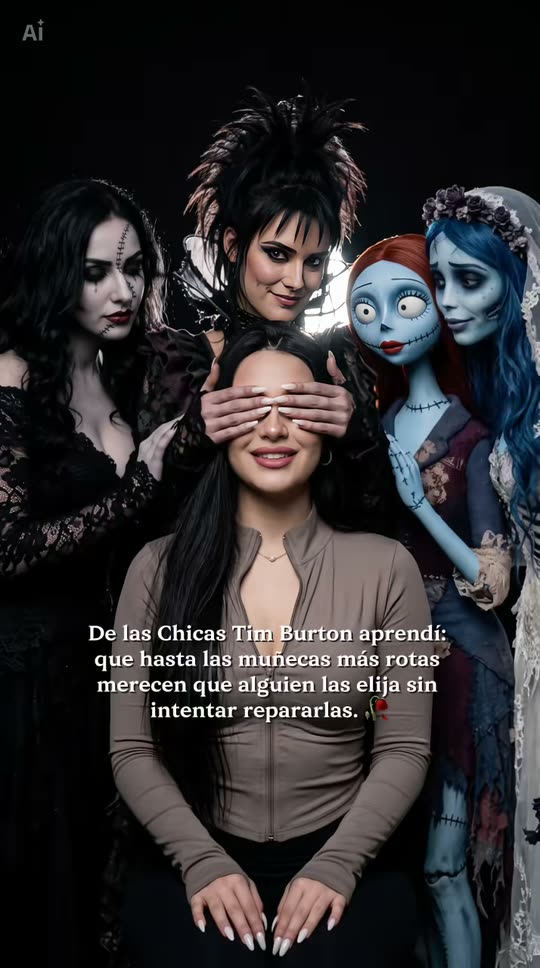
Tim Burton Girls AI Trend: Sit with the Gothic Dolls

You sit in the middle of a dark studio portrait, four pale gothic women and dolls lean in behind you, and one of them covers your eyes with her hands. One selfie in, a photo out, or a 10-second video where the hands slide away.

The original Tim Burton Girls reel by @fabihola_ccOriginal reel
  • 1 photo you add
  • 2K photo you can turn into a video
  • 9:16 for TikTok, Reels, Shorts
  • No watermark

No prompt to write: Add your photo and tap once

Create your own

Ready in a few minutes · Photo · 3 credits

The Tim Burton Girls AI trend is a Halloween photo trend from Mexico, October 2026: you sit in the center of a dark portrait while pale gothic girls and dolls in a dark storybook style stand behind you, and one of them covers your eyes with her hands. You need one clear selfie.

Example

What the Tim Burton Girls photo looks like

This is the original reel that started the trend. Your video is a new clip made from your photo in the same style, not a copy of these shots. No two runs come out the same.

Original reel by @fabihola_cc, 11 s

The original post by @fabihola_cc, the creator of the CapCut template: she sits in the middle of a dark studio portrait while gothic figures lean in and one covers her eyes. The template's figures copy film characters; our version draws four original gothic girls instead.

Step by step

How to make the Tim Burton Girls photo on MakeViral

Everything runs in the browser. No editing app, no prompt to write, no watermark.

  1. Add your photo

    Press "Create your own" and add your selfie, face clear. Take it with the camera or pick it from your library.

  2. Press Generate

    The button shows the price. Nano Banana 2 puts your photo into the Tim Burton Girls scene and makes one 2K photo. You write no prompt.

  3. Download or share

    The photo is ready in a few minutes as a 9:16 2K image. Download it, share it from your phone, turn it into a video, or find it later in your Library.

Which photo works best?

Use one sharp selfie or a photo from the chest up, face to the camera, in soft daylight.

  • Your face does the work. Hands cover your eyes in the photo, so your nose, mouth, jaw and hair are what make it look like you. A clear, well-lit face matters more than usual.
  • Eyes open, no sunglasses. The video version shows your eyes at the end, and the model copies them from your photo.
  • Your clothes stay yours, as in the original template. Wear something dark if you want the full gothic mood.
  • One person per photo. With two faces, the model may mix them.
  • Use your own face, or the face of an adult who agreed. Never a child and never a celebrity.

Where did the Tim Burton Girls trend start?

The trend started as a CapCut template by Fabihola CC (@fabihola_cc), a template maker who posts from Mexico. The first template post went up on 13 October 2026, with the creator's own sound and a Spanish line on the picture: "De las Chicas Tim Burton aprendí: que hasta las muñecas más rotas merecen que alguien las elija sin intentar repararlas" (from the Tim Burton girls I learned that even the most broken dolls deserve someone who chooses them without trying to fix them). By the next day it had 198,800 views and 15,100 likes, and 2,595 TikTok videos used the template's sound. Of the 14 most viewed of those videos, 13 were posted from Mexico.

The line plays on a phrase from two days earlier: on 11 October a #timburton clip with the caption "Soy una chica de Tim Burton" (I'm a Tim Burton girl: no matter how many times I break, I will always rebuild myself) passed 111,500 views. It also follows the Tim Burton AI trends of September 2026, when people asked ChatGPT and Gemini to turn them into a Burton-style character. How-to videos in Spanish and English followed from the evening of 13 October.

  1. A CapCut tutorial shows a "Tim Burton characters behind you" mirror selfie template, an early version of the same idea: dark storybook figures crowd in behind the person in the photo. TikTok

  2. A #timburton clip captioned "Soy una chica de Tim Burton" ("I'm a Tim Burton girl"), about a girl who rebuilds herself every time she breaks, passes 111,500 views and 11,100 likes. TikTok

  3. @fabihola_cc posts the Tim Burton Girls CapCut template: one photo, the gothic figures behind you, one of them covering your eyes, and the line about broken dolls. It has 198,800 views and 15,100 likes a day later. TikTok

  4. How-to videos in Spanish and English start the same evening (the first we found went up at 17:23 UTC) and walk viewers to the "Chicas Tim Burton" template in CapCut. TikTok

  5. The template's sound reaches 2,595 TikTok videos about 30 hours after the first post; 13 of the 14 most viewed ones we checked were posted from Mexico. TikTok

Copy and paste

The Tim Burton Girls prompts

You do not need this: the one-tap flow runs it for you. The photo prompt puts your photo into the scene. Want to change it? Copy it and edit it in AI Photo.

Photo

1 photo: your selfie, face clearNano Banana 2Photo · 2K · 9:163 credits
Photo prompt

Use the uploaded image as the base. Keep the person's face, facial features, skin tone, hair, gender and body shape exactly the same as in the photo, and keep the clothes from the photo: no gothic makeup and no costume on the person. Do not beautify or change the face. A dark, moody studio portrait in a gothic storybook style, like a still from a dark fairy-tale film. The person sits in the center in front, on a low black chair, facing the camera with a calm, soft smile, both hands resting on their knees, shown from the head down to the knees. Behind the person stand four pale gothic women and dolls in a dark storybook style, leaning in close: on the left, a tall woman with long black hair in black lace; directly behind the person, a woman with black curls pinned up, in black velvet; next to her, a porcelain-doll girl with huge glassy dark eyes and burgundy braids; on the far right, a ghostly woman with silver-white hair in torn grey lace, close together like an old family portrait. All four have ghost-pale skin, dark-rimmed eyes and dark lips. The woman directly behind the person covers the person's eyes from behind with both of her pale, slender hands with long dark nails: her fingers lie gently across the eyes and eyebrows only, and the person's nose, cheeks, mouth, chin and hair stay fully visible, sharp and well lit. The other three rest a hand on the person's shoulders or keep their hands at their sides, and look into the camera with calm, knowing half smiles. Pitch-black background with a soft white backlight glowing behind their heads, soft cool light on the faces, deep shadows, muted cold colors with small accents of plum and dark red, fine film grain, sharp focus on the person. Vertical 9:16. Exactly one real person and four gothic women, exactly two hands over the person's eyes, no extra hands, arms or fingers. They are not known film or cartoon characters: no blue skin, no stitches, no veil, no red yarn hair, no spiky hair. No text, no captions, no logos, no watermark.

2015 characters

Video

1 photo: your selfie, face clearSeedance 2.510 s · 720p · 9:16126 credits
Video prompt

A dark gothic storybook portrait that slowly comes to life, in one shot with no cuts. Photorealistic, fine film grain. The person sitting in the center is the person in [Image 1], in every frame: copy the exact face from [Image 1] (the face shape, eye color and eye shape, eyebrows, nose, mouth, skin tone, age, hair color, hair length and hairstyle, and any beard, moustache, glasses or freckles) and the clothes from [Image 1], so their friends recognize them at once. No gothic makeup and no costume on this person. If [Image 1] already shows this portrait with hands over the eyes, it is the first frame: skip the reveal and keep the hands over the eyes for the whole clip. The person sits in front on a low black chair, facing the camera, hands on the knees, framed from the head to the knees. Behind them stand four pale gothic women and dolls in a dark storybook style, leaning in close: on the left, a tall woman with long black hair in black lace; directly behind the person, a woman with black curls pinned up, in black velvet; next to her, a porcelain-doll girl with huge glassy dark eyes and burgundy braids; on the far right, a ghostly woman with silver-white hair in torn grey lace. Pitch-black background, soft white backlight behind their heads. 0-5 s, a living photo: the woman directly behind covers the person's eyes with both pale hands, and the person smiles softly. The backlight flickers like candlelight; the women lean in. Slow push in. 5-10 s, the reveal: she slowly slides her hands down onto the person's shoulders, and the person opens their eyes and looks into the camera with a calm smile. The whole face is large and sharp: exactly the face from [Image 1], with its eye color. Never morph. Audio: an original slow music-box lullaby with a wordless choir. Exactly one real person and four gothic women, no extra hands. They are not known film or cartoon characters: no blue skin, no stitches, no veil, no red yarn hair, no spiky hair. No text, no logos.

1988 characters

How many credits does it cost?

You pay per photo in credits, and the create page shows the exact price on the Generate button before you spend anything. The one-tap price covers one 2K photo, charged once. One photo is 3 credits, so the smallest one-time pack that covers it is $9.99 for 100 credits, with no subscription. A smaller 1K photo costs less if you run the prompt by hand in AI Photo.

ModelSettingsCredits
Nano Banana 2 (this template)2K photo, 9:16, one tap3
Nano Banana 2 (by hand in AI Photo)1K photo, 9:16, same prompt2

One-time packs and plans are on the pricing page. A failed photo gives its credits back.

What is in the Tim Burton Girls photo?

Every Tim Burton Girls post has the same few parts, and each one matters:

PartWhat it looks like
YouIn the middle, in front, seated, in your own clothes, hands resting on your knees, with a calm, soft smile
The handsThe woman right behind you covers your eyes with both pale hands. The rest of your face stays in view
The gothic girlsFour pale figures in a dark storybook style lean in close behind you, like an old family portrait
The lightA pitch-black studio, a soft white glow behind their heads, deep shadows and cold, muted colors
The lineIn the original posts, a Spanish line about broken dolls who deserve to be chosen, not fixed

In the CapCut template, the figures behind you look like heroines from Tim Burton's films. Ours are four original gothic girls, made up for this template in the same mood: a tall woman in black lace, a woman with pinned-up black curls in black velvet, a porcelain doll with huge glassy eyes and burgundy braids, and a ghostly woman with silver-white hair in torn grey lace. Your photo then shows no one else's characters, and the look stays the same from run to run.

Photo or video: which version should you pick?

Both versions start from the same selfie.

  • Photo is the trend as people post it: the still portrait with your eyes covered, as one 2K image. It is the cheaper pick, and you can add the trend's sound in TikTok when you post it.
  • Video is 10 seconds with its own sound. For the first 5 seconds the portrait moves like a living photo: the light behind the girls flickers like candlelight and they lean in. Then the hands slide down to your shoulders, and you open your eyes and look into the camera. It is made straight from your selfie, with no in-between picture, so your real eyes and face show at the end.

The template clips on TikTok keep the hands over the eyes for the whole clip, so the reveal at the end is our own twist. You can also make the photo first and then use Make it a video on the result screen: that clip starts from the finished photo, so the prompt asks the model to keep your eyes covered, because the photo does not show them.

What goes wrong, and how do you fix it?

What goes wrongWhyWhat to do
The face looks less like youThe hands hide your eyes and eyebrows, which carry a lot of a faceUse a sharp, front-facing selfie in daylight and run it again, or pick Video, which ends with your eyes open
An extra hand appearsFive people close together means a lot of hands, which image models find hardRun it again: the prompt asks for exactly two hands over your eyes
The hands cover your nose or mouthThe model placed the hands too lowRun it again: the prompt keeps the hands across the eyes only
Your outfit changesThe model dressed you for the gothic sceneRun it again: the prompt keeps the clothes from your photo, as the original template does

Each run is a little different, so it is worth making two or three and keeping the best one. If a run fails, the credits come back.

Which sound, caption and hashtags go with it?

The original posts use the template's own sound, "sonido original" by Fabihola CC, and the Spanish line about broken dolls. To use that sound, open one of the template posts on TikTok, tap the sound and add it to your post. The Photo has no sound of its own. The Video comes with an original music-box lullaby and a wordless choir, with no lyrics and no copyrighted music.

Captions that fit: the Spanish line itself, "De las Chicas Tim Burton aprendí: que hasta las muñecas más rotas merecen que alguien las elija sin intentar repararlas", or in English, "From the Tim Burton girls I learned that even the most broken dolls deserve someone who chooses them without trying to fix them."

Hashtags (TikTok, 14 October 2026): #timburtongirl (670 videos, 10.3 million views), #efeitohalloween, the tag on the template's own posts (301,910 videos), #timburtonfilter (9,056 videos, 144 million views) and #chicastimburton. Keep the platform's AI label on.

FAQ

Tim Burton Girls trend questions

What is the Tim Burton Girls AI trend?
It is a Halloween AI photo trend that took off on TikTok on 13 October 2026, mostly in Mexico. One selfie becomes a dark studio portrait: you sit in the middle, pale gothic girls and dolls stand behind you, and one of them covers your eyes with her hands. In Spanish it is called "las chicas Tim Burton".
How do I do the Tim Burton Girls trend?
Press "Create your own", add one clear selfie, pick Photo or Video and press Generate. MakeViral puts you into the portrait with the four gothic girls behind you, and the result lands in your Library. You write no prompt.
Is there a Tim Burton Girls AI prompt?
No creator shared one. The trend comes from a closed CapCut template, and its tutorials only show how to open the template and add a photo. The Tim Burton prompts that circulate for ChatGPT and Gemini turn you into a Burton-style character, which is a different look. So we wrote our own prompts from the template's frames: the same seat, the hands over the eyes, the black studio and the glow, with four original gothic girls in place of film characters.
Is this an official Tim Burton filter?
No. Tim Burton has no part in this trend or in MakeViral. Creators use his name as a label for a pale, dark storybook look. Our template makes four original gothic women and dolls, not characters from his films.
Who started the Tim Burton Girls trend?
The CapCut template maker Fabihola CC (@fabihola_cc), who posts from Mexico. The first template post went up on 13 October 2026 and had 198,800 views a day later. The "Tim Burton girl" phrase itself was already spreading: a #timburton clip with the caption "Soy una chica de Tim Burton" passed 111,500 views on 11 October.
What does the Spanish line in the posts mean?
"De las Chicas Tim Burton aprendí: que hasta las muñecas más rotas merecen que alguien las elija sin intentar repararlas" means "From the Tim Burton girls I learned that even the most broken dolls deserve someone who chooses them without trying to fix them." It is the caption on the template's posts.
Which AI models make it?
The Photo runs on Nano Banana 2, Google's image model, as one 2K image. The Video runs on Seedance 2.5, made straight from your selfie: 10 seconds, vertical, 720p, with sound.
Can men or couples do it?
Men can: the prompt keeps your own face, hair, gender and clothes, and the gothic girls stand behind whoever sits in the chair. The template takes one photo, so it is made for one person. For a spooky portrait of two, try the duo version of the [Ghostface AI trend](/templates/ghostface-ai-trend).
Does it cost credits?
Yes. The Photo costs a few credits and the Video costs more. The create page shows the exact price on the Generate button before you spend anything, and if a run fails, the credits come back.
Can I post it on TikTok or Instagram?
Yes. There is no watermark on the result. Keep the platform's AI label on, and use only your own photo or the photo of an adult who agreed.
Is my photo private?
Yes. MakeViral does not post your photo or the result anywhere or show it to other users. The result goes to your private Library, and you can delete it there at any time.

Make your own Tim Burton Girls photo

Add one photo and tap once. No prompt to write. 3 credits.

No watermark. A failed video gives its credits back. Secure checkout by Stripe.