Back

AI Aging Filter: See Yourself Get Older, Age by Age, From One Photo

Your photo comes to life, then you jump to 25, 40, 60 and 80 on the beat: the same pose, the same clothes, the same place, only the years change.

The original AI Aging Filter reel by @georgi.secundar15Original reel
  • 1 photo you add
  • 10 s clip with sound
  • 9:16 for TikTok, Reels, Shorts
  • No watermark

No prompt to write: Add your photo and tap once

Create your own

Ready in a few minutes · 126 credits

The ai aging filter is the "me at every age" trend: one photo becomes a video of you getting older, one age per beat, in the same pose and place. On TikTok it is the aging filter, also called the 5 ages filter. MakeViral makes it from your photo: you now, then 25, 40, 60 and 80.

Also called Aging timeline filter · Me at every age trend · Beat-synced aging effect

Example

What the AI Aging Filter video looks like

The example is a creator's take of the trend, cut to the adult ages. MakeViral does not copy this clip: it makes a new aging video from your photo, adults only, with no numbers on screen.

Original reel by @georgi.secundar15, 3 s

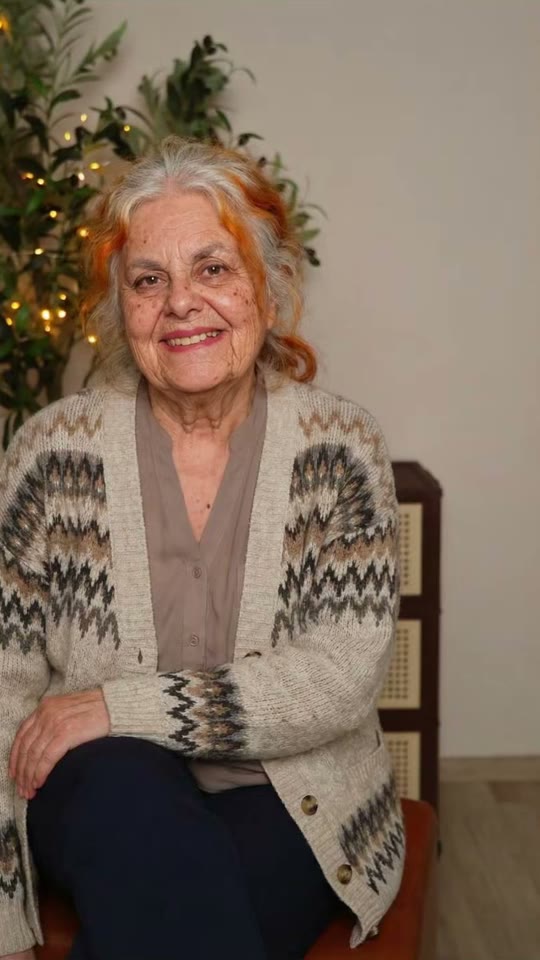
A take of the age filter by @georgi.secundar15 (April 2026, 171,000 views): her own photo, then her at 80. Solo makes the full aging video from your photo.

Step by step

How to make the AI Aging Filter video on MakeViral

Everything runs in the browser. No editing app, no prompt to write, no watermark.

  1. Add your photo

    Press "Create your own" and add you (18+), face clear, waist up. Take it with the camera or pick it from your library.

  2. Press Generate

    The button shows the price. Seedance 2.5 films the AI Aging Filter scene straight from your photo, with no in-between picture, for 10 seconds with original sound. You write no prompt.

  3. Download or share

    The video is ready in a few minutes as a 9:16 MP4. Download it, share it from your phone, or find it later in My videos.

Which photo works best?

You need one photo of one adult (18+).

  • Face to the camera, sharp and well lit, from the waist up. The video keeps your pose and your place, so pick a photo you like the look of.
  • No sunglasses, no mask, no beauty filter, nobody else in the photo.
  • Your clothes stay the same at every age. Plain clothes work best; a logo or a print on the shirt comes out plain.
  • A simple background (a wall, a street, a garden) keeps the steps clean.
  • This template is for adults: use your own photo or one of an adult friend who agreed. Never a child, a celebrity or a stranger.

Where did the AI Aging Filter trend start?

The aging filter that fills TikTok in 2026 is a phone editor template known as the "5 ages filter". It takes one photo and shows you at 4, 12, 21, 40 and 80 in the same place, one age on each beat, while the numbers fly onto your face. It started in the UK on 25 March 2026, when @aitrendsdaily1 posted "Me at 5 ages trend" on the sound "original sound - aitrends". A day later @youngcapcutg's "5 ages filter trend" was on its way to 10 million views, and on 31 March @phoenixwilder67's take ("Ok, but 40 is literally my Mum!") reached 16.9 million, the biggest so far.

New waves followed: "Different ages filter" in June (5 million views), "Aging AI filter trend" in August (2.1 million), and how-to posts in the US in September and October that call it the "aging timeline face trend". In April a 12, 20, 40, 80 version spread on a sound from Burkina Faso with "AI beat-synced effect" tutorials (1.8 million views), and that sound was still adding about 100 videos a day on 26 October.

  1. @aitrendsdaily1 posts "Me at 5 ages trend", the first post on the template's sound: one photo, then the same person at 4, 12, 21, 40 and 80 (463,000 views by 26 October). TikTok

  2. @youngcapcutg posts "5 ages filter trend": the first take to pass a million views, 10 million by 26 October. TikTok

  3. @phoenixwilder67's take ("Ok, but 40 is literally my Mum!") reaches 16.9 million views, the biggest of the trend. TikTok

  4. A 12, 20, 40, 80 version spreads with "AI beat-synced effect" tutorials on a sound from Burkina Faso: @faas6486's reaches 1.8 million views. TikTok

  5. A new wave as the "Different ages filter": @zfrjnozdo8's post reaches 5 million views. TikTok

  6. US how-to posts call it the "viral age filter aging timeline face trend": @mengg4872's reaches 638,000 views. TikTok

Copy and paste

The AI Aging Filter prompt

You do not need this: the one-tap flow runs it for you. [Image 1] is your photo: the video model takes it as a reference and films the scene straight from it, with no photo step first.

1 photo: you (18+), face clear, waist upSeedance 2.510 s · 720p · 9:16126 credits
Video prompt

A viral AI aging filter video: the person in [Image 1] gets older step by step, one age on each beat, like their own photo coming to life. Vertical 9:16, photorealistic, a locked-off camera: the same framing, the same pose, the same place, the same light and the same background as [Image 1] in every frame. Only the age changes. THE PERSON is the person in [Image 1], in every frame: copy the exact face from [Image 1] (the face shape, eye color and eye shape, eyebrows, nose, mouth, ears, skin tone, and any moles, freckles or glasses), so their friends recognize them at once at every age. A woman stays a woman, a man stays a man. The same clothes as in [Image 1] at every age (any print or logo stays plain), their own hairstyle and hair length, the hair color turning grey and then white. A beard only if [Image 1] has one. Exactly one person. The steps, each one a quick, smooth morph of about half a second on the beat, with no cut, no flash and no camera move: 0-2 s: the person exactly as in [Image 1], at their age in the photo, with a small natural blink and breath. 2-4 s: the same person at about 25, a young adult: smooth skin, full hair in their own color, bright eyes. 4-6 s: the same person at about 40: the first fine lines around the eyes and the mouth, a few grey hairs at the temples, a slightly fuller face. 6-8 s: the same person at about 60: deeper lines, mostly grey hair, thinner hair or a higher hairline, a softer jawline. 8-10 s: the same person at about 80: white or silver hair, deep wrinkles, age spots, thinner lips, the shoulders a little bent, and a warm, calm smile into the camera. Audio: an original, upbeat instrumental beat with a soft whoosh on each change. No voice, no lyrics, no known song. Every step shows a grown adult with an adult face and body: never a child, a teen or a baby, never a teenage look. No text, no numbers, no letters, no age labels, no captions on the screen. No logos, no watermark. No second person, no mirror double. One head, two arms and five fingers on each hand. Never a famous person's face.

2069 characters
How many credits does it cost?

You pay per video in credits, and the create page shows the exact price on the Generate button before you spend anything. The one-tap price covers the scene photo and the video, charged once. One video is 126 credits, so the smallest one-time pack that covers it is $13.99 for 150 credits, with no subscription. The cheaper models are there if you run the prompts by hand in AI Video.

Video modelSettingsCredits
Seedance 2.5 (this template)10 s, 720p, straight from your photos, one tap126

One-time packs and plans are on the pricing page. A failed video gives its credits back.

What happens in the AI aging filter video, second by second?

You get one 10-second clip, vertical, with a camera that never moves. Every 2 seconds you jump to the next age, with a quick, smooth morph on the beat:

SecondsAgeWhat changes
0-2You nowYour photo comes to life: a blink and a breath
2-4About 25Smooth skin, full hair in your own color
4-6About 40Fine lines around the eyes, first grey hairs at the temples
6-8About 60Deeper lines, mostly grey hair, a softer jawline
8-10About 80White hair, deep wrinkles, a slightly bent posture and a warm smile

Your face shape, eyes, skin tone and glasses stay yours, and so do the pose, the clothes and the place. That is what makes the ai aging video work: it is clearly you, only older. The sound comes with the clip: an original beat with a soft whoosh on each change. The videos come from top-quality AI video models, including Seedance 2.5. Every run is a new take, so the looks at each age differ a little.

How to add the ages on screen, like the trend

The trend shows the ages as numbers on screen. AI video models write numbers badly, so your clip has no text: you add the ages yourself in the TikTok editor (or any video editor) in under a minute.

Add this textAt
Now (or your age)0 s
252 s
404 s
606 s
808 s

Put them in a column on the left, like the 5 ages filter, or one at a time over your face. The original template starts at 4 and 12. This one starts at 25, because it is for adults only, so it works as an all ages filter for grown-ups: the different ages filter look, with you as an adult at every step. It is also an ai age progression in one clip, or an age progression ai video if you want to answer what will i look like when i'm older.

What can go wrong and how to fix it

ProblemWhyFix
At 80 you look like someone elseStrong aging hides the faceUse a sharp, front-facing photo in good light and run it again
The clip cuts or the camera movesThe AI changes the shot now and thenRun it again; most takes keep one locked shot
Your clothes or the place changeThe AI dresses you for the ageRun it again; plain clothes hold best
The hair stays dark at 80Dark, dyed or very short hairRun it again; it changes from run to run

One adult per photo. A far photo with a small face gives the AI less to work with.

Posting tips: sound, hashtags and caption

Your clip comes with an original beat, so you choose the sound. To join the aging filter tiktok trend, add a trending sound on TikTok when you post; the changes land every 2 seconds, so most beats fit.

Hashtags: #agefilter (47,327 videos), #agingfilter (12,899), #agefiltertrend and #aging. Keep the platform's AI label on: the video is AI-made, like the filter takes.

Caption ideas: "40 is literally my mum", "me at all ages ai trend", "why do I look exactly like my dad at 60" or "tag who you look like at 80". Two friends can each make one and post them side by side.

Want more face trends? Try the AI caricature of your funny older self, 2016 me meets 2026 me or the AI hug video.

FAQ

AI Aging Filter trend questions

What is the AI aging filter trend?
It is the age filter trend of 2026: one photo becomes a short video of you at different ages, one age on each beat, in the same pose and place, with the ages on screen. It started in the UK in March 2026 as the 5 ages filter and came back in new waves through October.
How do I make the AI aging filter video from my photo?
Press "Create your own", add one photo of yourself and press Generate; the button shows the price first. You get a 10-second ai aging filter video: you as in your photo, then you at about 25, 40, 60 and 80. Add the ages as text when you post.
Is this an aging filter video or a photo?
A video. Most of the old age filter apps give you one still picture of you at 70 or 80. This aging filter video shows every step, from you now to you at 80, with a smooth morph on each beat, 10 seconds and vertical.
Why does it start at 25 and not at 4 like the trend?
Because this template is for adults only. The original age filter shows you as a small child first; ours never makes a child or a teen. You get your photo, then 25, 40, 60 and 80.
What is the aging timeline face trend?
It is the US name for the same trend in September and October 2026: how-to posts call it the "viral age filter aging timeline face trend" and ask "what I look like at 80 years old". The aging timeline here is you now, 25, 40, 60 and 80.
Is the ai age filter accurate?
No AI can know how you will really age: it makes a good guess from your face. That is why people post it with captions like "40 is literally my mum". Treat this ai age filter as a fun look, not a forecast.
Can I use it as an AI aging video generator for someone else?
Only with an adult who agreed: a friend, your partner or a parent. As an ai aging video generator it works the same for any adult photo. Never use a child's photo, a celebrity or a stranger.
What is the beat-synced aging effect?
It is the name the promoter tutorials use: "How to make this AI beat-synced effect". The ages change on the beat of the music. Your clip changes every 2 seconds on its own beat, so it stays in sync with most trending sounds.
Does the video show the numbers?
No. Your clip has no text, because AI video models write numbers badly. Add the ages in the TikTok editor in a few taps: now, 25, 40, 60 and 80, at 0, 2, 4, 6 and 8 seconds.
More trends

Other AI video templates

Template

Stones to Castle AI Trend: They Threw Stones, You Built a Castle

A crowd of angry women throws stones toward you across a green mountain valley. You stay calm, pick the stones up, and they rise into a huge Gothic castle while you smile down from its window. One photo, 15 seconds, with the reel's own song.

Read more
Template

Bby Wow Guy AI: Put Your Face in the Guy Dancing at a Quince Meme

Dance up to the camera at a quinceañera, bite the concha, chew with full cheeks while you stare into the lens, then dance away. Add one photo and become the bby wow guy, with the song.

Read more
Template

Phone on the Train Trend: Your Face in the Paris Metro Reel

You sing Training Season on a Paris metro platform, tape your phone to the train window, run after the train, and the phone rides off to the Eiffel Tower view, like the 7-million-like reel. One photo in, a 33-second video with the reel's song out.

Read more
Template

AI Caricature: Turn Your Photo Into a Funny 3D Caricature That Comes Alive

A big head on a small body, your own clothes and glasses, a few extra wrinkles and a grumpy frown that turns into a smug grin. You alone, the two of you, or your pet. One photo, 10 seconds, with sound.

Read more
Template

AI Hug Video: Turn Two Photos Into a Warm Hug

Two people step toward each other in a sunny park and share a warm hug. Two photos in, an 8-second clip with gentle original music out.

Read more
Template

2016 vs 2026: Your 2016 Self Walks In and Meets You

Your 2016 self walks in, looks you up and down and asks why you look so exhausted. Write your own lines, pick the place and the ending. An old photo and a new one in, a 10-second clip with voices out. It works with your pet too.

Read more

Make your own AI Aging Filter video

Add one photo and tap once. No prompt to write. 126 credits.

No watermark. A failed video gives its credits back. Secure checkout by Stripe.