Back

Green Light Portrait AI Trend: Your Eyes, Face and Lips

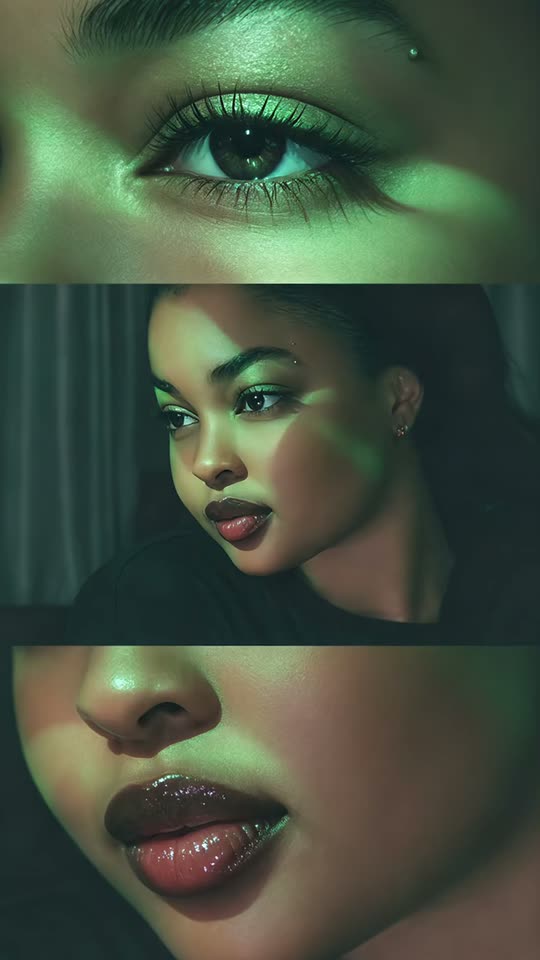
Add one selfie. MakeViral turns it into the three panel portrait from TikTok: a close-up of your eye, your face turned to the side, and your glossy lips, all in thin beams of dark green light.

The original Green Light Portrait reel by @_rahama_0Original reel
  • 1 photo you add
  • 2K photo you can turn into a video
  • 9:16 for TikTok, Reels, Shorts
  • No watermark

No prompt to write: Add your photo and tap once

Create your own

Ready in a few minutes · Photo · 3 credits

The green light portrait is a TikTok AI photo trend where one selfie becomes a 3 panel green light portrait: an eye close-up on top, the face in the middle, glossy lips at the bottom, lit by thin beams of green light in a dark green room. It started as a CapCut and Hypic template on 21 November 2026 and took off in Nigeria with the song "I'm in Love" by Patoranking. Here you add one photo and get the picture in one tap.

Also called Green Beam Portrait · 3 Panel Green Light Lip Combo · She Got the Eyes and Lips · Three Panel Portrait · Green Triptych Portrait · Dark Green Cinematic Portrait · Three Close Up Portrait · Portrait Lumière Verte

Example

What the Green Light Portrait photo looks like

This is a creator's own post: her own selfie made into the green light portrait with an AI template, shown as a still with the trend's song. Your result is one new still photo of your own face in the same three panel layout and the same dark green light.

Original reel by @_rahama_0, 10 s

The post that took the trend past a million views, by @_rahama_0 in Nigeria (24 November 2026): her eye, her face and her glossy lips in three panels of dark green light, with "I'm in Love" by Patoranking.

Step by step

How to make the Green Light Portrait photo on MakeViral

Everything runs in the browser. No editing app, no prompt to write, no watermark.

  1. Add your photo

    Press "Create your own" and add you, face clear, chest up. Take it with the camera or pick it from your library.

  2. Press Generate

    The button shows the price. Nano Banana 2.1 puts your photo into the Green Light Portrait scene and makes one 2K photo. You write no prompt.

  3. Download or share

    The photo is ready in a few minutes as a 9:16 2K image. Download it, share it from your phone, turn it into a video, or find it later in My videos.

Which photo works best?

Use one clear selfie from the chest up. The three panels are an eye close-up, your face and your lips, so the photo needs all three sharp.

  • Face the light. Stand facing a window in daylight. The model adds the green beams itself; it needs to see your real skin tone and eye color first.
  • Eyes open, no sunglasses. The top panel is a close-up of your eye, so a sharp, open eye gives the best panel. Normal glasses are fine and stay on.
  • Hair away from the face, so the eye and the lips are not covered.
  • A calm face works best. The trend look is a soft, closed-mouth pose, lips relaxed or slightly parted, not a big smile.
  • One person per photo, no beauty filter. A filtered photo can change your face before the model even starts.
  • Wear what you like. The middle panel shows your neck and shoulders in a plain dark top, the trend's look.

Where did the Green Light Portrait trend start?

The green light portrait trend began as an AI template. On 21 November 2026 accounts that promote CapCut templates posted it with the words "Upload your portrait photo. Create dark green cinematic triptych portrait shots." (@wildcrazylass123, 19,400 views by 27 November). The same day, accounts that promote the Hypic photo app posted the same look as the Green Light Portrait, also called Portrait Lumière Verte or Green Beam Portrait (@mb5hctjbg2, 70,500 views).

The real wave came three days later, in East and West Africa. On 24 November @_rahama_0 in Nigeria posted her result with "I'm in Love" by Patoranking, an afrobeats song from 2021, and passed 1.3 million views. On 25 November @_shan1235 in Uganda reached 2.1 million views and @colee971 in Tanzania 1.4 million; on 26 November @empresschiii in Kenya reached 1.7 million views and 274,300 likes. Tutorials now call it the 3 panel green light lip combo, "she got the eyes and lips" or simply the three panel portrait, and new tutorials come out every day in the UK, the US, Canada and Australia.

  1. "I'm in Love" by Patoranking becomes a Nigerian TikTok sound for "somebody's daughter" glow-up posts; the biggest one has 3.3 million views by November 2026. TikTok

  2. CapCut template promoters post the look with the words "Create dark green cinematic triptych portrait shots"; Hypic promoters post it the same day as the Green Light Portrait. TikTok

  3. @_rahama_0 in Nigeria posts her green light portrait with "I'm in Love": the first post of the trend to pass a million views (1.3 million views and 177,900 likes by 27 November). TikTok

  4. @_shan1235 in Uganda posts the biggest version so far: 2.1 million views and 219,400 likes by 27 November. TikTok

  5. @empresschiii in Kenya reaches 1.7 million views and 274,300 likes, and tutorials name it the "3 panel green light lip combo". TikTok

Copy and paste

The Green Light Portrait prompt

You do not need this: the one-tap flow runs it for you. The photo prompt puts your photo into the scene. Want to change it? Copy it and edit it in AI Photo.

1 photo: you, face clear, chest upNano Banana 2.1Photo · 2K · 9:163 credits
Photo prompt

Use the uploaded portrait photo. Create dark green cinematic triptych portrait shots. Turn the photo into an ultra-cinematic beauty portrait with thin bands of neon green light that cross precisely the eyes, the cheekbones, the nose, the lips and the neck, while the rest of the face stays in a mysterious dark green mood. Start with a close-up of the gaze with long lashes and green light on the eyelid, move to an elegant portrait of the face turned three-quarters toward the camera with the hand under the chin, then end with a beauty close-up of glossy lips, for an eyes, face and lips triptych. THE LAYOUT: one single vertical 9:16 image made of three horizontal panels of the same height, stacked top to bottom, with a thin dark line between them. All three panels show the same person from the uploaded photo. TOP panel: an extreme close-up of the eye area, the eyes open and sharp with the eyebrows, a thin green beam across the eyelids and the cheek. MIDDLE panel: the head, neck and shoulders, the face turned three-quarters toward the camera or straight to it, eyes open, one hand resting lightly under the chin, a plain dark top, a dark green-black background with soft curtain folds, green light on the cheekbones and the rest in deep shadow. BOTTOM panel: a close-up of the nose tip, the lips and the chin, the lips relaxed and slightly parted with a clear glossy shine, a green beam across the lips. THE EYES: both eyes keep the exact eye color and eye shape of the uploaded photo. The green light falls on the eyelids and the skin around the eyes, never on the irises as a new color: never green eyes unless the photo shows green eyes. Glasses stay on when the photo shows them. THE LOOK: the person's own lip shape and lip size, with only a clear gloss on their own lip color; soft makeup only if the photo shows makeup, facial hair only as in the photo. Low-key light, deep shadows, fine film grain, real skin texture, photorealistic, editorial beauty photography. Exactly one person. One head in each panel, the hand with five fingers, only in the middle panel. No text, no letters, no logo, no watermark.

2124 characters

How many credits does it cost?

You pay per photo in credits, and the create page shows the exact price on the Generate button before you spend anything. The one-tap price covers one 2K photo, charged once. One photo is 3 credits, so the smallest one-time pack that covers it is $9.99 for 100 credits, with no subscription. A smaller 1K photo costs less if you run the prompt by hand in AI Photo.

ModelSettingsCredits
Nano Banana 2.1 (this template)2K photo, 9:16, one tap3
Nano Banana 2.1 (by hand in AI Photo)1K photo, 9:16, same prompt2

One-time packs and plans are on the pricing page. A failed photo gives its credits back.

What the green light portrait looks like

Every green light portrait has the same three parts, stacked in one tall 9:16 picture:

PanelWhat it showsThe light
TopAn extreme close-up of one eye, with the lashes and the browA thin green beam across the eyelid and the cheek
MiddleThe face turned three-quarters to the side, neck and shoulders, a dark curtain behindGreen light on the cheekbones, the rest in deep shadow
BottomA close-up of the nose tip, the lips and the chinGreen light across glossy lips

That is why people call it the three panel portrait, the green triptych portrait or "she got the eyes and lips": three close-up crops of the same face, in one dark green cinematic portrait. Our version makes the whole picture from your selfie in one step, with your own face in all three panels.

The green light portrait prompt

The trend began as a closed AI template, so the first green light portrait prompt is the template's own short text: "Upload your portrait photo. Create dark green cinematic triptych portrait shots." The Hypic promoters described the same look in more words: thin bands of neon green light across the eyes, the cheekbones, the nose, the lips and the neck, the rest of the face in a dark green mood, a close-up of the eyes first, then the face, then a beauty close-up of glossy lips.

Our prompt keeps those words and their order, and adds three things the model needs: the layout (one 9:16 picture with three equal panels stacked top to bottom), your own eye color (the green light must not turn brown eyes green), and the face lock that keeps you recognizable in every panel. The full prompt is on the create page, so you can copy it as a 3 panel photo prompt for any AI photo app.

What goes wrong, and how to fix it

  • The eyes turn green. Green light on the face can tint the eyes. We read your eye color from the photo and name it in the prompt, so this is rare; a photo in daylight helps most.
  • The three panels show three different faces. The face lock asks for the same person in every panel. If one panel looks off, run it again: each run is a little different.
  • The lips look different. The bottom panel adds a clear gloss to your own lip shape and color. A photo with your mouth closed or slightly open gives the most natural result.
  • A hand looks odd. The creators' look has a hand under the chin in the middle panel. If the hand comes out wrong, run it again.
  • It looks too dark. The trend is low-key on purpose. Turn up the brightness of the photo in your gallery if you want a lighter version.

How to post it like the trend

The big posts are simple: the picture alone, no caption on the image, and the song "I'm in Love" by Patoranking from the TikTok sound library. On TikTok, post it as a photo post or as a short video of the still, and add the sound in the app. That is the whole i'm in love trend format. Add #greenlightportrait and #threepanelportrait so people who search the trend find it.

FAQ

Green Light Portrait trend questions

What is the green light portrait trend?
It is a TikTok AI photo trend from November 2026: one selfie becomes three stacked close-ups (an eye, the face, glossy lips) in thin beams of dark green light. It started as a CapCut and Hypic template on 21 November and went viral in Nigeria, Uganda, Kenya and Tanzania from 24 November, with the song "I'm in Love" by Patoranking.
How do I make the green light portrait AI photo?
Press "Create your own", add one clear selfie from the chest up, and press Generate. MakeViral makes the three panels from your photo in one step, keeps your face, and puts the picture in My videos.
What is the green light portrait prompt?
The template's own words are "Upload your portrait photo. Create dark green cinematic triptych portrait shots." Our full prompt keeps them, adds the Hypic description of the look (green beams across the eyes, cheekbones, nose, lips and neck; eyes, then face, then lips) and the layout of three panels in one 9:16 picture. You can copy it from the create page.
Is this the same as the green beam portrait or the 3 panel green light lip combo?
Yes. Green beam portrait is the name the Hypic promoters used (Portrait Lumière Verte in French), and tutorials call it the 3 panel green light lip combo or the "she got the eyes and lips" trend. It is all the same three panel portrait trend in dark green light.
Do I need CapCut or Hypic for the green light portrait?
No. The trend began as a green light portrait CapCut template and a Hypic effect, but MakeViral makes the same green light portrait template look in your browser from one selfie, with no app to install.
What song do people use for the green light portrait?
"I'm in Love" by Patoranking, a Nigerian afrobeats song. It was already a TikTok sound in 2021 for "somebody's daughter" posts, and the biggest green light portrait posts of November 2026 all use it. Add it in TikTok when you post.
Will my eyes turn green?
They should not. The light is green, not your eyes. The run reads your eye color from your photo and the prompt keeps it, so brown eyes stay brown. A sharp photo in daylight makes this most reliable.
Does it work for men?
Yes. Most posts show women, but the prompt keeps your own face, hair and facial hair. A man gets the same three panels and the same green light, with no makeup added.
Can I make it with my pet?
Not on this template: the look is built on a human eye, face and lips, so it works for people only.
Can I make it a video?
Yes. Under your finished picture, press "Make it a video": it opens AI Video with your green light portrait as the first frame, for example with a slow push-in. The video costs its own credits.
Is it an AI triptych selfie or a real photo shoot?
It is an AI triptych selfie: no green lamp and no studio needed. The moody green portrait comes from the model, from one normal selfie, as a cinematic triptych portrait.
Is this the three close up portrait trend?
It is the same idea: a three close up portrait of one face. Some posts use teal or magenta light; the green light photo trend is the version that went viral in November 2026.
Does the green light portrait cost credits?
Yes. The create page shows the exact price on the Generate button before you spend anything. A photo costs far fewer credits than a video, and if a run fails, the credits come back.
More trends

Other AI video templates

Make your own Green Light Portrait photo

Add one photo and tap once. No prompt to write. 3 credits.

No watermark. A failed video gives its credits back. Secure checkout by Stripe.