Back

Loved One in the Sky AI Trend: They Watch Over You Again

Add a photo of you and one of someone you miss. They appear above you in a stormy sky as a huge, glowing, see-through figure, lay a hand on your head and bend down to hold you, in an 8-second video with the trend's song.

The original Loved One in the Sky reel by @alesyaskyOriginal reel
  • 2 photos you add
  • 8 s clip with sound
  • 9:16 for TikTok, Reels, Shorts
  • No watermark

No prompt to write: Add your photos and tap once

Create your own

Ready in up to several minutes · 122 credits

The AI template for missing loved ones is a TikTok trend where a loved one who died or is missing appears as a giant, glowing figure in a stormy sky, puts a hand on your head and holds you while you look up. It started on a Russian song in January 2026. You need two photos: you, and them.

Also called Sky AI template for missing loved ones · Loved one in the sky · AI template for memory of loved ones · Heartfelt AI sky template · Sky farewell moment · Plantilla de IA para seres queridos perdidos · Шаблон ИИ с небом для памяти о близких · Missing loved ones CapCut template

Example

What the Loved One in the Sky video looks like

This is a post of the trend's template, not a MakeViral result. Your video copies this clip with your two photos, with the same song. No two runs come out the same.

Original reel by @alesyasky, 8 s

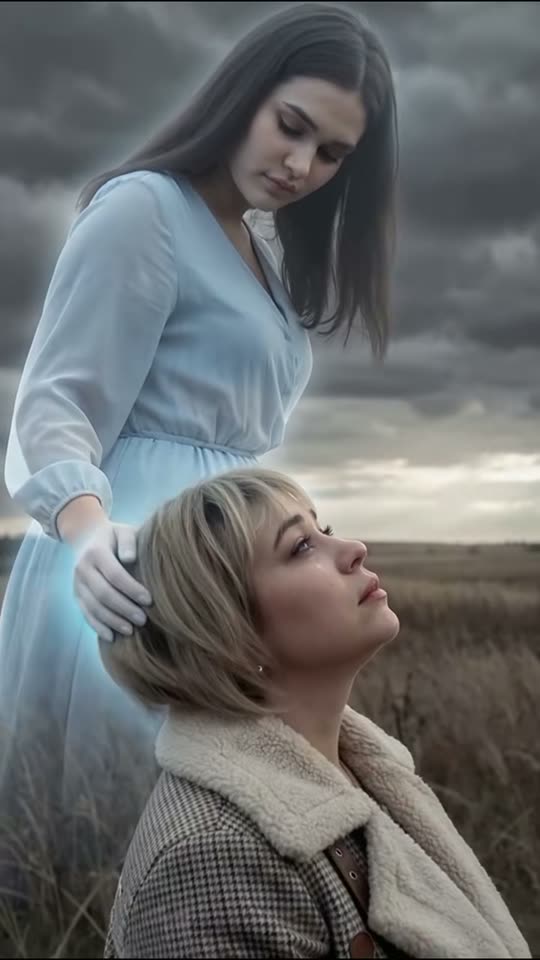
One of the first popular posts of the sky template, by @alesyasky on 11 January 2026 (246,200 views): a young woman in a pale blue dress appears in the storm clouds, lays a hand on the head of the woman below, then bends down and holds her. The whole 8-second post, with the trend's song.

Use this reference
Step by step

How to make the Loved One in the Sky video on MakeViral

Everything runs in the browser. No editing app, no prompt to write, no watermark.

  1. Add the two photos

    Press "Create your own" and add you, face clear, then your loved one, face clear. Add them in this order, because the order decides who is who in the scene. Take them with the camera or pick them from your library.

  2. Press Generate

    The button shows the price. Seedance 2.5 puts your photos into the Loved one in the sky trend clip and copies it shot by shot for 8 seconds, with the reel's original song. You write no prompt.

  3. Download or share

    The video is ready in up to several minutes as a 9:16 MP4. Download it, share it from your phone, or find it later in My videos.

Which photo works best?

Use two photos: photo 1 is you, the one who looks up at the sky. Photo 2 is the person you miss, the one who appears in the sky above you.

  • Clear, sharp faces that look at the camera, in good light. A photo from the waist up works best.
  • Your loved one at the age you want to remember. The video keeps the age in the photo.
  • Old prints are fine. Lay the print flat and photograph it with no glare. A black-and-white photo comes out in soft natural color under the glow.
  • Two people in photo 2, like your grandparents, appear side by side in the sky.
  • Only you in photo 1. Crop a group photo first.
  • A pet in photo 2 appears as a huge, glowing animal that lowers its head to yours.

Where did the Loved One in the Sky trend start?

The sky AI template for missing loved ones began on Russian-speaking TikTok in January 2026. The tags #ШаблонИИдляблизких and #ИИдляпамятиоблизких ("AI template for loved ones") were made on 3 January, and on 9 January @lexa_carev posted a memorial clip with a sad Russian song, "оригинальный звук" (original sound) by Leha Chutkov. Its line "Да, я жива, но еле дышу" means "Yes, I'm alive, but I can barely breathe". That sound carries the trend: 6,693 videos by 26 November 2026.

The scene became a CapCut template. One of its first popular posts, by @alesyasky on 11 January, shows a young woman glowing in the clouds above a woman who looks up (246,200 views). On 15 January a Russian tutorial by @kyvclljk became the first post on the sound to pass 1 million views. Tutorials in Brazil and Mexico followed within a week (3.8M and 3.1M views), as plantillas de IA para seres queridos perdidos; Russian posts say видео на память о умерших близких ("a video in memory of loved ones who died"). In November 2026 it came back with English and Spanish tutorials, and the sound grew from 5 to 38 new videos a day.

  1. The Russian TikTok tags #ШаблонИИдляблизких and #ИИдляпамятиоблизких are made. Each has about 1,260 videos and 22.8 million views by 26 November 2026. TikTok

  2. @lexa_carev posts a memorial clip with the Russian song "оригинальный звук" (original sound) by Leha Chutkov, the sound of the trend. The post has 883,600 views by 26 November. TikTok

  3. @alesyasky posts the sky scene: a young woman glows in the storm clouds above a woman in a field and lays a hand on her head. It has 246,200 views by 26 November. TikTok

  4. A Russian tutorial for the template by @kyvclljk becomes the first post on the sound to pass 1 million views. It has 2.0 million views and 54,400 shares by 26 November. TikTok

  5. A Brazilian tutorial by @b1mbitpcf3 reaches 3.8 million views, the sound's most viewed post. A Mexican one by @ry78hhugj4 follows on 21 January with 3.1 million. TikTok

  6. The trend comes back with English and Spanish tutorials, such as "How to make sky AI template tutorial for missing loved ones". On 26 November the sound gains 38 new videos a day, up from 5 the day before. TikTok

Copy and paste

The Loved One in the Sky prompt

You do not need these: the one-tap flow runs them for you, together with the trend clip. [Image 1] and [Image 2] are your two photos, and [Video 1] is the trend clip the video copies.

2 photos: you, face clear + your loved one, face clearSeedance 2.58 s · 720p · 9:16122 credits
Video prompt

Recreate the reference video [Video 1] shot for shot: the same stormy sky over the field, the same two shots, camera, timing and moves. The ONLY change: the woman with short blonde hair who looks up is now [Image 1], and the huge glowing see-through woman in the sky behind her is now [Image 2]. Both change: no one from the video stays. Photo roles: [Image 1] is the living person, [Image 2] is the deceased loved one. Show the person from [Image 1] in a quiet grassy field at dusk, in the lower front of the frame, turned in profile, looking toward the sky. In the clouds above, place the loved one from [Image 2]: larger, semi-transparent, face exactly the same, gently reaching out the right hand to touch the person's head. Add soft glow, golden rim-light. Use moody dark tones, soft contrast, emotional yet peaceful atmosphere. The one below = the subject of [Image 1], in EVERY frame. A person: copy the exact face from [Image 1]: face shape, eye color and eye shape, eyebrows, nose, mouth, skin tone, age, hair color, hair length and hairstyle, and any beard, moustache, glasses or freckles exactly as in the photo. The same real person in every frame. Never the original woman's face: NO short blonde bob unless [Image 1] shows it; the clothes from [Image 1], never the checked coat with the fleece collar. An animal: that same animal with its own whole body, face, fur and markings looks up in her place, never a person. The one in the sky = the subject of [Image 2], in EVERY frame: a huge figure, about twice life size, from the waist up behind and above the one below, see-through, with a soft blue-white glow and the clouds faintly visible through the body. A person: copy the exact face from [Image 2] with the same face list, at the age in [Image 2]; an old or black-and-white photo comes out in soft natural color. Never the original woman's face: NO long straight dark hair unless [Image 2] shows it; the clothes from [Image 2], never the pale blue dress. Two people in [Image 2]: both appear side by side in the sky, each with their own face. An animal: that same animal, huge and glowing, with its own whole body, face and fur, lowers its head to the head of the one below, never a person, no human hands. Never blend the two faces, never swap their clothes. Shot 1 [0-4s]: fade in from black over 0.6 s. Storm clouds, a pale horizon, a dry grass field. The one in the sky looks down and rests a hand on the top of the head of the one below, lifts it and lays it again, stroking the hair. The one below looks up at the sky with wet eyes, the head tilted back. Shot 2 [4-8s]: a soft cut, a little closer. The one in the sky slowly bends down, cradles the head of the one below with one hand and rests the face on the top of their head. The one below keeps looking up. No dialogue throughout the entire video. No background music. Real live-action footage, the same moody light. One head on each body. Nobody else. No wings, no halos, no flags, no badges. No text, no logos, no watermark.

3013 characters
How many credits does it cost?

You pay per video in credits, and the create page shows the exact price on the Generate button before you spend anything. The one-tap price covers the video, made in one step from your photos and the trend clip, charged once. One video is 122 credits, so the smallest one-time pack that covers it is $13.99 for 150 credits, with no subscription. The cheaper models are there if you run the prompts by hand in AI Video.

Video modelSettingsCredits
Seedance 2.5 (this template)8 s, 720p, copies the trend clip, one tap122

One-time packs and plans are on the pricing page. A failed video gives its credits back.

What happens in the 8-second video

The video copies the trend's own clip shot by shot:

TimeWhat you see
0 to 4 sThe video fades in on a stormy sky over a dry grass field. You look up with wet eyes. Your loved one stands in the clouds behind you, about twice life size, see-through and softly glowing, and lays a hand on your head.
4 to 8 sA soft cut, a little closer. They bend down, hold your head and rest their face on your hair, while you keep looking up.

Your two faces and your own clothes come from your photos, not from the clip. The trend's song plays on the result, and you can turn it off on the result screen. Top-quality AI video models, including Seedance 2.5, make the clip in 720p. The exact price shows on the Generate button before you spend anything, and the video waits in My videos when it is ready.

Who people make it for

Most posts are for a parent or a grandparent: a mother in the clouds over her daughter, a grandmother over a field. Others are for a partner, a brother or a friend, and many of the first posts were for husbands and sons who did not come home. The trend's captions call it an AI template for memory of loved ones, for those who are lost or missing, not only for those who died.

People also share it as an AI memorial video on a death anniversary, or as a guardian angel AI video: the idea that a loved one in heaven is still watching over you. Some call it an AI memorial template, others simply loved ones in the sky. The video shows that moment, but it is an AI creation, not a memory. Make it when it feels right to you, and talk to your family first if the person was theirs too.

The CapCut template, the prompt and this page

On TikTok the trend is a closed CapCut template, the missing loved ones CapCut template that tutorials send you to with a "Use template" button, and the CapCut template for loved ones who passed away does not show its prompt. The closest public prompt is the "Sky Farewell Moment" prompt of a template site's heartfelt AI sky template: "Photo 1, the living person, Photo 2, the deceased loved one ... In the clouds above, place the loved one from Photo 2: larger, semi-transparent, face exactly the same, gently reaching out the right hand to touch the person's head."

Our version starts from that prompt and follows the trend's own clip shot by shot, so the light, the timing and the moves match the TikTok posts. You write no prompt: as an AI memorial video generator for this one scene, it needs only your two photos. It makes a video, not an AI sky tribute picture; for a still, pause the result and save a screenshot.

What goes wrong, and how do you fix it?

ProblemFix
A face does not look like the photoUse a sharp photo that looks at the camera, in good light. For an old print, photograph it flat with no glare. Then run it again.
Your loved one looks younger or older than you hopedThe video keeps the age in the photo. Pick a photo from the time you want to remember.
The two faces look alike or mixUse only one person in photo 1, and run it again.
The figure in the sky is not see-through enoughRun it again. Every run is a new take.
Wings, halos or text show upRun it again. The prompt asks for none of them.
The run failsSome photos get refused. The credits come back; try another photo.
FAQ

Loved One in the Sky trend questions

What is the AI template for missing loved ones?
It is a TikTok trend in which a photo of you and a photo of someone you lost become a short video: they appear as a huge, glowing, see-through figure in a stormy sky, lay a hand on your head and hold you while you look up. Tutorials call it the sky AI template for missing loved ones.
How do I make the loved one in the sky video?
Press "Create your own", add a photo of you as photo 1 and a photo of your loved one as photo 2, and press Generate. The button shows the price first. You get an 8-second vertical video in My videos, with no CapCut template needed.
Where did the sky AI template start?
On Russian-speaking TikTok in January 2026. Russian tags for an AI template for loved ones were made on 3 January, the song was first posted on 9 January, and a Russian tutorial passed 1 million views on 15 January. Brazil and Mexico followed within a week, and English tutorials came in November 2026.
What is the song in the loved one in the sky trend?
It is a sad Russian song uploaded to TikTok as "оригинальный звук" (original sound) by Leha Chutkov (@lexa_carev) on 9 January 2026. The line "Да, я жива, но еле дышу" means "Yes, I'm alive, but I can barely breathe". Your video comes with this song, and you can turn it off on the result screen.
Is this the same as the heaven hug?
No. In the [heaven hug](/templates/ai-heaven-reunion-hug) you run up a stairway of light or across the clouds into their arms. Here you stay on the ground and they appear above you in the sky. For a hug from behind by the Christmas tree, see [Christmas in heaven](/templates/christmas-hug-from-heaven-ai-trend).
Can I make it for a loved one who is missing, not dead?
Yes. The trend's own captions say it is for loved ones who are lost or missing, and an AI template for lost loved ones works the same way: add the clearest photo you have of them as photo 2.
How do I make an AI video of a deceased loved one?
Add a clear photo of your deceased loved one as photo 2 and a photo of you as photo 1, then press Generate. AI makes a short memorial video in which they watch over you from the sky. It is an AI creation, not a memory.
Can I use an old or black-and-white photo?
Yes. Photograph the print flat, with no glare, so the face is sharp. Your loved one comes out in soft natural color under the glow, at the age they are in the photo.
Can photo 2 show two people or a pet?
Yes. Two people in one photo, like your grandparents, appear side by side in the sky. A pet appears as a huge, glowing animal that lowers its head to yours. For a pet on its own, see [Day of the Dead pet](/templates/ai-day-of-the-dead-pet).
Is there an AI of loved ones app for this, or do I need CapCut?
You need neither. On TikTok people use a CapCut template; here it runs in your browser. You do not need a template link, and nothing turns an AI generated loved one into an avatar that talks: it is one short video of one scene.
Is it okay to make a video of someone who has passed away?
It is a personal choice. Many people find it comforting, and some comments on the trend say it is too painful to make. Talk to your family first, use a photo they are comfortable with, and keep the video private if you are unsure. For a hug with someone in your life today, use the [AI hug video](/templates/ai-hug-video).
How long is the video, and does it have sound?
It is 8 seconds, vertical 9:16, at 720p, with the trend's own Russian song and no talking. You can turn the song off on the result screen.
Does the video cost credits?
Yes. The create page shows the exact price on the Generate button before you spend anything. If a video fails, the credits come back.
Are my photos private?
Yes. MakeViral does not post your photos or the result anywhere or show them to other users. The video goes to your private My videos page, and you can delete it there at any time.
More trends

Other AI video templates

Make your own Loved One in the Sky video

Add two photos and tap once. No prompt to write. 122 credits.

No watermark. A failed video gives its credits back. Secure checkout by Stripe.