Back

Long Live Donnie GTA 6 AI Trend: Your Photo With Donnie

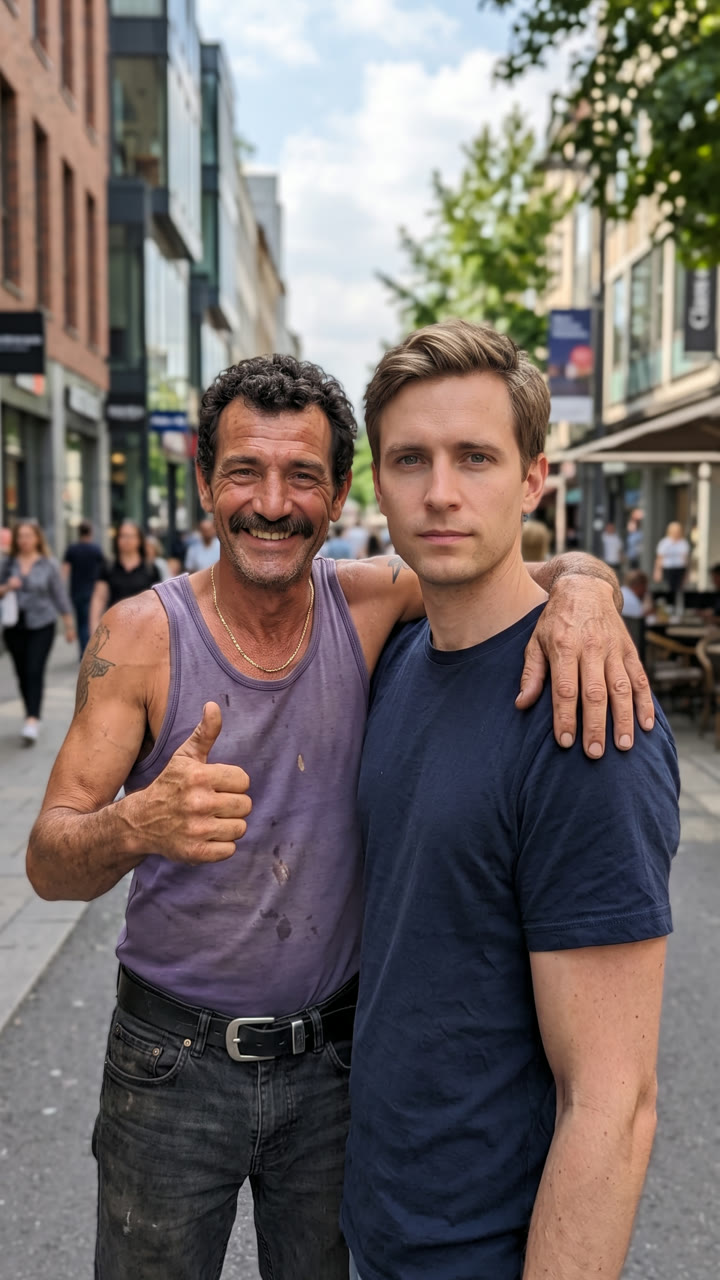
Add one photo of yourself. The AI puts a man in Donnie's look next to you, arm around your shoulders, like an old photo of two friends. Your face, your clothes and your place stay as they are.

Long Live Donnie example video, made with AI-made peopleAI-made
  • 1 photo you add
  • 2K photo you can turn into a video
  • 9:16 for TikTok, Reels, Shorts
  • No watermark

No prompt to write: Add your photo and tap once

Create your own

Ready in a few minutes · Photo · 3 credits

The Donnie GTA 6 trend is TikTok's goodbye to Donnie, Jason's mustached friend who dies early in GTA 6: people post an AI photo of themselves posing with him as old friends, captioned "LL Donnie", on the "Long Live Dushy" sound. It started in the US days after the 19 November 2026 launch. Add one photo to make yours.

Also called Long Live Donnie slideshow · Donnie memorial slideshow · Donnie brothers AI duet

Example

What the Long Live Donnie photo looks like

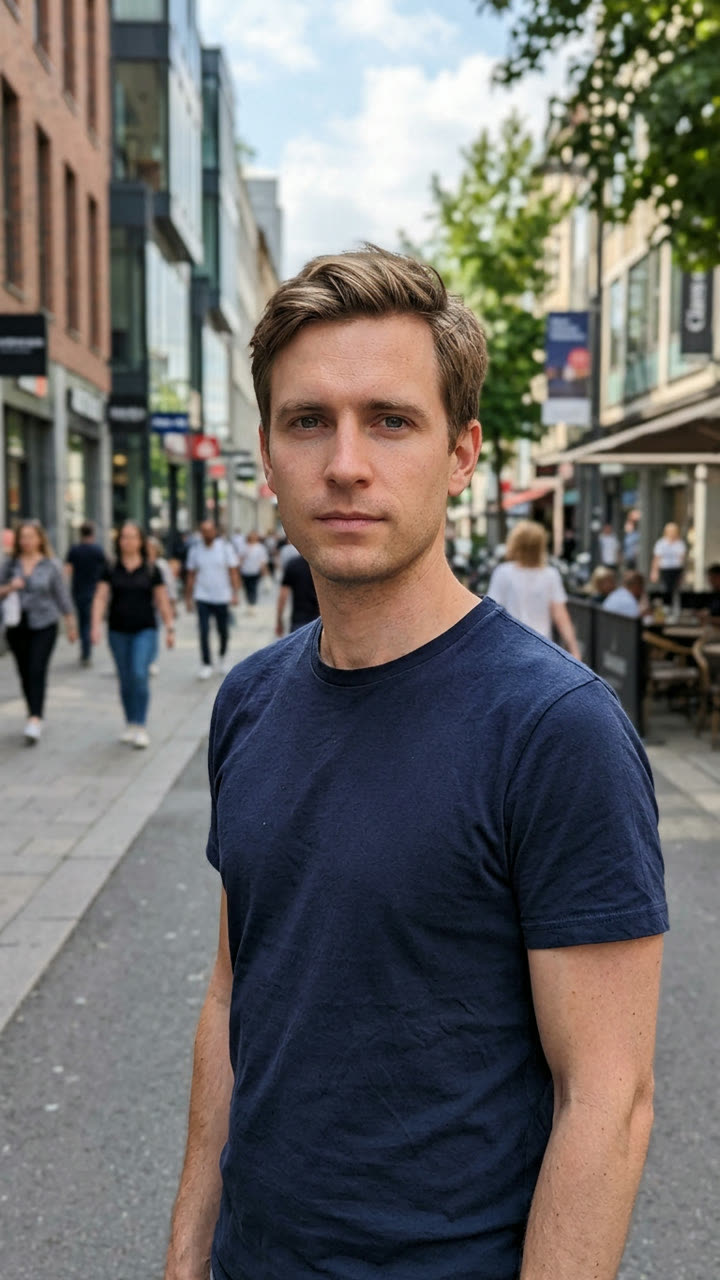
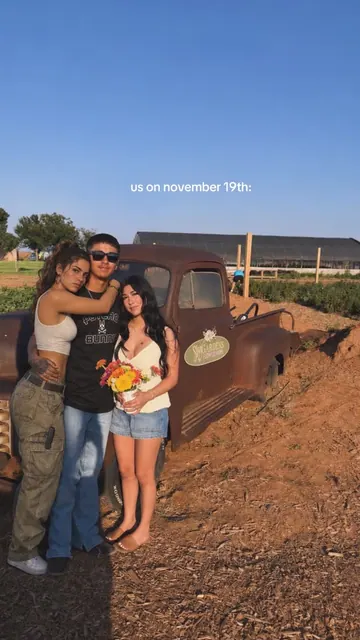
This is a MakeViral result: one photo of a person in, the same photo out with a man in Donnie's look posing next to them as an old friend. Your result is one new 2K photo with no text: post it on TikTok as a photo with the "Long Live Dushy" sound and an "LL Donnie" caption. The sound on this clip is the trend's sound, added for the page. No two runs come out the same.

Input photo for Long Live Donnie example (AI-made person)
Input
Result, before and after

A MakeViral result: one photo in, the same photo with Donnie's look-alike posing as an old friend, on the trend's sound.

Step by step

How to make the Long Live Donnie photo on MakeViral

Everything runs in the browser. No editing app, no prompt to write, no watermark.

  1. Add your photo

    Press "Create your own" and add you, face clear, waist up or full body. Take it with the camera or pick it from your library.

  2. Press Generate

    The button shows the price. Nano Banana 2.1 puts your photo into the Donnie GTA 6 scene and makes one 2K photo. You write no prompt.

  3. Download or share

    The photo is ready in a few minutes as a 9:16 2K image. Download it, share it from your phone, turn it into a video, or find it later in My videos.

Which photo works best?

Use one photo of yourself, from the waist up or head to toes, face clear.

  • Leave a little room on one side. Donnie stands next to you with his arm around your shoulders, so a photo with some wall or background beside you works best.
  • A posed photo works best, like the viral post: standing against a wall, in a store, on a couch or by a car. Holding something works too: the AI keeps what is in your hands.
  • Good light gives the most natural match: the AI copies the light of your photo onto him.
  • Friends in the photo? He joins at one end, arm around the nearest person.
  • Use your own photo, or a photo of someone who said yes.

Where did the Long Live Donnie trend start?

GTA 6 came out on 19 November 2026, and players soon reached the part of the story where Donnie dies (a spoiler). The same day, @gta6.clipzz392 posted the scene as "Donnie is DEAD", the first Donnie post we found with over a million views (1.16 million). On 22 November a clip of Jason and Donnie's last car ride reached 4.2 million views, and "RIP Donnie" and "LL Donnie" (long live Donnie) posts followed.

The photo version took the tribute sound that TikTok already used for fallen characters: "original sound" by @siirdeed, a clip of "Long Live Dushy" by Migo Lee that fans had put under anime goodbyes since 2025. @mondz_009 posted the first Donnie post we found on it on 23 November. On 24 November @igotthefundss posted a photo of himself counting cash next to an AI-made Donnie, arm around his shoulders: 247,000 views, 60,000 likes and 9,100 shares by 28 November. From 25 November, CapCut tutorial accounts showed the template as the "Donnie GTA 6 AI photo". By 28 November #donniegta6 had 809 videos and 4.9 million views, and the sound grew by about 70 videos a day. A Mexican singer's tribute passed 4.5 million views on 27 November.

  1. GTA 6 comes out. The same day @gta6.clipzz392 posts Donnie's death scene as "Donnie is DEAD": 1.16 million views, the first Donnie post over a million that we found. TikTok

  2. A clip of Jason and Donnie's last car ride, "You never know the last time you'll see somebody", reaches 4.2 million views and 926,000 likes. TikTok

  3. @mondz_009 posts the first #lldonnie post on the "Long Live Dushy" sound by @siirdeed (79,600 views). TikTok

  4. @igotthefundss posts an AI photo of himself with Donnie, arm around his shoulders, on the same sound: 247,000 views, 60,000 likes and 9,100 shares by 28 November. TikTok

  5. CapCut tutorials such as "how to make the donnie gta6 trend photo" spread the template (39,400 views for one of them). TikTok

  6. #donniegta6 has 809 videos and 4.9 million views, #lldonnie 278 videos, and the sound grows by about 70 videos a day. TikTok

Copy and paste

The Long Live Donnie prompt

You do not need this: the one-tap flow runs it for you. The photo prompt puts your photo into the scene. Want to change it? Copy it and edit it in AI Photo.

1 photo: you, face clear, waist up or full bodyNano Banana 2.1Photo · 2K · 9:163 credits
Photo prompt

Use the uploaded image as the base. This is a careful photo edit, not a new picture: keep the whole photo exactly as it is, with every person in it, their faces, hair, bodies, clothes, poses and hands, the place, the background, the light, the colors, the camera angle and the framing. The ONLY change: add one new man into the photo, posing with them like an old friend, as if he was there when it was taken. He is nobody from the photo: a sun-tanned, wiry man of about fifty with short dark curly hair (no hat), a thick dark mustache, a few days of stubble, deep smile lines and a big loose grin. He wears a faded, worn purple tank top with a few old faded stains on the front, a thin gold chain, dark worn jeans with a black belt and a big silver belt buckle, and scuffed brown work boots, with a faded tattoo on one upper arm: the look of a scruffy, lovable small-time crook from a sunny Florida-style crime drama. Where he stands: if the photo shows one person, he stands right next to them, wraps one arm around their shoulders and leans in, and gives the camera a thumbs-up or a playful hand sign with his other hand. If the person sits, he sits right next to them in the same way. If the photo shows two or more people, he joins at one end, next to the nearest person, with his arm around that person's shoulders. If the photo shows only a pet, he crouches next to it with one arm around it. Nothing else about the people in the photo changes: their hands keep what they hold, and empty hands stay empty. He looks into the camera, his face clear and fully visible. Match him to the photo perfectly: the same light direction, shadows, color temperature, grain, sharpness, focus and lens; the same scale and perspective as the people next to him, with his feet on the same ground and a real shadow where he stands and where he touches someone. He must look like a real person photographed in the same moment: photorealistic, not CGI, not a game render, not a drawing, not pasted in. If the photo has a caption or text, keep it exactly where it is. Do not add any other text, logo, watermark, frame or border. No weapon of any kind, no drugs, no blood, no wounds. Vertical 9:16, with every person in the photo still fully in frame.

2236 characters
How many credits does it cost?

You pay per photo in credits, and the create page shows the exact price on the Generate button before you spend anything. The one-tap price covers one 2K photo, charged once. One photo is 3 credits, so the smallest one-time pack that covers it is $9.99 for 100 credits, with no subscription. A smaller 1K photo costs less if you run the prompt by hand in AI Photo.

ModelSettingsCredits
Nano Banana 2.1 (this template)2K photo, 9:16, one tap3
Nano Banana 2.1 (by hand in AI Photo)1K photo, 9:16, same prompt2

One-time packs and plans are on the pricing page. A failed photo gives its credits back.

How to do the Long Live Donnie trend

The trend is one photo of you and Donnie, posted as a goodbye. Here is how to make the Donnie GTA 6 trend photo in three steps.

  1. Add one photo of yourself here. The AI keeps you and your place as they are and adds a man in Donnie's look: a tanned man of about fifty with curly dark hair, a thick mustache, a faded purple tank top, a gold chain and a tattoo on his arm, his arm around your shoulders and a thumbs-up for the camera.
  2. Save the result from My videos.
  3. On TikTok, post it as a photo with the "Long Live Dushy" sound ("original sound - siirdeed") and a caption like "LL Donnie" or "long live Donnie", with #lldonnie and #donniegta6, as the viral posts do.

That is the photo with Donnie without a CapCut template. The tutorials call it the Donnie GTA 6 AI photo, the GTA 6 Donnie photo edit, the Donnie GTA 6 picture or the lldonnie AI photo, and one names it the Donnie brothers AI duet: it is the same edit. The man is a look-alike made by AI from a plain description, not the game's own character model, so his face changes a little from run to run.

Who is Donnie in GTA 6, and why does TikTok say long live Donnie?

Spoiler warning. Donnie is Jason's old friend in GTA 6: a scruffy, mustached small-time crook in a purple tank top and a trucker cap, with a tattoo on his arm. Players liked him because he was a mess and loyal at the same time. The comments under the biggest photo post say it in their own words: "He was a idiot but he was our idiot". He dies early in the story, and the Donnie GTA 6 death hit fans hard. Google now suggests "rip donnie gta 6" and the GTA 6 Donnie tattoo when you type his name.

"LL" means "long live", the way people on TikTok say goodbye to a friend. The GTA 6 Donnie trend took that tribute literally: people made a photo that makes it look like Donnie was their friend in real life, and posted it on the long live Dushy sound as a Long Live Donnie slideshow or a Donnie memorial slideshow. The words "long live Dushy bro" in the song fit the joke. Plenty of the posts are half sad and half a joke, and that is the mood of the trend.

The Donnie GTA 6 AI prompt

The trend's CapCut template hides its prompt, and no creator shared one, so we wrote our own Donnie GTA 6 AI prompt from the viral results. It asks for a careful photo edit, not a new picture: every person, face, outfit and pose in your photo stays, and only one new man joins. It describes him in plain words (a tanned man of about fifty, curly dark hair, a thick dark mustache, a faded purple tank top with a few old stains, a gold chain, dark jeans, a big belt buckle, work boots and a tattoo on his upper arm), puts his arm around your shoulders, and matches his light, shadows, grain and size to your photo so he does not look pasted in.

It never names the game, the studio or the character, because AI image tools refuse those names, and it bans weapons, blood and logos. Our face lock keeps your face. You can copy it for other tools, but the one-tap flow runs it for you, with no Donnie GTA 6 CapCut template to install.

FAQ

Long Live Donnie trend questions

What is the Donnie GTA 6 trend?
It is a TikTok tribute from November 2026: people post an AI photo of themselves posing with Donnie, the GTA 6 character who dies early in the story, as if they were old friends, captioned "LL Donnie" (long live Donnie) on the "Long Live Dushy" sound. The biggest photo post, by @igotthefundss on 24 November, passed 247,000 views.
What does LL Donnie mean?
"LL" is short for "long live". It is how people on TikTok say goodbye to a friend who died, and fans use it for Donnie after his death in GTA 6. #lldonnie had 278 videos on 28 November 2026.
Does Donnie die in GTA 6?
Yes, and this is a spoiler: Donnie dies early in the story. The Donnie GTA 6 death scene went viral on launch day, 19 November 2026, and the RIP Donnie posts and this photo trend came from it.
What is the song in the Long Live Donnie posts?
The photo posts use "original sound" by @siirdeed, a clip of "Long Live Dushy" by Migo Lee with the line "long live Dushy bro". TikTok users had already used it for goodbyes to anime and TV characters before Donnie. Add it on TikTok when you post your photo: the result here is a photo, with no sound.
How do I make a photo with Donnie?
Press "Create your own", add one photo of yourself and press Generate. The AI adds a man in Donnie's look next to you, arm around your shoulders, and keeps everything else in your photo. It is the Donnie GTA 6 AI photo from the tutorials, with no CapCut template.
Is it the real Donnie from the game?
No. The AI adds a look-alike man, described in plain words: curly dark hair, a thick mustache, a faded purple tank top, a gold chain and an arm tattoo. It is not the game's official character model, and his face changes a little from run to run, which makes it look like a real photo rather than a game screenshot.
Will the AI change my face?
It should not. The prompt keeps every person, face, outfit and pose in your photo, and our face lock tells the model to keep each face exactly. Only your shoulder gets his arm. If a run looks off, run it again: a sharp photo with your face in good light helps most.
Can I do it with friends or my pet?
Yes. With two or more people, Donnie joins at one end with his arm around the nearest person. With only a pet in the photo, he crouches next to it with an arm around it.
Is there a Donnie GTA 6 CapCut template?
The viral posts used a CapCut AI template, and tutorials share it as the Donnie GTA 6 CapCut template. This page does the same edit in the browser, with no app and no template link. It is not a live camera filter.
Can I make it a video?
Yes. Under your finished photo, press "Make it a video": it opens AI Video with your photo as the first frame. The trend posts are still photos with the sound, so the photo alone is enough for the trend.
Does it cost credits?
Yes. The create page shows the exact price on the Generate button before you spend anything. A photo costs far fewer credits than a video, and if a run fails, the credits come back.
More trends

Other AI video templates

Make your own Long Live Donnie photo

Add one photo and tap once. No prompt to write. 3 credits.

No watermark. A failed video gives its credits back. Secure checkout by Stripe.