Back

No Ordinary Love AI Trend: You Two as the Umbrella Couple

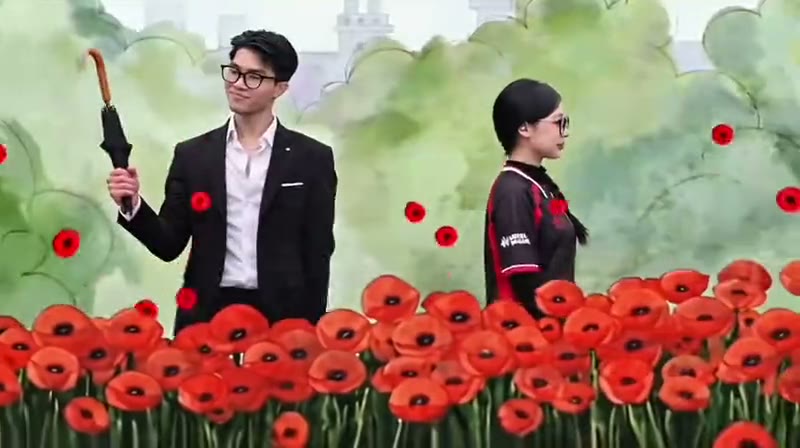
A deep bow, a bouquet of poppies, a heart of pigeons, a dance dip in the rain and one umbrella for two. Add a photo of him and a photo of her, and the cartoon love story plays out with your faces.

The original Umbrella AI Trend reel by @capcutcuanam0Original reel
  • 2 photos you add
  • 15 s clip with sound
  • 16:9 like the original clip
  • No watermark

No prompt to write: Add your photos and tap once

Create your own

Ready in up to several minutes · 228 credits

The umbrella AI trend (in Vietnam, trend cầm ô) turns the cartoon couple of the AI short No Ordinary Love into real people with your faces: a man in a black suit with an umbrella courts a woman in a red dress across London. It started with antrofrog's short on X in October 2026 and became a CapCut trend in Vietnam on 26 November. Add two photos.

Also called Umbrella trend · Trend cầm ô · No Ordinary Love animation · Umbrella man love story · Umbrella couple AI · The Umbrella Boy · George and Gina

Example

What the Umbrella AI Trend video looks like

Both clips are the trend's own CapCut results, made from the photos of two real people, with the trend's sound. Your video follows the same story with your two photos.

Original reel by @capcutcuanam0, 15 s

Part 1, the first live-action version of the trend, by @capcutcuanam0 (26 November 2026, 404,400 views): the bow, the poppies, the pigeon heart and the escalator, with two real people in the cartoon roles.

Use this reference
Original reel by @capcutcuanam0, 15 s

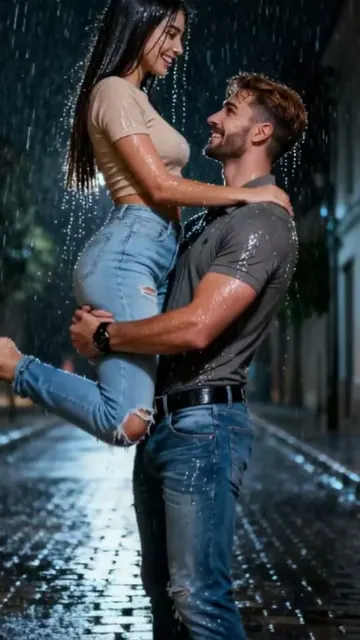
Part 2, in the rain, by @capcutcuanam0 (26 November 2026, 561,300 views): the umbrella, the dance dip, the red flower and the coat at the bus stop.

Use this reference
Step by step

How to make the Umbrella AI Trend video on MakeViral

Everything runs in the browser. No editing app, no prompt to write, no watermark.

  1. Add the two photos

    Press "Create your own" and add him: the man with the umbrella, face clear, then her: the woman in red, face clear. Add them in this order, because the order decides who is who in the scene. Take them with the camera or pick them from your library.

  2. Press Generate

    The button shows the price. Seedance 2.5 puts your photos into the Umbrella AI Trend trend clip and copies it shot by shot for 15 seconds, with the reel's original song. You write no prompt.

  3. Download or share

    The video is ready in up to several minutes as a 16:9 MP4. Download it, share it from your phone, or find it later in My videos.

Which photo works best?

Upload two photos, in this order:

  1. Him: the person who becomes the man with the umbrella.
  2. Her: the person who becomes the woman in the red dress.
  • One person per photo, face to the camera, sharp and in good light. Waist up works best; head to toes is fine.
  • Each person keeps the face, hair and clothes of their photo, as in the trend's own results. Want the suit and the red dress? Wear them in the photos.
  • The roles do not have to match the cartoon: any two people work, and the AI keeps each person as they are in their photo.
  • No sunglasses, no hand over the face, no heavy filter.

Where did the Umbrella AI Trend trend start?

The story comes from No Ordinary Love, an AI short by the artist antrofrog (@antrofrog_ on X), posted on 28 October 2026. In about a minute, George, a lanky man in a black suit who always carries a black umbrella, tries to win over Gina, a woman in a red dress: he bows, offers poppies, gets a heart of pigeons to form around him, dips her in the rain and finally shares his umbrella. Krea's blog counted more than 21 million views on X by 2 November and names the tools: Midjourney and Krea for the two characters, Seedance 2.5 for the animation. The title is the name of the Sade song, which is why people also look for Sade No Ordinary Love AI versions.

On 30 October the TikTok account @n.lyyyyy reposted the short with a Vietnamese line, "time will tell", and her own sound. On 26 November 2026 the CapCut creator @capcutcuanam0 used that clip as the reference for an AI swap that turns the cartoon into live action, with the photos of two people in the roles. His first two results had 404,400 and 561,300 views a day later, and Vietnamese TikTok filled up with tutorials for the trend cầm ô (the umbrella trend), also called the umbrella man animation love story, the umbrella guy animation and the umbrella couple AI trend. The sound had 370 videos on 27 November, almost all from Vietnam.

  1. The AI artist antrofrog posts the short No Ordinary Love on X: George, the man with the umbrella, courts Gina, the woman in red, across a cartoon London. Krea

  2. @n.lyyyyy reposts the short on TikTok with a Vietnamese caption and her own sound: 651,400 views by 27 November. TikTok

  3. Krea's blog counts more than 21 million X views for the short and explains how it was made. Krea

  4. The CapCut creator @capcutcuanam0 posts the first live-action version from two photos (404,400 views by 27 November); his part 2 reaches 561,300 views. TikTok

  5. @sharecapcut1 posts the most viewed tutorial with the prompt in the comments: 394,800 views by 27 November. TikTok

Copy and paste

The Umbrella AI Trend prompts

You do not need these: the one-tap flow runs them for you, together with the trend clip. [Image 1] and [Image 2] are your two photos, and [Video 1] is the trend clip the video copies.

Part 1: The courtship

2 photos: him: the man with the umbrella, face clear + her: the woman in red, face clearSeedance 2.515 s · 720p · 16:9228 credits
Video prompt

STRICT FULL CHARACTER REPLACEMENT + REAL HUMAN CONVERSION. [Image 1] = REFERENCE IMAGE FOR THE MAN IN THE BLACK SUIT WITH THE UMBRELLA. [Image 2] = REFERENCE IMAGE FOR THE WOMAN IN THE RED DRESS. [Video 1] = ORIGINAL REFERENCE VIDEO. Completely replace the original man with [Image 1] and the original woman with [Image 2], including exact facial identity, head, hairstyle, skin, entire body, proportions, and clothing. NO FACE SWAPPING ONLY. Convert both characters into photorealistic REAL HUMANS, even if the original video uses cartoon, anime, CGI, or 3D animation. DO NOT inherit the original animated style. A person keeps the exact face from their image (the face shape, eye color and eye shape, eyebrows, nose, mouth, skin tone, age, hair color, hair length and hairstyle, and any beard, moustache, glasses or freckles) in every shot, so friends instantly recognize them. Never drift back to the cartoon faces, the spiky black hair of the man or the black bob of the woman in [Video 1] unless the image shows it. An animal keeps its species, face, fur colors and markings, with natural body proportions, on its own legs. Anything else keeps its own whole body, shape, colors and style, with no human body parts it does not have. Never blend the two. Shot 1 [0-1.4s]: outside a white townhouse with black railings, he bows low to her with a sweep of his arm; she hides a laugh. Shot 2 [1.4-4s]: a field of red poppies, he offers her a huge bouquet of poppies; she holds up a hand. Shot 3 [4-6s]: from above, on a paved square, a crowd of pigeons forms a big heart around him. Shot 4 [6-7.5s]: close on her face in a grey street, one eyebrow raised, not impressed. Shot 5 [7.5-11.7s]: an underground escalator; he slides down the handrail, lands with a flourish and offers her his hand as she rides down. Shot 6 [11.7-15s]: a coffee kiosk window; they take two coffees from the barista, she walks off and he follows. Preserve 100% of [Video 1]'s original actions, choreography, body movements, camera paths, camera angles, transitions, timing, and beat synchronization. Both characters must follow the original movements perfectly without distortion or misalignment. Naturally match environmental lighting, shadows, and reflections. Preserve the original background, environment, visual effects, color grading, and composition. ONLY replace the characters and convert them into realistic live-action humans. Maintain the natural wide frame of [Video 1] without stretching, unnecessary cropping, or changing the original camera framing. Extend background edges naturally only when necessary. Ultra-photorealistic live-action quality, realistic human skin texture, natural facial features, anatomically accurate bodies, smooth fluid movements. NO cartoon, NO anime, NO illustration, NO CGI characters, NO 3D-rendered appearance. No text, captions, logos or watermarks.

2875 characters
Part 2: The rain

2 photos: him: the man with the umbrella, face clear + her: the woman in red, face clearSeedance 2.515 s · 720p · 16:9228 credits
Video prompt

STRICT FULL CHARACTER REPLACEMENT + REAL HUMAN CONVERSION. [Image 1] = REFERENCE IMAGE FOR THE MAN IN THE BLACK SUIT WITH THE UMBRELLA. [Image 2] = REFERENCE IMAGE FOR THE WOMAN IN THE RED DRESS. [Video 1] = ORIGINAL REFERENCE VIDEO. Completely replace the original man with [Image 1] and the original woman with [Image 2], including exact facial identity, head, hairstyle, skin, entire body, proportions, and clothing. NO FACE SWAPPING ONLY. Convert both characters into photorealistic REAL HUMANS, even if the original video uses cartoon, anime, CGI, or 3D animation. DO NOT inherit the original animated style. A person keeps the exact face from their image (the face shape, eye color and eye shape, eyebrows, nose, mouth, skin tone, age, hair color, hair length and hairstyle, and any beard, moustache, glasses or freckles) in every shot, so friends instantly recognize them. Never drift back to the cartoon faces, the spiky black hair of the man or the black bob of the woman in [Video 1] unless the image shows it. An animal keeps its species, face, fur colors and markings, with natural body proportions, on its own legs. Anything else keeps its own whole body, shape, colors and style, with no human body parts it does not have. Never blend the two. Shot 1 [0-2s]: a rainy grey street; he steps in and holds his black umbrella over her. Shot 2 [2-3.6s]: wide, a gust takes the umbrella away; she walks on in the rain. Shot 3 [3.6-5s]: close, he dips her low like a dance, faces close. Shot 4 [5-8.2s]: a window box of red flowers; he picks a red flower and puts it in his hair; she smiles. Shot 5 [8.2-10.9s]: a red double-decker bus passes the camera. Shot 6 [10.9-13.4s]: a glass bus shelter in the rain; he puts his black jacket around her shoulders, then a black taxi splashes him. Shot 7 [13.4-14.6s]: close, they stand together under one black umbrella. Preserve 100% of [Video 1]'s original actions, choreography, body movements, camera paths, camera angles, transitions, timing, and beat synchronization. Both characters must follow the original movements perfectly without distortion or misalignment. Naturally match environmental lighting, shadows, and reflections. Preserve the original background, environment, visual effects, color grading, and composition. ONLY replace the characters and convert them into realistic live-action humans. Maintain the natural wide frame of [Video 1] without stretching, unnecessary cropping, or changing the original camera framing. Extend background edges naturally only when necessary. Ultra-photorealistic live-action quality, realistic human skin texture, natural facial features, anatomically accurate bodies, smooth fluid movements. NO cartoon, NO anime, NO illustration, NO CGI characters, NO 3D-rendered appearance. No text, captions, logos or watermarks.

2820 characters

How many credits does it cost?

You pay per video in credits, and the create page shows the exact price on the Generate button before you spend anything. The one-tap price covers the video, made in one step from your photos and the trend clip, charged once. One video is 228 credits, so the smallest one-time pack that covers it is $39.99 for 450 credits, with no subscription. The cheaper models are there if you run the prompts by hand in AI Video.

Video modelSettingsCredits
Seedance 2.5 (this template)15 s, 720p, copies the trend clip, one tap228

One-time packs and plans are on the pricing page. A failed video gives its credits back.

What happens in the No Ordinary Love AI video?

The template copies antrofrog's short shot for shot and turns the cartoon into live action, with you two in the roles. Pick the part you want.

Part 1, the courtship (15 s):

TimeWhat you see
0 to 1.4 sOutside a white London townhouse, he bows deeply; she hides a laugh.
1.4 to 4 sIn a field of red poppies, he offers a huge bouquet; she holds up a hand.
4 to 6 sFrom above, pigeons form a big heart around him.
6 to 7.5 sClose on her face: one eyebrow up, not impressed yet.
7.5 to 11.7 sHe slides down the escalator handrail and offers her his hand.
11.7 to 15 sTwo coffees at a kiosk window; she walks off, he follows.

Part 2, the rain (14.6 s):

TimeWhat you see
0 to 3.6 sHe holds his umbrella over her in the rain, and a gust takes it away.
3.6 to 5 sHe dips her low, like a dance.
5 to 8.2 sHe puts a red flower from a window box in his hair; she smiles.
8.2 to 10.9 sA red double-decker bus passes.
10.9 to 13.4 sAt the bus stop he puts his jacket around her shoulders, and a taxi splashes him.
13.4 to 14.6 sThe two of them under one black umbrella.

It is a whole love story in 15 seconds, and it is funny: he tries everything, she stays cool, and the umbrella keeps coming back. This cartoon to real life AI swap puts a real couple, or two friends, in the roles, which is the whole joke in the comments: who gets tagged as the couple. The first Vietnamese clips used the photos of the streamers tagged #tainzo and #mimeo, and people started to make their own at once.

It is a different film from the umbrella man walk of Englishman in New York, by the same artist. There George walks alone through the chaos; here he falls in love, so the trend needs two photos.

What goes wrong, and how do you fix it?

ProblemFix
A face looks a bit like the cartoonUse sharp, front-facing photos in good light and run it again.
The two people swap rolesPhoto 1 is always him (the umbrella), photo 2 is always her (the red dress). Check the order.
A face is soft in the wide shotsThe pigeon heart and the bus stop are wide. Clear faces in the photos help the most.
The scene is not exactly the cartoon'sThe AI makes a live-action version, so a street or a sky can change a little. The story, the moves and the timing stay.

Which caption and hashtags should you post it with?

Your clip comes with the trend's sound from TikTok. You can turn it off on the result screen.

Caption ideas: "Tag the couple", "He tried everything", "Time will tell", "No ordinary love".

Hashtags: #umbrellatrend (1,054 TikTok videos on 27 November 2026), #noordinarylove (7,876 videos), #umbrellaman (738), and in Vietnam #capcutpioneer and "trend cầm ô" in the caption.

FAQ

Umbrella AI Trend trend questions

What is the umbrella AI trend?
It is an AI video that turns the cartoon couple of antrofrog's short No Ordinary Love into real people with your faces: a man in a black suit with an umbrella courts a woman in a red dress through London. In Vietnam it is called trend cầm ô (the umbrella trend), and it took off on TikTok on 26 November 2026.
Where does the No Ordinary Love AI animation come from?
From the AI artist antrofrog (often spelled anthro frog: people search for the anthro frog animation), who posted No Ordinary Love on X on 28 October 2026. Krea's blog counted more than 21 million views by 2 November. The two characters are George and Gina; TikTok calls him the umbrella man or the umbrella boy.
How do I make the No Ordinary Love AI video with my photos?
Press "Create your own", pick part 1 or part 2, and add two photos: him first, her second. Press Generate; the button shows the price first. You get a 15-second clip with the sound, and it waits in My videos when it is ready. You write no prompt.
Is this the CapCut umbrella trend?
It is the same idea as the CapCut umbrella trend (trend cam o in CapCut): the Vietnamese tutorials feed the cartoon clip and two photos to an AI video model with a long swap prompt. This template uses that same prompt, and it runs on the best AI video models available, so you only add the photos.
Which prompt does the umbrella trend use?
The prompt from the most viewed tutorial, by @sharecapcut1: "Strict full character replacement + real human conversion", the man and the woman each from their own photo, converted to photorealistic real humans, with every move, cut and camera angle of the original kept. We added a shot list and the rules that keep your faces in every shot.
Is the Sade song No Ordinary Love in the video?
No. The short is named after the Sade song, but this trend uses the Vietnamese TikTok sound of the clip that went viral there. Your clip gets that sound, and you can turn it off on the result screen.
Can two friends, or two men or two women, do it?
Yes. Any two people work: each keeps their own face, hair and clothes. The roles are only the places in the story, him with the umbrella and her in red.
Can I use my pet?
Yes, a pet photo works in either role: it keeps its own face and fur and plays the scene on its own legs. Two people give the best result, as in the trend.
How long is the video and what format is it?
Part 1 is 15 seconds and part 2 is about 14.6 seconds, MP4 at 720p, in the wide frame of the cartoon, with the sound. It plays on TikTok, Reels and Shorts, and there is no watermark.
Does the umbrella AI trend video cost credits?
Yes. Each video costs credits, and the create page shows the exact price on the Generate button before you spend anything. If a video fails, the credits come back.
More trends

Other AI video templates

Make your own Umbrella AI Trend video

Add two photos and tap once. No prompt to write. 228 credits.

No watermark. A failed video gives its credits back. Secure checkout by Stripe.